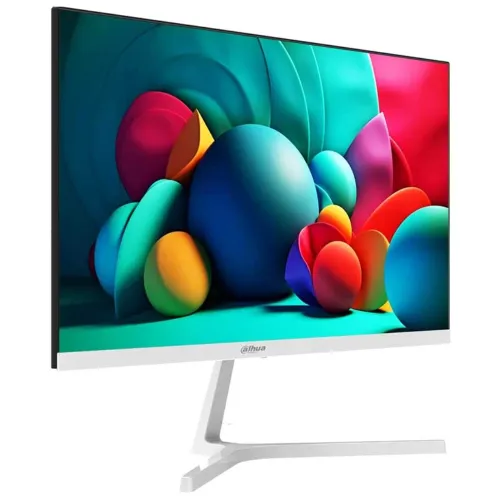
Dahua DHI-LM22-B201SW is listed as a 21.45-inch Full HD IPS monitor with 100Hz refresh and HDMI/VGA connectivity. Dahua’s official page located for this review covers DHI-LM22-B201S (without the W suffix). Core specifications align, but exact suffix equivalence is unconfirmed; verify the label and datasheet for the delivered variant before relying on variant-specific details.
Product identity and exact model
This BiponiBD listing is titled Dahua DHI-LM22-B201SW, a 21.45-inch Full HD IPS monitor. The W suffix matters: Dahua’s public product page located during review is for DHI-LM22-B201S, without the W. That manufacturer page provides a detailed specification set for the closely named B201S, while the local Vibe Gaming page names B201SW. Core size, resolution and 100Hz capability align, but the official source does not explicitly establish that the W variant is identical in every detail. Check the label on the monitor, carton or supplier invoice before relying on suffix-specific attributes, accessory contents or warranty terms. This listing therefore states the
Screen size, resolution and layout
The product is marketed as a 21.45-inch monitor with a 16:9 widescreen shape and 1920 × 1080 Full HD resolution. Full HD provides a practical desktop workspace for common office documents, browser tabs, online classes, video meetings and entertainment. At this size, text and interface elements generally remain readable at ordinary desk distance, while the 16:9 format suits contemporary video. The manufacturer page for the related DHI-LM22-B201S describes an IPS LCD and ELED backlight. These details are attributed to that B201S page until Dahua confirms the B201SW suffix. Resolution is a fixed panel capability; the connected computer, cable, graphics output
IPS viewing and color
The official B201S specification identifies IPS LCD technology and a 178-degree horizontal and vertical viewing angle. IPS panels are useful when the viewer is not seated perfectly straight in front of the display, or when two people share the screen, because the image is designed to remain viewable across a broad angle. Dahua lists 16.7 million display colors and a 72% NTSC color gamut for the B201S. These figures describe color capability; they do not certify factory calibration or professional color accuracy. The retailer page contains broader color-gamut statements that conflict with the manufacturer specification, so this listing does not
Brightness, contrast and surface
Dahua lists 250 cd/m² maximum brightness and a 1000:1 contrast ratio for the B201S. Brightness is a maximum specification rather than a promise that every unit or picture preset will operate at that level. Typical indoor desks and rooms are the intended environment; direct sunlight or strong reflections may still affect visibility. The manufacturer describes a haze 25% surface treatment and 3H hardness for the related model. A matte treatment can help manage reflections, while the surface should still be cleaned gently with a soft cloth. Avoid pressing on the panel or applying household cleaners unless Dahua approves them. Because
Refresh rate and motion
The Dahua B201S page lists a 100Hz refresh rate and explicitly states that HDMI 1.4 can carry 1920 × 1080 at 100Hz. A higher refresh rate than a conventional 60Hz screen can make pointer movement, scrolling and supported game animation appear smoother when the computer sends a compatible signal. The actual refresh rate depends on the graphics device, cable, port, operating-system display settings and application. Select 100Hz in the computer settings after connecting over HDMI and verify that the mode is active. The local B201SW seller page advertises 100Hz. Do not assume that every input or an older VGA-connected system
Response-time claims
Response-time figures require care because measurement methods are not interchangeable. Dahua’s official B201S specification says OD 5ms, while the Vibe Gaming B201SW listing advertises 4ms GTG. OD and GTG refer to different measurement descriptions, and the two model suffixes are not fully reconciled by the public manufacturer source we found. This product description preserves both claims with their source attribution instead of presenting them as one confirmed figure. Response time alone does not determine motion quality: refresh rate, panel tuning, overdrive settings, content and viewer sensitivity also matter. Buyers choosing the monitor for competitive play should confirm the exact model
Ports and device connection
The official B201S page lists one HDMI 1.4 input, one VGA input and one audio output. HDMI is the preferred connection for a modern computer and is the path explicitly rated by Dahua for Full HD at 100Hz on the B201S. VGA can connect older desktops, but its available refresh modes depend on the monitor variant and source device. The audio-out socket is useful for routing sound to separate headphones or speakers; it is not an input for a microphone. Check which ports your laptop or desktop actually has before ordering. A computer with only USB-C may require a compatible
Built-in sound
The official B201S information and the seller’s B201SW feature list both state that the monitor has two 1W speakers. These small integrated speakers can provide basic audio for system alerts, spoken lessons, video calls and casual viewing without placing separate speakers on the desk. They are not a substitute for a dedicated speaker set or headphones when deeper bass, high volume or detailed music playback is important. The computer may need to route audio through HDMI for the monitor speakers to receive sound. Check the operating system’s selected output device and volume controls if the picture works but sound does
Eye comfort features
The Dahua B201S specification mentions software blue-light protection, and Vibe Gaming lists Low Blue Light and Flicker-Free among its B201SW features. These are source-attributed features rather than medical claims. Users can adjust brightness, take regular breaks and set a comfortable viewing distance to support daily use. A blue-light setting may change the image tone, which can be undesirable for color assessment. If a flicker-free setting or a specific eye-care mode is important, inspect the on-screen display and the exact B201SW manual after delivery. The product listing does not claim that a monitor prevents eye strain or replaces professional advice. Room
Stand, adjustment and mounting
The manufacturer page for B201S specifies a tilt range from -5° to +15° and VESA mounting holes at 75 × 75mm. Tilting helps direct the screen toward the seated viewing position and reduce awkward neck posture. The VESA pattern can support a compatible third-party arm or wall mount, but mounting hardware and the arm are not identified as included accessories. Confirm the weight rating and screw requirements of any mount with Dahua before installation. The official page lists a base in the package, but the B201SW suffix relationship remains unconfirmed. Place the monitor on a stable desk, route cables without
Power and operating conditions
The B201S page lists 12V DC at 2A, 15W basic power use, 17W typical, 19W maximum and less than 0.5W standby. It also lists an operating temperature range of 0°C to +40°C and operating humidity of 10% to 85% relative humidity. Use the supplied compatible adapter and do not substitute an adapter solely because its plug fits; voltage, polarity and current ratings must match the unit label. Keep the screen away from moisture, heat sources and blocked ventilation. The exact B201SW electrical label should take precedence if it differs from the related B201S page. Disconnect power before cleaning or moving
Size, weight and placement
For the related B201S, Dahua lists dimensions of 492.7 × 284.0 × 39.5mm without the wall-mount bracket, a net weight of 2.18kg and a gross packaged weight of 3.12kg. The package is listed as 598 × 366 × 99mm. These figures can help estimate desk space, transport and mounting needs, but they are not independently confirmed for the B201SW suffix. Allow room for the stand, cable bends and airflow, and remember that the listed product dimensions exclude the stand or bracket context specified by Dahua. For a tight desk or wall-mount installation, measure the actual unit and request the B201SW
In the box
Dahua’s B201S page lists a power adapter, base, HDMI cable, user manual via QR code and legal/regulatory information. That is the manufacturer’s related-model accessory list, not an independently confirmed B201SW box inventory. The seller page carries broad copy and does not provide a reliable complete package list. Confirm that the delivered carton contains the required stand, compatible power adapter and cable before setup. Optional wall mounting is listed separately. If a cable is missing or damaged, contact the seller before purchasing a replacement or installing the monitor. Keep the model and serial labels readable for support and warranty claims.
Work, study and entertainment use
A Full HD 21.45-inch display with HDMI and VGA can serve as a general-purpose screen for office work, online classes, browsing, spreadsheets, streaming and casual gaming. The 100Hz mode may make supported desktop motion feel smoother, while the IPS viewing-angle specification helps when the viewing position shifts. The built-in speakers offer basic sound convenience, and the VESA pattern gives a mounting option for compatible hardware. Buyers should match the display to their actual workload: the official B201S data shows 72% NTSC and does not substantiate the seller’s professional wide-gamut claims. Anyone doing color-critical design should confirm measured gamut and calibration
Warranty and local seller information
Vibe Gaming’s direct listing showed the DHI-LM22-B201SW In Stock at ৳9,900, reduced from a displayed ৳10,300, when checked. The same page advertises a three-year brand warranty and fast delivery, but the warranty provider, coverage, exclusions and claim process need confirmation with the seller. Star Tech’s direct page showed Out Of Stock and To be announced; its old body copy states ৳9,900, which is treated as stale. One in-stock price is not enough to establish a reliable market range, and these external prices are not BiponiBD merchant offers. Availability and price can change. Ask the seller to confirm the exact suffix,
Model and claim verification before buying
There are several conflicting details across available pages: the official model found is B201S while this catalog item and seller listing say B201SW; the seller also contains a stale paragraph naming a different Dahua monitor and broad color claims that are not in the official specification. The existing catalog and local B201SW seller pages list white, while Dahua’s related B201S page says black. Because the suffix match is unresolved, the color remains seller-attributed as white and is not inferred from B201S. Verify the rear label and invoice, check the active refresh mode, and confirm warranty terms in writing. Unsupported marketing
Care and setup
Set the monitor on its supplied base or install it on a compatible 75 × 75mm VESA mount after confirming the exact model instructions. Connect a supported HDMI source for the documented Full HD 100Hz mode on B201S, then select the desired resolution and refresh rate in the computer display settings. Adjust tilt and brightness to suit the room. Clean the screen with a soft, dry or manufacturer-approved cloth; do not spray liquid directly onto the panel. Keep the power adapter accessible and provide gentle cable slack. If the image is blank, recheck input selection, cable seating and source output
Technical data provenance
Specifications in this description are drawn from Dahua’s official LM22-B201S product page and are explicitly attributed to that model. The catalog and local listing identify DHI-LM22-B201SW. The shared core display characteristics are consistent across the official page and seller material, but suffix identity is unresolved. Vibe Gaming provides the current B201SW listing and its observed price, stock and seller claims. Conflicting legacy text was excluded from the factual claims. No BiponiBD offer or multi-seller price range is asserted. This provenance note is important because an exact product code and verified variant help buyers compare like for like, receive the correct
Key specifications
- Model: Dahua DHI-LM22-B201SW (catalog/seller identifier; verify suffix against unit label)
- ReferenceModel: Official Dahua page reviewed: DHI-LM22-B201S; exact B201SW suffix equivalence not confirmed
- Panel: IPS LCD
- Backlight: ELED per official B201S page
- DisplaySize: 21.45 inch
- AspectRatio: 16:9
- Resolution: 1920 × 1080 Full HD
- RefreshRate: 100Hz; official B201S source states HDMI 1.4 supports 1920 × 1080 at 100Hz
- Brightness: 250 cd/m² maximum (official B201S)
- Contrast: 1000:1 (official B201S)
- ResponseTime: OD 5ms (official B201S); seller advertises 4ms GTG for B201SW; verify suffix and measurement method
- ViewingAngle: 178° horizontal / 178° vertical
- Colors: 16.7 million
- ColorGamut: 72% NTSC on official B201S; no unsupported wide-gamut claim
- PixelPitch: 0.2493 × 0.241mm
- Surface: Haze 25%, 3H (official B201S)
- EyeCare: Software blue-light protection listed for B201S; retailer also claims flicker-free for B201SW
- Ports: 1 × HDMI 1.4, 1 × VGA, 1 × audio out (official B201S)
- Audio: 2 × 1W speakers according to Dahua B201S page and seller B201SW page
- Power: 12V DC, 2A; 15W basic, 17W typical, 19W maximum; <0.5W standby (official B201S)
- Tilt: -5° to +15° (official B201S)
- Mount: 75 × 75mm VESA
- Dimensions: 492.7 × 284.0 × 39.5mm without wall-mount bracket (official B201S)
- Package: 598 × 366 × 99mm (official B201S)
- Weight: 2.18kg net; 3.12kg gross (official B201S)
- Environment: 0°C to +40°C; 10%–85% RH operating (official B201S)
- Included: Power adapter, base, HDMI cable, user manual QR code, legal/regulatory information (official B201S)
- Color: Black casing (official B201S); Vibe page has conflicting white-color copy
- Warranty: Vibe Gaming page labels brand warranty and seller copy claims 3 years; confirm exact B201SW local warranty in writing
Features
- 21.45-inch 16:9 Full HD 1920 × 1080 display
- IPS LCD technology listed for related B201S
- ELED backlight listed for B201S
- 100Hz refresh listed for B201S
- HDMI 1.4 at Full HD 100Hz listed for B201S
- VGA input listed for B201S
- 178°/178° viewing angles listed for B201S
- 250 cd/m² maximum brightness listed for B201S
- 1000:1 contrast listed for B201S
- 16.7 million colors and 72% NTSC listed for B201S
- 2 × 1W speakers per B201S and B201SW seller claims
- Audio output listed for B201S
- Software blue-light protection listed for B201S
- 75 × 75mm VESA pattern listed for B201S
- Below 0.5W standby listed for B201S
Advantages
- Full HD suits everyday desktop work and study
- 100Hz HDMI mode is specified for official reference model B201S
- Wide IPS viewing angle listed by Dahua
- HDMI and VGA support different generations of source devices
- Integrated stereo speakers provide basic sound convenience
Considerations
- Official manufacturer page is for B201S; W-suffix match remains unresolved
- Retailer page has stale conflicting copy and unsupported gamut claims
- Seller 4ms GTG and manufacturer OD 5ms figures are not directly comparable
- Only one verified in-stock B201SW seller price; no reliable market range
- Confirm local warranty coverage and exact box contents
Frequently asked questions
What model is this monitor?
Catalog and Vibe Gaming identify DHI-LM22-B201SW. Dahua’s official page found is DHI-LM22-B201S; verify the W suffix.
What is the resolution?
Official related-model specification lists 1920 × 1080 Full HD.
Does it support 100Hz?
Dahua lists 100Hz for B201S and HDMI 1.4 at 1920 × 1080 and 100Hz. Confirm exact B201SW support and source settings.
Which ports are available?
Official B201S page lists one HDMI 1.4, one VGA and audio out.
Does it have speakers?
Dahua B201S and the seller B201SW page state two 1W speakers; confirm the exact unit.
What response time is verified?
Dahua lists OD 5ms for B201S; Vibe Gaming advertises 4ms GTG for B201SW. The measurement labels and suffix differ.
What color gamut is specified?
Official B201S lists 72% NTSC. Wider seller gamut claims were not verified.
Can older computers connect?
VGA is listed for B201S. Check your source output and supported mode.
Does it support VESA mounting?
Dahua lists 75 × 75mm for B201S. Confirm the B201SW mount pattern before buying hardware.
What is in the box?
B201S list includes adapter, base, HDMI cable and QR manual/regulatory information. Confirm B201SW contents.
What is current price and stock?
Vibe Gaming showed ৳9,900 In Stock during review; external price can change and is not a BiponiBD offer.
What warranty applies?
Vibe Gaming advertises brand warranty and claims three years. Confirm provider and terms for the exact B201SW.
Facts are attributed to Dahua DHI-LM22-B201S unless a B201SW seller claim is identified. Verify exact suffix, current price, stock, accessories and local warranty.