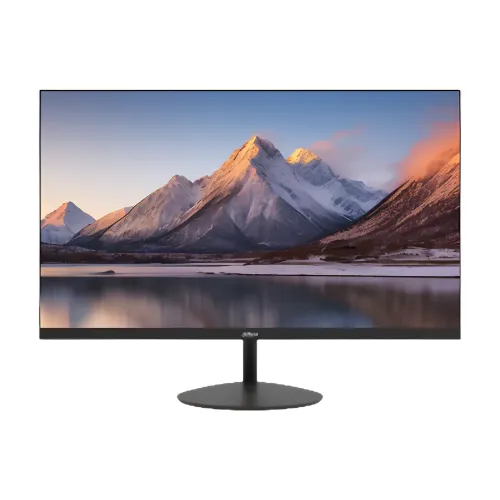
A dependable Full HD screen for everyday work
The Dahua DHI-LM24-A200Y is a 23.8-inch desktop monitor built around a VA LCD panel and an ELED backlight. Its native resolution is 1920 × 1080 pixels, commonly called Full HD, with a 16:9 shape. That combination is a familiar fit for office documents, web applications, online learning, video playback and general home-computer use. The model number matters: this description is for DHI-LM24-A200Y. Dahua sells other monitors with similar LM24 names and different panels, refresh rates, speakers or connectivity. Those features should not be assumed to apply here.
At 23.8 inches, Full HD provides a spacious desktop area for a browser beside a spreadsheet or a video meeting beside notes. Dahua lists a 0.2745 mm pixel pitch and 92.55 pixels per inch. Text and interface elements remain a comfortable everyday size at common desktop viewing distances, while users who need very fine text or several large design canvases may prefer a higher-resolution screen. The published pixel density is a calculation from the panel dimensions and pixel count, not a claim of 4K-level detail. The active picture area is 527.04 × 296.46 mm according to Dahua’s product specifications.
VA panel, contrast and viewing angles
Dahua identifies the panel as VA with ELED backlighting. The published static contrast ratio is 3000:1, a useful specification for maintaining separation between dark and light parts of a typical image. Maximum brightness is listed as 250 cd/m². Color support is 8-bit, and the manufacturer lists 72% NTSC typical color gamut. These are rated characteristics. They do not substitute for an independent color calibration, uniformity measurement or professional print-proofing assessment. For ordinary documents, browsing and video, the specification set describes the intended display class; color-critical production should be evaluated against a calibrated reference monitor.
The stated viewing angle is 178 degrees horizontally and vertically. This can make the image easier to view when someone is sitting beside the primary user or looking at a presentation from an angle, though perceived brightness and contrast can still vary with the content and viewing position. The panel is flat and has a 16:9 shape. No curved-screen feature is involved. An included stand allows tilt adjustment; for a different desk height or reach, the 75 × 75 mm VESA mounting pattern can be used with a compatible monitor arm or wall mount. Check the mount’s load rating and fastener fit before installing.
Use the right input for the refresh rate
The monitor provides one HDMI 1.4 input and one VGA input. Dahua lists HDMI timing up to 1920 × 1080 at 100Hz. This lets a compatible computer use the panel’s 100Hz refresh rate for smoother pointer movement, scrolling and supported video playback compared with a 60Hz mode. To reach that mode, the graphics output, operating-system setting and cable connection must all support the selected resolution and refresh rate. If a computer defaults to 60Hz, check its display settings and graphics capability rather than assuming the panel is defective.
VGA remains useful when connecting older computers or devices that lack a suitable HDMI output. Dahua’s timing table lists VGA at up to 1920 × 1080 and 60Hz. Therefore, the 100Hz headline should be paired with the correct HDMI input; the analog VGA connector has a different published limit. A suitable converter may be needed for devices with only DisplayPort or another output, and an adapter does not guarantee every refresh rate. This monitor does not list USB-C display input, a USB hub or a built-in docking function. The specific ports are HDMI and VGA, so buyers can match them to their computer before ordering.
Response-time figures vary by Dahua revision
Response time is the most important specification conflict found during this audit. Dahua’s current Bangladesh product page for this exact model states 5ms. The official 2024 V1 datasheet lists 10ms. An older Dahua PDF describes typical OD response as 8ms. These figures may reflect different revisions or measurement conventions, and the documents do not give enough common methodology to normalize them to one guaranteed number. Bangladesh retail pages also commonly repeat 10ms, while one retailer table shows 5ms in one place and 10ms elsewhere.
For that reason, this catalog record preserves all three manufacturer-published values and identifies the document source for each. It does not promise that every unit will achieve the same measurement under an unstated test. For most office work, the refresh rate, resolution, connection mode and viewing comfort are more directly useful buying checks. Anyone choosing a display for response-critical competitive gaming should verify the specification and revision on the exact package or current seller documentation before purchase. The product is described as a 100Hz office/commercial monitor; no unsupported gaming certification or response-time guarantee is added.
A familiar desk setup with tilt and VESA mounting
The stand supports tilt from −5° ± 2° to +15° ± 2° according to Dahua. This lets the screen angle be adjusted to reduce awkward reflections and better match a seated position. The official specification does not list stand height adjustment, swivel or pivot, so those movements should not be expected from the supplied base. Users who need a higher or portrait-oriented position can consider a separate compatible mount using the 75 × 75 mm VESA pattern. Follow the arm or wall bracket instructions and use appropriate fasteners.
The monitor is black. Dahua lists the body dimensions without the base as 539.2 × 320.4 × 41.3 mm. Because this excludes the stand, allow more desk depth and height for the assembled monitor. Its net weight is 2.79 kg. The retail package is listed at 612 × 405 × 101 mm and 3.75 kg gross; those larger figures include packaging and are not the installed monitor dimensions. These details help with desk planning, shelves and transport. The three-sided bezel specification gives a slim visual frame around the image, but the overall product remains a standard desktop monitor rather than an all-in-one computer.
Power and day-to-day operation
Dahua specifies an external 12V DC, 2.5A power adapter. The rated consumption figures are 13W basic, 16W typical and 16W maximum, with standby below 0.5W. Use the adapter supplied with the monitor or a replacement with the correct voltage, polarity, connector and current rating. Do not choose a power supply based only on a connector that appears to fit. The exact adapter supplied in a Bangladesh retail box should be checked on receipt.
The current manufacturer specifications list flicker-free operation. This is a display design claim and should not be interpreted as medical advice or a guarantee against eye strain. A suitable brightness for the room, regular breaks, legible text scaling and comfortable screen placement remain useful parts of a desktop setup. The 250 cd/m² maximum rating describes the screen’s specified luminance capability, not a recommendation to run it at full brightness in every environment.
What comes with the monitor and the Bangladesh warranty
Dahua’s package contents list includes the monitor, a base, external power adapter, HDMI cable, QR quick guide and legal information. Regional packaging or seller bundles can vary, so compare the delivered items with the actual invoice and package. The official weight and dimensions are useful when planning a desk, but the monitor should be unpacked and assembled according to the included guide. Handle the panel by its frame and use a stable surface while attaching the base.
Star Tech, Ryans and TechLand Bangladesh advertise a three-year warranty for the exact DHI-LM24-A200Y listing. The product record also carries a three-year warranty field. Retail warranty periods do not by themselves identify the responsible service provider or every claim condition. The warranty card, seller invoice and current seller terms determine the applicable process for a purchased unit. This description therefore states the advertised duration and asks buyers to confirm the issuer and conditions, rather than inventing a service-center promise. The current catalog price and stock are not derived from other stores’ listings.
Who this monitor suits
The DHI-LM24-A200Y is a straightforward choice for a desktop user who wants a 23.8-inch Full HD screen, VA panel, HDMI connectivity and a 100Hz HDMI mode, while retaining VGA for an older computer. It can serve as a primary everyday display for documents, email and online services, or as a second screen for a compatible desktop or laptop output. The VESA holes give an additional mounting path, and the low rated power figures can help users understand the adapter and typical operating load.
Before ordering, check three practical details: whether the source computer has HDMI or VGA, whether 100Hz is required and will be used over HDMI, and whether tilt-only stand adjustment meets the desk arrangement. Users who need integrated sound should plan separate speakers or headphones because Dahua does not list speakers for this model. Buyers who need USB-C single-cable connectivity should choose a monitor that explicitly supports that feature. These checks keep the model’s real strengths clear without attributing features from a similarly named Dahua series.
Specifications at a glance
The key published specifications are 23.8-inch diagonal VA/ELED display, 1920 × 1080 resolution, 16:9 aspect ratio, 100Hz over HDMI, 60Hz over VGA, 250 cd/m² maximum brightness, 3000:1 contrast, 8-bit color, 72% NTSC typical gamut and 178°/178° viewing angles. Inputs are one HDMI 1.4 and one VGA. The stand tilt range is −5° ± 2° to +15° ± 2°, and the VESA pattern is 75 × 75 mm.
Dahua lists dimensions without the base at 539.2 × 320.4 × 41.3 mm and net weight at 2.79 kg. The external adapter is 12V DC, 2.5A; rated usage is 13W basic, 16W typical and maximum, and below 0.5W on standby. The response-time figure is explicitly version-dependent in available Dahua documents: 5ms on the current Bangladesh page, 10ms on the 2024 V1 datasheet and typical OD 8ms on an older PDF. Check the exact batch documentation where that figure is material.