Display and intended use
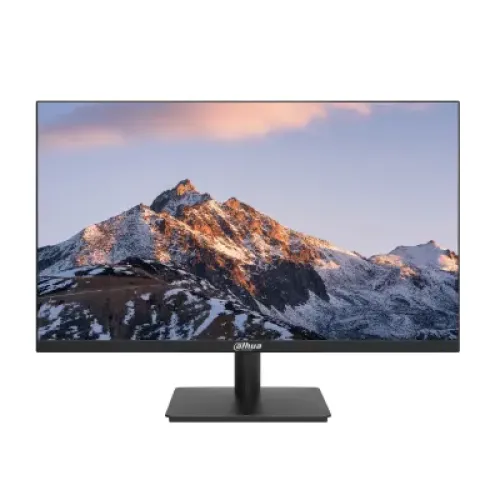
The Dahua DHI-LM24-A221Y is a 23.8-inch commercial-series monitor with an IPS LCD panel, E-LED backlight and 1920 × 1080 Full HD resolution. Its 16:9 format suits office applications, web browsing, study, video and general PC use. Dahua lists a 527.04 × 296.46 mm viewing area and an at-least-85% screen-to-body ratio. The product’s 23.8-inch viewable size is distinct from the larger 24-inch class sometimes used in retailer headlines. It is a flat desktop monitor, not a curved display. Its IPS panel and 178-degree horizontal and vertical viewing angles support a wide seating position, although actual image appearance depends on ambient light, settings and viewing distance.
Refresh rate and response modes
Dahua’s product information sheet describes a 120Hz refresh timing that can be overclocked to 144Hz. The HDMI 1.4 input supports Full HD at up to 144Hz, while VGA is listed for Full HD up to 75Hz. Dahua’s manual cautions that 144Hz is HDMI-only and may need to be enabled in the monitor’s OSD on some configurations; if display problems occur after enabling it, the manual recommends switching back to 120Hz. Use a compatible graphics output and cable, then check the operating system’s display settings. Dahua lists OD 5ms and a separate 1ms MPRT mode. MPRT is a blur-reduction mode, not a Gray-to-Gray value, so avoid presenting “1ms” as the monitor’s ordinary response time.
Picture, brightness and color
The IPS panel is rated at 250 cd/m² typical brightness and 1200:1 typical contrast. Dahua lists 72% NTSC typical color gamut and 6-bit + FRC color depth. These are straightforward general-purpose display specifications; they should not be converted into unsupported claims of full sRGB coverage or professional color accuracy. The screen treatment has 25% haze and a 3H hard coating. Dahua also lists flicker-free technology. Together, these features make the monitor appropriate for everyday work and entertainment, but a designer who needs a calibrated wide-gamut screen should compare the color requirements with the published 72% NTSC figure before choosing it.
Inputs and compatibility
The back panel provides one HDMI 1.4 input and one VGA input. HDMI is the connection for the 144Hz timing; the VGA port is limited to 1920 × 1080 at 75Hz according to the manufacturer information. The display’s refresh rate depends on the source computer, graphics settings, cable, input and selected OSD mode. No DisplayPort, USB-C, USB hub, audio-out connector or built-in speakers are listed in the Dahua product sheet. Connect sound equipment to the computer or another source device if audio is needed. Before purchase, check that your graphics card has the required HDMI or VGA output and can drive the desired Full HD rate.
Stand, mounting and physical details
The included stand provides tilt adjustment from −5 degrees to +20 degrees. The published specification does not list height adjustment, swivel or pivot for the supplied stand. A VESA 100 × 100 mm interface allows attachment to compatible monitor arms or wall mounts; verify load capacity and installation instructions. Dahua lists the monitor body without wall-mount bracket as 542.1 × 322.4 × 47.6 mm and its net weight as 2.8 kg. The package measures 602 × 412 × 120 mm and gross weight is 3.9 kg. The casing is black. Measure desk or mount clearance and include space for the stand and cables when planning installation.
Power and warranty
The monitor uses an external 12V DC, 2A power adapter. Dahua lists 16.5W basic, 21.2W typical and 22W maximum power consumption, with standby consumption below 0.5W. The datasheet lists typical operation of seven days by 16 hours, and a 30,000-hour lifespan figure; these are manufacturer operating specifications, not a promise that every unit will run identically for that duration. Bangladesh retailer pages commonly state a three-year warranty, but the local claim provider and conditions should be checked on the product invoice and warranty card. Confirm the authorized service route and current stock with the seller; this description does not invent a current BiponiBD offer or rating.
Technical specifications
Key features
- 23.8-inch IPS display with Full HD 1920 × 1080 resolution and E-LED backlight.
- 120Hz standard timing with 144Hz overclocked mode; Dahua manual says 144Hz is HDMI-only and may require enabling in OSD on some units.
- HDMI 1.4 supports up to 1920 × 1080 at 144Hz; VGA supports up to 1920 × 1080 at 75Hz.
- 1200:1 typical contrast, 250 cd/m² typical brightness and 178°/178° viewing angles.
- OD 5ms response and separate 1ms MPRT mode.
- 72% NTSC typical color gamut and 6-bit + FRC color.
- Flicker-free operation, 3H anti-glare surface with 25% haze and screen-to-body ratio at least 85%.
- Tilt stand from −5° to +20°; VESA 100 × 100 mm mounting.
- External 12V/2A adapter; 21.2W typical and 22W maximum consumption.
- Black casing; Dahua lists approximately 30,000-hour lifespan and 7×16-hour daily operation.
Advantages
- IPS panel and broad viewing angles suit shared desks and general productivity.
- 144Hz overclocked HDMI mode can deliver smoother compatible motion than standard 60Hz displays.
- One HDMI and one VGA input support a current digital source and legacy hardware.
- VESA mounting and a simple tilt stand allow placement on a desk or compatible arm.
- Flicker-free feature and anti-glare finish support ordinary work and study environments.
Things to consider
- The 144Hz mode is HDMI-only and may require enabling in the OSD; VGA tops out at 75Hz.
- The included stand offers tilt only; height adjustment, swivel and pivot are not specified.
- The 1ms figure is MPRT, distinct from the 5ms OD response-time specification.
- 72% NTSC and 6-bit + FRC indicate an entry-level color gamut/depth rather than a professional color display.
- Only one HDMI and one VGA input are listed; no DisplayPort, USB-C or speakers are specified.
Frequently asked questions
What is the exact model?
The exact model is Dahua DHI-LM24-A221Y. The catalog model and MPN should not include screen size or refresh-rate marketing text.
What is the screen size and resolution?
It has a 23.8-inch 16:9 IPS display with Full HD 1920 × 1080 resolution.
Is 144Hz the standard refresh rate?
Dahua lists 120Hz timing with 144Hz overclocked mode. The user manual notes 144Hz is supported through HDMI and may need to be enabled in the OSD on some units. Check your PC and screen menu; do not assume VGA reaches 144Hz.
What are the refresh limits on each port?
The Dahua information sheet lists HDMI 1.4 up to 1920 × 1080 at 144Hz and VGA up to 1920 × 1080 at 75Hz. A compatible graphics output and cable are required.
What does 1ms response mean?
Dahua specifies OD 5ms and a separate 1ms MPRT mode. MPRT is a motion-blur reduction mode and is not the same as Gray-to-Gray response time.
What are brightness and contrast?
Dahua lists typical brightness of 250 cd/m² and a typical contrast ratio of 1200:1.
What color gamut does it support?
The product sheet lists 72% NTSC typical and 6-bit + FRC color. It is suitable for everyday display use but should not be represented as a wide-gamut professional color monitor.
Which ports does it have?
It has one HDMI 1.4 and one VGA input. There is no DisplayPort or USB-C listed.
Does it have built-in speakers?
The reviewed Dahua product information does not list built-in speakers or an audio output. Use audio connected to the computer or another source.
Can I mount it on a monitor arm?
Yes. Dahua specifies a 100 × 100 mm VESA interface. Verify the arm’s load limit and the monitor’s mounting instructions.
Can the stand adjust height?
The supplied stand supports tilt from −5° to +20°. Height adjustment is not listed; use a compatible VESA arm if height positioning is needed.
What power adapter and warranty are included?
Dahua lists an external 12V DC, 2A adapter. Bangladesh sellers list three years, but authorized claim provider and conditions vary; confirm the local invoice and warranty card.
Confirm current price, stock, included accessories and local warranty conditions with the seller. Manufacturer timing may require the 144Hz OSD setting and compatible HDMI source.