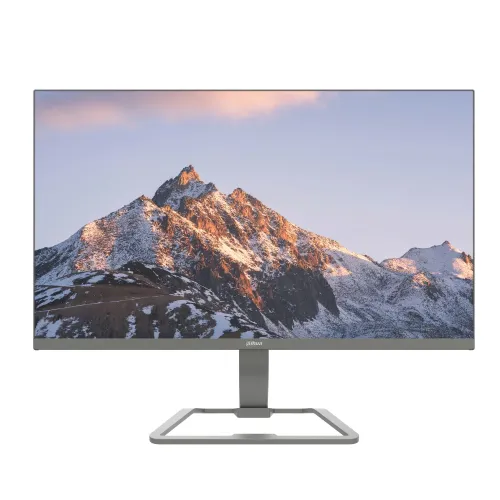
The Dahua DHI-LM24-C221P is a 23.8-inch Full HD IPS monitor with a 144Hz maximum refresh rate, 5ms OD response specification, HDMI 1.4 and VGA inputs. Its exact-model specifications include a 1920 × 1080 panel, 178° viewing angles, VESA 75 × 75mm mounting and flicker-free and software blue-light features. The refresh mode depends on the source and connection; the HDMI input supports the listed 144Hz mode, while VGA is specified up to 60Hz.
Model identity and intended role
The Dahua DHI-LM24-C221P is a 23.8-inch Full HD monitor with an IPS panel and a 144Hz maximum refresh rate. Dahua’s display catalog identifies the product family as LM24-C221P, while the complete local model code includes the DHI prefix. Match the full code on the carton or product label when comparing a quote, warranty or replacement. Some Dahua monitors share similar names but have different inputs, refresh rates and panel specifications.
This screen combines a standard 1920 × 1080 resolution with a faster refresh mode than a basic 60Hz monitor. It can suit everyday desktop work, browsing, study, video and compatible games. Its exact capabilities should guide the purchase: the panel is Full HD, the listed inputs are HDMI and VGA, and no DisplayPort or USB-C connection is specified. Buyers who need a dock, high-resolution creative workspace or additional video ports should compare a different model.
Full HD resolution and 23.8-inch workspace
The native 1920 × 1080 resolution places 1,920 pixels across the screen and 1,080 vertically, using a 16:9 widescreen format. At 23.8 inches, this is a familiar desktop size for documents, web pages, spreadsheets and video. The manufacturer lists a pixel pitch of 0.2745mm and a density of 92.56 pixels per inch. These figures describe the panel grid; perceived sharpness also depends on viewing distance, font size, image quality and the scaling settings on the connected computer.
For the clearest output, set the source device to 1920 × 1080 and choose a refresh rate supported by the cable and selected input. If text appears too small, operating-system scaling or application zoom can improve readability without changing the monitor’s native pixel count. A Full HD panel also places a lower rendering load on many computers than QHD or 4K, but the practical frame rate still depends on the processor, graphics hardware, software and workload.
144Hz refresh and the 5ms OD response specification
Dahua lists a 144Hz refresh rate for this exact model. A higher refresh rate can make cursor movement, scrolling and supported game motion appear smoother when the computer produces enough frames and the chosen input mode supports the target setting. Refresh rate is not the same as frame rate: a 144Hz monitor does not cause a game or video to generate 144 frames each second. The source, application, graphics hardware, cable and display mode all contribute to the result.
The manufacturer specification lists a 5ms overdrive (OD) response time. Star Tech’s short key-feature line says 1ms, but its detailed table says 5ms, and Dahua’s exact-model product page also gives 5ms OD. For accurate comparison, this product profile uses the manufacturer’s exact-model 5ms OD specification. Response time describes pixel transition behavior under the stated method; it does not represent total system input lag or guarantee that every scene will be free of motion artifacts.
The HDMI input is specified for 1920 × 1080 at up to 144Hz, while the VGA input is listed for Full HD at up to 60Hz. Use HDMI when the 144Hz mode matters. After connecting the source, open its display settings, choose the monitor’s native resolution and select a supported refresh rate. If 144Hz is not available, verify the selected input, cable, graphics driver and source output before assuming the monitor is faulty.
IPS viewing, color and brightness
The monitor uses an IPS LCD panel with E-LED backlighting. Dahua specifies 178-degree horizontal and vertical viewing angles. This rating describes the angle at which the display remains viewable under its specification method; the appearance of color and contrast can still vary with position, room reflections and picture settings. IPS technology can be useful when more than one person needs to view the screen or when the viewer does not sit perfectly centered.
The listed display color is 6-bit plus frame-rate control, and the typical color gamut is 72% NTSC. These details indicate a general-purpose monitor profile rather than a claim of professional calibration. The manufacturer lists a 1000:1 contrast ratio and 250 cd/m² typical brightness. In a room with direct sunlight or strong reflections, that brightness may feel limited. Position the screen to reduce glare and adjust brightness for the lighting around the desk.
The product page describes a three-sided bezel-less design and a screen-to-body ratio of at least 90%. The upper and side frame measurements are listed as 2.1mm, with a 15mm lower frame. This gives the monitor a relatively narrow appearance along three edges, but the display still has a lower border. For multi-screen arrangements, measure the full outer dimensions and account for the stand, cable routing and the visible frame between panels.
Connections and source compatibility
The exact-model specification lists one HDMI 1.4 input and one VGA input. HDMI supports the manufacturer’s stated 1920 × 1080 at 144Hz mode, while VGA supports 1920 × 1080 at 60Hz. This combination can accommodate a modern digital source and an older analog computer, but only one active input is used at a time. The manufacturer does not list DisplayPort, USB-C, USB hub functions or an audio output for this model.
Check the available output on a desktop computer, laptop dock, game console or CCTV device before ordering. If the source has only DisplayPort, USB-C or a newer HDMI connector, select a compatible adapter only after confirming its supported resolution and refresh rate. A passive adapter or older cable can limit the selected mode. To avoid unexpected blanking or a 60Hz cap, confirm both the cable rating and the output mode in the source settings.
VGA is useful for legacy equipment, but the stated VGA limit is 60Hz at Full HD. The port therefore should not be treated as an alternative route to the monitor’s 144Hz mode. HDMI 1.4 is the preferred listed interface for the maximum refresh specification. The monitor does not claim built-in speakers or an audio jack in the manufacturer table, so plan separate audio equipment if sound output is required.
Ergonomics, mounting and physical setup
The supplied base supports tilt adjustment from -5 degrees to +15 degrees. The specification does not list height adjustment, pivot or swivel, so users who need those movements may want a separate monitor arm. A 75 × 75mm VESA pattern is listed for mounting. Confirm the arm or wall bracket accepts this spacing and check its load rating against the monitor’s weight before installation. Use the correct fasteners and follow the manual for the shipped unit.
Dahua gives the monitor’s dimensions without the base as 538.8 × 318.7 × 35.0mm. Its package dimensions are 610 × 400 × 89mm. The net weight is 2.79kg and gross packaged weight is 3.85kg. Allow additional space for the stand and power/video cables; the package dimensions are not the assembled desk footprint. Place the display on a firm surface, keep its vents clear and route cables so they do not pull on the connectors.
The manufacturer describes a metal body and lists the casing color as black. The monitor uses five-button controls and has a status indicator light. Use the on-screen controls to select the correct input and adjust the picture. A five-button layout may take a little practice; after setup, save or note the preferred brightness, contrast and input settings if the monitor will be moved between devices.
Power, operating conditions and care
The display uses an external power adapter rated at 12V DC and 2A. Dahua lists 18W basic, 21W typical and 24W maximum consumption, with standby consumption below 0.5W. Keep the supplied adapter with the monitor and check its label before reconnecting after a move. Do not substitute an adapter with a different voltage or connector. Leave room around the power unit and avoid placing it beneath fabric or other items that restrict airflow.
The manufacturer specifies an operating temperature range of 0°C to +40°C and operating humidity of 10%–85% relative humidity, non-condensing. Storage temperature is listed from -20°C to +60°C, with 5%–90% non-condensing storage humidity. These conditions are product limits, not a recommendation to expose the monitor to extreme environments. Let equipment acclimatize if it has been moved from a cold space, and avoid moisture or condensation.
Dahua lists a 30,000-hour lifespan and operation hours of 7 × 16 hours. These are manufacturer ratings and should not be read as a guarantee that a specific unit will last for that exact period under every brightness, temperature or usage condition. For routine care, turn off and unplug the display, then use a soft dry cloth. Do not press on the LCD surface or spray liquid directly onto it; follow the supplied user guidance for cleaning and maintenance.
Flicker-free and blue-light features
The specification lists flicker-free technology and software blue-light protection. These settings can be relevant for people choosing a display for long work or study sessions, but individual comfort differs. Adjust brightness and picture settings for the room, avoid unnecessary glare and position the screen at a comfortable distance. The features are not a medical treatment and should not be taken as a promise to prevent eye fatigue.
The monitor’s 250 cd/m² typical brightness, matte-style Haze 25%, 3H surface treatment and 178-degree viewing angle are listed separately in the product table. Surface treatment can reduce some reflections, but it does not eliminate bright light sources or all glare. If a window or lamp is reflected in the screen, reposition the display or light source where possible. For text-heavy tasks, also adjust font scaling, contrast and application zoom to suit the user.
Who may choose this monitor
The DHI-LM24-C221P may suit a compact workstation where a 23.8-inch Full HD screen and 144Hz maximum refresh are useful. Its IPS panel, standard widescreen format and HDMI input can support common computer tasks and compatible entertainment. The VGA connection can also help with older equipment that lacks HDMI. The model may fit mixed-use desks where buyers want a straightforward monitor with a VESA mounting option and built-in tilt adjustment.
It may not fit buyers who require QHD or 4K resolution, a USB-C docking connection, DisplayPort, an integrated speaker, a headphone output or extensive stand movement. The manufacturer does not specify those features for this model. Users who need 144Hz should confirm their source supports the required mode over HDMI and understand that the VGA input is limited to 60Hz at Full HD. A higher refresh rate is most useful when the source can deliver a correspondingly high frame rate.
Warranty, current prices and buying checks
Star Tech currently lists the model as in stock at ৳13,000 and shows a three-year warranty. Four Star IT and PQS list the same exact model at ৳12,800, with Buy Now actions on the category pages. These checked seller prices support an approximate Bangladesh market range of ৳12,800–৳13,000. They are retailer listings, can change, and are not current BiponiBD store offers or a manufacturer-set MSRP. Confirm stock, delivery charges, payment conditions and the final checkout total before ordering.
The manufacturer product page does not state a local warranty term. Warranty coverage is supplied through the seller or local service channel, so confirm the duration, registration requirements, service location and exclusions on the written invoice. Star Tech lists three years for its offer; check whether another seller provides the same term rather than assuming coverage transfers between purchase channels. Keep the invoice and serial/model label if service is required.
Before paying, match DHI-LM24-C221P on the product label, confirm that the included base and 12V adapter are present, and verify the selected display input. Dahua’s accessories section lists a power adapter, base, HDMI cable, QR-code user manual, energy-efficiency label, quick-start guide and regulatory information. Box contents can vary by region or shipment, so compare the physical box with the seller’s written listing.
Installation and first-use checklist
Place the monitor on the supplied base or install it on a compatible 75 × 75mm VESA mount. Connect the external adapter, then attach the computer to HDMI or VGA. Select the input that matches the cable. Set the operating system to the native 1920 × 1080 resolution. When using HDMI, select a supported refresh rate up to 144Hz if the computer and cable offer that mode. When using VGA, expect the specified maximum of 60Hz at Full HD.
If the image is blank, confirm the power indicator, adapter connection, selected input and source output. If the refresh-rate menu stops at 60Hz, check whether VGA is connected, whether HDMI is set as the active input, and whether the graphics driver recognizes the display mode. If the picture is stretched, choose the native resolution and a 16:9 aspect ratio. These basic checks help separate source and connection settings from monitor specifications.
Frequently asked questions
This profile uses the exact-model manufacturer's page for technical specifications and the retailer pages for current Bangladesh price and seller terms. The manufacturer lists 144Hz, 5ms OD response, a Full HD IPS panel, HDMI 1.4 and VGA. The 1ms phrase found in a retailer highlight is not used as the final response-time specification because its own full table and Dahua’s exact-model page specify 5ms OD.
The market estimate reflects three checked Bangladesh listings and is clearly separated from live BiponiBD offers. Prices, stock and warranty terms can change after review. Buyers should confirm the exact model, port limits, warranty and delivery conditions with the chosen seller before placing an order.
Key features
- 23.8-inch flat IPS display with E-LED backlight
- Full HD native resolution of 1920 × 1080 in a 16:9 format
- 144Hz maximum refresh rate; HDMI 1.4 supports 1920 × 1080 at 144Hz
- 5ms overdrive response-time specification (OD)
- 178° horizontal and vertical viewing angles
- 250 cd/m² typical brightness and 1000:1 contrast ratio
- 6-bit + FRC display color and 72% NTSC typical gamut
- One HDMI 1.4 input and one VGA input; VGA supports up to 60Hz at FHD
- Flicker-free technology and software blue-light protection
- 75 × 75mm VESA mounting pattern and -5° to +15° tilt adjustment
- 18W basic, 21W typical and 24W maximum power consumption; standby below 0.5W
- External 12V DC, 2A power adapter; black metal body; 2.79kg net weight
Advantages
- 144Hz refresh can display smoother movement than a 60Hz screen when the computer and connection supply compatible frames.
- IPS panel and 178° stated viewing angles support shared viewing from different seating positions.
- Full HD resolution is widely supported by desktop computers and is less demanding to render than higher resolutions.
- HDMI and VGA inputs support both newer digital sources and older VGA equipment.
- Flicker-free operation, software blue-light protection, tilt adjustment and VESA mounting give useful setup choices.
Points to consider
- The native resolution is Full HD; it does not provide the extra workspace of QHD or 4K.
- Brightness is rated at 250 cd/m² typical, which may be limited in rooms with strong direct light.
- The response-time figure is 5ms OD; a retailer headline also says 1ms, but the exact-model manufacturer table lists 5ms OD.
- The VGA input is specified up to 60Hz at Full HD; use HDMI for the listed 144Hz mode.
- The catalog has one SKU variant, and warranty coverage should be checked on the selected seller invoice.
Frequently asked questions
What is the native resolution?
The Dahua DHI-LM24-C221P is specified at 1920 × 1080 pixels (Full HD) with a 16:9 aspect ratio.
What is the panel type and screen size?
It uses a 23.8-inch IPS panel with E-LED backlighting and a flat screen.
What is the maximum refresh rate?
The manufacturer lists 144Hz. Its port table specifies HDMI 1.4 at 1920 × 1080 and 144Hz.
What response time does the manufacturer list?
The exact-model manufacturer table says OD 5ms. One retailer headline says 1ms, while that retailer’s detailed specification says 5ms; use the manufacturer’s 5ms OD figure.
Which ports are included?
There is one HDMI 1.4 input and one VGA input. The manufacturer lists VGA at up to 1920 × 1080 and 60Hz.
What brightness and contrast are specified?
The manufacturer lists 250 cd/m² typical brightness and a 1000:1 contrast ratio.
Does it support wall mounting?
Yes. It has a 75 × 75mm VESA pattern. Check that the mount accepts this spacing and supports the screen’s weight.
Can the screen tilt?
The specified incline range is -5° to +15°. The manufacturer does not list height or swivel adjustment.
Does it include eye-care features?
The official specifications list flicker-free technology and software blue-light protection. These are display features, not a medical claim.
How much power does it use?
The specifications list 18W basic, 21W typical and 24W maximum consumption, with standby below 0.5W. It uses an external 12V DC, 2A adapter.
How large and heavy is the monitor?
The monitor weighs 2.79kg net. Without the base, the stated dimensions are 538.8 × 318.7 × 35.0mm.
What warranty comes with it?
Warranty coverage depends on the seller and the exact sales terms. Star Tech lists three years; confirm the duration, service provider and exclusions on your invoice.
Verify the model label, warranty, included accessories and live seller price before purchase.