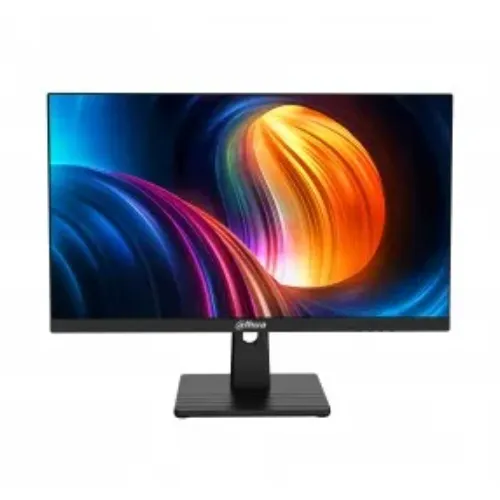
Dahua DHI-LM25-B211B 24.5-inch 120Hz IPS Monitor
The Dahua DHI-LM25-B211B is a 24.5-inch, 1920 × 1080 Full HD monitor with an IPS panel, a 16:9 aspect ratio and a three-sided micro-edge frame. Dahua’s official datasheets list a maximum refresh rate of 120Hz and 178° horizontal and vertical viewing angles. The model is intended for desktop work, study, video and compatible gaming setups. It is a Full HD display, not a QHD or 4K panel. At 24.5 inches, Full HD offers a familiar desktop scale and modest graphics demand; buyers who prioritize very fine text detail or a larger workspace may prefer a higher-resolution display.
Motion and image characteristics
Dahua lists a 1ms MPRT response-time figure, 16.7 million display colours and 85% NTSC gamut. MPRT is a motion-response specification and should not be compared directly with grey-to-grey response figures unless the measurement methods match. Brightness and contrast differ between published material: the 2024 Dahua datasheet lists 250 nits and 1500:1, while a later official revision lists 300 cd/m² typical and 1500:1; some local retailer specifications show 1000:1. Verify the carton, hardware revision and seller’s supplied unit before relying on those values. As with most displays, perceived brightness and colour depend on room lighting, viewing settings and the source material. For long work sessions, set brightness to a comfortable level for the room and use the computer’s display controls to select the native 1920 × 1080 resolution.
Ports and mounting
The newer official datasheet lists one DisplayPort 1.4 input and one HDMI 2.0 input, both supporting 1920 × 1080 at up to 120Hz, plus one audio-out port. Dahua lists a 100 × 100mm VESA mounting pattern. A separate built-in speaker is not consistently listed; the 2024 datasheet says Speaker: NA, so plan to use external audio unless the supplied revision is confirmed to include speakers. The monitor can connect to a desktop or laptop with a matching video output. Choose one input cable at a time and confirm the operating system recognizes the display at its native resolution. A VESA arm or wall mount must use the 100 × 100mm pattern and support the display’s weight; use the fasteners and load limits specified by the mount maker.
Stand, power and dimensions
The official sheets describe a tilt stand and an external 12V DC adapter. Published revisions differ on tilt range, power-adapter current, dimensions, net weight and maximum power: one sheet lists -5° to +15°, 12V/2A, up to 24W and 2.75kg net weight, while a later sheet lists -5° to +20°, 12V/2.5A, up to 32W and 2.9kg net weight. Check the monitor label and included adapter for the exact revision. Dahua’s later sheet lists a 0.5W-or-lower standby figure. Leave room for the stand and connected cables when measuring a desk; the listed dimensions can vary by revision and do not represent the space required for a VESA arm.
Setting up 120Hz
The 120Hz maximum is a capability, not a guarantee that every connected device will use that mode automatically. Use an HDMI 2.0 or DisplayPort connection, a compatible cable and a computer graphics output that can send 1920 × 1080 at the selected refresh rate. After connecting, open the operating system’s advanced display settings and choose 120Hz if it is available. If the option does not appear, check the cable, graphics driver, selected input and device output specification. Some laptops limit external display modes through their port or dock, so confirm support with the laptop maker. Gaming performance also depends on the graphics card and game; a 120Hz monitor does not make a system render 120 frames per second by itself.
Who this monitor may suit
This model may suit a desk setup where a 24.5-inch Full HD screen, an IPS viewing panel and a refresh rate above standard 60Hz are the main priorities. HDMI and DisplayPort inputs give common connection choices, while the audio-out port supports external audio equipment and VESA compatibility allows a suitable third-party mount. It can also serve general office, learning, browsing and video use. Consider a higher-resolution monitor if your work requires more screen area for dense spreadsheets, detailed creative timelines or multiple windows. Consider a brighter panel if the room is strongly lit. Confirm speaker availability if audio must come directly from the display.
Warranty and what to confirm
Bangladesh retailer listings report a three-year warranty, but the exact coverage and service provider can differ by seller. Confirm the written warranty card, dead-pixel policy, adapter coverage and service process before purchase. Ask whether the seller’s stock is the same hardware revision described in its listing, and retain the invoice and packaging until the product is checked. Also verify that your computer has HDMI 2.0 or DisplayPort output and a cable capable of the refresh rate you intend to use. Inspect the screen, stand, supplied adapter and ports on delivery, and follow the retailer’s stated procedure promptly if the item arrives damaged or does not match the listing.
Sources