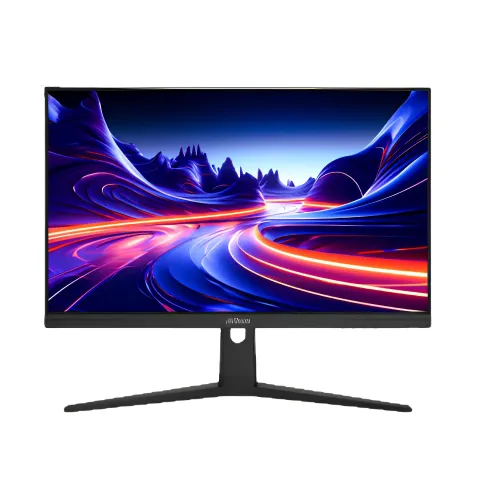
The Dahua DHI-LM25-E231BN is a 24.5-inch monitor built around a Full HD 1920 × 1080 IPS panel. Its 16:9 format suits a conventional desk setup, and the 200Hz maximum refresh rate is the main reason to consider it for responsive PC gaming. The 1080p resolution is familiar to a wide range of computers and game consoles, and it is less demanding to render at high frame rates than QHD or 4K. The screen is flat, rather than curved, so it works well for centered play, everyday browsing, study and general desktop use. The product number and the BN suffix matter: check the carton label and invoice for DHI-LM25-E231BN so it is not confused with similarly named Dahua monitors that have different refresh rates or specifications.
A 24.5-inch Full HD gaming display
The Dahua DHI-LM25-E231BN is a 24.5-inch monitor built around a Full HD 1920 × 1080 IPS panel. Its 16:9 format suits a conventional desk setup, and the 200Hz maximum refresh rate is the main reason to consider it for responsive PC gaming. The 1080p resolution is familiar to a wide range of computers and game consoles, and it is less demanding to render at high frame rates than QHD or 4K. The screen is flat, rather than curved, so it works well for centered play, everyday browsing, study and general desktop use. The product number and the BN suffix matter: check the carton label and invoice for DHI-LM25-E231BN so it is not confused with similarly named Dahua monitors that have different refresh rates or specifications.
A high refresh panel does not force a game to run at 200 frames per second. The graphics card, processor, game engine and selected settings all affect delivered frame rate. When the computer supplies more frames, the display can refresh more often and motion can look smoother, with less visible judder during quick camera movement. If the game runs at a lower frame rate, the monitor still displays it, but the full benefit of the maximum refresh mode is not realized. For ordinary office work, a high refresh rate can also make cursor movement and scrolling appear more fluid, although that may not matter to every user. Choose settings that keep play stable rather than chasing a number that the computer cannot sustain.
IPS image and viewing comfort
Dahua identifies an IPS LCD panel with an ELED backlight. IPS technology is useful when more than one person looks at the screen or when the user shifts position, because the stated viewing angle is 178 degrees horizontally and vertically. These angles are specification measurements; they do not mean that brightness and color remain perfectly unchanged from every direction. For consistent image appearance, sit near the center of the screen and avoid placing bright windows or lamps directly behind the viewer. The panel is listed at 350 cd/m² typical brightness and a 1000:1 contrast ratio. Adjust brightness to suit the room instead of assuming maximum output is comfortable for long sessions.
Color is specified as 8-bit with 16.7 million colors and 85% NTSC gamut coverage. That is useful for everyday gaming, streaming, documents and general media, but it should not be treated as a promise of professional color calibration. Photographers, designers and print workflows should use a calibrated display and verify the actual unit with their own tools. The datasheet lists HDR10 support. HDR playback also depends on the operating system, graphics hardware, software and source content; the label alone does not guarantee the peak brightness or local dimming of a premium HDR screen. Dahua lists a haze 25%, 3H surface treatment, which describes the panel finish. Room lighting and reflections can still affect perceived contrast.
200Hz refresh and response ratings
The 200Hz refresh specification describes how often the screen can update in a second when the selected signal mode supports it. To use the maximum mode, the computer and cable must provide a compatible Full HD signal, and the operating system or graphics control panel may need to be set to 200Hz manually. DisplayPort 1.4 and HDMI 2.0 are listed on the product; check the exact output capability of the connected computer and any adapters. If a laptop dock, converter or older cable limits the signal, the display may offer a lower refresh mode. After connecting, open display settings and confirm both 1920 × 1080 resolution and the chosen refresh rate.
The manufacturer lists 1ms MPRT and 0.5ms OD response figures. These are different measurement methods and should not be compared as if they were a single real-world guarantee. MPRT describes perceived motion persistence under the manufacturer’s test conditions; OD refers to overdrive response. Actual motion clarity varies with the game, frame rate, overdrive setting and individual perception. Fast response claims do not remove all blur or eliminate every artifact. Adaptive Sync support can help the display and compatible graphics source coordinate refresh behavior, which may reduce tearing in supported conditions. Compatibility depends on the graphics device, driver and connection. Check the manufacturer’s documentation for supported combinations before relying on a particular variable-refresh feature.
Connections, audio and setup
The listed inputs are one DisplayPort 1.4 and one HDMI 2.0, plus an audio output. A desktop graphics card can connect over DisplayPort or HDMI, while a console may use HDMI depending on the console’s supported modes. The port version on the monitor does not upgrade a source device: the complete chain must support the intended resolution and refresh. Use a suitable direct cable where possible, and verify the selected mode after connecting. The audio jack is an output for external audio equipment. Built-in speakers are not specified in the official datasheet, so plan to use headphones, powered speakers or another audio device if sound is required.
The supplied package details may vary by region or seller. SmartDeal lists a DisplayPort cable and power adapter among accessories, while the manufacturer’s local box contents should be checked at delivery. Inspect the panel, stand, cable and adapter before installation, and keep the packaging and purchase documents if they are required for warranty service. The external adapter is rated at 12V DC and 3A. Match any replacement adapter to the manufacturer’s voltage, polarity and current requirements; an incompatible supply can damage equipment. Connect the monitor to a grounded outlet where appropriate, route cables so they cannot be pulled, and keep ventilation areas clear.
Desk fit, mounting and ergonomics
The listed product dimensions are 557.7 × 330.6 × 58.0mm without the wall mount bracket, and net weight is 2.93kg. Allow additional space for the stand, cables and comfortable viewing distance; the listed measurement does not include every installed accessory. The monitor supports a 100 × 100mm VESA wall mount pattern. Before using an arm or wall bracket, confirm its VESA plate, screw length and supported weight against the actual unit and mount instructions. A stand or arm should hold the display securely without blocking ventilation or putting strain on the ports. Measure the desk and mounting surface first, especially where a monitor arm shares space with a keyboard, laptop or speakers.
Dahua lists a tilt range from approximately -5 degrees to +20 degrees, each with a tolerance of two degrees. Tilt can help aim the panel toward the viewer, but the product specification does not list height adjustment, swivel or pivot rotation. Do not assume those ergonomic movements are available from the supplied stand. Users who need height control or portrait orientation may prefer a compatible adjustable VESA arm. Place the top portion of the display near eye level and keep a relaxed viewing distance to reduce awkward neck posture. The black finish fits many desk setups, but the actual shade and trim can look different under room lighting or camera exposure.
Power, environment and durability
The datasheet lists 18W basic consumption, 19W typical and 23.8W maximum, with standby consumption below 0.5W. These are manufacturer measurements and actual usage can vary with brightness, selected mode, connected equipment and power conditions. The unit uses an external 12V, 3A adapter. Use the supplied adapter where possible and avoid covering the adapter or placing it where heat cannot escape. Turn the monitor off when it will not be used for an extended period. The listed operating range is 0 to 40 degrees Celsius and 10% to 85% relative humidity. Keep the display away from water, condensation, excessive heat and dust, and follow the printed safety information.
Storage conditions are listed as -20 to +60 degrees Celsius and 5% to 90% relative humidity. Those limits describe storage, not recommended operating conditions. The datasheet lists 30,000 hours as panel lifespan; that is a rated specification, not a promise that every component will last exactly that long. Avoid pressing on the LCD surface, use a soft clean cloth, and follow Dahua cleaning instructions. Do not spray liquid directly onto the panel. For transport, protect the screen from pressure and impact. If the image flickers, a port stops working or the adapter behaves unusually, disconnect power and contact the seller or authorized service rather than opening the monitor yourself.
Warranty and buying checklist in Bangladesh
SmartDeal’s exact-model page showed ৳17,015 as the current listing price, ৳21,540 as the regular price, in-stock availability and a three-year warranty when checked. The offer is listed by Computer Zone through SmartDeal; price and inventory can change without notice. This is one seller observation, not a complete Bangladesh market range. Compare the final checkout price, delivery conditions, warranty provider and return terms before ordering. Keep the invoice and product box because the seller states that the box is mandatory for warranty claims. Confirm the serial number and model suffix on the unit before accepting delivery. The catalog variant MSRP remains unset because a current manufacturer MSRP was not verified.
The product is most relevant to users who want a compact Full HD gaming screen with a high refresh ceiling, IPS viewing angles, Adaptive Sync and DisplayPort/HDMI connectivity. It may be less suitable if the buyer needs built-in speakers, USB-C docking, a height-adjustable stand, a higher resolution or verified professional color calibration. Those features are not listed for this model. Check the computer’s graphics outputs and expected game performance, decide whether a 24.5-inch Full HD workspace fits your needs, and ensure a VESA arm supports the display if mounting is planned. A short pre-purchase checklist avoids confusion between this 200Hz BN model and another Dahua monitor with a similar product name.
Key features
- 24.5-inch Full HD IPS display
- 1920 × 1080 native resolution and 16:9 format
- Up to 200Hz refresh rate
- 1ms MPRT and 0.5ms OD manufacturer response ratings
- 350 cd/m² typical brightness and 1000:1 contrast
- 8-bit color, 16.7 million colors, 85% NTSC
- HDR10 and Adaptive Sync support
- DisplayPort 1.4, HDMI 2.0 and audio output
- 100 × 100mm VESA mounting
- Tilt adjustment from about -5° to +20°
Advantages
- High 200Hz ceiling for compatible gaming systems
- IPS panel with broad stated viewing angles
- Full HD is less demanding to render than higher-resolution gaming modes
- Adaptive Sync support is listed
- Standard DP and HDMI inputs plus 100 × 100mm VESA mounting
Points to consider
- Built-in speakers are not specified
- Stand height, swivel and pivot adjustment are not listed
- Only Full HD resolution, which may be less detailed than QHD at a similar desk distance
- Actual 200Hz use depends on source hardware, cable and settings
- Only one seller price was verified, so no cross-market price range is claimed
Frequently asked questions
What is the native resolution of the Dahua DHI-LM25-E231BN?
Its native resolution is Full HD 1920 × 1080, in a 16:9 aspect ratio.
Does this monitor support 200Hz?
Yes. Dahua lists a maximum refresh rate of 200Hz. The connected computer, cable and selected display mode must support Full HD at that rate.
Which panel type does it use?
The manufacturer specifies an IPS LCD panel with ELED backlighting.
What response times are listed?
The datasheet lists 1ms MPRT and 0.5ms OD. These use different measurement methods and are not identical guarantees of motion clarity.
Does it support HDR?
HDR10 is listed. The viewing result depends on the source, software and display settings; HDR10 support alone does not establish a particular peak brightness or local dimming capability.
Does the monitor support Adaptive Sync?
Yes, Adaptive Sync is listed. Feature behavior depends on the compatible graphics source, driver and connection.
What ports are available?
The listed connections are one DisplayPort 1.4, one HDMI 2.0 and one audio output.
Does it have built-in speakers?
The official datasheet does not specify built-in speakers. Use headphones or external speakers through a compatible audio setup.
Can it be wall mounted?
It lists a 100 × 100mm VESA pattern. Verify bracket compatibility, screw length and weight rating before installation.
What is the stand adjustment?
The listed tilt is about -5° ±2° to +20° ±2°. Height, swivel and pivot adjustments are not listed.
What is the power requirement?
It uses a 12V DC, 3A external adapter. Listed consumption is 18W basic, 19W typical and 23.8W maximum.
What warranty and price were observed in Bangladesh?
SmartDeal showed ৳17,015 current price, ৳21,540 regular price, in-stock status and a three-year warranty when checked. This is one seller listing; recheck the live offer and terms before purchase.
Technical specifications are based on the manufacturer datasheet. Price, stock, seller warranty and package contents may change; confirm the current offer and the exact DHI-LM25-E231BN model suffix with the seller.