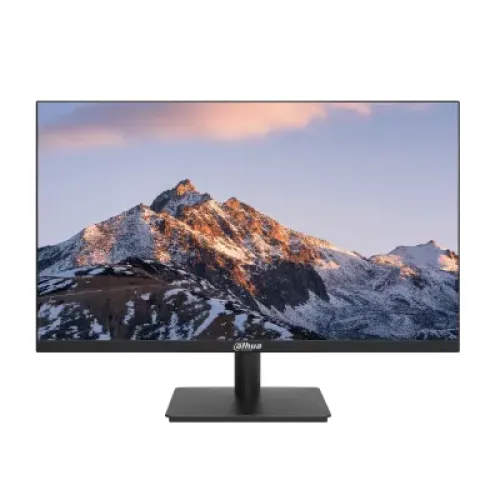
A 27-inch Dahua IPS monitor for smooth everyday display use
The Dahua DHI-LM27-A221Y is a 27-inch Full HD monitor with an IPS panel and an ELED backlight. Dahua’s exact-model product page lists a native 120Hz refresh rate that can be overclocked to 144Hz, making 144Hz an available maximum mode rather than the panel’s base timing. It also lists an OD response time of 5ms and a separate 1ms MPRT figure. Those measurement labels matter when comparing monitor specifications. The 1920 × 1080 resolution, 16:9 shape, HDMI 1.4 input and VGA input suit many common desktop computers and other compatible sources. The product is black and the catalog gallery shows front, angled-front and rear views. Dahua’s official datasheet is the primary reference for its technical values; Bangladesh retailers provide useful local cross-checks but sometimes disagree on details. The exact model code should be checked on the box or rear label because Dahua’s A221Y family contains visually similar models with different port, panel or suffix configurations.
Full HD on a 27-inch screen
The panel displays 1920 × 1080 pixels in a 16:9 aspect ratio. On a 27-inch diagonal this gives about 81.6 pixels per inch, according to the Dahua specification. It provides a large physical viewing area for documents, browser windows, dashboards, videos and games, while offering less pixel density than a 27-inch QHD screen. Text and interface elements can therefore appear larger at a normal viewing distance, but fine detail and workspace are not as dense as on a higher-resolution display. If you work with detailed design, small text, high-resolution photography or several narrow windows at once, compare Full HD with QHD before choosing. Full HD can also demand less rendering power than higher resolutions, which may help a graphics card maintain a high frame rate in games. The right choice depends on eyesight, desk distance, software layout and the performance of the source device; a 27-inch size alone does not tell you how sharp text will appear.
IPS viewing and the specified image characteristics
Dahua identifies the panel technology as IPS and the backlight as ELED. Its datasheet lists 178-degree horizontal and vertical viewing angles, a typical brightness of 250 cd/m², a 1200:1 contrast ratio and a typical 72% NTSC color gamut. The display color specification is 6-bit plus FRC. These are manufacturer-listed characteristics for the exact model and give more useful context than broad terms such as “vivid” or “professional.” The Star Tech listing shows 1500:1 contrast in its detailed table, which conflicts with Dahua’s official 1200:1 value; this content follows Dahua. Brightness and contrast are measurement figures under defined conditions, and perceived results change with ambient light, picture settings and reflections. A 72% NTSC gamut is an entry-level color range and does not establish suitability for color-critical mastering. The IPS panel can be convenient when the screen is viewed from different positions, but no panel type removes the effects of glare or poor room lighting.
Native 120Hz and the 144Hz overclocked mode
Dahua documents 120Hz as the native refresh rate and says it can be overclocked to 144Hz. Retail listings often shorten this to “144Hz,” so the two modes should not be confused. Refresh rate describes how many times per second the screen can update. A higher rate can make movement and scrolling appear smoother when the computer actually sends enough frames and the connection carries the selected mode. Dahua lists HDMI 1.4 input timing up to 1920 × 1080 at 144Hz, while the VGA input is listed up to 1920 × 1080 at 75Hz. The 144Hz path therefore depends on HDMI and a compatible source, cable, driver and setting. Overclocking may need to be enabled in the monitor menu or supported software, depending on the revision. If 144Hz does not appear in the operating-system display settings, check the input, cable, graphics driver and Dahua manual. The display cannot raise the frame rate generated by the PC or console.
What 5ms OD and 1ms MPRT mean
Dahua lists two response measurements: OD 5ms and MPRT 1ms. OD refers to overdrive, which changes pixel behavior to speed up transitions; MPRT, or Moving Picture Response Time, describes motion-picture persistence. They are different methods and should not be collapsed into a promise of “1ms GTG.” The local product title and retailer copy commonly promote 1ms MPRT, so this listing retains that number with its proper label and also includes the manufacturer’s 5ms OD specification. Motion clarity depends on refresh rate, frame rate, pixel transitions, overdrive settings and the content being shown. Aggressive overdrive can introduce visual artifacts on some monitors, so use the setting recommended in the manual and judge it in real content. Buyers choosing a screen for competitive gaming should compare the precise timing modes and independent measurements for the exact model; the marketing response figure alone does not establish input lag or full end-to-end responsiveness.
Connecting a computer or console
The Dahua datasheet lists one HDMI 1.4 input that supports Full HD up to 144Hz and one VGA input listed up to Full HD at 75Hz. HDMI is the relevant input for the maximum refresh mode. VGA is an analog connection and has a lower listed vertical frequency ceiling. The monitor does not list DisplayPort or USB inputs, so check the output ports on a laptop, graphics card, console or dock before ordering. A passive adapter does not guarantee that a signal will reach 144Hz; adapter bandwidth and the source’s supported timings also matter. Choose 1920 × 1080 in the computer display settings, then select the supported refresh rate. If you only see 60Hz or 75Hz, verify the HDMI cable, graphics output, selected input and driver. The rear gallery photo helps identify the general layout but cannot confirm the port capability of an individual delivered revision. Dahua lists a separate 12V DC, 3A power adapter.
Audio output and built-in speakers
Audio details are inconsistent across the local retailer data reviewed for this model. The original BiponiBD attribute says an audio jack is present, Star Tech also lists an audio jack, while Ryans reports no headphone jack. The Dahua manufacturer specification excerpt clearly lists the VGA and HDMI inputs but does not clearly establish a headphone output in the accessible table. Retailer pages say there are no built-in speakers. For that reason, this product copy does not promise an audio jack or speakers: verify the rear panel and manual for the exact unit if sound output matters. Many computers and consoles can send audio directly to separate speakers or a headset, so an audio jack on the monitor may not be necessary. If you plan to pass HDMI audio through the monitor, confirm that feature explicitly with the seller and check whether the source supports it. A port shown in an image or seller table does not prove the installed hardware revision.
Stand, tilt and VESA mounting
Dahua lists an inclination range from −5 degrees to +20 degrees and a 100 × 100mm VESA mounting pattern. Tilt lets you change the screen’s vertical angle; it is not the same as height adjustment, swivel or portrait rotation. Local sellers say that rotation is not supported, so do not expect the stand to pivot into portrait orientation. The supplied base is visible in the gallery images, but those images do not prove the stand’s precise adjustment range or what accessories are included in the carton. If you prefer a monitor arm, verify the VESA screw depth, bracket fit and arm’s load rating. The official dimensions without a wall-mount bracket are 615.1 × 364.1 × 49.1mm. The quoted gross weight includes packaging and is different from the monitor’s 3.4kg net weight. Desk space, stand depth and cable clearance should be checked against your setup rather than inferred from the front view.
Physical size, weight and practical desk fit
The active display area is 597.888mm wide by 336.312mm high. Dahua lists the monitor body without a mounting bracket at 615.1 × 364.1 × 49.1mm, a net weight of 3.4kg and a gross packed weight of 4.7kg. The package size is 678 × 450 × 118mm. Net weight is useful for checking a stand or arm; gross weight and package dimensions matter for transport and delivery planning. These are manufacturer values and can differ slightly from a measured unit or a regional packaging revision. The BiponiBD variant has no parcel-weight or parcel-dimension values, so shipping calculations should not assume that the monitor body dimensions are carton measurements. The 27-inch diagonal also does not include the width of the frame and stand base. Measure the full desk footprint and viewing distance before placing the display, especially if it sits beside a laptop, speaker or another monitor.
Power, standby and operating environment
Dahua specifies a 12V DC, 3A power adapter. Its power figures are 20.0W basic, 27.1W typical, 28.0W maximum and less than 0.5W standby. These values describe the manufacturer’s test conditions; actual consumption may vary with brightness, refresh mode and settings. Use the supplied adapter or a replacement that meets the exact voltage, current and polarity requirements in the manual. Do not choose a power supply merely because its plug fits. Dahua lists an operating temperature range of 0°C to 40°C and humidity from 10% to 85% RH. Keep vents clear, avoid liquids and follow the installation instructions. The catalog lists the product’s electrical adapter details but does not verify the box contents of the BiponiBD unit. Confirm whether the correct adapter and HDMI cable are included before payment if those accessories affect your setup.
Flicker-free feature and color expectations
Dahua lists flicker-free technology for the DHI-LM27-A221Y. Its datasheet does not establish a certified low-blue-light mode for this exact model, so this description does not claim that it has a dedicated blue-light filter. Some sellers may use general eye-comfort language across several monitor products; exact model documentation should take priority. A flicker-free listing is one display feature, not a guarantee that every user will avoid fatigue. Screen brightness, contrast, reflections, font size, viewing distance, posture and regular breaks all contribute to comfort. Color gamut is listed as 72% NTSC typical, while the panel uses 6-bit+FRC color. This provides context for ordinary home and office use but does not establish a calibrated professional reference display. If your workflow depends on a specific color space, factory accuracy or uniformity, request measured data for this model or consider a display with an independently documented color target.
The three product photos
The BiponiBD gallery contains three Dahua images. The first is a straight-on view of the black monitor showing a mountain landscape on screen, a narrow upper and side frame, Dahua logo and rectangular stand base. The second is an angled front view that shows the panel depth and the same stand. The third is a rear view of the black housing, centered Dahua logo, mounting points, vent detail and stand. These images are useful for recognizing the design and rear mounting area. They do not independently verify the maximum refresh mode, exact input timings, audio jack, included cable, warranty or stock. Alt text should describe the view and model without stuffing in repeated keywords. The original image identifiers and URLs remain unchanged so the current gallery relationship is preserved. If a physical product photo is later available, it should be identified as an actual unit photo only when that provenance has been confirmed.
Warranty, price and availability in Bangladesh
The catalog has an active variant with a stored MSRP of BDT 16,800. This is the value saved in the product record; it does not prove current stock, a live seller offer or the final amount due at checkout. Bangladesh retailer pages show their own prices and warranty terms, and those can change independently. Star Tech and Ryans list a three-year warranty for their products; those seller policies do not establish the coverage provider or terms for the BiponiBD unit. Confirm the exact serial number’s local warranty eligibility, service provider, dead-pixel policy, claim process, invoice requirement and any packaging conditions. Ask BiponiBD to confirm the currently available price, quantity and delivery charge before placing an order. No seller’s stock badge should be copied into this listing as BiponiBD availability. Keeping those facts separate helps the product description stay useful if market prices or merchant inventory change.
Who this monitor may suit
The Dahua DHI-LM27-A221Y may suit someone looking for a large 27-inch IPS panel, Full HD resolution and a refresh mode reaching 144Hz over HDMI. Its 120Hz native timing, overclocked 144Hz mode, 1ms MPRT claim and Full HD pixel count can be relevant to everyday use and casual gaming. It may not suit someone who needs QHD-level detail at 27 inches, multiple modern inputs, USB connectivity, proven audio passthrough, built-in speakers, portrait rotation or documented low-blue-light certification. Before choosing it, confirm that the computer can output 1920 × 1080 at the intended refresh rate through HDMI 1.4. Check the stand and audio needs, then verify unit-specific warranty and availability with the seller. The catalog page describes specifications; it does not guarantee a graphics-card frame rate, game performance, live stock or a particular warranty outcome.