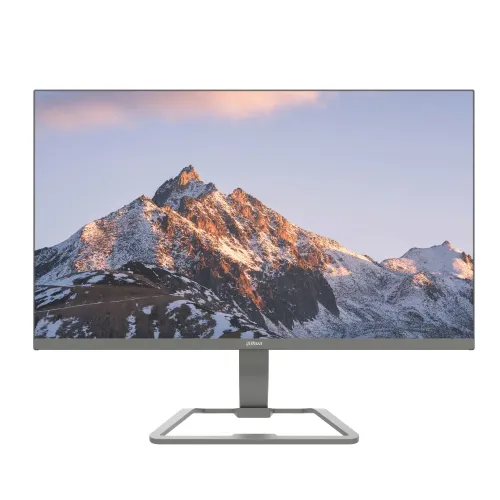
Dahua DHI-LM27-C221P 27-inch 144Hz FHD IPS Monitor
The Dahua DHI-LM27-C221P is a 27-inch Full HD monitor built around an IPS panel with an ELED backlight. Dahua lists a native 1920 × 1080 resolution, 16:9 shape and 27-inch diagonal, with a visible area of 597.888 × 336.312mm. The catalog previously used a 23.8-inch phrase even though the product model, image proportions and exact maker record indicate 27 inches; the corrected name now uses the verified screen size. Full HD compatibility makes it straightforward to connect to desktop computers and laptops, while the larger diagonal gives documents, browser windows and video content room to breathe. Users who need finer text or more desktop area may prefer a QHD panel at 27 inches.
The panel uses IPS technology and provides 178-degree horizontal and vertical viewing angles according to Dahua. This wide viewing range can help when more than one person is looking at the display or the screen is viewed from the side. ELED describes the edge-lit LED backlight type in the manufacturer listing. Pixel pitch is 0.3114mm and density is 81.59 pixels per inch. The image surface is described with Haze 25% and 3H treatment, intended to diffuse reflections under indoor lighting. The monitor is rated at 250 cd/m² typical brightness and a 1500:1 contrast ratio. These are general consumer display specifications and do not imply factory calibration or professional color grading suitability.
Dahua specifies a 72% NTSC typical color gamut and 6-bit plus FRC color output. That combination is appropriate for everyday browsing, office documents, study, movies and general desktop graphics, but it is more limited than wide-gamut creator displays. For photo or video work where color matching matters, use a calibrated reference screen and verify the final output on the intended target devices. Brightness at 250 cd/m² is designed for typical indoor settings, not direct sunlight. The flat 16:9 screen matches standard media and productivity layouts. Screen settings, room lighting and the source device affect perceived color and contrast, so the stated gamut and brightness are not guarantees of a specific visual result in every environment.
The maximum refresh rate is 144Hz. Dahua’s exact product specifications state that the HDMI 1.4 input can carry 1920 × 1080 at 144Hz, while the VGA input supports 1920 × 1080 at 60Hz. This distinction matters: select HDMI and a capable graphics output to use the highest refresh mode. At 144Hz the display can redraw motion more often than a standard 60Hz screen, which may make cursor movement, scrolling and compatible games feel smoother. Actual mode selection depends on the connected computer, cable and driver settings. If the system offers only 60Hz, inspect the connection type, graphics settings and display configuration before assuming the monitor is limited.
Dahua specifies a 5ms response time using overdrive (OD). Overdrive changes pixel transition behavior to reduce smearing during motion, and the measured result can depend on the selected mode. It should not be represented as a 1ms native response time. Dahua also lists adaptive sync support on the product page, which can coordinate refresh timing with a compatible graphics card. Compatibility depends on the connected GPU, operating mode and supported input. Users choosing the monitor for competitive play should consider both refresh rate and response behavior, and compare independent measurement reviews when available. The verified copy presents the manufacturer’s rating without promising a specific game performance or latency result.
For viewing comfort, Dahua lists flicker-free technology and a software-based Low Blue Light protection mode. The latter is a picture setting that adjusts blue light output and may shift the displayed color temperature. Users can choose it when reading or working for long sessions, then switch back to a standard color mode when color appearance matters. Comfort depends on individual preferences, viewing distance, room lighting and breaks; these features are not medical claims. The control layout includes five buttons according to Dahua. The panel has a stated 30,000-hour lifespan figure, which is a manufacturer specification and not a guarantee of a fixed usable lifetime under every brightness and operating condition.
Connections include one HDMI 1.4 input and one VGA input. HDMI is the digital connector for modern desktops, laptops and compatible devices; it supports the model’s Full HD 144Hz maximum according to Dahua. VGA is an analog connector for older computers and is limited to Full HD at 60Hz. No DisplayPort, USB hub, built-in speakers or separate audio output is listed for this exact model. Plan for sound to come from the computer or an external audio device. Dahua lists an external DC 12V, 2A adapter, so the power brick is part of the setup. Confirm the label on the included adapter before replacing it, and use an adapter with the specified voltage, current capacity and compatible connector.
The included stand supports tilt from -5 to +15 degrees. It does not list height adjustment, swivel or portrait pivot, so users who need more ergonomic range may choose a compatible monitor arm. Dahua specifies a 75 × 75mm VESA mounting pattern; this is smaller than the 100 × 100mm pattern used on many monitors, so check bracket compatibility before ordering. The product images show a rectangular open-frame stand, slim front bezel and a rear panel with button controls and mounting points. The exact manufacturer page describes a metal body design and a black casing. Use the rear mounting points and the supplied screws appropriate to the bracket, and avoid overtightening.
The monitor measures 613.1 × 363.3 × 35.3mm without the base and has a net weight of 3.85kg. The listed package dimensions are 682 × 516 × 145mm and gross weight is 5.4kg. Dahua’s listed accessories include the power adapter, base, HDMI cable, user manual by QR code, energy label, quick start guide and legal/regulatory information. Since package contents can vary by market or batch, check the box when received. The stand and 27-inch panel need adequate desk depth and width. Leave room behind the panel for cables and the external adapter, and make sure any arm or shelf can support the panel and its mounting arrangement.
Power requirements are DC 12V, 2A through the external adapter. Dahua gives power consumption as 24W basic, 27W typical and 30W maximum, with standby below 0.5W. These are maker specifications; actual consumption can depend on image settings and operating mode. The product supports operating temperatures from 0°C to +40°C and non-condensing humidity between 10% and 85% according to Dahua. Avoid moisture, blocked ventilation and unstable power sources. If the adapter becomes damaged or is lost, match the specified output voltage, current capacity, polarity and plug type using the official replacement guidance rather than choosing a visually similar generic adapter.
The exact Dahua page identifies model DHI-LM27-C221P as a 27-inch FHD monitor with IPS, 144Hz, 1500:1 contrast, 72% NTSC gamut, 5ms OD and 75×75mm VESA mounting. This product-specific manufacturer record resolves the size discrepancy in the catalog and establishes the power and display details. Bangladesh retailers Star Tech, TechLand and Ryans also list the product as 27 inches, typically with a three-year warranty. Star Tech’s title and TechLand’s page contain their own variations in color and headline copy; these are retailer presentation differences, not a basis to change the model. The exact manufacturer data is used for specifications, and seller warranty statements remain external context.
The images in this catalog show front and angled views of the screen, a thin side profile, and the rear casing with button controls and mounting area. They depict a gray-looking finish in the studio render, while the Dahua official specifications give the cabinet color as black. Product photography lighting can affect apparent color. The visual gallery does not expose a serial label, regional box code or GTIN, so the exact physical unit’s origin and barcode should not be inferred from these renders. Dahua lists CE EMC, CE LVD and CE ERP certifications for the model. Check the unit label and included regulatory materials if a particular regional certification or color is important to the purchase.
The DHI-LM27-C221P suits users looking for a larger 27-inch IPS Full HD screen with up to 144Hz over HDMI, ordinary HDMI/VGA connectivity, Adaptive Sync, flicker-free operation and basic blue-light adjustment. Its main trade-offs are Full HD pixel density at this size, limited stand ergonomics, a relatively modest color gamut, no stated built-in audio and a 75 × 75mm rather than 100 × 100mm VESA pattern. The exact supported inputs, refresh behavior and physical setup should be matched to the user’s computer and desk. This listing describes the verified manufacturer specifications and does not represent external retail offers as BiponiBD stock or selling price.
Warranty sellers in Bangladesh commonly advertise three years, and Ryans notes that the box is mandatory for a claim. Those are seller-specific terms and can vary with the distributor and imported unit. Keep the invoice, warranty card and original packaging, and confirm which local service provider handles the product before purchase. The catalog record does not carry a verified physical barcode, unit serial or exact origin label. The source record and current local offer details are attached as evidence, while unknown GTIN and country-of-origin fields are retained as unknown. This separation keeps model specifications clear without inventing unit-specific identifiers or extending a seller’s warranty promise to every regional stock item.
Technical summary