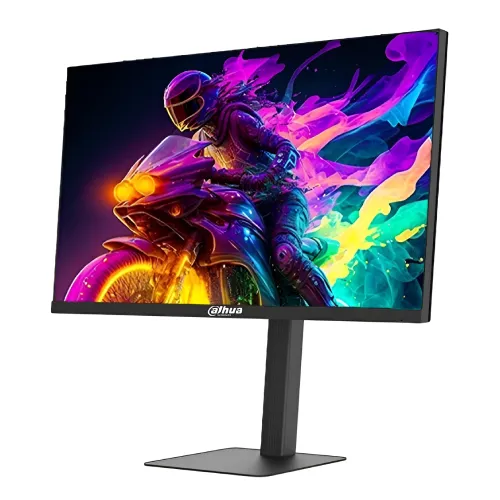
Dahua DHI-LM27-E240A: 27-inch FHD gaming monitor
The Dahua DHI-LM27-E240A, also marketed as LM27-E240A, is a 27-inch Full HD gaming monitor with a flat VA panel and E-LED backlight. Dahua's current V1 datasheet lists 280Hz as the refresh rate and says it can be overclocked to 300Hz. This distinction matters: 280Hz is the listed native rate, while 300Hz is the maximum overclock through DisplayPort 1.4. Bangladesh retailers market the upgraded model as a 300Hz monitor. The same official specification lists a 1ms MPRT response rating, 4,000:1 contrast and 300 cd/m² maximum brightness. The model code remains DHI-LM27-E240A; the old “E240A” suffix should not be read as the refresh rate of the current upgraded unit.
Resolution, screen size and VA panel
The panel measures 27 inches diagonally and uses a 16:9 aspect ratio with 1920 x 1080 Full HD resolution. Dahua lists a viewing area of 597.888 x 336.312mm, 0.3114mm pixel pitch and approximately 81.6 pixels per inch. These are useful for checking text size and desk distance: a 27-inch Full HD screen is spacious, though fine text is less dense than on a 24-inch Full HD or 27-inch QHD display. The flat Vertical Alignment panel is designed for broad 178-degree horizontal and vertical viewing angles. VA technology and the listed 4,000:1 typical contrast suit darker game scenes, but pixel transition behavior can vary, especially in dark-to-light motion.
280Hz native refresh and 300Hz DisplayPort overclock
The current Dahua V1 specification distinguishes 280Hz from the 300Hz overclock. Both DisplayPort 1.4 inputs are listed for Full HD up to 300Hz, while the overclocked mode should be described as up to 300Hz rather than as the native refresh rate. Dahua's older regional product page lists 240Hz, which reflects an earlier revision; the current upgraded specification and Bangladesh retail listings describe the 300Hz version. HDMI 2.1 inputs support up to 1920 x 1080 at 240Hz according to the current datasheet. To use the highest refresh, connect a compatible PC to DisplayPort, choose 1920 x 1080 in display settings, select the available 280Hz or overclocked 300Hz mode, and confirm the GPU, cable and driver support it.
1ms MPRT and adaptive sync
Dahua rates the response at 1ms MPRT, or Moving Picture Response Time. MPRT describes motion-picture persistence and should not be rewritten as a 1ms gray-to-gray measurement. Dahua also lists Adaptive-Sync; Bangladesh retailers report FreeSync and G-SYNC compatibility. Variable refresh can help align the display refresh with frame delivery from a compatible graphics card to reduce tearing. Supported modes can depend on the input, GPU, driver and on-screen settings. A response-time rating or high refresh number cannot guarantee that a game itself renders at 280 or 300 frames per second. Choose the picture and response settings that look cleanest to you, and test overdrive or motion-strobing features with the games you actually play.
Contrast, brightness and color gamut
The current Dahua datasheet lists 4,000:1 typical contrast and 300 cd/m² maximum brightness. It lists 85% NTSC typical color gamut and 1.07 billion display colors. In its feature text, the same manufacturer datasheet also advertises 95% DCI-P3, while the specification table reports 85% NTSC; these are different gamut measures and the source does not supply a colorimeter result. The catalog therefore records the published values with their measurement labels rather than claiming independent color accuracy. Dahua's older regional sheet reports 3,000:1 contrast, another revision difference. For color-critical design work, ask for a calibration report for the exact unit. For gaming and general entertainment, set brightness to suit the room and use the preferred color preset.
Inputs, audio and the service USB port
The current manufacturer datasheet lists two DisplayPort 1.4 inputs, each supporting Full HD up to 300Hz, and two HDMI 2.1 inputs supporting Full HD up to 240Hz. Dahua calls the HDMI interface HDMI 2.1; its specified resolution and refresh are listed separately, so check those mode limits instead of assuming every HDMI 2.1 feature. There is one audio output for wired headphones or external speakers; no built-in speakers are listed. The current spec also identifies a USB port for firmware upgrades only. It is not described as a downstream USB hub for keyboards or storage. The rear photo shows the recessed I/O area and a security-lock slot. Confirm which signal cable is included in your regional box.
Stand movement and VESA mounting
The included stand supports approximately 110mm of height adjustment, tilt from -5 to +15 degrees, left/right swivel from -30 to +30 degrees, and vertical pivot from -90 to +90 degrees. Dahua's datasheet lists a standard 100 x 100mm VESA mounting pattern for compatible arms or wall mounts. The front product image shows a flat square base; the rear image shows the height-adjustable column, cable clip, red five-way OSD joystick, mounting recess and Kensington security slot. Before mounting, check the arm's weight limit, screw length and clearance. The pivot range makes portrait orientation possible, but cable slack and surrounding desk space still need to be considered when turning the panel.
Dimensions, weight and power
Dahua lists the monitor without a wall-mount bracket at 613.8 x 362.5 x 67.9mm in width, height and depth order. Net weight is 5.58kg; packaged dimensions are 744 x 482 x 166mm and gross weight is 7.27kg. The variant shipping fields record the net panel measurement separately from the packaged measurements in the product attributes. Power comes from an external 12V, 4A adapter. The current V1 datasheet lists 21W basic, 29W typical, 32W maximum and less than 0.5W standby consumption. Older and retailer-derived records can show different maximum power or adapter ratings; use the label on the delivered adapter and current datasheet for the exact revision.
What's included and how to check the delivered unit
Dahua's current datasheet lists a power adapter, base, HDMI cable, QR-code user manual, legal and regulatory information, and other standard materials. A regional package may also include the stand assembly or a different video cable, so inspect the box-content list from the local seller. The datasheet identifies the display model as DHI-LM27-E240A and the updated refresh revision as 280Hz with overclock to 300Hz. Check the product label, on-screen information and seller invoice if you need to confirm the delivered configuration. Do not assume an optional wall mount is included; Dahua lists it as optional. Retain packaging and invoice for warranty support and safe transport.
Bangladesh price and warranty
The BiponiBD variant price remains ৳24,500. Current Bangladesh seller pages list prices around ৳24,500 to ৳26,000, with some regular-price references above that range. The exact price depends on the retailer, payment method and offer period, and stock can change. Major local listings advertise a three-year warranty. The seller's warranty issuer, service center, dead-pixel policy and exclusions should be confirmed on the invoice because manufacturer specifications do not determine the local sales contract. The preserved catalog price corresponds to the reviewed local market evidence and is not automatically changed to match a temporary external discount.
Who should consider this display?
The DHI-LM27-E240A can suit PC players who value high refresh, Full HD resolution, VA contrast, a flexible stand and multiple inputs. Full HD is less demanding to render than QHD, which can help a system pursue high frame rates in competitive games; actual frame rate still depends on the computer and game settings. The 27-inch size provides a broad view, while its approximately 81.6 PPI is less sharp for small text than denser screens. The high refresh mode is an overclock through DisplayPort; HDMI is rated up to 240Hz. Users who prioritize built-in speakers, USB hub functionality, 1440p resolution or measured color calibration should compare those needs against the published specifications before buying.
First setup and refresh-rate checklist
Assemble the stand using the included instructions and place the monitor on a stable desk, or use its VESA mount with compatible hardware. Connect the external adapter and choose DisplayPort for 280Hz native or the 300Hz overclock mode. In the graphics driver and operating system, set Full HD resolution and select the desired refresh rate; if 300Hz does not appear, check the input, cable, GPU output, driver and overclock setting. Enable Adaptive-Sync when it is supported by the graphics card and selected connection. Use HDMI for a console or secondary device within the HDMI mode limit, up to 1080p at 240Hz. Adjust height, tilt, swivel and pivot for your seating position, then set brightness and color to the room.
Specification and revision transparency
This listing separates the current Dahua V1 datasheet from older regional specifications. Current V1 values are 280Hz native with overclock to 300Hz, 4,000:1 contrast, two DP 1.4 inputs, two HDMI 2.1 inputs, 300 cd/m² maximum brightness, a 12V 4A adapter, 29W typical consumption, 5.58kg net weight and 7.27kg packaged weight. Dahua's older product page reports a 240Hz revision, and the same current datasheet's 85% NTSC specification table sits beside a feature claim of 95% DCI-P3. These details are documented as revision or source differences rather than silently combined. Product origin and GTIN remain unverified.