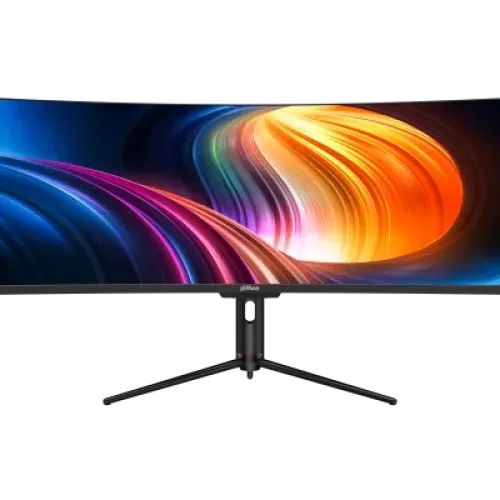
Dahua DHI-LM49-EW410CA overview
The Dahua DHI-LM49-EW410CA is a 49-inch curved Super Ultrawide monitor with a 32:9 aspect ratio and native DQHD resolution of 5120 × 1440. Its VA LCD panel uses an ELED backlight and is rated for up to 120Hz through DisplayPort 1.4 and USB-C. Dahua’s current product page and later datasheet list a 1800R curve, 3000:1 contrast and up to 400 cd/m² brightness. This model is designed for a wide single-screen desktop that can show multiple applications or a panoramic game view. It includes DP 1.4, HDMI 2.1 TMDS and USB-C video connections, an integrated USB hub, RJ-45 pass-through, PBP, speakers and audio out. The connection limits matter: at native 5120 × 1440, the product documentation lists 120Hz for DP and USB-C but only 60Hz for HDMI. USB-C power delivery is listed up to 65W in Dahua’s 2025 datasheet. Check the computer, cable and port capabilities before assuming the same resolution, refresh and charging are available on every host.
49-inch 32:9 DQHD workspace
The screen measures 49 inches diagonally and has a native 5120 × 1440 pixel grid. DQHD combines the vertical pixel count of QHD with twice the horizontal pixels, creating a wide 32:9 workspace. Dahua lists a viewable area of 1191.936 × 335.232mm, 108.54 PPI and 0.2382mm pixel pitch. A single desktop can keep a timeline, documents, spreadsheets, communication windows or several browser panels visible together. The actual benefit depends on the operating system’s window tools and the applications used; the monitor does not automatically replace multiple independent displays in every workflow. The 1800R curve follows the shape of the very wide panel and is intended for a centered viewing position. Because revision history differs, note that Dahua’s November 2024 specification listed 1500R, while its later 2025 and current product page list 1800R. This description follows the newer official model information and leaves the historical discrepancy visible for buyers checking an older unit. Verify the label or current regional datasheet when the curvature revision is important.
Panel, brightness, contrast and color
Dahua identifies the LCD technology as VA with ELED backlighting. Official specifications list 400 cd/m² maximum brightness, 3000:1 contrast, 178° horizontal and vertical viewing angles, 8-bit color, 85% NTSC gamut, flicker-free technology and a low-blue-light mode. The 2025 Dahua datasheet also lists 99% sRGB and average color accuracy of ΔE below 2; the current online specification table omits those two details, so they are recorded as revision-specific published claims rather than an independent calibration guarantee. The surface treatment is Haze 25% with 3H hardness. HDR is marked “Yes” in the manufacturer feature table, but no VESA DisplayHDR tier was located. HDR signal support should not be described as a VESA certification or as proof of a particular sustained brightness. For color work, set the desired mode and use a calibrated profile if the workflow requires measured accuracy. Wide-screen edge consistency, ambient light and viewing distance also affect the experience. These notes separate manufacturer specifications from performance that would require independent measurement.
120Hz refresh and port-specific modes
The display supports up to 120Hz at the native 5120 × 1440 resolution through DisplayPort 1.4 and USB-C according to Dahua. The HDMI 2.1 TMDS input is specified for native DQHD up to 60Hz. This is a critical distinction: an HDMI 2.1 label alone does not establish that every resolution and refresh combination reaches 120Hz on this product. Choose DisplayPort or USB-C for the maximum listed native refresh and verify that the graphics card, laptop, dock, cable and driver support the required signal. The rated response is 1ms MPRT, which describes motion-picture response under the manufacturer’s mode conditions; it is not the same as a measured gray-to-gray transition or full system input latency. Users who need 120Hz for competitive play should confirm the actual detected mode in the operating system and monitor information menu. Users connecting an older HDMI source can still use the monitor at compatible lower modes. A 49-inch 32:9 screen can also require game support for the ultrawide aspect ratio; some games may add side bars, crop the image or limit the field of view.
USB-C laptop connection, hub and Ethernet
Dahua lists one USB-C port with video up to 5120 × 1440 at 120Hz. The 2025 datasheet says the port can provide up to 65W power output, which can charge compatible laptops while carrying video and USB data through one cable. The laptop must support DisplayPort Alt Mode or the documented USB-C display behavior, and its power requirement must not exceed the available delivery for sustained full-load operation. The monitor also lists a USB 2.0-B upstream port and two USB 2.0-A downstream ports; connect the upstream cable to the host to use the hub. Dahua lists an RJ-45 port and describes network signal transmission to a laptop connected through Type-C. Ethernet pass-through depends on the host, drivers, network connection and cable, so it should be tested with the intended computer. The monitor includes one audio output and built-in speakers rated at 2 × 3W. This set of connections is useful for a single compatible laptop desk, but the USB hub is USB 2.0 and is not a high-speed USB 3 dock. The Type-C feature and USB hub should not be described as Thunderbolt unless the exact documentation supports that standard.
PBP, gaming and ultrawide compatibility
Picture-by-Picture (PBP) allows two signal sources to be shown at once in supported configurations. This can be useful for monitoring a work laptop beside a desktop or keeping a second source visible while using the broad screen. The manual should be checked for which input pairs, image ratios and refresh combinations are available; simultaneous display can limit the resolution or refresh of one or both inputs. The monitor’s 32:9 aspect ratio also benefits from software that supports ultrawide layouts. Productivity applications can divide the large canvas into several regions, while games vary in their treatment of 32:9 field of view and interface scaling. A 120Hz maximum is a smoother target than standard 60Hz when the source can deliver it, but HDMI at native DQHD is specifically listed at 60Hz. Dahua also specifies 1ms MPRT, flicker-free technology, low blue light and HDR support. Treat these as manufacturer features with mode-specific behavior rather than a guarantee that every game or input uses the same settings. Use the input and refresh combination best suited to each device.
Stand, dimensions and mounting
The stand supports 95 ± 5mm of height adjustment, tilt from −5° ± 2° to +15° ± 2°, and left/right rotation of −15° to +15°. The monitor’s VESA mounting pattern is 75 × 75mm. That pattern is smaller than the 100 × 100mm common on many monitor arms, so check the arm’s included adapter and the monitor’s screw and load requirements before buying a mount. Dahua lists dimensions of 1198.5 × 375.6 × 160.2mm (width × height × depth) without the wall-mount bracket. The manufacturer lists 11.5kg net weight and 15.6kg gross weight for the package. An older retailer entry copied the 15.6kg gross figure into the product weight field; this review corrects the monitor’s net weight while retaining package weight in specifications. Leave courier parcel measurements to merchant fulfillment because the final billed package may depend on protective packing. At nearly 1.2 metres wide, the screen requires a sturdy, deep desk and enough clearance for the curved panel and stand. Measure the workspace before ordering.
Power, HDR and long-session comfort
The built-in power supply accepts 100–240VAC (±10%) at 50/60Hz. Dahua lists 42W basic, 72W typical and 180W maximum consumption, with standby power below 0.5W. Those figures describe different operating conditions; the maximum should not be presented as normal consumption. The display has flicker-free technology and a low-blue-light mode that users can configure for comfort, though individual comfort varies. The datasheet marks HDR as supported but does not identify a VESA DisplayHDR certification tier. For long sessions, position the screen so the viewing distance and center height are comfortable, use the stand adjustments or a rated mount, and avoid setting brightness higher than the room requires. A 49-inch 32:9 panel places content far to the left and right; centered placement and application window zones help reduce repeated head movement. These ergonomic choices are especially relevant for office use and extended gaming. Use the supplied power cord and maintain the manufacturer’s operating environment and ventilation requirements.
Bangladesh price, warranty and model selection
At review time Star Tech listed the monitor at ৳95,000 cash and ৳103,400 regular, while Tech Land and other Bangladesh listings showed approximately ৳98,000–৳99,000. A few sellers displayed substantially higher regular prices. The current BiponiBD variant price of ৳98,000 is preserved. Star Tech and Tech Land list three-year warranty, while a Resource Technology page showed a one-year replacement warranty; warranty terms are seller-specific and must be confirmed in writing for the exact unit. Confirm the model code DHI-LM49-EW410CA, package condition, cable accessories, USB-C charging requirements, stock, payable price and warranty provider before purchase. Dahua’s accessories list includes a base, power cord, DP cable, Type-C cable and quick-start/manual information, but local packaging can vary. The catalog inventory contains another exact-model Dahua record with a longer slug. Both records are retained separately; before merging or redirecting, compare merchant offers, media, publication history, ownership and the preferred canonical URL. This reviewed product keeps its current ID, SKU, price, status and URL.