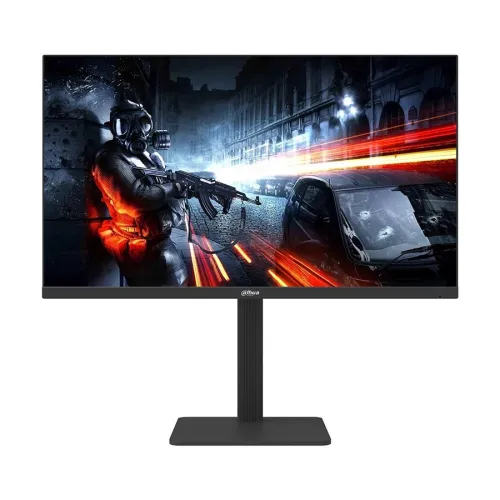
Dahua LM25-E241A 24.5-inch 320Hz FHD IPS Gaming Monitor — Complete Buyer Guide
Exact model and part number
The Dahua LM25-E241A is a 24.5-inch-class esports monitor. Dahua’s manufacturer datasheet identifies the full model and ordering code as DHI-LM25-E241A; LM25-E241A is the shorter model name used in local listings. The current catalog record had the generic brand “Others” and repeated screen-size/refresh text in the model and manufacturer part number. Those fields are normalized to Dahua and DHI-LM25-E241A while the catalog product name, slug, category, active status, variant identity, SKU, ৳21,000 price and three image assets stay the same. The similarly named LM25-E231, LM25-E231B, LM25-B221B, LM25-A221 and 27-inch LM27 models have different refresh rates, ports or stands. Confirm the complete model code on the box or invoice so another Dahua monitor’s specifications are not mistakenly applied to this unit.
Full HD panel, pixel density and surface
The display uses a flat IPS LCD panel with ELED backlighting, a 16:9 aspect ratio and native Full HD resolution of 1920 × 1080. The manufacturer lists a 24.5-inch diagonal active area of 543.744 × 302.616 mm and approximately 89.91 pixels per inch. Pixel pitch is 0.2832 × 0.2802 mm. FHD is a practical resolution for high frame rates because it asks a gaming PC to render fewer pixels than QHD or 4K. It also means this screen provides less desktop detail than those higher-resolution formats, especially for fine text or expansive editing timelines. The anti-glare surface is specified as 25% haze with 3H hardness; these are surface properties, not a guarantee against scratches or impacts. Dahua lists 178-degree horizontal and vertical viewing angles.
Native refresh, overclock and input limits
Dahua rates the monitor at 300Hz native refresh and supports overclocking to 320Hz. The input matters: either of the two DisplayPort 1.4 inputs can carry 1920 × 1080 at up to 320Hz, while either HDMI 2.1 input is listed for up to 1920 × 1080 at 240Hz. Therefore, a 320Hz mode requires a DisplayPort connection and a computer, graphics card, cable and operating-system display mode capable of supplying it. The HDMI label alone does not mean this product accepts 320Hz over HDMI. The operating system may initially select a lower refresh rate; users should check advanced display settings and select the highest stable supported mode. Overclocking is optional and the advertised top mode may depend on the connected hardware and setup.
Response time, adaptive sync and honest motion claims
The specified response metric is 1ms MPRT. MPRT describes moving-picture response and is not the same measurement as gray-to-gray pixel transition time. Do not rewrite it as 1ms GtG. Dahua advertises Adaptive Sync to reduce tearing and stutter when the graphics frame rate varies. The exact variable-refresh compatibility and range can depend on the graphics hardware, driver, connection and settings; confirm these on the intended PC rather than assuming every sync feature is certified by NVIDIA or AMD. The monitor also has on-screen display controls, operated using a joystick, and an overdrive setting. Fast refresh and response specifications can help competitive play, but they do not ensure a player will win or remove all motion artifacts in every scene.
Brightness, contrast, color and viewing angles
Dahua specifies maximum brightness of 300 cd/m², typical static contrast of 1000:1, 16.7 million colors and 85% NTSC typical color gamut. The wide-gamut claim is useful for general gaming and entertainment, but it is not a color-calibration report or a professional print-proofing certification. Brightness is a maximum specification; the actual comfortable setting depends on room light and personal preference. The monitor is not described in the manufacturer datasheet as an HDR display, so HDR support should not be advertised as a verified feature. The combination of IPS viewing angles and FHD resolution suits a desk where the screen may be viewed slightly off-axis, while the conventional 1000:1 contrast is typical of an IPS monitor and will not produce the deep blacks of an OLED display.
Ports, audio and what is not built in
For video, the monitor has two DisplayPort 1.4 inputs and two HDMI 2.1 inputs. Dahua’s timing table sets the DisplayPort ceiling at FHD 320Hz and HDMI at FHD 240Hz. A 3.5mm-style audio output is listed for connecting headphones or powered speakers; it is an output and should not be mistaken for a microphone input. Star Tech reports that there are no built-in speakers, and the manufacturer port list identifies audio out rather than speaker hardware. If sound is required, connect an audio device to the monitor output or directly to the PC. The datasheet lists no USB hub, USB-C video, webcam, microphone, Ethernet or built-in speakers. Use a suitable DisplayPort cable for the maximum refresh mode and check that the PC has a compatible output.
Stand, VESA mounting and desk fit
The supplied stand has useful adjustments for a gaming desk: 110mm height travel, tilt from −5° to +15°, swivel ±30° and pivot ±90°. Pivot allows portrait positioning, for example when reading long documents, although competitive gaming is normally done in landscape orientation. The rear mount uses a 100 × 100mm VESA pattern, so a compatible arm or wall bracket can be considered if it is rated for the monitor and installed securely. The datasheet’s listed product dimensions are 557.7 × 327.3 × 67.9mm without the wall-mount bracket; this is not the complete assembled footprint with the stand. Allow room for the stand, cables, ventilation and desk movement, and check the seller’s exact box dimensions before planning a tight installation.
Power, size, weight and box contents
The monitor uses an external 12V DC, 4A power adapter. Dahua lists consumption at 18W basic, 29W typical and 32W maximum, with standby below 0.5W. It specifies a 30,000-hour lifespan, which is a rated specification rather than a promise that every unit will run for exactly that duration. Net weight is 4.65kg and gross packaged weight is 6.20kg. The listed package size is 644 × 471 × 170mm. Dahua’s accessory list includes the power adapter, base, HDMI cable, QR-code user manual, legal/regulatory information and related material; a DisplayPort cable is not listed in that official box list. Retailer bundles may differ, so ask the seller which cable and accessories are included in the actual Bangladesh stock.
Who this monitor suits
This model is aimed at players who prioritize a very high refresh rate at 1080p, especially users with a PC that can generate high frame rates in esports titles. The 24.5-inch size, fast IPS panel, ergonomic stand and two of each major video input make it adaptable to a desk shared by multiple computers or consoles. A console’s achievable refresh rate depends on its own output modes; do not assume it can use the monitor’s 300Hz or 320Hz PC mode. For everyday browsing, study and office work, its IPS panel and adjustable stand remain useful, but buyers who need more workspace detail may prefer a higher-resolution model. The most important setup choice for a PC gamer seeking the top refresh is a DisplayPort connection and a compatible graphics output.
Trade-offs to consider
There are several trade-offs to weigh. Full HD at this size has about 90 PPI, so QHD monitors can show finer text and more workspace. HDMI is limited to 240Hz even though the input is labeled HDMI 2.1, and 320Hz requires DisplayPort plus supported hardware and settings. The 1ms figure is MPRT, not GtG, and should be compared only with the same measurement method on other products. The datasheet lists 85% NTSC and 1000:1 contrast, and does not substantiate HDR, integrated speakers, USB-C docking or a USB hub. The specified maximum brightness is 300 nits. These limits are not defects; they help match the product to a buyer who values high-speed 1080p gameplay over higher pixel count, HDR or integrated docking features.
Bangladesh price and warranty context
Bangladesh seller pages checked during this review showed an advertised Star Tech offer of ৳19,500, while Ryans and Techland listed around ৳21,500; the Skyland page was out of stock with price not announced when checked. Seller prices and stock change frequently. BiponiBD’s current ৳21,000 variant price is retained rather than automatically overwritten from temporary offers. Star Tech and other retailers advertise a three-year warranty, but this does not establish the warranty provider or conditions for every imported unit. Before paying, confirm the final price, stock, invoice, serial-number coverage, dead-pixel policy and the local warranty service route with the seller.
Before ordering
Before purchase, check that the label reads DHI-LM25-E241A and that the physical monitor and supplied stand match the seller’s description. For the highest advertised refresh, connect over DisplayPort 1.4 and select the supported refresh mode in the operating system; over HDMI, plan for up to 240Hz at FHD. Confirm the PC’s graphics output, cable and game performance can take advantage of a high refresh rate. Decide whether Full HD density, 300-nit maximum brightness and the listed ports fit your room and work. Confirm box contents, the correct power adapter, local warranty terms and current price. This review keeps the original catalog product identity, offer price, status, SKU and media URLs intact while improving the buyer-facing technical explanation.