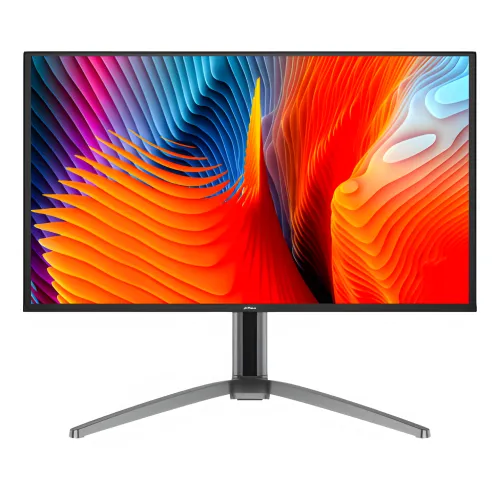
Dahua DHI-LM27-GO34A: 26.5-inch QHD QD-OLED Gaming Monitor
The Dahua DHI-LM27-GO34A, also sold under the short model name LM27-GO34A and listed on Dahua’s regional product page as LM27-GO34A=V1, is a flat 26.5-inch gaming monitor built around a QHD QD-OLED display. Its native resolution is 2560 × 1440, its aspect ratio is 16:9, and its specified refresh rate reaches 240Hz. Dahua also lists a 0.03ms gray-level response time, 1,500,000:1 static contrast ratio, 99% DCI-P3 color gamut, color accuracy below ΔE 2, and HDR 400 support. The unit has one DisplayPort 1.4 input, two HDMI 2.1 inputs, a 3.5mm audio output and two integrated 5W speakers. The included stand adjusts height, tilt, horizontal rotation and portrait rotation. These specifications place the display in the high-refresh QHD segment, where panel contrast, rapid refresh and connection bandwidth matter alongside resolution.
Use the full manufacturer model DHI-LM27-GO34A when checking compatibility, warranty terms or exact specifications. Retail product titles may omit the DHI prefix or use the 27-inch category name even though Dahua states a 26.5-inch diagonal. That naming variation is common in monitor listings and does not identify a separate panel size by itself. The current catalog record previously held a shortened and polluted model string and the generic brand Others. The corrected record identifies the manufacturer as Dahua and uses the manufacturer’s DHI-LM27-GO34A model number. Buyers can compare that exact code with the carton label and invoice if the seller title uses only LM27-GO34A.
QD-OLED panel and image formation
Dahua identifies the display technology as QD-OLED. OLED pixels emit their own light, while quantum-dot color conversion is used to produce saturated colors. Unlike a conventional LCD monitor, which controls light from a separate backlight through a liquid-crystal layer, an OLED panel can reduce light output at individual pixel locations. For dark images this design supports a high specified contrast ratio and deep black appearance. Dahua rates the LM27-GO34A’s static contrast at 1,500,000:1. The number is a manufacturer specification; it should not be confused with a measured result under a particular room, picture mode or review methodology.
The panel’s 26.5-inch diagonal and 2560 × 1440 pixel grid make it a QHD monitor rather than a 4K display. QHD provides more workspace and image detail than 1920 × 1080 Full HD at the same diagonal, while requiring fewer pixels per frame than 3840 × 2160 UHD. The active viewing area is listed as 590.42mm horizontally by 333.72mm vertically. Pixel pitch is 0.2292mm by 0.2292mm and density is 111 pixels per inch. This density is suited to ordinary desktop viewing distances; perceived sharpness still depends on viewing distance, application scaling, source resolution and eyesight. Text and game interfaces rendered at native resolution benefit from the monitor’s full pixel grid.
The aspect ratio is 16:9, the familiar widescreen shape used by many PC games, video services and current consoles. A 16:9 panel fills the screen with native QHD content without requiring a custom ultrawide layout. When a game or video uses another ratio, the source device controls how it is scaled or letterboxed. The monitor’s rated viewing angles are 178 degrees horizontally and vertically. This figure describes the panel’s specified viewing range; color and brightness can still vary with viewing position, room lighting and the content on screen. The display is flat, not curved, and the official specification identifies a 2H surface coating hardness.
Refresh rate, response time and motion
The 240Hz refresh specification means the display can refresh up to 240 times each second when the input signal, graphics device, cable and selected display settings support that mode. At 240Hz, one refresh interval is about 4.17 milliseconds. A high refresh rate can make pointer movement, scrolling and supported games look more fluid than lower-refresh modes, particularly when the computer consistently renders a high frame rate. The monitor cannot create extra game frames by itself: the game, processor, graphics card, operating system, connection and settings all influence the frame rate that reaches the panel.
Dahua rates the gray-level response time at 0.03ms. This is the manufacturer’s stated panel response specification. It describes pixel transition behavior and is not a guarantee of total system input latency, which also depends on the source device, game engine, frame queue and signal path. Response-time figures from different panel technologies or brands may be measured using different methods, so a direct comparison is strongest when the measurement method is known. A fast pixel response can help reduce visible transition trails, while refresh rate determines how often a new frame can be presented. They describe related but distinct parts of motion reproduction.
Dahua lists Adaptive-Sync for the model. Variable refresh synchronization is intended to align the display refresh with compatible source-device frame output over supported connections and modes. Users should enable the matching option in both the monitor’s on-screen settings, where applicable, and the graphics or console settings. Supported range and behavior can depend on firmware, cable, GPU driver, graphics card and game. The official product material names Adaptive-Sync; it does not establish every branded certification or every operating range for all computers. If a particular system reports a compatibility warning, check the display driver and connection mode before attributing the issue to the monitor.
For a competitive title, 240Hz can be useful when a PC can render a high and reasonably stable frame rate at 2560 × 1440. Less demanding games may reach higher frame rates than graphically intensive games, and game settings often affect the result. A powerful GPU is not a guarantee that every game will run at 240 frames per second. Players can choose a lower rendering setting to prioritize frame rate, or a higher setting to prioritize visual detail. The monitor remains compatible with lower refresh modes; selecting 240Hz is optional and depends on the connected source and operating system.
Color, gamut and HDR 400
Dahua specifies 99% DCI-P3 gamut coverage and color accuracy below ΔE 2. DCI-P3 is a wider color space than standard sRGB and is used in cinema-related workflows and many modern games. Gamut coverage describes the range of colors a display can reproduce; it does not alone guarantee a particular calibration state in every picture mode. ΔE is a measure of color difference, with lower values indicating closer agreement to a reference under the conditions used for measurement. Buyers doing color-critical work should verify the intended color profile and calibration workflow rather than relying on any single headline specification.
The official Dahua product page and datasheet list 10-bit display color. Star Tech’s summary specification table separately reports 16.7 million colors, which corresponds to a conflicting 8-bit-style listing. This audit uses the manufacturer’s 10-bit specification as the primary technical value and records the retailer discrepancy in the evidence fields instead of silently merging the two claims. The actual color mode available to a computer can depend on GPU output format, driver, bit-depth setting, refresh mode and cable bandwidth. Users who need a particular signal format should check the display settings after connecting the monitor and consult their GPU documentation.
The monitor supports HDR 400 and is specified for a maximum brightness of 400cd/m². HDR is a signal and presentation format; support does not mean every game or video is mastered for HDR, nor that every scene will reach the maximum rating. Actual brightness can vary with image content and settings. Dahua’s official material uses the term HDR 400. In the reviewed material it does not establish a VESA DisplayHDR True Black 400 certification badge, so this product copy does not add that separate certification claim. For a useful HDR result, the playback device, operating system, application and media must all use compatible HDR output and settings.
OLED image characteristics can be affected by the environment. Bright light reflected from the room can reduce perceived contrast, as it can with other display surfaces. Adjusting the desk direction, closing a curtain or using indirect room lighting may improve viewing comfort. The monitor’s coating is rated 2H; avoid abrasive cloths, rough paper and harsh cleaners on the screen. Switch the display off and allow it to cool before cleaning, then use a clean soft microfiber cloth with light pressure. Follow the official manual for any additional cleaning or care instructions.
Inputs, audio and device connections
The LM27-GO34A provides one DisplayPort 1.4 input and two HDMI 2.1 inputs. Dahua specifies 2560 × 1440 at up to 240Hz for the DisplayPort input and both HDMI inputs. The selected resolution and refresh rate still depend on the source device, cable quality, driver and output configuration. A port’s standard name alone does not guarantee that an older computer will support every mode. Check the graphics card or laptop’s output specifications and use a compatible cable. If 240Hz is missing from system settings, inspect the cable and port selection, choose native 2560 × 1440, review the graphics driver and confirm that the source supports the requested timing.
Multiple video inputs let a user connect more than one source, such as a desktop and a second computer or console, and select the active input through the monitor’s controls. The number of attached devices does not mean the display presents all of them at once; it remains a single-screen monitor with one selected video input at a time. Dahua lists one audio output. The exact routing behavior for a particular source should be checked in the user manual and source-device settings. The official port list does not include USB-C, a USB data hub or an Ethernet connection. Do not buy this model expecting laptop charging, USB peripheral pass-through, a KVM switch or a network port.
Two integrated 5W speakers provide basic sound from a compatible connected source. The total speaker rating is 2 × 5W; it does not specify room coverage, bass response or a substitute for dedicated external speakers. The 3.5mm audio output can be useful for connecting headphones or other audio equipment, subject to the device’s audio routing and volume settings. Competitive players may prefer a dedicated headset for positional cues and isolation. Streamers and content creators should evaluate their microphone, monitoring and audio interface needs separately because the monitor’s built-in speakers are output devices, not a complete recording setup.
The monitor has a rear joystick control for its on-screen display according to the product research record. The OSD is where users select inputs and adjust available image and sound options. Names and menu organization can vary with firmware or regional revision, so refer to the supplied manual if a setting is not immediately visible. Dahua’s specification lists Low Blue Light and flicker-free technology. These features may suit users who prefer reduced blue-light output or a flicker-controlled display mode, but they do not replace regular breaks, comfortable brightness or proper desk ergonomics during long sessions.
Stand adjustment and mounting
The included stand supports 120mm of height adjustment, tilt from -5 degrees to +20 degrees, horizontal rotation from -20 degrees to +20 degrees, and vertical rotation from -90 degrees to +90 degrees. The rotation values in Dahua’s official product specification are ±20 degrees horizontally. Some retailer information presents a wider ±45-degree swivel, which conflicts with the official Dahua value; this product record follows the manufacturer and logs the discrepancy. The vertical rotation range supports portrait orientation where the connected software and graphics settings also support rotating the image. The panel itself remains a 16:9 display in either orientation.
Height adjustment helps position the screen at a comfortable eye level, while tilt can reduce awkward viewing angles or reflections. Horizontal rotation allows a modest turn of the display without moving the full base. Portrait rotation can be useful for some code, document and chat layouts, although not every application adapts cleanly. Stand movement should be made carefully while supporting the screen. Keep the base on a stable surface, leave enough room behind the monitor for cables and movement, and avoid forcing the stand past its mechanical range. The monitor is not specified here as a height-adjustable arm with unrestricted motion; movement is limited to the manufacturer’s stated ranges.
The rear mount pattern is 75 × 75mm VESA. This is the measurement between mounting holes, not the size of the monitor panel. Before purchasing an arm or wall mount, confirm that it supports a 75 × 75mm pattern and is rated for the monitor’s weight. The display weighs 5.5kg net without its package. Dahua lists a wall-mount bracket as optional, so do not assume one is included in the retail box. Use the screws and spacers specified by the monitor or mount maker; screws that are too long or incompatible may damage the chassis. If the screen will be wall-mounted, allow adequate clearance for the input connectors and power cable.
The monitor head dimensions are 610.7mm wide, 351.7mm high and 63.2mm deep without the wall-mount bracket. These dimensions do not include the footprint or full height of the installed stand. Measure the desk, shelf, arm position and path through doors before installation, especially when replacing a smaller display. The package dimensions are 810 × 476 × 184mm and the gross shipping weight is 7.9kg. Use the boxed dimensions when planning delivery storage and the net weight when checking the capacity of a desk arm. Do not treat package size as the assembled monitor footprint.
Power, operating conditions and package information
Dahua’s Bangladesh product page and its linked LM27-GO34A V1 datasheet specify an external power adapter with 24V DC, 5A output. The same documentation lists 66W basic consumption, 66W typical consumption, 120W maximum consumption and less than 0.5W standby consumption. A Star Tech summary table labels the product as built-in power with a 100–240V AC input. Because those power-source descriptions conflict, the manufacturer’s Bangladesh page and linked model datasheet are the basis for this catalog’s technical value, and the discrepancy is explicitly retained in the evidence. Confirm the adapter and cable configuration on the exact regional retail unit with the seller before purchase.
Power consumption changes with the displayed content, brightness and operating state. The listed 120W maximum is not the same as typical continuous draw, and the less-than-0.5W standby rating applies to the specified standby condition. The external adapter should be connected using the correct rated cable and supplied power equipment. Do not substitute an adapter based only on matching plug size; voltage, polarity and current capacity must match the product requirements. If an adapter is missing or the label does not match the product information, ask the seller or authorized service channel before powering the display.
The datasheet lists operation from 0°C to +40°C and operating humidity from 10% to 85% relative humidity. Storage specifications include -20°C to +60°C and storage humidity from 5% to 90% relative humidity. These are manufacturer operating and storage limits, not an instruction to expose the display to condensation, direct water or sudden temperature changes. Keep ventilation openings unobstructed and place the monitor away from heat sources or liquid spills. Dahua lists CE EMC, CE LVD and CE ERP certifications for this model. Certification marks and documentation can vary by shipment; check the actual unit and documentation for the destination market.
Dahua’s listed accessories include a base, power cord, DisplayPort cable, user manual accessed through a QR code, quick-start guide and legal/regulatory information. The specification also lists a wall-mount bracket as optional. The exact adapter packaging should be verified because of the conflicting regional power descriptions noted above; do not infer an accessory from a generic product photo. Local retailer descriptions list a three-year warranty for this model. That is a Bangladesh retail listing claim, not a warranty duration stated in the technical datasheet. Ask the seller to write the warranty provider, term, panel coverage and claim conditions on the invoice before ordering.
Important limitations and purchase checks
The model has no USB-C input, USB hub, RJ-45 network port or integrated docking station in the official connection list. A laptop that uses USB-C for video and charging will need a separate compatible video adapter and its own charging method. A computer that only has USB-C output should be checked for DisplayPort Alt Mode and an adapter compatible with the required QHD high-refresh signal. These requirements are important for desk setups that currently rely on a one-cable docking monitor.
Brightness is rated up to 400cd/m², and HDR support is specified as HDR 400. Users who prioritize bright-room performance should compare independent measurements and consider reflections, room lighting and window placement. The display is QHD rather than 4K. Buyers who need 4K pixel detail, a USB-C dock or a larger number of display inputs should compare products designed for those needs. Conversely, if a system is configured around QHD and high refresh, the combination of 2560 × 1440 and 240Hz may align better with its graphics performance than a higher pixel-count display.
The stand’s horizontal rotation is specified at ±20 degrees by Dahua’s Bangladesh product page and datasheet. This is more limited than a listing that states ±45 degrees, so buyers who need a wide swivel range should plan to use a compatible VESA arm or verify the supplied stand. The VESA hole spacing is 75 × 75mm; not every arm includes an appropriate plate. The monitor is 5.5kg without packaging, and mount capacity should include any additional adapter or accessory weight. Confirm that the arm’s supported pattern and load range are appropriate.
Local listing details may change. At the time of this audit, the checked direct retail pages showed model-specific prices around ৳79,500–৳80,000, with individual pages differing in price and availability. That observation is not a future price guarantee and does not change the catalog variant’s existing MSRP. Bangladesh listings describe a three-year warranty, but panel burn-in coverage and service terms can differ. Ask the seller to confirm current stock, delivery, warranty provider, exclusions, serial-number registration, invoice details, return conditions and included accessories before paying.