Screen size, resolution and everyday use
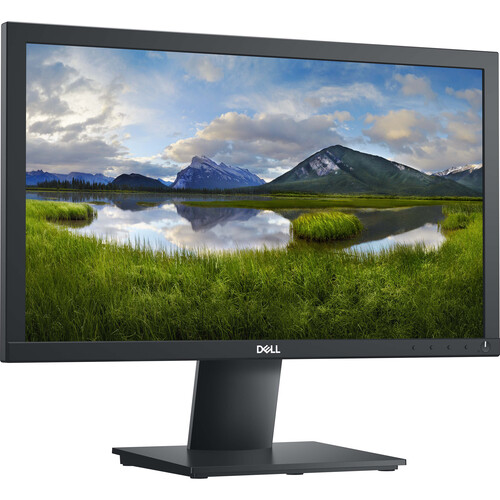
The Dell E2020H is a compact business monitor with a 19.5-inch viewable screen, HD+ resolution and familiar video connections for office and home workstations. Dell also calls it a Dell 20 Monitor because it belongs to the 20-inch product class; the actual diagonal viewable area is 19.5 inches. This distinction helps compare it accurately with screens that advertise their full viewable diagonal. The model is designed for everyday desktop tasks such as documents, spreadsheets, web-based systems, email, point-of-sale software and a second screen beside a laptop. Its published maximum preset is 1600 × 900 at 60Hz, so buyers should treat it as an HD+ productivity display rather than a Full HD or high-refresh gaming monitor. The 16:9 shape is familiar for modern applications and video. At this size, 1600 × 900 provides more workspace than 1366 × 768 while maintaining a modest pixel load for common office computers. Dell lists a 0.27 × 0.27mm pixel pitch and 94 pixels per inch. Text sharpness still depends on viewing distance, operating-system scaling, source quality and the eyesight of the person using it. The 60Hz ceiling is appropriate for routine cursor movement, typing, web pages and standard video playback, but does not provide the smoother motion associated with 120Hz or 144Hz monitors. If your workflow requires fine photographic retouching, detailed design work or a large side-by-side workspace, compare a higher-resolution screen before choosing this model.
Panel, image characteristics and viewing position
The E2020H uses a twisted-nematic (TN) panel with LED backlighting and a matte anti-glare surface. Dell specifies 250 cd/m² typical brightness and a 1000:1 typical static contrast ratio. The quoted contrast is a conventional static specification; it should not be confused with dynamic contrast figures sometimes used in retail copy. Color support is 16.7 million colors. Dell lists a typical gamut of 72% CIE 1931 and 83% CIE 1976. These figures describe different measurement spaces and are not directly interchangeable with a percentage of sRGB. The panel is suitable for ordinary business visuals, but Dell does not position this model as a wide-gamut professional color monitor. The listed viewing angles are 170 degrees horizontal and 160 degrees vertical. As with TN panels generally, contrast and color can shift as the viewer moves away from a centered position. For consistent text and images, place the screen directly in front of the user and adjust its tilt to reduce glare.
Motion response and eye-comfort features
Dell specifies a 5ms typical Gray-to-Gray response time in Normal mode. This is a response measurement and does not change the monitor’s 60Hz refresh limit. The E2020H is therefore best matched to office applications and ordinary media rather than competitive gaming. Dell lists ComfortView and a flicker-free screen. Those product features are useful context for users who spend time reading, but they do not establish a medical benefit or a quantified blue-light reduction for every setting. The monitor also has a physical anti-glare surface, which can reduce reflections from nearby windows and overhead lighting. A comfortable setup still depends on sensible ambient light, screen distance, breaks and the display’s brightness setting. If you require a particular eye-care certification or measurable blue-light specification, check the exact regional documentation for the unit offered.
Inputs and device compatibility
The documented video inputs are one DisplayPort 1.2 connector and one VGA connector. DisplayPort HDCP 1.2 support is specified. The combination lets the monitor connect directly to a desktop or compatible dock with DisplayPort, while VGA remains useful with older computers and equipment. Dell does not list HDMI, USB-C, a USB hub, an audio jack or built-in speakers for this model. A computer with only HDMI or USB-C may need a suitable adapter, and compatibility depends on the computer’s output, adapter direction and the desired resolution. Check your graphics output and cable before ordering. Dell’s datasheet lists a DisplayPort cable in the box and describes VGA cable inclusion as dependent on region (EMEA and Japan in the reviewed specification); the contents of a Bangladesh retail box should be confirmed with the seller.
Stand, placement and mounting
The supplied stand supports tilt from −5 degrees to +21 degrees. Dell describes tilt as the available stand adjustment; the specification does not list height adjustment, swivel or portrait pivot. The rear mounting interface uses the 100 × 100mm VESA pattern, allowing compatible third-party arms or wall mounts. Confirm the mount’s supported screen size, load rating and screw fit before installation, and use the monitor’s manual for safe mounting guidance. A security-lock slot is also listed; the cable lock is sold separately. The compact screen and stand footprint can help where desk space is limited. Dell’s datasheet lists dimensions with the stand of approximately 471.52mm wide, 171mm deep and 368.96mm high. Those measurements describe the monitor and stand, not the carton, and a mounted screen may require additional clearance for cables and arm movement.
Power, efficiency and operating details
The monitor uses an external AC mains connection at the display, with a specified input range of 100–240V AC, 50 or 60Hz (±3Hz) and 0.7A typical. Dell lists power consumption of 11W typical and 14W maximum during operation, and less than 0.3W in standby or sleep. A separate ENERGY STAR measurement is stated as 10.7W in Dell’s datasheet; it is a labeled test value and should not be substituted for the typical-use figure. Actual consumption varies with image content, brightness, connected signal and power state. Use the supplied, correctly rated power cable and follow the manual’s safety instructions. The broad input range is appropriate for common mains supplies, but buyers should still use a properly grounded outlet and avoid damaged cables or unsuitable adapters.
Model identity and warranty considerations
The exact model in this review is Dell E2020H. The existing catalog name and model fields contain “20 E2020H 19.5-inch,” which combines the product class, model code and screen size. The cleaned product model is E2020H; the catalog’s existing slug is retained to avoid breaking a live product URL. Dell’s datasheet lists a 3-year Limited Hardware Warranty and Advanced Exchange service in the market covered by that document. Warranty service is regional, and that publication alone does not prove that a particular imported or locally sold unit is eligible for Dell service in Bangladesh. Local stores also advertise three-year coverage, but seller warranty may have different terms. Ask who provides the service, which components are covered, how dead pixels are handled and what documents are required; retain the serial number and purchase invoice. No offer, stock status or customer rating is inferred by this description.
Who may find this monitor useful
Consider the E2020H if you need a straightforward secondary display, a compact business screen, or a monitor for routine office applications and your computer has DisplayPort or VGA. The native 1600 × 900 resolution and 60Hz refresh rate suit basic productivity and general desktop use. The anti-glare coating, tilt adjustment, VESA compatibility and low specified power draw add practical flexibility. It may be less suitable when you need Full HD or higher resolution, wide viewing angles, accurate color work, integrated audio, HDMI without an adapter, USB-C docking, height adjustment or high-refresh gaming. Compare those needs against your existing computer and desk before purchase. The right choice depends on how far you sit from the display, how many windows you use and whether you need a digital connection that matches the ports already available.
What to check before ordering
Confirm that the listing and box label identify model E2020H and inspect the serial number on arrival. Check that your computer has a compatible DisplayPort or VGA output, or arrange a suitable adapter before setup. Ask the seller which cable is included, since Dell notes regional variations in box contents. Confirm the exact Bangladesh warranty provider and duration in writing, and keep the invoice. If you plan to use an arm, verify the 100 × 100mm mounting pattern and the mount’s load capacity. The public product specification does not mean each unit has the same regional accessory pack or service entitlement. For support, use Dell’s E2020H support page and the documentation associated with the serial number. These checks reduce avoidable connection and warranty surprises without assuming details that are not verified for the individual retail unit.
Technical specifications
Key features
- 19.5-inch viewable TN display in Dell’s 20-inch monitor class, with a 16:9 aspect ratio.
- HD+ native resolution of 1600 × 900 at up to 60Hz, with 94 PPI and 0.27mm pixel pitch.
- 250 cd/m² typical brightness and 1000:1 typical static contrast ratio.
- 5ms typical Gray-to-Gray response in Normal mode and 16.7 million color support.
- Color gamut listed as 72% CIE 1931 and 83% CIE 1976 (typical).
- Dell ComfortView and a flicker-free screen for everyday viewing comfort.
- One DisplayPort 1.2 input and one VGA input; DisplayPort supports HDCP 1.2.
- Tilt-only stand from −5° to +21°, 100 × 100mm VESA interface and security-lock slot.
- Typical operating consumption 11W, maximum 14W, and less than 0.3W in standby/sleep.
- External AC input supports 100–240V, 50/60Hz; Dell datasheet lists 3-year service in its stated market.
Advantages
- Compact viewable screen size and HD+ resolution suit basic office documents, web applications, point-of-sale desks and secondary-display tasks.
- DisplayPort and VGA accommodate both newer desktop outputs and legacy computers.
- Anti-glare coating, ComfortView and flicker-free operation are useful for routine work sessions.
- Tilt, VESA mounting and a security slot offer practical placement options.
- Low stated operating power and broad AC input range fit typical office deployments.
Things to consider
- Native resolution is 1600 × 900 at 60Hz; it is not Full HD (1920 × 1080) or a high-refresh display.
- TN panel viewing angles and color consistency can change when viewed off-axis compared with many IPS displays.
- The stand provides tilt only; height adjustment, swivel and pivot are not listed.
- No built-in speakers, HDMI, USB hub or USB-C port is listed; plan adapters or audio through the computer if needed.
- Bangladesh warranty coverage and included cable configuration should be confirmed for the exact unit and seller.
Frequently asked questions
What is the Dell E2020H screen size?
Dell lists a 19.5-inch diagonal viewable screen. “20-inch” is the monitor product class used in the model’s marketing name.
What is its native resolution and refresh rate?
The maximum preset native resolution is 1600 × 900 at 60Hz, commonly called HD+. It is not a 1920 × 1080 Full HD panel.
What panel technology does it use?
It uses a TN (Twisted Nematic) TFT LCD panel with LED backlighting and an anti-glare surface.
How bright is the display?
Dell specifies 250 cd/m² typical brightness. Actual appearance depends on room lighting, settings and the individual panel.
What are the response time and contrast ratio?
Dell lists 5ms typical Gray-to-Gray in Normal mode and 1000:1 typical static contrast. These are separate measurements.
Which video ports are available?
The monitor has one DisplayPort 1.2 input and one VGA input. Dell lists HDCP 1.2 support on DisplayPort. It does not list HDMI.
Does it have built-in speakers?
No built-in speakers are listed. Connect speakers or headphones to the computer or other source device.
Can I mount it on a monitor arm?
Dell lists a 100 × 100mm VESA interface. Check that the arm supports this pattern and the monitor’s weight.
Can the stand adjust its height?
Dell specifies tilt only, from −5° to +21°. Height adjustment, swivel and pivot are not listed for the supplied stand.
Does it support low-blue-light and flicker reduction features?
Dell lists ComfortView and a flicker-free screen. No quantified blue-light reduction value is stated in the product specification.
How much power does it use?
The datasheet lists 11W typical and 14W maximum operational consumption, with less than 0.3W in standby/sleep. ENERGY STAR figures are labeled separately.
What warranty applies in Bangladesh?
Dell’s datasheet describes a 3-year Limited Hardware Warranty with Advanced Exchange for its stated service market. Bangladesh service eligibility can vary; confirm the exact serial number, seller coverage and invoice terms before purchase.
Specifications are based on Dell documentation for E2020H. Confirm regional box contents and Bangladesh warranty terms with the seller.