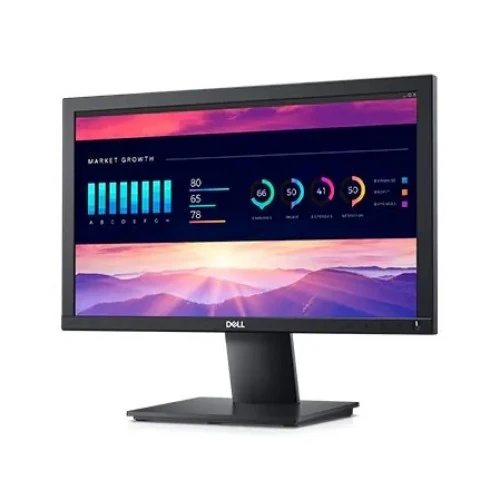
Dell E1920H: a compact screen for everyday work
The Dell E1920H is an 18.5-inch LED-backlit LCD monitor built for routine desktop work, basic office use, classroom tasks and home computing. Its native 1366 × 768 resolution and 16:9 shape give a familiar workspace for documents, web pages and standard-definition video. This is an HD screen rather than Full HD; buyers who need 1920 × 1080 detail or more room for several windows should compare a higher-resolution model.
TN panel, brightness and image characteristics
Dell specifies a TN panel, 200 cd/m² typical brightness and a 600:1 typical contrast ratio. The screen supports 16.7 million colors, with typical color gamut coverage of 72% CIE 1931 and 83% CIE 1976. These figures describe a basic business display and do not represent wide-gamut or calibrated color performance. The anti-glare coating helps reduce reflections from nearby light sources, but it cannot remove glare in a bright room.
Dell lists viewing angles of 65°/90° in the technical sheet; retailer specifications do not always make the horizontal/vertical order clear. TN panels can show changes in color and contrast when viewed from above, below or off-centre, so position the display in front of the main user. Dell’s specification quotes 5ms typical gray-to-gray response in Normal mode; it is an office-class 60Hz panel rather than a high-refresh gaming monitor.
1366 × 768 at 60Hz
The maximum preset mode is 1366 × 768 at 60Hz. It can handle email, spreadsheets, point-of-sale tools and everyday browsing, but the lower resolution shows less detail and less desktop area than Full HD. Check application requirements before replacing a higher-resolution monitor, particularly if you use dense spreadsheets, design tools or multiple side-by-side windows.
The 60Hz refresh rate is suitable for ordinary desktop movement and video sources that match the display’s supported timings. This model does not advertise FreeSync, HDR or high-refresh modes. If you need those capabilities, verify them on another model’s manufacturer datasheet rather than assuming they are included here.
DisplayPort and VGA connectivity
The E1920H provides one DisplayPort 1.2 input and one VGA input; it has no HDMI or USB-C input listed. DisplayPort supports digital video and HDCP 1.2. VGA is an analogue connection for compatible older computers and may require picture adjustment for a sharp image. Check the output available on your computer before buying; a suitable active adapter may be required when the source has HDMI but the display has no HDMI input.
Dell’s box list includes a power cable and a DisplayPort-to-DisplayPort cable. Dell notes that a VGA cable is included only in EMEA and Japan; do not assume a VGA cable comes with a Bangladesh shipment. The monitor itself has no built-in speakers; Dell lists the AC511M soundbar as an optional accessory. Connect separate audio equipment if you need sound.
Stand adjustment, VESA mounting and dimensions
The supplied stand supports tilt only, from approximately -5° to +21°. It does not provide height adjustment, swivel or pivot. Dell lists a 100mm VESA mounting interface, so a compatible arm or wall bracket can provide more positioning flexibility; confirm the exact mounting hardware and screw cover before installation.
With the stand, the monitor measures approximately 445.4mm wide, 171.0mm deep and 359.6mm high. Dell lists a 2.19kg monitor weight, 2.93kg for monitor and cables with stand, and 3.92kg packaged weight. Leave space behind the display for the power and video cables, place it on a stable surface and use the stand or mount designed for its weight.
Eye comfort and power use
Dell includes ComfortView and a flicker-free screen; ComfortView reduces blue-light emissions when activated through the on-screen menu. The display can help users choose a comfortable picture setting, though individual comfort varies. Adjust brightness to suit room lighting, place the screen at a comfortable height and take regular breaks during long work sessions.
Dell specifies AC input from 100V to 240V at 50/60Hz. Typical power consumption is 10W, maximum is 14W, and standby/sleep use is below 0.3W. The monitor supports Dell Display Manager and PowerNap features through the applicable Dell software. Software availability and compatibility may vary by operating system and deployment environment.
Who is the E1920H for?
The E1920H may suit an office workstation, reception desk, school lab or home PC where a compact display, low power draw and simple DisplayPort/VGA connections are sufficient. Its anti-glare screen, tilt stand, cable-management channel and VESA compatibility make it adaptable to basic desk setups. It is not designed for high-resolution creative work or modern high-refresh gaming.
Before purchase, compare the 18.5-inch HD resolution with the size and clarity you need. Consider a Full HD monitor for more desktop space, HDMI or USB-C if those are the only outputs on your devices, integrated speakers if you want all-in-one audio, or an adjustable stand if height and swivel matter.
Warranty and Bangladesh purchase checklist
Dell’s technical sheet describes a three-year Limited Hardware Warranty with Advanced Exchange Service. Bangladesh retailers also list a three-year warranty, but the authorized seller, invoice, serial number eligibility and local claim channel determine actual coverage. Confirm the local service terms in writing before checkout.
Verify that the label says E1920H, the display is 18.5-inch and 1366 × 768 at 60Hz, and the shipment includes the monitor stand, power cable and DisplayPort cable. Confirm whether a VGA cable is included, the monitor’s physical condition, VESA fit, return policy and warranty provider. BiponiBD’s approximate price range is a market reference only, not a current store offer or stock promise.