Dell Pro 24 E2425HM: পরিচিতি ও সঠিক মডেল
Dell Pro 24 Monitor E2425HM হলো একটি অফিস ও দৈনন্দিন কম্পিউটিংয়ের জন্য তৈরি 23.8-inch viewable IPS মনিটর। Dell-এর অফিসিয়াল datasheet মডেল কোড E2425HM এবং viewable diagonal 604.7 mm বা 23.8 inch বলে। বাংলাদেশের দোকানগুলো সহজে খোঁজার জন্য একে প্রায়ই “24-inch” নামে তালিকাভুক্ত করে; এখানে শিরোনামে সেই প্রচলিত শ্রেণি রাখা হয়েছে, আর প্রকৃত viewable size স্পেসিফিকেশনে 23.8 inch হিসেবে দেয়া হয়েছে। E2425HM-কে E2425HSM-এর সঙ্গে গুলিয়ে ফেলা যাবে না: HSM সংস্করণে উন্নত stand ও built-in speakers থাকতে পারে, কিন্তু HM হলো tilt-only stand-এর আলাদা মডেল।
এই পণ্যের নির্ভরযোগ্য পরিচয় হলো Dell Pro 24 Monitor এবং model E2425HM। Dell-এর আঞ্চলিক order/part code দেশ ও বিক্রয় অঞ্চলে আলাদা হতে পারে; তাই যাচাই ছাড়া কোনো একক 210-BQ… কোডকে সার্বজনীন manufacturer part number হিসেবে দেখানো হয়নি। এই BiponiBD রেকর্ডের মডেল ও variant পরিচয় E2425HM করা হয়েছে। Dell support page-এ user guide, quick-start guide এবং service documentation পাওয়া যায়; কেনার সময় বাক্সের লেবেল এবং invoice-এ একই model code আছে কি না মিলিয়ে নিন।
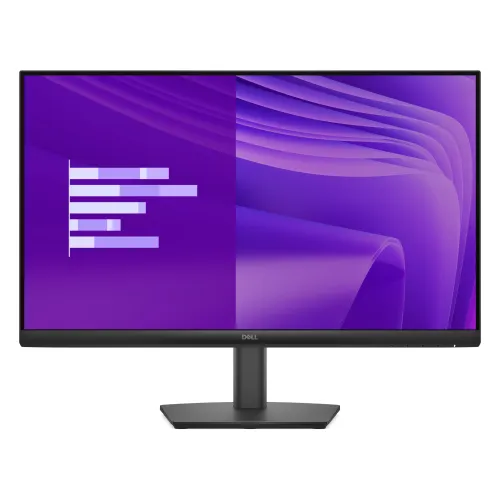
পণ্যের ছবিগুলো এই listing-এ আগে থেকেই সংযুক্ত ছিল; সেগুলোই রাখা হয়েছে এবং alt text-এ Dell E2425HM মডেল ও দৃশ্যমান পণ্যের ধরন উল্লেখ করা হয়েছে। primary image-কে social preview এবং variant image-এর সঙ্গেও মিলিয়ে দেয়া হয়েছে, যাতে product card, detail page ও share preview একই পণ্য দেখায়। ছবির রঙ, stand-এর আকার বা rear port layout কেনার আগে বাস্তব বাক্সের সঙ্গে মিলিয়ে নিন—ছবি সহায়ক, regional box contents-এর নিশ্চয়তা নয়।
স্ক্রিন, রেজোলিউশন ও ছবির গুণমান
23.8-inch IPS panel-এ Full HD 1920 × 1080 resolution রয়েছে। 16:9 aspect ratio ওয়াইডস্ক্রিন ভিডিও, অফিস অ্যাপ, ওয়েবসাইট এবং সাধারণ ডেস্কটপ ব্যবহারের সঙ্গে মানানসই। Dell-এর datasheet অনুযায়ী typical brightness 250 cd/m², typical contrast 1000:1 এবং horizontal ও vertical viewing angle উভয়ই 178°। LED edgelight backlight, anti-glare 3H hard coating, 0.2745 mm pixel pitch এবং 93 PPI-ও অফিসিয়াল নথিতে উল্লেখ আছে।
রংয়ের ক্ষেত্রে Dell NTSC CIE 1931 color gamut minimum 72% এবং 16.7 million colors উল্লেখ করে। এই পরিসর সাধারণ অফিস, ওয়েব ব্রাউজিং, অনলাইন ক্লাস, ভিডিও দেখা এবং নথি সম্পাদনার জন্য উপযোগী। এটি wide-gamut professional color monitor বলে দাবি করা হচ্ছে না; রঙ-নির্ভুল প্রিন্ট, HDR mastering বা বিস্তৃত Adobe RGB কাজের জন্য প্রয়োজনীয় রঙের পরিসর ও factory calibration আলাদাভাবে যাচাই করা উচিত। 250-nit typical brightness সাধারণ indoor setup-এ ব্যবহারের কথা মাথায় রেখে বিবেচনা করুন; সরাসরি উজ্জ্বল জানালার সামনে বা HDR কাজের জন্য এটি উচ্চ brightness-এর মডেল নয়।
100Hz refresh rate ও সংযোগের সীমা
DisplayPort 1.2 এবং HDMI input দিয়ে সর্বোচ্চ Full HD 100Hz চালানো যায় বলে Dell উল্লেখ করে। VGA input-এ সর্বোচ্চ 1920 × 1080 at 60Hz। এই পার্থক্যটি গুরুত্বপূর্ণ: 100Hz পেতে DP বা HDMI ব্যবহার করুন, VGA নয়। কম্পিউটারের graphics output, cable এবং operating-system display setting-ও কাঙ্ক্ষিত refresh rate সমর্থন করতে হবে। নতুন মনিটর সংযোগের পর Windows Advanced display বা graphics control panel-এ 100Hz নির্বাচন করা হয়েছে কি না দেখুন।
HDMI এবং DisplayPort—দুটিই HDCP 1.4 সমর্থন করে। মনিটরে একটি করে HDMI, DisplayPort এবং VGA video input আছে। একাধিক কম্পিউটার যুক্ত থাকলে input source হাতে বদলাতে হতে পারে; এখানে USB-C video, USB hub, headphone output বা built-in speaker নেই। অফিসে পুরোনো VGA desktop এবং নতুন DP/HDMI computer—দুই ধরনের উৎসের সঙ্গে সংযোগের সুবিধা হলো তিন ধরনের input থাকা, তবে একসঙ্গে একাধিক উৎসের seamless KVM switching বা USB docking-এর বিকল্প এটি নয়।
100Hz refresh সাধারণ 60Hz স্ক্রিনের তুলনায় cursor movement, scrolling এবং supported content-এ বেশি ঘন ঘন frame দেখাতে পারে। ফলাফল নির্ভর করবে computer কত frame তৈরি করতে পারে এবং কোন input ও cable ব্যবহার হচ্ছে তার উপর। Dell-এর এই model datasheet-এ 5ms gray-to-gray Fast mode ও 8ms Normal mode দেয়া আছে। এগুলো manufacturer response-time mode; “1ms gaming response” দাবি এই মডেলের জন্য প্রযোজ্য নয়।
HDMI 1.4 label দেখে 100Hz অসম্ভব ভাবার দরকার নেই: Dell এই নির্দিষ্ট monitor-এর জন্য HDMI-তে 1920 × 1080 at 100Hz timing সমর্থন করে। তবে পুরোনো laptop, adapter বা dock-এর সীমাবদ্ধতা থাকতে পারে। USB-C to HDMI/DP converter ব্যবহার করলে adapter নিজেও Full HD 100Hz support করে কি না তার specification দেখুন। VGA path-এ analog signal-এর কারণে Dell-এর তালিকাভুক্ত ceiling 60Hz; একই computer থেকে refresh limit input অনুযায়ী আলাদা হতে পারে।
Eye comfort, stand ও mounting
Dell এই panel-কে TÜV EyeComfort 3-star certified বলে এবং flicker-free ও hardware-based ComfortView Plus low-blue-light বৈশিষ্ট্য বর্ণনা করে। এগুলো দীর্ঘক্ষণ স্ক্রিন ব্যবহারে চোখের আরামের জন্য তৈরি বৈশিষ্ট্য; প্রত্যেক ব্যবহারকারীর ক্লান্তি বা ঘুমের সমস্যার নিশ্চয়তাপূর্ণ চিকিৎসা নয়। ঘরের আলো, brightness, দূরত্ব, বিরতি এবং ব্যক্তিগত সংবেদনশীলতাও আরামে প্রভাব ফেলে।
E2425HM-এর supplied stand-এ tilt adjustment −5° থেকে +21°। এটি height-adjustable, swivel বা pivot stand নয়; একই পরিবারের E2425HSM-এ থাকা ergonomic adjustment এখানে ধরে নেয়া যাবে না। প্রয়োজন হলে stand খুলে 100 × 100 mm VESA-compatible arm বা wall mount ব্যবহার করা যায়। Mount-এর ওজন ধারণক্ষমতা, screw length, দেয়ালের ধরন ও installation instructions যাচাই করুন। Dell datasheet-এ cable lock/security slot-ও তালিকাভুক্ত আছে; compatible cable lock আলাদা কিনতে হয়।
Dell-এর পরিমাপ অনুসারে stand-সহ উচ্চতা 412.35 mm, প্রস্থ 538.64 mm ও গভীরতা 171.00 mm। stand ছাড়া display body 324.21 × 538.64 × 47.70 mm। assembled stand নিজে 174.02 × 222.03 × 171.00 mm। stand ও cables-সহ ওজন 3.60 kg; stand/cables ছাড়া display 2.81 kg, আর packaging-সহ ওজন 5.18 kg। ডেস্কের জায়গা বা arm নির্বাচন করার সময় panel-only এবং stand-সহ মাপ আলাদা করে বিবেচনা করুন।
সরবরাহকৃত stand ব্যবহারে panel-এর tilt angle ঠিক করে চোখের সমতলে আনার চেষ্টা করা যায়, তবে স্ক্রিনের উচ্চতা বদলাতে বই বা improvised support ব্যবহার না করে সঠিক মাপের adjustable arm বিবেচনা করুন। VESA arm লাগালে মনিটরের পিছনে পর্যাপ্ত ventilation space রাখুন এবং অতিরিক্ত লম্বা screw যেন casing-এর ভেতরের অংশে চাপ না দেয় তা নিশ্চিত করুন। এই নির্দেশনা সাধারণ installation সতর্কতা; mount kit-এর manual-ই চূড়ান্তভাবে অনুসরণযোগ্য।
Power, compatibility ও বাক্সের সামগ্রী
মনিটরে internal power supply আছে; আলাদা external power brick লাগে না। Dell datasheet অনুযায়ী input 100–240 VAC, 50/60Hz। power consumption on mode-এ 14.30W, সর্বোচ্চ 28.50W এবং standby/off mode-এ 0.30W করে; ENERGY STAR 8.0, EPEAT Gold with Climate+, TCO Certified/Edge এবং RoHS-সহ compliance-ও তালিকাভুক্ত। এসব certification exact configuration/market অনুসারে যাচাইযোগ্য হলেও নির্দিষ্ট retail unit-এর label ও regional documentation মিলিয়ে দেখা উচিত।
Dell Display and Peripheral Manager for Windows software compatibility এবং remote asset management support উল্লেখ করা হয়েছে। এর মানে এই নয় যে monitor-এ network port বা built-in computer আছে; এটি computer-এর সঙ্গে যুক্ত display-management software। Dell-এর datasheet-এ monitor, stand, power cable, 1.8m DisplayPort cable, quick-start guide ও safety information আছে। HDMI cable কেবল কিছু regional bundle-এ অন্তর্ভুক্ত বলে উল্লেখ আছে, তাই বাংলাদেশের দোকানের বাক্সে HDMI cable থাকবে ধরে নেবেন না—seller-কে নিশ্চিত করুন।
কোনো built-in speaker বা audio output এই E2425HM datasheet-এ তালিকাভুক্ত নেই। শব্দের জন্য computer-এর headphone jack, USB sound device, Bluetooth device বা আলাদা speaker ব্যবহার করতে হবে। একই রকম নামের E2425HSM সংস্করণে integrated speaker এবং adjustable stand-এর তথ্য থাকতে পারে; E2425HM পণ্য পাতায় সেগুলো প্রয়োগ করা হয়নি।
বাংলাদেশের দাম, warranty ও কেনার আগে যাচাই
এই audit-এ Star Tech-এর পৃষ্ঠায় ৳18,500 এবং TechLand-এর পৃষ্ঠায় ৳18,500 sale/৳20,600 regular price দেখা গেছে। Ryans-এ ৳18,500 special/৳19,640 regular দেখানো হয়েছে। এগুলো বিক্রেতার তালিকাভুক্ত বাজারদর এবং সময়ের সঙ্গে বদলাতে পারে; এগুলো BiponiBD-এর নিজস্ব offer, stock বা checkout price নয়। এই product variant-এর মূল্য ৳18,500 রাখা হয়েছে এবং দেখা বাজারদরের পরিসর ৳18,500–৳20,600 হিসেবে নথিভুক্ত। অর্ডারের আগে live price, stock, delivery charge, invoice ও warranty provider যাচাই করুন।
পর্যালোচিত বাংলাদেশের seller listing-গুলোতে 3-year warranty লেখা আছে। Dell-এর global datasheet-এ 3-year limited hardware warranty ও Advanced Exchange Service উল্লেখ থাকলেও অঞ্চলভেদে service entitlement আলাদা হতে পারে। সুতরাং স্থানীয় invoice/warranty card-এ কোন প্রতিষ্ঠান warranty দেবে, dead-pixel policy কী, claim-এর জন্য box/serial number প্রয়োজন কি না এবং coverage কোথায় পাওয়া যাবে তা লিখিতভাবে নিশ্চিত করুন। “3 years” একাই স্থানীয় claim process-এর সব শর্ত জানায় না।
সারসংক্ষেপে, FHD IPS, DP/HDMI-তে 100Hz, VGA-তে 60Hz, eye-comfort features এবং 100 × 100 VESA—এই বৈশিষ্ট্যগুলো E2425HM-কে সাধারণ অফিস বা home workstation-এর জন্য ব্যবহারিক করে। সীমাবদ্ধতাগুলো হলো tilt-only stand, 250-nit typical brightness, 72% NTSC gamut, কোনো integrated speaker/audio jack না থাকা এবং VGA-তে 100Hz না পাওয়া। এই গুণ-সীমা মিলিয়ে নিলে model-specific expectation পরিষ্কার থাকে।