Business monitor for a compact workspace
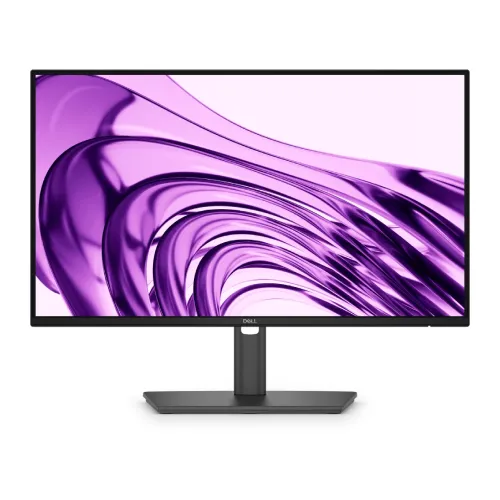
The Dell Pro P 22 P2226H is a 21.5-inch viewable Full HD IPS monitor in the 22-inch class. It targets office desks, study spaces and general computer use where an adjustable stand and several connection options are useful. The native 1920 × 1080 resolution, 16:9 aspect ratio and 100Hz refresh rate support familiar desktop work with smoother movement than a 60Hz screen. Dell’s official product page confirms the P2226H model and a 21.5-inch viewable panel. The catalog images show a dark-gray monitor from the front and angled front, a side profile, rear stand and rear port bay. These are product views rather than imagery of a specific local unit; packaging, stock code and local warranty remain seller-dependent.
Panel size, resolution and viewing
The diagonal viewable area is 21.5 inches, while Dell markets the product in the 22-inch size class. The IPS panel has 1920 × 1080 pixels, 16:9 aspect ratio, 102 pixels per inch and 0.24795mm pixel pitch. Dell lists typical horizontal and vertical viewing angles of 178 degrees. Full HD is suitable for documents, spreadsheets, email, browser tabs and video calls on a compact desk. Users who need more side-by-side workspace or sharper fine text may prefer a larger QHD display. Set the computer to 1920 × 1080 for native detail and use comfortable scaling and viewing distance. The display has an anti-glare surface with 3H hard coating.
100Hz refresh and response modes
Dell specifies up to 100Hz at Full HD through HDMI 1.4 or DisplayPort 1.4. A higher refresh rate can make cursor movement, window dragging and page scrolling look smoother than 60Hz, though it does not increase the frame rate generated by a computer or game. The source graphics port, cable and driver must support the selected mode. Response time is 8ms gray-to-gray in Normal mode or 5ms gray-to-gray in Fast mode. These are separate settings and are not a claim of 1ms MPRT. The P2226H is a professional productivity display rather than a dedicated high-refresh gaming model.
Brightness, contrast and color
Dell lists 300 cd/m² typical brightness and a 1500:1 typical native contrast ratio. The panel specification gives typical 99% sRGB and 99% BT.709 coverage under CIE 1931, with 16.7 million colors and 8-bit color processing using 6-bit plus FRC. These manufacturer figures describe the panel’s nominal capability; individual-unit measurement, factory calibration and color uniformity are not guaranteed by the gamut number alone. The brightness is appropriate for many indoor office settings, while direct sunlight and high-dynamic-range work may call for a brighter display. Star Tech, Four Star IT and TechLand list the same core values for the Bangladesh P2226H.
USB hub and the important USB-C distinction
The monitor combines one USB Type-B upstream port, three USB Type-A downstream ports and one USB-C downstream port rated for data and up to 15W charging. To make the hub available to the computer, connect the included USB-A-to-USB-B upstream cable. The front USB-C connection can transfer data and charge a phone or small accessory, but it is not a video input and does not supply laptop-class power. Connect laptop video through HDMI or DisplayPort. This distinction matters because “USB-C monitor” is sometimes used for displays that accept video and power over USB-C; the P2226H’s USB-C connector serves a different role.
Video connections and HDCP
The rear input panel includes one HDMI 1.4 port with HDCP 1.4 support and one DisplayPort 1.4 port, both specified for Full HD at up to 100Hz. Choose whichever output is available on the computer and confirm the cable supports 1920 × 1080 at the target refresh. The catalog’s product name previously emphasized USB-C without explaining its downstream-only purpose; the updated copy separates video input from hub connectivity. There is no VGA input listed. The USB hub is separate from the video signal path and needs its upstream cable connected to the computer.
Stand adjustments and mounting
The included stand supports height adjustment up to 5.91 inches (150mm), tilt from −5° to +21°, swivel from −45° to +45° and pivot from −90° to +90°. This range supports landscape positioning, portrait use for long documents and adjustment for different desk heights. Dell lists a 100 × 100 mm VESA mount for compatible arms or wall brackets. The catalog images show the stand and rear housing, but not a measured scale or every adjustment position. Dell lists the panel at 488.06mm wide and 285.79mm high without the stand, with approximately 50.03mm depth; with the stand, height ranges from 364.00 to 482.39mm and depth is 181.75mm.
Power, weight and certifications
Dell specifies a 100–240V AC internal power supply at 50/60Hz and 1.5A. Typical operating power is 10.9W, standby and off-mode power are 0.3W, and 60W is the maximum rating. Approximate weight is 4.40kg with stand and cables or 2.58kg without stand and cables. Dell lists ENERGY STAR, EPEAT Gold, EPEAT Climate+, TCO certification, RoHS and TÜV Eye Comfort 4-star credentials. Its feature list also includes flicker-free operation and low-blue-light support. These display comfort features do not replace sensible brightness, room lighting and rest breaks.
Audio and soundbar options
The P2226H does not include integrated speakers. Dell’s product details list no built-in speaker, and the rear casing provides mounting slots for a compatible Dell soundbar. Users can continue using computer speakers or headphones, or buy a separate soundbar after checking compatibility and cost. HDMI and DisplayPort can deliver digital audio to compatible devices, but this monitor has no internal speaker system to play it. The updated description avoids suggesting that USB-C supplies audio or video input.
Package contents and regional variation
Dell lists a monitor with stand, power cable, 1.8m DisplayPort cable, 1.8m USB-A-to-USB-B upstream cable, QR card and safety, environmental and regulatory information. HDMI cable inclusion is marked for selected countries only, so local package contents may differ. Check the Bangladesh carton or retailer’s written listing if HDMI is needed. No external price or stock claim in this description represents BiponiBD’s offer.
Warranty and local purchase checklist
Star Tech, Four Star IT and TechLand Bangladesh list three-year warranty for the P2226H. Dell official pages identify the P2226H but service terms and manufacturer part numbers can vary by region. The Dell US page identifies manufacturer part W7XP7; this does not prove that W7XP7 appears on every Bangladesh unit. Confirm the exact product/stock code printed on the box, who handles warranty claims, whether an invoice and serial number are required, and whether dead-pixel rules differ. Save the invoice and serial information after purchase.
Who may want the P2226H
This monitor may suit an office, student or home setup that values Full HD IPS viewing, a 100Hz refresh rate, a fully adjustable stand and a USB hub. The compact 21.5-inch viewable screen can fit a smaller desk or a multi-monitor arrangement. It may be less suitable for users who want USB-C video docking, laptop power delivery, built-in audio, higher-than-Full-HD resolution, HDR brightness or competitive gaming refresh rates. Before checkout, compare the exact ports and package contents with the device you plan to connect.
Setup checklist
Attach the stand and connect either HDMI 1.4 or DisplayPort 1.4 for video. Select 1920 × 1080 and up to 100Hz in the operating system’s advanced display settings. To use the monitor’s USB hub, connect its USB-B upstream cable to the computer; use the front USB-C port for compatible downstream data and up to 15W charging only. Adjust height, tilt, swivel and pivot to fit the desk, then select landscape or portrait orientation in display settings. Connect external speakers or headphones if audio is needed. Keep the retailer invoice and confirm the local three-year warranty provider and exact regional stock code.
Technical specification summary
Key features
- 21.5-inch viewable Full HD IPS panel (22-inch class) at native 1920 × 1080 and 16:9.
- 100Hz maximum refresh through HDMI 1.4 or DisplayPort 1.4 at Full HD.
- 300 cd/m² typical brightness, 1500:1 typical contrast and 99% sRGB / BT.709 gamut.
- Response modes: 8ms gray-to-gray Normal or 5ms gray-to-gray Fast.
- Height-adjustable stand with 150mm range, tilt −5° to +21°, swivel ±45° and pivot ±90°.
- HDMI, DisplayPort and USB hub with three USB-A downstream ports, one USB-B upstream and one USB-C downstream port.
- Front USB-C is a 5Gbps data/downstream charging port rated up to 15W; it is not a video input or laptop-docking upstream port.
- Anti-glare 3H coating, flicker-free backlight, hardware low-blue-light support and Dell 4-star Eye Comfort certification.
- 100 × 100 mm VESA mounting, Kensington-compatible lock slot and integrated power supply.
- No built-in speakers; soundbar slots are provided. Bangladesh listings state three-year warranty; confirm local coverage.
Advantages
- 100Hz IPS display with Full HD and wide 178° viewing angles suits office and study use.
- 99% sRGB and BT.709 typical coverage supports consistent general-purpose color reproduction.
- Full ergonomic stand adjusts height, tilt, swivel and pivot, supporting portrait orientation.
- USB hub includes front USB-C charging/data plus USB-A ports for peripherals.
- Local Bangladesh sellers list three-year warranty and the monitor ships with key connection cables, subject to regional pack contents.
Points to consider
- 21.5-inch Full HD offers less workspace than larger QHD monitors.
- USB-C is downstream data/15W charging only; it does not accept video or replace a laptop dock.
- No built-in speakers; audio needs headphones, PC speakers or a separately purchased Dell soundbar.
- USB hub requires the USB-B upstream cable to connect the hub to the computer.
- 300-nit brightness and 100Hz are designed for office use, not HDR viewing or high-refresh gaming.
Frequently asked questions
What is the Dell P2226H?
The Dell Pro P 22 P2226H is a 21.5-inch viewable Full HD IPS business monitor (22-inch class) with a 100Hz refresh rate, adjustable stand, HDMI, DisplayPort and an integrated USB hub. It is intended for office productivity, study and general computing.
What resolution and refresh rate does it support?
Dell specifies 1920 × 1080 Full HD at up to 100Hz. Dell lists 100Hz over both HDMI 1.4 and DisplayPort 1.4. The computer, cable, display driver and selected resolution must support the mode.
What is the response time?
Dell lists 8ms gray-to-gray in Normal mode and 5ms gray-to-gray in Fast mode. These are different panel response modes; the product is not specified as a 1ms MPRT gaming display.
How accurate are the colors?
Dell lists 99% sRGB and 99% BT.709 coverage under CIE 1931, typical, plus 16.7 million colors (8-bit using 6-bit plus FRC). This is a business monitor specification, not a guarantee of factory calibration or measured accuracy on an individual unit.
What ports are available?
The P2226H includes one HDMI 1.4 input, one DisplayPort 1.4 input, one USB Type-B upstream port, three USB Type-A downstream ports and one USB-C downstream port. HDMI and DisplayPort support Full HD at up to 100Hz.
Can I connect a laptop through USB-C video?
No. The monitor’s USB-C port is a downstream hub/charging port that supports data and up to 15W charging. It is not a USB-C video input and does not power or dock a laptop. Use HDMI or DisplayPort for the picture and USB-B upstream for the monitor hub.
How does the USB hub work?
Connect the included USB Type-A-to-Type-B upstream cable from the monitor to a computer USB-A port. Then the monitor’s USB-A and USB-C downstream ports can serve compatible peripherals. The USB-C downstream port supplies up to 15W and is intended for small-device charging, not laptop power delivery.
Does it have speakers?
No built-in speakers are listed by Dell or Bangladesh retailers. The chassis has soundbar mounting slots. Use audio output on the connected computer or attach a separately purchased soundbar or speaker.
Can the stand rotate to portrait?
Yes. Dell specifies height adjustment up to 5.91 inches, tilt from −5° to +21°, swivel from −45° to +45° and pivot from −90° to +90°. Rotate the operating system’s display orientation after turning the panel.
Can I mount it on an arm?
Yes. Dell lists a 100 × 100 mm VESA mounting pattern and a Kensington-compatible security slot. Select an arm rated for the monitor’s weight and use the correct screws.
What is included in the box?
Dell lists the monitor and stand, power cable, 1.8m DisplayPort cable, 1.8m USB-A-to-USB-B upstream cable, QR card and safety/regulatory information. HDMI cable inclusion varies by country. Confirm the Bangladesh carton with the seller.
What warranty applies in Bangladesh?
Bangladesh listings from Star Tech, Four Star IT and TechLand state three years. Dell service terms vary by region and stock code, so confirm the local provider, coverage and claim documents with the seller before purchase.
Specification sources: Dell P2226H product information and exact-model Bangladesh listings. USB-C is a downstream data/charging port, not a video input. Bangladesh warranty and regional identifiers must be confirmed against the seller’s unit.