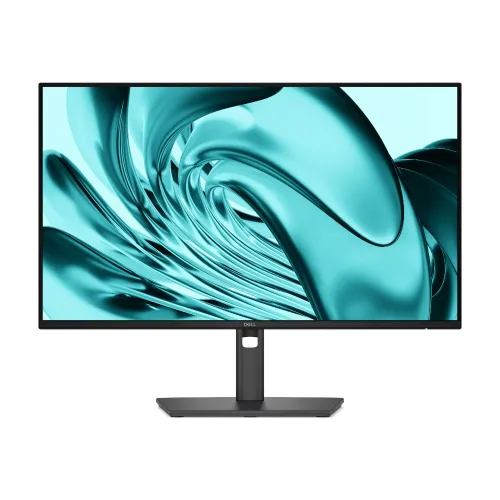
Dell Pro 24 P2426H 23.8-inch FHD 120Hz IPS Monitor — Complete Buyer Guide
Exact product identity and part number
The Dell Pro 24 Monitor P2426H is a business-focused 24-inch-class display with a 23.8-inch viewable screen. Dell identifies the product model as P2426H, manufacturer part number R3H3M and Dell part 210-BVST in the United States; regional order codes can vary, so check the exact carton label and invoice. Retailers in Bangladesh market it as a 24-inch, 120Hz Full HD IPS Type-C monitor. Keep this model distinct from P2425H, the older 100Hz P2425HE USB-C docking monitor and the separate P2426HE model. Those lookalike names can refer to different refresh rates, port layouts and docking features. The catalog name, slug, category, status and variant identity remain unchanged.
24-inch class and 23.8-inch Full HD panel
The screen is a flat 23.8-inch (60.5cm) IPS panel with 16:9 aspect ratio and native Full HD resolution of 1920 × 1080. Dell classifies it as a 24-inch monitor, while the active diagonal is 23.8 inches; both figures describe the same product and the viewable measurement is the more exact panel size. Pixel pitch is 0.2745mm and pixel density is about 93 PPI. The anti-glare surface and three-sided slim bezel suit general office desks and multi-monitor layouts. Full HD keeps application compatibility broad, though text and detailed workspace have fewer pixels than a QHD screen of this size.
120Hz refresh and response options
Dell lists a maximum refresh of 120Hz at 1920 × 1080 through its HDMI 1.4 input and DisplayPort 1.4 input. To use 120Hz, the computer's graphics output, cable and chosen display mode must support it; select the desired refresh in the operating system after connection. Dell gives two response options: 5ms gray-to-gray in Fast mode and 8ms GtG in the standard mode. These figures are tied to their named modes, not a universal response under every pixel transition. The 120Hz mode can make compatible desktop movement and video look smoother than 60Hz; this remains a productivity monitor rather than a gaming model with adaptive sync claims.
Brightness, contrast and color
Dell specifies 300cd/m² brightness, 1,500:1 native contrast, 99% sRGB and 99% BT.709 coverage, with up to 16.7 million colors using 8-bit (6-bit + FRC) processing. Horizontal and vertical viewing angles are 178 degrees. These are useful specifications for documents, web content, presentations and common office graphics. The gamut percentages do not establish a per-unit factory calibration report or a professional proofing guarantee. Dell's certified ENERGY STAR record also identifies the P2426H family as a 23.8-inch IPS display with 300 nits maximum luminance; check the local regional order code for its own label and regulatory information.
ComfortView Plus and eye comfort
Dell ComfortView Plus, low-blue-light and flicker-free functions are designed to make extended viewing more comfortable. The panel uses an anti-glare finish and Dell reports eye-comfort certification for this model. These features are display characteristics rather than medical claims. Adjust brightness to match room lighting and set the screen at a comfortable distance and height. The OSD controls let users manage image settings and input selection. Dell's documentation also lists a security lock slot and cable-management stand design. Use the Dell support page corresponding to P2426H for current user manuals, driver utilities, firmware and regional setup documentation.
Video inputs and what USB-C means here
The video inputs are one HDMI 1.4 port and one DisplayPort 1.4 port; both support Full HD at up to 120Hz in Dell's specification. The two USB-C connectors are downstream peripheral ports, not laptop video inputs: they do not provide DisplayPort Alt Mode and do not charge a laptop at 65W or 90W. Dell specifies up to 15W charging per USB-C downstream port for phones, tablets or accessories. Connect the computer to HDMI or DisplayPort for the picture. The name “Type-C Monitor” in Bangladesh seller listings refers to the presence of downstream USB-C ports and can be misunderstood as USB-C docking. The P2425HE and P2426HE are different models; do not transfer their USB-C host, laptop charging or Ethernet capabilities to the P2426H.
USB hub and accessory charging
For the hub, P2426H has one USB-B upstream connection, two rear USB-A 5Gbps downstream ports and two front USB-C 5Gbps downstream ports. Connect the included USB-A-to-USB-B upstream cable from the PC to the monitor to enable its downstream ports. The front USB-C ports can charge compatible accessories up to 15W, but the monitor does not deliver laptop power. The port count is therefore four downstream peripheral ports total (two Type-A plus two Type-C), plus the upstream link. Dell lists no built-in webcam and no integrated speakers. For audio, connect speakers or a headset to the computer or another audio device rather than expecting the display to produce sound.
Four-way ergonomic stand and mounting
The included stand supports up to 150mm of height adjustment, tilt from −5° to +21°, swivel ±45° and pivot ±90°. The screen can turn to portrait orientation for long documents, with the computer display orientation changed accordingly. A 100 × 100mm VESA pattern allows a compatible arm or wall mount, and the quick-release stand can be removed. Dell lists a dark-gray finish, a security lock slot and a cable-routing channel in the stand riser. Keep enough desk depth for the base and attached cables, and check that a third-party arm is rated for the display's mass and VESA pattern.
Power, dimensions, weight and box contents
Dell specifies 100–240V AC input at 50/60Hz, 11.7W operating consumption, 0.3W standby/off and 74W maximum consumption. Dimensions with stand are approximately 538.7 × 181.8 × 496.5mm (W × D × H); stand height can be adjusted within its specified range. The display head is about 2.9kg without the stand, while assembled package weight varies by source/region. Dell's US package list includes power cable, 1.8m DisplayPort cable and 1.8m USB-A-to-B upstream cable; an HDMI cable is included only in selected countries. Confirm which cables are in the Bangladesh box before purchase.
Desk, office and multitasking uses
P2426H suits office users who need Full HD, a refresh ceiling above 60Hz, a height-adjustable stand and a USB hub for daily peripherals. Its 23.8-inch IPS screen, slim bezel, 99% sRGB claim and three-sided frame fit administrative desks, business applications and dual-monitor setups. The USB-C downstream charging can reduce cable clutter for small devices, while the USB-B upstream link shares the hub with the computer. The monitor is not a one-cable laptop dock: video must use HDMI or DP, laptop charging is not provided, and there is no RJ-45 Ethernet. Users needing USB-C video/65W charging should compare Dell's P2425HE or another verified USB-C docking model.
Limitations and model distinctions
This model does not include built-in speakers, webcam, RJ-45 Ethernet or USB-C laptop video/charging. Its resolution remains Full HD rather than QHD or 4K, and USB-C charging is limited to downstream accessory output up to 15W. Do not infer a USB-C docking workflow from the Bangladesh marketing phrase “Type-C Monitor.” P2425H is a 100Hz generation, while P2426H is specified at 120Hz; P2425HE and P2426HE are separate docking variants. If you work with color-critical content, verify the intended calibration workflow rather than treating 99% sRGB as a calibration certificate. These distinctions help select the right version for a specific laptop and desk setup.
Bangladesh price and warranty
Current Bangladesh seller prices observed during this review ranged from about ৳21,699 to ৳22,199: Skyland listed ৳21,699, Star Tech ৳21,799 and TechLand ৳22,199. The existing BiponiBD variant price of ৳22,300 is preserved. These offers can change with stock and promotions. Retailers advertise a three-year warranty, but verify the exact imported unit's warranty provider, invoice requirement, box/serial documentation and dead-pixel conditions in writing. Product availability can differ between a web listing and the physical warehouse; confirm final price and stock before purchase.
Before you order
Before ordering, verify the carton or invoice says Dell Pro 24 Monitor P2426H (MPN R3H3M or the relevant local order code), not a P2425H or HE docking variant. Connect the PC using HDMI 1.4 or DP 1.4 for video up to 1920 × 1080 at 120Hz. Use the USB-A-to-B upstream cable if you want the monitor's USB hub and downstream Type-C charging. Do not expect USB-C video, laptop USB-C PD, RJ-45, built-in speakers or a webcam from this H model. Confirm current stock, included cables, local warranty route and the final Bangladesh price.