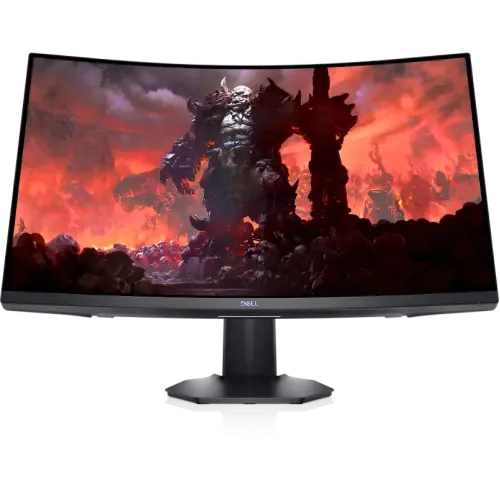
Dell S2722DGM overview
The Dell S2722DGM is a 27-inch curved gaming monitor built around a QHD 2560 × 1440 VA panel. Dell specifies a 16:9 aspect ratio, 1500R curve, 165Hz maximum refresh rate through DisplayPort and 144Hz through HDMI. That combination targets PC players who want a faster refresh experience with more workspace than a Full HD screen. The screen can also serve for streaming, general browsing, office work and entertainment, but the VA panel, curved shape and gaming refresh features should be weighed against the tasks you do most often.
This listing identifies the exact S2722DGM model and preserves its existing BiponiBD SKU, variant price, listing status, category, URL slug and three-year catalog warranty. The checked local sellers list the monitor in stock at different prices, while the official Dell US product page currently labels the model unavailable in that market. Dell’s US availability is not evidence of Bangladesh stock; local stock observations below come from the Bangladesh retailer pages.
QHD resolution and 27-inch workspace
At 2560 × 1440, the S2722DGM has 3.69 million pixels across its 27-inch 16:9 surface. The added pixel area compared with Full HD can make it easier to keep a game, reference window or two documents visible without moving between as many full-screen views. Dell lists a pixel pitch of 0.2331mm and 109 pixels per inch. Text and interface sizes depend on operating-system scaling, viewing distance and personal preference, so users moving from Full HD may want to review scaling options after setup.
The display is a standard 16:9 screen rather than an ultrawide panel. That keeps common game, video and streaming formats familiar, while QHD offers more vertical resolution than 1080p. A 1440p output still requires a graphics device capable of driving the selected refresh rate. Check the output specifications on your computer or console and use a compatible cable and port; the screen itself cannot increase the frame rate rendered by the source device.
1500R curve and VA panel
Dell identifies the S2722DGM as a VA monitor with 1500R curvature. The curve bends the left and right edges toward the viewer and can make a 27-inch screen feel more enveloping at a typical desk distance. Curvature is a comfort and viewing preference rather than a performance guarantee. Sit centred in front of the panel and consider how the curve will appear when the monitor is used for shared viewing, flat artwork, spreadsheets or side-by-side alignment with another flat screen.
Dell specifies a 3000:1 contrast ratio and 350 cd/m² brightness. Those figures describe the display’s published characteristics; perceived black level and brightness will vary with room lighting and selected settings. The manufacturer lists 99% sRGB colour coverage and an anti-glare coating with 3H hardness. This information can guide general use, but a published colour-gamut percentage does not establish factory calibration accuracy for colour-critical work.
Refresh rate and motion modes
The highest refresh rate depends on which input is used. Dell lists QHD at 165Hz through DisplayPort and QHD at 144Hz through HDMI. A high refresh rate can show more frequent frames when the computer generates them and when the game or application supports the selected mode. To aim for 165Hz, connect over DisplayPort 1.2, then select the resolution and refresh setting in the operating system or graphics control panel. Confirm that the cable and source device support the required bandwidth.
Dell’s product page lists a 2ms gray-to-gray response mode and a 1ms MPRT mode. Retailer tables additionally describe 6ms, 4ms and 2ms gray-to-gray overdrive settings. These figures refer to different response-time modes and measurement methods; the 1ms MPRT label is not a promise of 1ms gray-to-gray transitions in every scene. Very aggressive response settings can also affect image appearance. Compare practical motion clarity at the mode you intend to use.
Adaptive sync and compatible systems
Dell specifies AMD FreeSync Premium adaptive-sync technology. When a compatible graphics device and connection support variable refresh, the monitor can coordinate refresh timing with rendered frames within supported limits. The exact range and operation depend on the computer, graphics driver, cable, display mode and configuration. Enable the feature in the relevant graphics software and on-screen display where applicable, then test it with a supported application. The presence of FreeSync does not make every game run at a fixed or guaranteed frame rate.
Retailers also list G-SYNC support. Dell’s official page highlights AMD FreeSync Premium; the S2722DGM is not a dedicated G-SYNC hardware module monitor. NVIDIA compatibility can vary by GPU, driver and setup, so buyers using GeForce graphics should check the current NVIDIA compatibility information and be prepared to validate their own configuration. These distinctions help set realistic expectations without treating third-party shorthand as a guarantee for every combination of hardware.
Colour, contrast and viewing comfort
The manufacturer lists 99% sRGB colour coverage, support for 16.8 million colours, 178-degree horizontal and vertical viewing angles, Flicker Free technology and Dell ComfortView low-blue-light technology. These specifications support everyday gaming, web use, documents and entertainment. The anti-glare surface can reduce the prominence of reflections under some lighting conditions, but it does not eliminate glare from windows or lamps. Position the screen away from direct reflections and adjust brightness for the room.
For photo editing, design proofing or other colour-managed work, check whether the published gamut and calibration are sufficient for the application. The specification does not provide a factory Delta E accuracy figure in the reviewed table. Likewise, low-blue-light features and flicker reduction are display options, not medical claims. Choose settings that remain comfortable for you and take normal breaks during long sessions.
Ports, cables and audio
Dell lists two HDMI inputs, one DisplayPort 1.2 input and one 3.5mm audio line-out. The multiple video inputs let you connect more than one source, such as a desktop and a console, and switch between them through the monitor controls. Dell lists an HDMI cable and a DisplayPort 1.2 cable in the product package specification. Local seller package contents can change, so check the specific box and included cables with the store before purchase.
The monitor has no built-in speakers according to Dell. Its audio line-out can pass sound from a compatible video source to headphones or external powered speakers; it is not a built-in speaker system. Confirm where sound will be routed when connecting a console or computer, because audio settings on the source device may need to be changed. The display does not replace a computer sound card, receiver or powered speaker.
Stand, ergonomics and mounting
The supplied stand supports height adjustment up to approximately 100mm and tilt from -5 to +21 degrees. Adjust the height so that the top of the visible screen sits comfortably relative to your eye line, then use tilt to reduce reflections and find a neutral viewing angle. Dell also specifies integrated cable management and a 100 × 100mm VESA mounting interface. A compatible monitor arm or wall bracket can provide alternative placement when it supports the monitor’s weight and mounting pattern.
Dell lists dimensions of about 24 × 7.5 × 15.5 inches with the stand at its lowest position. Retailer pages give the same component dimensions in metric units and list 6.17kg with stand or 4.24kg without stand. Their separate aggregate weight field says 9.12kg, which conflicts with those component weights. This listing uses the component values and keeps the conflict visible in the evidence rather than repeating an inconsistent total. Plan desk depth and mount capacity accordingly.
Gaming functions and on-screen controls
Retailer descriptions mention game-oriented options such as a frame-rate counter, timer, Dark Stabilizer and user profiles. The official product description also identifies a joystick and shortcut controls for the on-screen display. These functions can make it easier to change display settings or inspect dark scenes, but the best settings depend on the game, lighting and personal taste. Use the monitor’s current manual for exact menu names, available profiles and control directions.
A monitor’s refresh rate, response mode and adaptive-sync feature are only part of a gaming setup. The graphics card, game engine, connection, selected resolution and in-game settings all affect actual performance. If a game runs below the display’s maximum rate, FreeSync may help within its supported range, but it cannot add rendering performance. Test the selected settings after connecting the monitor and keep a note of any mode that changes brightness or image clarity.
Use for work, video and multi-device setups
The 27-inch QHD surface gives room for a large document, timeline, browser window or application canvas. The curved profile may suit a single-user desk and a centred viewing position. Two HDMI inputs and DisplayPort allow multiple video sources to remain connected, while the on-screen input control lets you choose the active source. For productivity, consider whether a curve, VA panel and 16:9 shape match your application and viewing habits before selecting this model over a flat IPS or ultrawide alternative.
For streaming and video, the 16:9 format aligns with common content, and QHD provides more detail than Full HD when the source is available at that resolution. The monitor has no built-in speakers, so plan separate audio equipment. If you share the display with another viewer, the curved screen and seating angle may affect the experience. Place the screen on a stable desk with enough width for its stand and room to connect power, HDMI or DisplayPort cables.
Power, setup and care
Dell specifies AC 100–240V at 50/60Hz, with 25.3W on-mode consumption, up to 56W maximum and low standby/off figures in the product table. Use the supplied power lead and a suitable outlet, keep ventilation unobstructed, and arrange cables so they are not stretched or pinched. During setup, attach the stand on a protected surface, lift the screen by its frame rather than pressing on the panel, connect the source, and select the native 2560 × 1440 resolution.
Clean the screen according to Dell’s current care instructions and avoid spraying liquid directly onto the display. Use an appropriate soft cloth and disconnect power when required by the manual. Keep the monitor away from moisture, high heat and unstable surfaces. Update graphics drivers and check the monitor’s on-screen settings if the expected refresh rate does not appear. A cable or source limitation can prevent the maximum display mode even when the monitor supports it.
Price, stock and warranty in Bangladesh
The three checked Bangladesh listings showed exact S2722DGM model pricing on 6 November 2026. Monarch IT showed ৳61,300 and marked the product In Stock. Tech Land showed ৳61,500 discounted and ৳68,500 regular, with stock marked In Stock. Star Tech showed ৳61,500 online/cash and ৳63,500 cash at store, with ৳66,730 regular and In Stock. Because payment method changes the displayed amount, the observed cash-price range is ৳61,300–৳63,500 rather than a guaranteed single offer.
Tech Land and Star Tech list a three-year warranty; Dell’s US product page describes three-year Advanced Exchange Service. Local seller/importer service terms are the relevant terms for a Bangladesh purchase. Ask who receives the warranty claim, what documents are required, whether service is local, and whether replacement or repair is offered. Confirm the final price, delivery fee, stock, return terms and warranty wording directly with the seller before paying. The catalog’s variant MSRP remains unchanged from its existing value.
Model identity and purchase checklist
The product identity is Dell S2722DGM, with model and manufacturer part number normalized to the exact model code. The existing product ID, public slug, catalog category, active state, SKU, variant identifier, stored MSRP, image URLs and warranty value remain tied to the same product. The three current images were visually checked and show the same black curved Dell monitor from front and angled views. Their alternative text is revised to describe the actual visible views rather than repeat a generic numbered label.
Before ordering, confirm that your device can output QHD at the refresh rate you want, select DisplayPort for the 165Hz maximum, plan audio equipment because there are no built-in speakers, measure the desk and mounting area, and check the exact local warranty. Compare the payment-specific retailer price and current stock with the linked pages. This product description is based on Dell’s official product specification plus exact-model Bangladesh listings; it does not create a BiponiBD offer or guarantee a seller’s future price.