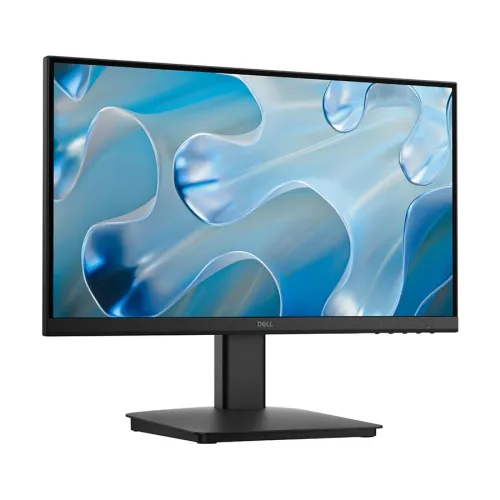
Full HD display for work and everyday use
The Dell SE2225HM is a 22-inch-class desktop monitor with a 21.5-inch (54.5 cm) viewable screen. Its VA panel displays Full HD 1920 × 1080 resolution in a 16:9 widescreen format. The monitor is aimed at ordinary office work, web browsing, online classes, document editing and everyday video. Dell specifies an LED edgelight system, 250 cd/m² typical brightness and 178-degree horizontal and vertical viewing angles. A matte anti-glare surface with 3H hard coating helps reduce reflections from common room lighting. This is a non-touch, flat panel. It is not a QHD or 4K display, and it should not be presented as an HDR screen.
100Hz refresh and response modes
Dell lists a maximum preset resolution of 1920 × 1080 at up to 100Hz. The HDMI 1.4 input supports that Full HD/100Hz signal when the graphics source, cable and software settings provide a compatible output. The VGA input has a lower listed vertical frequency ceiling, so users seeking 100Hz should plan to connect through HDMI. Dell specifies response time as 5ms Gray-to-Gray in Fast mode and 8ms in Normal mode. These are selectable response modes, not an unconditional promise that every image transition takes the same time. The higher refresh rate can make scrolling, cursor movement and compatible video motion appear smoother than 60Hz, though it does not make this an esports or high-refresh gaming display.
VA contrast and color
The VA panel has a typical native contrast ratio of 3000:1. Dell lists a minimum 72% NTSC color gamut measured under CIE 1931 and support for 16.7 million colors. Those figures describe a standard-use display; they should not be converted into unsupported claims of professional color accuracy or full sRGB coverage. The display offers 178-degree horizontal and vertical viewing angles, and the Full HD pixel grid is suited to common desktop work at a compact desk distance. Color appearance can vary with room light, operating-system settings and individual calibration. Dell does not list HDR support for this model.
Eye comfort and design
The monitor includes Dell ComfortView Plus, an always-on low-blue-light solution intended to reduce blue-light exposure while maintaining color fidelity better than a software-only warm tint. Dell also identifies TÜV Rheinland Eye Comfort 3-star certification. The anti-glare 3H coating and flicker-free operation are useful additions for a work or study screen. The product has narrow bezels and a small footprint. Comfort features do not remove the need to set a suitable brightness, position the screen at a comfortable distance and take breaks during long sessions.
Ports, audio and device compatibility
The rear connections include one HDMI 1.4 input with HDCP 1.4 and one VGA input. HDMI is the connection to use for the full 1920 × 1080/100Hz timing. VGA provides compatibility with older PCs and other legacy sources, at lower maximum refresh rates. Dell lists no DisplayPort, USB-C, USB hub or audio output. The specification sheet says audio output is not applicable and does not list internal speakers. If sound is required, connect headphones or speakers to the computer or another source device. Before buying, check that the intended computer has a matching video connector and can output the desired Full HD refresh rate.
Tilt, mounting and dimensions
The supplied stand supports tilt from −5 degrees forward to +21 degrees backward. Height adjustment, swivel and pivot are not listed. For a monitor arm or wall mount, Dell specifies a 100 × 100 mm VESA interface; confirm that the mount supports the display’s weight and follow the mounting instructions. Dell lists the unit as 492.86 mm wide, 395.75 mm high and 211.80 mm deep with stand. Without the stand, it measures 492.86 × 286.48 × 44.90 mm. Weight is 2.96 kg with stand and cables, 2.23 kg for the panel without stand and cables, and 4.38 kg packaged. A Kensington security-lock slot is included; the security cable is sold separately.
Power, package and warranty
The monitor has an internal power supply rated at 100–240V AC, 50 or 60Hz, with a maximum current of 1.0A. Dell’s official datasheet lists 11.7W typical on-mode consumption, 20.7W maximum, and 0.3W in both standby and off modes. The standard package includes the monitor and stand, power cable, 1.8m HDMI cable, QR card and safety information. Dell lists a three-year Advanced Exchange Service for worldwide configurations; US/Canada terms differ. Bangladesh retailers also list three years, but the local provider and process may vary. Check the warranty documents and invoice for the exact local coverage and service channel.
Technical specifications
Key features
- 21.5-inch (54.5 cm viewable) VA display with 1920 × 1080 Full HD resolution.
- 100Hz maximum refresh at Full HD over HDMI 1.4; compatible output and configuration required.
- Typical 3000:1 contrast, 250 cd/m² brightness and 178° horizontal/vertical viewing angles.
- 5ms Gray-to-Gray in Fast mode or 8ms in Normal mode.
- Minimum 72% NTSC color gamut (CIE 1931), 16.7 million colors.
- Dell ComfortView Plus and TÜV Rheinland Eye Comfort 3-star certification; anti-glare 3H coating.
- One HDMI 1.4 (HDCP 1.4) and one VGA input; no audio output listed.
- Tilt −5° to +21°, VESA 100 × 100 mm mount and Kensington security slot.
- Internal power supply; 11.7W typical on, 20.7W maximum, 0.3W standby/off listed in Dell datasheet.
- Dell lists 3-year Advanced Exchange Service for worldwide configuration; local service terms vary.
Advantages
- 100Hz Full HD VA panel offers smoother desktop motion than 60Hz models when connected through a compatible HDMI source.
- Typical 3000:1 contrast is useful for dark scenes and everyday video.
- ComfortView Plus, flicker-free operation and 3-star TÜV Rheinland Eye Comfort support long desktop sessions.
- HDMI and VGA cover a current digital connection and a legacy input.
- VESA 100 × 100 mm and a compact tilt stand offer mounting flexibility.
Things to consider
- Only one HDMI and one VGA input are provided; there is no DisplayPort or USB-C.
- The stand lists tilt only, with no height adjustment, swivel or pivot.
- There are no built-in speakers and Dell lists no audio output; separate audio must connect to the computer.
- The 21.5-inch Full HD screen is compact for multitasking compared with larger displays.
- The listed 72% NTSC gamut is entry-level for color-critical photo/video work; HDR is unsupported.
Frequently asked questions
What is the exact Dell model and part number?
The product model is Dell SE2225HM. Dell’s US page lists Manufacturer Part Number 1YYWD and Dell Part 1YR8X2 for that regional sales configuration. The catalog normalizes the model/MPN to SE2225HM because the Bangladesh unit’s regional carton label is not visible.
Is the screen 22 inches?
It is a 22-inch product class with a 21.5-inch (54.5 cm) diagonal viewable area. The active resolution is 1920 × 1080.
What panel does this monitor use?
Dell specifies Vertical Alignment (VA) technology, a 16:9 Full HD display and LED edgelight backlight.
Does the SE2225HM support 100Hz?
Yes. Dell lists up to 1920 × 1080 at 100Hz over HDMI 1.4. The source computer, port, cable and display settings must support that signal. VGA supports a lower maximum vertical frequency.
What response-time modes are available?
Dell specifies 5ms Gray-to-Gray in Fast mode and 8ms Gray-to-Gray in Normal mode. The mode should be stated with the value rather than describing one number as unconditional.
What are its brightness and contrast?
Dell lists 250 cd/m² typical brightness and a 3000:1 typical native contrast ratio.
What color gamut and color depth does it offer?
Dell lists a minimum 72% NTSC gamut measured in CIE 1931 and 16.7 million colors. This is not a claim of full sRGB coverage and is not targeted at color-critical mastering.
Does this monitor support HDR?
No. Dell does not list HDR support for the SE2225HM. Full HD and high contrast do not imply HDR capability.
Which ports are available?
There is one HDMI 1.4 port with HDCP 1.4 and one VGA connector. Dell lists no DisplayPort, USB-C, USB hub or audio output.
Does it have speakers?
Dell’s official port and specification sheet lists audio output as not applicable and does not list built-in speakers. Connect speakers or a headset to the computer instead.
Can it be mounted on a monitor arm?
Yes. Dell specifies a 100 × 100 mm VESA mount interface and a Kensington security-lock slot. Check the arm’s supported weight and mounting instructions.
What warranty is available in Bangladesh?
Dell’s datasheet lists three-year Advanced Exchange Service for worldwide models, while Bangladesh retailers list a three-year local warranty. The local claim channel and terms are seller/distributor specific; confirm them on the unit invoice and warranty documents.
Confirm current Bangladesh price, availability, box contents and local warranty terms with the seller. Specifications are based primarily on Dell’s SE2225HM datasheet.