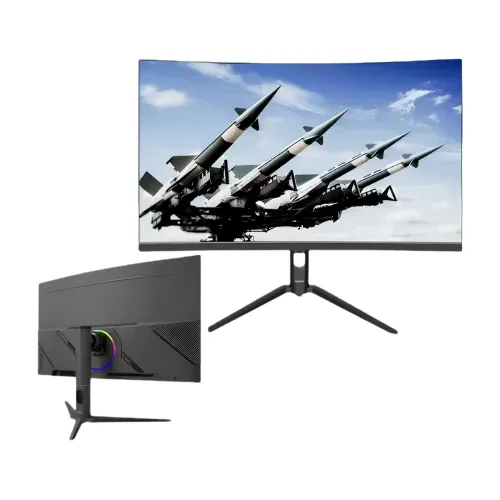
The Eurovision EV-GT27-2K-C is a 27-inch curved QHD gaming monitor with a VA panel, 165Hz refresh rate and 1ms response-time rating. Its 2560 × 1440 resolution, 16:9 format, HDMI×2 and DisplayPort×1 make it a model-specific option for compatible gaming PCs and other video sources. Check the complete EV-GT27-2K-C code when comparing offers, cables, mounting hardware or warranty coverage.
Overview and exact model
The Eurovision EV-GT27-2K-C is a 27-inch curved gaming monitor in the BrightOn Play series. Its manufacturer specification lists a VA panel, QHD resolution of 2560 × 1440, a 165Hz refresh rate and a 1ms response-time rating. The model code distinguishes this curved display from other Eurovision 27-inch monitors, including the EV-GT2700-C IPS model. Check the full EV-GT27-2K-C label when comparing a shop quote or ordering a replacement cable, stand or mount.
At 27 inches, QHD gives a useful balance between screen area and pixel density for PC games, streaming and general desktop work. The 16:9 format fits standard video and common application layouts. A curved panel brings the side portions around the viewer’s central line of sight when seated in front of the monitor. Whether that shape feels comfortable depends on the viewer, desk depth and viewing distance, so positioning the screen at the intended seat is part of choosing it.
QHD resolution and desktop clarity
The native 2560 × 1440 resolution contains more pixels than Full HD 1920 × 1080. In a compatible game or video, that can show finer details and provide more desktop workspace. For clear text, set the computer to the native resolution and select an operating-system scaling level that keeps menus readable. The panel cannot add detail that is missing from a low-resolution source, and the appearance of an image still depends on the source file, application, graphics settings and viewing conditions.
QHD is more demanding to render than Full HD. A game may need a capable graphics card to maintain a high frame rate at this resolution, especially when effects are enabled. If performance drops, adjust the game’s visual settings while keeping the monitor’s supported display mode in mind. For office work or browsing, a larger desktop can make side-by-side windows practical, though some users may prefer text scaling for comfortable reading.
165Hz motion and response rating
The manufacturer lists a maximum refresh rate of 165Hz. A higher refresh rate can make motion and pointer movement appear smoother when the computer delivers enough frames and the selected input mode supports that rate. It does not mean that every game will run at 165 frames per second; performance depends on the computer, graphics hardware, game engine and visual settings. Check the source output and monitor input specifications before selecting a high-refresh mode.
A 1ms response-time rating is listed for the panel. Response-time figures depend on the manufacturer’s measurement method and picture mode, which are not specified here. This rating should not be interpreted as complete input-to-screen latency: the computer, game, display processing and connection all contribute to the time between an action and the visible result. Users comparing gaming displays should review refresh rate, response rating and real system performance together.
Curved VA panel and viewing
The display uses a curved VA panel with a listed viewing angle of 178 degrees horizontally and vertically. VA panels are commonly used when buyers want a curved screen with strong on-screen contrast; this model’s specified contrast ratio is 1000:1. The viewing angle is a stated specification, while perceived color and contrast can change with the user’s angle, room reflections and picture settings. Center the monitor in front of the main seat for a balanced view across the curve.
The manufacturer does not state a curve radius for this model. The exact curvature therefore cannot be compared numerically from the available specification. A curved 27-inch screen may feel immersive for a centered gaming position, while users who often share the screen from the side should consider how the curve affects their viewing setup. If possible, view a similar curved monitor at the intended distance before committing to a desk or multi-screen arrangement.
Color, brightness and picture settings
The manufacturer lists 98% sRGB color gamut, 16.7 million colors using 8-bit color and maximum brightness of 280 cd/m². These figures describe the display’s stated capabilities; they do not certify factory calibration or professional color accuracy. For color-sensitive work, use a color-managed application and an appropriate calibration process. For games and video, choose a picture mode that suits the room, content and personal preference. Avoid treating a maximum brightness rating as the best setting for everyday viewing.
The 1000:1 contrast ratio and VA panel help describe the difference between dark and bright tones according to the stated specification. Actual perceived contrast can be affected by ambient light, reflections and panel settings. Adjust the screen for the room and viewing position, and check the source material if shadow or highlight detail appears missing. The monitor is intended for general gaming and multimedia use; no HDR certification is listed for this exact model.
Connections and device setup
The manufacturer’s table lists one DisplayPort input, two HDMI inputs, one USB input and one audio output. Multiple video ports make it possible to keep several compatible computers or consoles connected, then select the active source through the monitor controls. Exact HDMI and DisplayPort revisions are not stated in the product table, so confirm the mode supported by the connected computer or console if a specific resolution and refresh combination is important.
A USB input is listed, but its function and data rate are not described. USB-C and VGA are not listed for this model. The audio output’s connector type is not stated. Check the actual ports on the unit and verify whether any required cable is included. For gaming, use a cable appropriate to the target mode, then confirm the operating system or console detects the expected resolution and refresh rate.
Audio, controls and included accessories
Built-in stereo speakers can provide convenient sound for system notifications, dialogue, online meetings and casual media without a separate speaker set. Their output may be sufficient for basic listening, while users who need fuller sound or use the display in a noisy room may prefer headphones or external speakers. One audio output is also listed, although its connector type is not specified. Confirm compatibility with your headset or external audio device before relying on a particular plug.
The manufacturer lists a power adapter, HDMI cable, quick guide and desktop bracket as included accessories. Confirm these items with the seller because box contents can depend on the unit and sales channel. After connecting the monitor, choose the matching input and set the computer to a supported display mode. If the picture or sound does not appear, check the input selector, cable seating, source output and computer audio destination before changing advanced settings.
Mounting and desk placement
The monitor lists a 75 × 75mm VESA hole pattern and supports desktop or wall mounting. Choose an arm or bracket that accepts this spacing and is rated for the monitor’s weight. The available manufacturer specification does not provide product weight or screw details, so verify those measurements before installation. Keep the screen on a stable stand or mount, use the correct hardware, and route power and video cables without pulling on their connectors.
The stand adjustment range is not specified in the product table. Measure desk width and depth, then position the panel so its center is comfortable to view from the main seat. A curved display benefits from being centered in front of the viewer; a large side offset can make the image feel uneven. If using multiple monitors, consider how their curved and flat profiles line up and whether the desk can support them securely.
Power and daily use
The manufacturer specifies a DC 12V, 5A power adapter and standby consumption of 1W or less. The product page describes an external adapter and low-power design, but does not state a typical or maximum operating wattage. Keep the supplied adapter label and use an adapter with the correct rating. Do not substitute an incompatible power supply. Provide clearance around the display and adapter, and keep the equipment away from moisture and excessive heat.
The manufacturer’s product data lists operating conditions of 0°C to 50°C and storage conditions of −20°C to 60°C, with stated working humidity from 5% to 90%. Use the monitor within the supplied instructions and avoid condensation or conditions outside the stated range. For a long gaming session, set brightness for the room and take breaks as needed. A comfort-oriented setting is a personal adjustment, not a guarantee of reduced eye strain.
Who this curved gaming monitor may suit
This model may suit PC and console players who want a curved 27-inch QHD screen with a high listed refresh rate. The 165Hz rating and 1ms response-time claim are the main motion-focused specifications, while the VA panel and 98% sRGB gamut describe its image characteristics. It can also serve for streaming, general browsing and desktop work. Buyers should match the monitor’s inputs with the source device and ensure the computer can render games at the desired resolution and frame rate.
The monitor may be less suitable for buyers who require an IPS panel, USB-C docking, a stated curve radius, certified adaptive sync, a specified ergonomic stand range or documented calibration for color-critical work. These features are not established by the available product specification. If a particular capability is essential, check the exact model documentation and written seller confirmation before purchase rather than inferring it from the model’s gaming label.
Specifications, warranty and purchase checks
The manufacturer page confirms the core display, color, port, power and mounting specifications. It does not list FreeSync or G-Sync certification, a curve radius, USB-C, VGA, operating wattage or a warranty term. These limits matter when planning a desk, selecting cables, choosing a graphics source or estimating local service coverage. The product page lists several industry standards; buyers needing certification documents should confirm the applicable certificate for the shipped model and market.
Warranty terms vary across sellers: Star Tech lists three years, while TechLand lists two years, and Creatus asks buyers to check current warranty information. Confirm the written coverage, service location, exclusions and return terms for the exact unit before paying. Save the invoice and model label. Store prices and availability can change; compare current in-stock offers and delivery terms at checkout. The catalog’s approximate price range is informational and is not a live BiponiBD store offer.
Care and ownership
For routine care, use a soft cloth and follow the included guide for cleaning. Avoid pressing on the panel or applying liquid directly to the screen. Keep vents unobstructed and route the adapter and signal cables so they are not bent sharply or caught under furniture. If the monitor does not show an image, check its power, active input and source output before changing settings. A correct cable and supported display mode help avoid connection problems.
Before moving or mounting the monitor, disconnect its cables and support the panel securely. Keep the product number, serial label, sales invoice and warranty terms together in case the unit needs service. If the monitor is used for gaming, verify the selected display mode after graphics-driver or console updates. The exact model is EV-GT27-2K-C; do not confuse it with similarly named Eurovision products that may use different panel types, refresh rates or ports.
Key features
- 27-inch curved VA panel with QHD 2560 × 1440 resolution
- 16:9 aspect ratio with a 165Hz refresh rate
- 1ms response-time rating
- 280 cd/m² maximum brightness and 1000:1 contrast ratio
- 98% sRGB color gamut and 16.7 million 8-bit colors
- One DisplayPort, two HDMI inputs and one USB input
- Built-in stereo speakers and one audio output
- 75 × 75mm VESA wall-mount pattern
- DC 12V, 5A power supply with standby consumption ≤1W
- Metal and ABS housing in black
- Desktop base and HDMI cable included per manufacturer product page
- English, Spanish, Turkish, Russian and 20+ OSD language options
Advantages
- QHD resolution gives a detailed picture at 27 inches
- 165Hz refresh can display smoother motion when the computer supplies enough frames
- Curved 16:9 VA panel creates an enveloping view from a centered seat
- HDMI×2 and DisplayPort×1 allow several devices to remain connected
- Built-in stereo speakers and an audio output offer flexible everyday sound
- 75 × 75mm VESA compatibility supports a compatible arm or wall bracket
Points to consider
- A capable computer and compatible connection are needed to use 165Hz at QHD
- USB-C and VGA are not listed; the available inputs are HDMI, DisplayPort and USB
- The curve radius and stand adjustment ranges are not specified
- Adaptive-sync support is not specified for this exact model
- Brightness is listed as a 280 cd/m² maximum, which may be modest in bright rooms
- Warranty duration varies by seller and should be confirmed in writing
Frequently asked questions
What resolution does this monitor support?
The EV-GT27-2K-C is specified with a native 2560 × 1440 QHD resolution and a 16:9 aspect ratio. The source device must support the resolution you select.
What is the screen size and panel type?
It has a 27-inch curved VA panel.
What refresh rate does it have?
The manufacturer lists a 165Hz refresh rate. The computer, connection and selected display mode must also support the desired resolution and refresh rate.
What response time is listed?
The specification lists a 1ms response time. The measurement method is not stated, and response time is not the same as total system input latency.
Which display connections are available?
The manufacturer lists one DisplayPort and two HDMI inputs. It also lists one USB input and one audio output.
Does it have built-in speakers?
Yes. Built-in stereo speakers are listed. An audio output is also included.
Can the monitor be mounted on an arm or wall?
It lists a 75 × 75mm VESA hole pattern. Confirm that the bracket supports this spacing and the monitor’s weight.
What power adapter does it use?
The manufacturer lists a DC 12V, 5A power adapter and standby consumption of 1W or less.
Does the monitor support FreeSync or G-Sync?
Adaptive-sync certification is not specified for this exact model. Check the monitor and graphics device documentation if variable refresh is required.
What is the curvature radius?
The screen is curved, but the radius is not provided in the manufacturer specification.
What warranty is included?
Warranty terms differ among sellers. Check the written warranty and service coverage attached to the exact unit and purchase channel.
What is included in the box?
The manufacturer lists a power adapter, HDMI cable, quick guide and desktop bracket. Verify the included items with the seller before purchase.
Confirm the exact model label, in-stock offer, included accessories and written warranty with the seller before purchase.