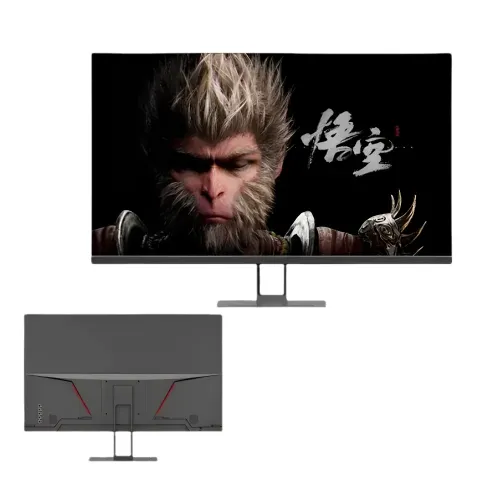
The Eurovision EV-GT3200-4K is a 32-inch 4K UHD IPS monitor designed for detailed desktop viewing, office productivity, CCTV monitoring and commercial display use. Its manufacturer specification lists a 3840 × 2160 resolution, 16:9 panel, 60Hz refresh rate, built-in stereo speakers and multiple video inputs. This model is different from Eurovision’s curved QHD EV-GT3200-C gaming monitor; check the complete model code before comparing products or ordering accessories.
Overview and exact model
The Eurovision EV-GT3200-4K is a 32-inch 4K UHD IPS monitor in the BrightOn series. Its official product specification identifies a 3840 × 2160 panel, 16:9 aspect ratio, 60Hz refresh rate, built-in stereo speakers, and two HDMI plus two DisplayPort inputs. The model suffix matters: this is the flat 4K monitor, distinct from Eurovision’s similarly named curved QHD gaming display. Check the full EV-GT3200-4K label when matching a quotation, replacement part, mount or cable.
A 3840 × 2160 panel contains four times as many pixels as a 1920 × 1080 Full HD panel. That resolution can make fine text, charts, images and detailed camera views appear more defined when the computer or video source supplies a suitable 4K signal. The final result also depends on the source device, content, cable, software settings and viewing distance. The 32-inch size provides a generous workspace, while the flat IPS format is designed for straightforward desktop, office, retail and monitoring environments.
4K resolution and 60Hz refresh
Set a connected computer to the display’s native 3840 × 2160 resolution when the device and connection support it. At native resolution, the monitor maps source pixels to its panel without scaling the image to a different pixel grid. Operating-system scaling can make menus and text more comfortable to read on a large high-resolution screen. Video playback resolution is determined by the source recording and application; a 4K panel cannot add detail that was not present in the original video.
The manufacturer lists a 60Hz refresh rate. This is suited to office work, surveillance feeds, presentations, streaming and everyday video playback. It is not a high-refresh gaming display, and users seeking faster motion for competitive gaming should compare a model that explicitly lists a higher native refresh rate. Confirm the source’s output mode and the selected port before purchase, because the computer or recorder, cable and monitor must all support the intended resolution and refresh combination.
IPS viewing and color
The model is described as an IPS display with a 178-degree horizontal and vertical viewing angle. This wide viewing specification can help a picture remain viewable from seats that are not directly in front of the panel, a useful property for shared desks, meeting spaces and monitoring stations. Viewing angle figures are manufacturer ratings; room lighting, reflections, picture settings and the exact seating position still affect perceived contrast and color.
The official product specification lists 280 cd/m² typical brightness, a 100% sRGB color gamut and 16.7 million colors using 8-bit color. These figures describe display capability, not factory calibration or professional color certification. For color-sensitive design or print work, use a suitable calibration workflow and check the application’s color-management settings. Choose a brightness level that is comfortable for the room rather than treating the maximum rating as the preferred setting for every environment.
Connections and device planning
The manufacturer’s connection table lists two HDMI inputs, two DisplayPort inputs and one audio output. Multiple video inputs can make it convenient to connect more than one compatible computer, recorder or media source and select the required input when switching tasks. The manufacturer does not state the exact HDMI or DisplayPort revision in the available product specification, so do not assume a particular bandwidth, console mode or maximum refresh combination without checking the manual or written seller confirmation.
The official connection table does not list USB or VGA. Retailer pages differ on whether VGA and USB ports are present, so confirm the physical port layout with the seller before relying on either connection. The audio output is listed as one port; its connector type should be verified if a particular headset or speaker cable is required. Check which cables and accessories are included with the specific unit rather than assuming every source cable is supplied.
Speakers and everyday sound
Built-in stereo speakers are listed for this model. They can provide convenient sound for system alerts, spoken content, online meetings and basic playback without requiring a separate speaker set. Room size, speaker placement, source quality and volume affect the listening result, so users who need fuller music or clear sound in a noisy space may prefer external speakers or headphones.
An audio output is also listed. This gives a possible connection point for compatible external audio equipment, though the connector standard is not specified in the available manufacturer table. Verify the port type and audio routing with the exact unit and connected device. For a computer, select the monitor as the audio destination if sound is not automatically sent through the chosen video connection.
Mounting, stand and placement
A desktop base is included according to the manufacturer, and the product page also identifies wall-mount installation as an option. The official specification does not give a VESA hole pattern or stand-adjustment range. A seller listing specifies a 200 × 150mm VESA pattern, but another matching seller does not confirm that dimension. Before ordering a monitor arm or wall bracket, ask the seller to confirm the unit’s hole spacing, supported load, screw size and any required adapter plate.
Measure desk width and depth before placing a 32-inch screen. Keep the display on a stable surface, leave space for the base and connected cables, and position it so that the center is comfortable to view. If the monitor is mounted, use a bracket rated for the product and install it into a suitable support. The flat panel can be positioned without accommodating a curved screen profile; the best viewing distance remains a matter of desk layout and personal comfort.
Power and continuous-use context
The manufacturer specifies a DC 12V, 5A power supply and describes the monitor as energy-saving. Its specification table lists standby power consumption at 3W or less. A retailer lists 35W, but the manufacturer table does not identify that figure as typical or maximum operating consumption. Treat the power adapter rating and standby figure as separate measurements, and confirm the supplied adapter label and local power requirements before connecting the monitor.
The manufacturer describes the model as suitable for 24/7 operation and mentions office, CCTV, retail and commercial use. This makes it a candidate for installations that need a screen available for extended periods, but actual suitability depends on ventilation, signal source, mounting, operating conditions and maintenance. Keep air openings clear, use a stable power source and follow the supplied instructions. For a security installation, verify that the recorder’s output format and resolution are supported by the display.
Who this 4K monitor may suit
This model may suit an office or home user who wants a large IPS screen for documents, spreadsheets, browser windows, presentations and video. The 4K resolution offers a detailed desktop when paired with a capable source, while the 60Hz rating aligns with general productivity and routine playback. Two HDMI and two DisplayPort inputs can help users who switch among multiple compatible sources. The speakers provide basic built-in audio for simple use cases.
The monitor may also fit a retail counter, CCTV desk, reception area or control room where a 32-inch screen, multiple inputs and long operating periods are useful. Consider the source equipment and installation before choosing it: verify the displayed camera or media resolution, connection type, mounting requirements, sound needs and daily operating conditions. The product does not claim high-refresh gaming performance, certified HDR, a USB-C dock, or a specified ergonomic stand range. Buyers who need those capabilities should confirm them separately or compare a model with explicit support.
Published ratings and buying checks
The detailed product specification lists 60Hz refresh, 3000:1 contrast and a 6.5ms response time; an accompanying product bullet mentions 5ms. Refresh, contrast and response ratings can vary between product descriptions, so check the unit label and written specification before ordering if a particular value affects your setup. The response-time measurement method is not stated.
The available specification identifies the core 4K, IPS, input and power information, but does not state warranty coverage, exact VESA hole spacing, HDMI/DisplayPort revisions or whether VGA and USB are fitted. Seller pages differ on those details. Ask the seller to confirm the written warranty, included accessories, physical port layout and bracket spacing for the exact unit before purchase, especially for a workplace or surveillance installation.
Setup and image settings
After connecting the source, choose the monitor input that matches the cable and set the output resolution to 3840 × 2160 if supported. Review the operating system’s scaling option to keep text readable, and adjust brightness for the ambient light. If the picture looks soft, check that the source is using the native resolution and that any video player or camera system is sending the intended quality. For a multi-device setup, label cables and inputs so users can identify each source easily.
For surveillance or other continuous display tasks, test the full signal chain before final installation. Confirm that the recorder sends a format supported by the monitor, that audio is routed as intended, and that the display remains stable during the planned operating schedule. Keep the power adapter accessible and avoid pinching the video or power leads behind furniture. If a wall mount is required, verify the mounting measurements before drilling or installing the bracket.
Care and ownership
Use a soft, clean cloth for routine screen care and follow the product guide for cleaning instructions. Avoid pressing on the panel or applying liquid directly to the screen. Keep the monitor away from excessive heat, moisture and unstable surfaces, and do not obstruct ventilation around the display or power adapter. If the picture disappears, check power, input selection and cable seating before changing advanced settings. Use only a correctly rated adapter and accessories compatible with the exact model.
Retain the purchase invoice and the seller’s written warranty terms. Confirm where service is available, what the warranty covers, and how a claim is handled before buying. Warranty duration is a seller-provided condition rather than a technical feature of the screen, and it may depend on the selling channel and unit. For business or CCTV installation, keep the model number, serial label and purchase details with the site’s equipment records.
Key features
- 32-inch flat IPS display with 3840 × 2160 4K UHD resolution
- 16:9 aspect ratio and 60Hz refresh rate
- 280 cd/m² typical brightness and 178° viewing angles
- 100% sRGB gamut and 16.7 million 8-bit colors
- Two HDMI inputs, two DisplayPort inputs and one audio output
- Built-in stereo speakers
- DC 12V, 5A external power supply; standby consumption ≤3W
- Manufacturer describes support for 24/7 operation
- Desktop base included; wall-mount installation supported
- Manufacturer product table lists 3000:1 contrast and 6.5ms response time
Advantages
- 4K UHD resolution gives a detailed 32-inch workspace with a compatible source
- IPS panel and wide listed viewing angles suit shared viewing positions
- Two HDMI and two DisplayPort inputs support several connected sources
- Built-in stereo speakers provide convenient basic audio
- Manufacturer describes 24/7 operation for commercial and monitoring contexts
Points to consider
- 60Hz refresh is aimed at general viewing rather than high-refresh gaming
- VESA hole spacing is not confirmed by the manufacturer specification
- Retailer listings conflict on refresh, contrast, response time and port availability
- Warranty terms differ by seller and should be confirmed in writing
- No HDMI or DisplayPort revision is stated in the available manufacturer specification
Frequently asked questions
What is the screen resolution?
The Eurovision EV-GT3200-4K is specified with a 3840 × 2160 4K UHD panel. The source device must also support the desired 4K output.
How large is the display?
It has a 32-inch, 16:9 flat IPS display.
What refresh rate does the manufacturer specify?
The manufacturer specification table lists 60Hz. Some retailer listings show 75Hz, so confirm the unit and intended mode with the seller.
Which ports are included?
The manufacturer lists two HDMI inputs, two DisplayPort inputs and one audio output. Retailer pages differ about VGA and USB, so verify the physical ports before purchase.
Does it have built-in speakers?
Yes. The manufacturer lists built-in stereo speakers.
Can it be wall mounted?
The manufacturer identifies wall mounting as an installation method, but its specification does not state the VESA hole spacing. Confirm bracket compatibility with the seller.
What brightness and color coverage are listed?
The manufacturer table lists 280 cd/m² typical brightness, 100% sRGB and 16.7 million 8-bit colors.
Is it suitable for CCTV or continuous use?
The manufacturer describes the display as suitable for 24/7 operation and CCTV/commercial settings. Confirm the installation environment and recorder output before deployment.
What response time does it have?
The detailed manufacturer table lists 6.5ms, while its feature bullets mention 5ms; retailer listings show other values. The measurement method is not stated, so confirm the exact unit specification if this figure matters.
What warranty is included?
Star Tech lists a three-year warranty. Creatus does not state a warranty term on its product page; confirm written coverage with the seller.
Check the model code, port layout, mounting pattern and written warranty with the seller before purchase.