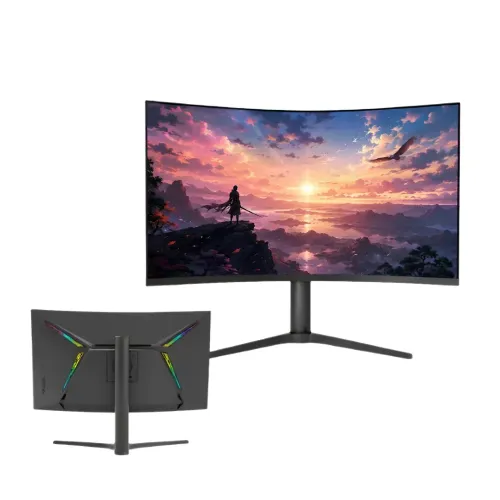
The Eurovision EV-GT3200-C is a 32-inch curved QHD gaming display built around a VA panel. Its 2560 × 1440 resolution, 16:9 format and 165Hz refresh rate are suited to a broad mix of computer games, videos and desktop applications. The model code identifies this particular size and feature set; compare the complete EV-GT3200-C label when selecting compatible cables, mounts and replacement accessories.
Overview and exact model
The Eurovision EV-GT3200-C is listed by Bangladesh retailers as a 32-inch curved gaming monitor with a VA panel and 2560 × 1440 QHD resolution. The exact model code matters: EV-GT3200-C should not be confused with other Eurovision sizes or suffixes, which can have different resolution, refresh rate and connectivity. Its 16:9 screen combines QHD resolution with 165Hz refresh and a listed 1ms response rating.
A QHD screen at 32 inches offers more pixels than Full HD and a broad area for games, streaming, browser windows and everyday computer use. The 16:9 shape is standard for desktop apps and most video. At this size, viewing distance and scaling settings affect how crisp text appears and how much of the desktop fits comfortably. The curved form may help bring the edges into a natural view from a centered seat, but whether the curve is comfortable depends on desk depth, distance and personal preference. Check the available desk space and stand arrangement before setting up a large display.
QHD resolution and 165Hz motion
The 2560 × 1440 QHD resolution contains more pixels than 1920 × 1080 Full HD, offering additional workspace and image detail. To see a sharp image, configure the computer to the monitor’s native resolution. The listed refresh rate is 165Hz. A higher refresh rate can make motion and pointer movement appear smoother when the computer generates enough frames and the connection supports the selected mode. The display rating does not mean that every game will run at 165 frames per second; performance depends on the computer, graphics hardware, game, resolution and quality settings.
The 1ms response time is a panel rating; complete input-to-screen latency also depends on the computer, game and settings. For gaming, connect with a suitable HDMI or DisplayPort cable and check supported resolution and refresh combinations in the computer’s graphics settings. The model is listed with two HDMI and two DisplayPort inputs, so it can serve multiple connected devices. Adaptive-sync compatibility is not specified, so verify support on the exact monitor and graphics source if variable refresh is important.
VA panel, image and color
The EV-GT3200-C is identified as a VA panel with 1000:1 contrast and 280 cd/m² brightness in the seller specifications. The listings report 178-degree viewing angles horizontally and vertically. Color output is listed as 1.07 billion colors using 10-bit (8-bit + A-FRC) output, with 100% sRGB coverage. These specifications describe color capability but do not certify calibration for a professional workflow. Color-critical work should use managed software and a suitable calibration process.
Low-blue-light technology is described as an eye-comfort feature. Set brightness for the room and take regular breaks during long sessions. The 32-inch screen should be positioned to avoid frequent head movement, and the curve should face the user directly. Room reflections, viewing distance and the chosen picture mode influence the perceived image. Choose a brightness level suitable for the room rather than assuming a maximum rating is the recommended daily setting. An HDR certification is not specified for this model.
Inputs, built-in audio and device setup
The monitor has two HDMI inputs, two DisplayPort inputs and one audio output. USB, USB-C, VGA and D-Sub are not specified for this model. This distinction is useful when planning a desktop or console setup: confirm that the source device has a matching output and that the required cable is included or purchased separately. The HDMI and DisplayPort revisions are not specified; check the source device and manual for supported resolution and refresh combinations.
Built-in stereo speakers provide convenient audio for desktop use, online calls and casual video. External speakers or headphones may provide a fuller sound. An audio output is listed; confirm its connector type if a specific headset connection is required. When connecting multiple sources, label which device is on each port and use the monitor’s input selector to switch. Verify audio routing on the connected computer or console if sound does not automatically follow the selected input.
Mounting, power and ownership
The VESA pattern is 75 × 75mm, so confirm a desk arm or wall bracket supports it. Tilt, swivel, pivot and height adjustment ranges are not specified; check the stand movement you need before mounting. The display uses an external DC 12V, 5A adapter, with standby consumption listed at 1W or less. Use a compatible rated adapter.
A curved 32-inch monitor needs sufficient desk width and depth. Keep the panel on a stable surface, leave space for cables and power adapter, and place the screen so that the center is aligned with the user. Keep the purchase invoice and verify the written three-year warranty coverage, service location, exclusions and return terms with the seller.
Who this monitor may suit
This display may suit a buyer who wants a large curved QHD monitor for casual or enthusiast gaming, desktop multitasking and media. The 165Hz rating is the main motion-oriented feature, while the VA panel, built-in speakers and multiple HDMI/DisplayPort inputs address common home setups. Buyers should check their graphics card performance at 2560 × 1440 and confirm that each intended device works with the exact inputs. A 32-inch screen can be useful for side-by-side windows, though a dense workspace may call for more scaling or a closer seating position than a smaller QHD display.
It may not be a suitable choice for users who need formally certified variable refresh support, a verified HDR standard, USB-C docking, specific stand adjustments, or guaranteed professional color calibration. Before buying, confirm that the label reads EV-GT3200-C, check the supplied accessories and warranty, and make sure the graphics source and VESA mount meet your needs.
Choosing the right display mode
For everyday use, set the operating system to the native 2560 × 1440 resolution and choose a scaling level that keeps text comfortable to read. In games, graphics settings can be tuned to balance detail and frame rate. The monitor’s 165Hz capability can show more frequent updates when the computer supplies frames and the selected port mode supports them. A demanding title may need reduced effects or a capable graphics card to sustain a high frame rate at QHD. The screen can also be used for video and general applications; playback quality depends on the source material and application.
The curved 32-inch format is best evaluated from the intended seating position. Center the screen, keep it at a comfortable distance and adjust the picture so that you do not need to turn your head repeatedly to see the edges. The 16:9 shape fits standard video and desktop layouts. With multiple HDMI and DisplayPort inputs, a user can keep compatible devices connected and choose the desired input from the monitor controls. Before installing a console or PC, check the output settings and select a mode supported by both ends of the connection.
Key features
- 32-inch curved VA LED panel with QHD 2560 × 1440 resolution
- 16:9 aspect ratio and 178° horizontal and vertical viewing angles
- 165Hz refresh rate for smoother motion when the source supports it
- 1ms response-time rating
- 280 cd/m² brightness and 1000:1 contrast ratio
- 10-bit (8-bit + A-FRC) output with up to 1.07 billion colors
- Two HDMI inputs, two DisplayPort inputs and one audio output
- Built-in stereo speakers
- 75 × 75mm VESA wall-mount pattern
- External 12V, 5A adapter with standby consumption of 1W or less
Advantages
- QHD provides more desktop detail than Full HD at the same screen size
- 165Hz refresh target can benefit games that render at higher frame rates
- Curved 32-inch screen offers a wide viewing area for compatible games and media
- Two HDMI and two DisplayPort inputs support several connected sources
- Built-in speakers provide basic audio without a separate speaker purchase
Points to consider
- The stand adjustment range and overall dimensions are not specified
- No HDR certification or adaptive-sync standard is specified
- The 1ms response-time method is not specified
- The 75 × 75mm VESA pattern requires a compatible mount
- The 32-inch screen needs sufficient desk width and viewing distance
Frequently asked questions
What is the native resolution?
The EV-GT3200-C is specified with a 2560 × 1440 QHD resolution and a 16:9 aspect ratio.
How large is the screen?
It has a 32-inch curved VA LED display.
What refresh rate does it support?
The display supports a listed refresh rate of 165Hz. The computer, cable and selected mode must also support the intended refresh.
What response time is listed?
The listed response time is 1ms. Complete input-to-screen latency also depends on the computer, game and settings.
Which connections are available?
It has two DisplayPort inputs, two HDMI inputs and one audio output. USB, USB-C and VGA are not specified.
Does it include speakers?
Yes. Built-in stereo speakers are included.
Can it be wall mounted?
It supports a 75 × 75mm VESA pattern. Verify bracket hole spacing and weight compatibility before purchase.
What power adapter does it use?
It uses an external DC 12V, 5A adapter. Standby consumption is listed at 1W or less.
What warranty is listed?
A three-year warranty term is listed for this model. Confirm written coverage and local service terms with the seller.
Does the monitor support adaptive sync?
Adaptive-sync certification is not specified for this model. Check compatibility with the exact monitor and graphics source if variable refresh is required.
Check the exact model label, included accessories and written warranty before purchase.