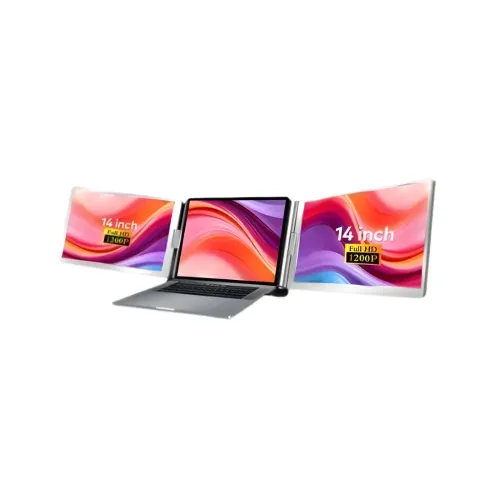
FOPO 14-inch Tri Screen overview
The FOPO 14-inch Tri Screen is a laptop display extender intended to add side panels to a compatible laptop. In the product image, the laptop’s own display sits between two attached external panels, creating a three-screen arrangement when the host laptop screen is included. Star Tech identifies the exact product as “FOPO 14-inch Tri Screen” and lists 14-inch IPS panels, 60Hz refresh, matte finish and a 16:10 aspect ratio. It also lists Windows, Android, Chromebook, Surface and Linux compatibility, while noting laptop-size fit from 12 to 16.5 inches.
This listing has not been matched to a published FOPO manufacturer specification page. Its exact-model source is the Star Tech product listing, and the technical claims below are identified accordingly. One notable discrepancy must be checked before buying: Star Tech’s table says 1920 × 1200 while the product image labels the panels “1080P.” Because the source page disagrees with its own image, this catalog review preserves the table value with a clear confirmation note instead of silently treating the resolution as settled.
Three-screen laptop workspace
The product is designed to place a side display on each side of a laptop, using the laptop’s built-in panel as the centre screen. That can keep reference material, messaging, spreadsheets or supporting windows visible while the main application remains on the laptop. It is a portable alternative to carrying two separate desktop monitors, although the attached displays still add bulk and setup time. Check the product photos and installation instructions to understand how the extender attaches to the host device.
The number of screens that can be active at once depends on both the extender and the laptop. A laptop may limit simultaneous displays through its GPU, operating system, USB-C controller, dock or driver. A connector-shaped USB-C port does not automatically support video output. Before purchase, check the exact laptop model’s display-output specifications and ask the seller which connection arrangement is required to run both side panels together with the laptop display.
14-inch IPS panels and resolution discrepancy
Star Tech lists the display size as 14 inches, panel type as IPS, resolution as FHD (1920 × 1200), aspect ratio as 16:10, refresh rate as 60Hz, contrast as 1000:1 and viewing angle as 178 degrees. It also lists a matte surface. If the 1920 × 1200 table entry is accurate, that is a 16:10 WUXGA pixel mode rather than the usual 16:9 1920 × 1080 mode. This distinction changes vertical pixel count and aspect ratio.
The product image’s “1080P” badge conflicts with the 1920 × 1200 specification table, so neither claim should be treated as fully resolved solely from that page. This review keeps the table value visible as a seller-listed specification and explicitly calls out the inconsistency in the description, FAQ and feature list. Ask Star Tech to confirm the native pixel matrix for both side screens and the input modes accepted by the extender before placing an order.
Laptop size and physical fit
Star Tech lists compatible laptop sizes from 12 to 16.5 inches. That range refers to the supported laptop fit claimed on the product page; it does not guarantee that every laptop with a matching diagonal will attach correctly. Bezel thickness, lid shape, hinge position, camera placement, ventilation, keyboard deck shape and screen thickness can all affect fit. Compare the host laptop’s physical dimensions and hinge layout with the product diagrams rather than relying on screen diagonal alone.
The catalog’s seller-listed device dimensions are 1.55 × 13.62 × 8.62 inches and its listed weight is 3.52 pounds. The source does not clearly state whether these measurements describe the folded accessory, an operating configuration or packaging. Treat them as seller-reported physical values and confirm the folded carry size, weight and storage case details before planning a mobile setup. The assembled accessory needs additional desk width on both sides of the laptop.
Host connections, cables and power
The exact-model specification lists HDMI, Type-C and USB. Its connectivity rows say one HDMI, four USB ports in total and one Type-C connection. However, the source does not explain clearly which ports carry video, which are used for power or data, whether both side screens need separate cables, or whether a special driver or adapter is required. The connector list alone is not enough to confirm a one-cable setup.
Ask the seller for the model-specific connection diagram, included cables, required host ports and power arrangement. For USB-C, confirm that the laptop port supports video output and that it can provide the required bandwidth or power. For HDMI, confirm which host output feeds which panel and whether the USB connection is still required. Avoid assuming every USB or Type-C port has the same function.
Operating-system and laptop compatibility
Star Tech lists compatibility with Windows, Android, Chromebook, Surface and Linux. These are broad platform labels; actual operation may depend on device support, graphics hardware, USB-C display output, drivers and the number of external screens the host can drive. The exact-model listing does not list macOS in its compatibility field. A separate Tech Land listing for a generic FOPO triple-screen product mentions Mac, but that page has a different product identity and conflicting display and warranty details, so its compatibility claim is not applied to this SKU.
If you use a Mac, Linux laptop, tablet, Chromebook or Android device, confirm support for the exact host model and operating-system version with the seller before ordering. Ask whether both attached screens work simultaneously, whether the laptop display remains active, and whether extra software is necessary. Compatibility should be proven against the computer’s video outputs and graphics capability, not inferred from the presence of an HDMI or USB-C connector.
Panel surface and viewing comfort
The seller lists a matte display surface and a 178-degree viewing angle. A matte finish can reduce the visibility of some reflections compared with a glossy surface, but room lighting still affects what you see. The viewing-angle number is a specification range; it does not mean the image has identical brightness, contrast and colour from every seating position. Position the side panels to face the viewer and keep strong lamps or windows from reflecting directly across them.
Each screen is listed at 60Hz, so this product is intended as an additional work display rather than a high-refresh gaming monitor. A 1000:1 contrast ratio is also listed. The Star Tech source does not provide measured colour coverage, brightness, response time or factory calibration values for this exact model. Do not infer those characteristics from “IPS” or the marketing badge alone. For colour-critical editing, verify measurements and calibration data before relying on the panels.
Side-panel adjustment and handling
Star Tech’s exact product description claims that the left screen rotates from 0 to 245 degrees with a 360-degree flip and that the right screen rotates from 0 to 205 degrees. Those ranges are retailer-described movement features. The product photos show a folding side-panel arrangement, but the movement range should be confirmed in the current manual before forcing a hinge beyond a normal stop. Use both hands when opening or closing the panels and support the laptop to avoid putting strain on its lid.
The listing does not provide a detailed hinge diagram, durability rating or safe angle sequence. Confirm how the screens attach, which direction each panel folds, whether the stated angles refer to rotation or viewing position, and whether any travel lock is used. Store the unit folded as described by the seller and protect the display surfaces during transport. A hinge feature does not imply that the laptop lid can support every force or that the panels should be carried while open.
Resolution, scaling and application layout
If the seller confirms a 1920 × 1200 native mode, the 16:10 panels can provide additional vertical workspace for documents and browser pages. If “1080P” instead describes the true panel matrix, the side displays would have a different pixel count and aspect ratio. Confirm which value is correct before choosing operating-system scaling or comparing sharpness with the laptop’s own screen. Different pixel densities may make text and interface elements appear at different sizes across the three displays.
Applications may open on a side screen at a scale that does not match the laptop panel. Operating-system display settings can usually arrange screens, set their relative positions and adjust scaling, but available controls differ by platform. Check whether the side panels support extended desktop mode or only duplicate/mirror mode on your laptop. The retailer page describes a tri-screen setup, but individual operating-system behaviour and display arrangement depend on the host configuration.
Use cases and practical limits
The three-screen arrangement can help with work that benefits from keeping several windows visible, such as writing with reference material, spreadsheets beside dashboards, communication tools beside documents, or coding with a preview window. The foldable form may suit people who move between a home desk and office. It can also support presentations or study when the laptop and accessory can be positioned securely. These are practical use examples rather than guarantees that every app or computer will support every panel at once.
This accessory may be less suitable for a compact desk, frequent travel where weight is critical, games that expect a single wide display, or a laptop with limited external-display support. A single portable monitor may be easier to pack and configure. Compare the assembled width, cable count, setup time and display compatibility against your needs. Before buying, test the exact host laptop’s display outputs or request written confirmation from the seller.
Price, stock and warranty in Bangladesh
On 6 November 2026, Star Tech showed the exact FOPO 14-inch Tri Screen listing in stock at ৳63,000 cash-discount price and ৳69,000 regular price. This is one checked seller snapshot, not a broad market average and not a current BiponiBD offer. The catalog variant MSRP of ৳63,000 is retained. Price and availability may change with stock, payment method, delivery location or seller updates.
Star Tech lists a two-year warranty for this exact listing, matching the existing catalog warranty. Before purchase, confirm who provides service, where claims are handled, what proof of purchase is needed, whether both panels are covered, and the return or replacement conditions. A separate Tech Land FOPO page shows a one-year warranty and different technical details for a different model; it is not used to change the warranty on this product.
Listing identity and purchase checklist
This product is identified as the FOPO 14-inch Tri Screen portable laptop monitor. The listing is active in the Monitors category, with the existing slug and SKU preserved. The Brand field will be changed from generic Others to the active FOPO brand, and the model and MPN will be normalized to “14-inch Tri Screen” because the exact Star Tech listing does not publish a more specific model code. No unsupported serial model is invented.
Before ordering, confirm the resolution conflict between the 1920 × 1200 table and 1080P image, the physical laptop fit, simultaneous host display support, every port’s purpose, required cables and power, OS compatibility, fold/rotation instructions, current price and stock, and two-year warranty terms. The market source below links directly to the exact-model seller page so that buyers can check the latest listing details.