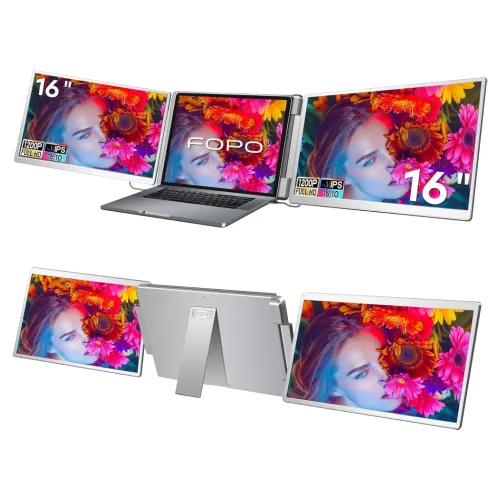
FOPO S788 16-inch tri-screen laptop extender adds three 1920 × 1200 IPS displays with 100% sRGB, 60Hz and a foldable frame. Check FOPO tri-screen monitor price in Bangladesh, laptop compatibility, cables, setup, warranty and full specifications on BiponiBD.
Product identity and how the S788 works
The FOPO S788 is a portable triple-screen laptop extender. It adds three 16-inch displays around a compatible laptop so a user can keep more windows visible at the same time. The host laptop remains the computer that runs applications and provides the display outputs; the extender is not a standalone computer and does not include a laptop. The product uses a folding frame that supports an expanded work position and a packed position for transport. FOPO’s manufacturer page calls it the S788, while the local retailer title describes it as a 16-inch tri-screen portable monitor. These names refer to the same family of device; the model identifier should be checked on the box and invoice.
Three displays, one laptop workspace
The S788 supplies three external panels. Together with the laptop’s built-in display, the complete setup can show four screens. This arrangement can keep a document, reference, communication app and main work window visible without repeatedly switching among windows. The use case is most valuable for tasks that benefit from persistent side-by-side information, such as research, dashboards, spreadsheets, planning, coding or reviewing creative assets. More screens do not automatically make a workflow faster: the laptop must support the display outputs, the desk must fit the panels, and the user still needs to organize windows clearly. Promotional workspace images are examples of layouts; the screen content is illustrative and the laptop is not included.
Resolution and 16:10 work area
Each FOPO S788 extension screen is specified at 1920 × 1200 resolution with a 16:10 aspect ratio. At the same horizontal resolution as 1920 × 1080, 1200 vertical pixels provide 120 more rows of image data, about eleven percent more vertical pixels than 1080p. The additional height can show more spreadsheet rows, code lines, document text or timeline content before scrolling. It is not 4K resolution; it is a Full HD-class wide format with a taller image. Set scaling and text size for the actual viewing distance, and arrange the panels so the user does not need to twist the neck repeatedly to see important information.
IPS panel, brightness and colour
FOPO lists IPS panels with 300-nit brightness, 1000:1 contrast and 100% sRGB colour coverage. IPS is commonly used for broad viewing angles and consistent image presentation across a desktop. The manufacturer’s product details specify 100% sRGB; this should be read as the claimed coverage of the sRGB colour space, not as proof of calibration accuracy for every unit or every colour workflow. The rating is useful for ordinary office, web and general creative tasks, but colour-critical production should verify calibration, uniformity and workflow requirements. Screen settings, laptop output profiles, ambient light and viewing angle can affect the image. The panels have independent brightness controls so the user can align them with the room and each other.
Refresh rate and everyday performance
FOPO lists 60Hz refresh for the S788 displays. This rate supports ordinary desktop work, browsing, communication, dashboards, video and document editing. It is not a high-refresh specification for competitive gaming. The product’s purpose is to add workspace around a laptop rather than to maximize gaming frame rates. The final experience depends on the laptop’s graphics hardware, operating system, driver support, cable routing and the number of external displays the host can drive. If a panel does not activate, follow the manufacturer’s troubleshooting guide, confirm the connection method and check the operating system’s display settings. A USB-C port may support charging only, video only or both depending on the exact computer; verify the model-specific capabilities before ordering.
Laptop compatibility and setup
FOPO recommends checking the specific laptop model, operating system and available ports before purchase. A connector that physically fits does not necessarily carry the video signal or enough power. The S788 manufacturer page includes guided setup for Windows and macOS and directs users to follow the supplied guide and driver instructions. The local retailer listing names Windows, Android, Chromebook, Surface and Linux, but the exact support path can differ by device and configuration. Send the laptop’s exact model number to FOPO support if there is any doubt. After connecting, install the required driver from the supplied USB drive when instructed, then use the computer’s display settings to extend or arrange each panel. Confirm that the selected mode is extended desktop, not mirrored, if the goal is independent workspaces.
Ports, cables and power
The manufacturer’s S788 packing list names a dual USB-A-to-USB-C cable for video and power, one USB-C-to-USB-C cable for power, another USB-C-to-USB-C cable for video and power, and a 30W PD adapter. It also lists a driver USB drive, quick guide and user manual. Star Tech’s product page summarizes the monitor connections as HDMI, Type-C and USB and lists up to four USB ports. The exact cable path depends on the laptop’s ports and the chosen setup, so follow the S788 diagram rather than assuming one cable works with every host. Keep power adapters accessible and avoid disconnecting cables while the driver is initializing. The monitor draws power from the host and supplied adapter as required by the connection mode.
Foldable design, rotation and handling
The S788 uses an aluminum-alloy frame and folds for storage in its carry bag. The display arrangement allows the side panels to rotate outward, and the top panel also has an adjustable range according to FOPO’s diagrams. Star Tech describes a left-screen 0–245-degree rotation with a 360-degree flip design and an auto-sensing screen, plus a right-screen 0–205-degree parallel rotation. These angles describe the panel mechanisms and should not be confused with an unlimited rotation or permission to force a hinge. Use both hands, support the panel and follow the manual when opening or folding. Check that the desk, keyboard, laptop stand and cables leave enough room for the full expanded configuration.
Desk size, viewing position and ergonomics
Three 16-inch extension panels take significantly more width and depth than a single portable monitor. Measure the desk and the laptop placement before buying, including room for a keyboard, mouse and power adapter. Position the center laptop display in front of the user and keep frequently viewed panels near the natural field of vision. A wider arrangement can make the user turn the head frequently if the side screens sit too far away. Adjust panel angles to reduce reflections, align brightness across the screens and use the laptop’s accessibility scaling or zoom controls for readable text. FOPO’s promotional workspace photos illustrate possible arrangements, not required setup geometry. The best angle depends on desk depth, chair position and the user’s work pattern.
Independent brightness controls
FOPO describes six brightness controls that allow the extension displays to be adjusted individually. Separate controls are useful because ambient light, panel angle and viewing distance can differ across the left, right and upper screens. Start with a moderate brightness and adjust the panels until white backgrounds look similar without causing glare. The laptop screen may have a different brightness scale or colour temperature, so exact matching is not guaranteed. These controls adjust the display output and do not replace software calibration. If the displays are used for colour-sensitive editing, validate the image on the intended production screen and use a consistent, colour-managed workflow. Comfortable settings are personal and should be adjusted to the room and task.
Package contents and laptop exclusion
The S788 product page lists the extender, FOPO packaging, carry bag, three cable types, 30W power adapter, driver USB, quick guide and user manual. The laptop displayed in product photography is explicitly marked as not included. Promotional free gifts or seasonal bonuses may vary and should be treated separately from the standard product kit. Confirm the actual package contents with the Bangladesh retailer before ordering, especially if the setup requires a particular video cable or USB-C power configuration. Keep the serial number, invoice, manual and packaging until the return period and warranty process are clear. Store the unit folded in the carry bag and protect the panels from pressure, impact and loose objects during transport.
Bangladesh price and warranty
On 6 November 2026, Star Tech’s direct exact-model page showed the FOPO 16-inch Tri-Screen Portable Monitor In Stock at ৳78,000 cash/online, with a regular price of ৳85,500. The catalog MSRP is already ৳78,000 and is preserved. Prices, stock, EMI terms and delivery charges can change; the final order total is determined at checkout. Star Tech’s page stated a two-year warranty, matching the existing catalog record. This does not independently identify the local service provider or define coverage, exclusions or claim procedure. Ask the seller to confirm who handles service and whether the invoice, product box or original accessories are required. A price snapshot is not a standing offer or a guarantee of stock.
Who may benefit from three extension screens
This product may suit a mobile professional who routinely works across several reference windows and wants them available while travelling between desks. Analysts, project coordinators, programmers, customer-support staff and researchers may value a dedicated screen for communication or monitoring alongside their main work. Students and presenters may also find a wider workspace useful if their laptop and software support it. Buyers who only need one extra display may prefer a lighter single portable monitor. People seeking 4K, high refresh, touchscreen input, battery operation or a self-contained display should compare those requirements separately; the S788 is a three-panel laptop extender. Confirm host compatibility and physical desk space before deciding.
Limitations and buying checklist
Before purchase, verify the laptop model, supported operating system, video-output capability, available USB-C or HDMI ports and the required driver path. Check the total number of external displays the laptop can run; some systems limit output count or resolution even when several ports are present. Measure the expanded width and desk depth and consider where the laptop sits within the arrangement. Confirm that the panel resolution, 60Hz rate, 100% sRGB claim and 300-nit brightness meet the intended tasks. Ask the retailer to confirm the standard box contents, local two-year warranty provider, return terms and checkout total. Treat manufacturer marketing examples as illustrations; exact compatibility and support should be verified for the chosen computer before ordering.
Care and troubleshooting
Use the supplied case when transporting the folded unit and avoid placing pressure on the screens. Clean the panel surface with a soft appropriate cloth and follow the user guide. If a screen shows no signal, verify the cable path, laptop video-output capability, power connection, driver installation and the computer’s display arrangement. Restarting the host may help after a driver install, but follow the vendor’s current instructions first. If the image flickers, test the supplied cable and power adapter, reduce unsupported resolution or refresh settings and contact FOPO support with the exact laptop model and a description of the setup. Avoid forcing hinge movement or using unapproved adapters. Retain the product serial and purchase invoice for retailer support.
Features
- FOPO S788 laptop extender with three external 16-inch IPS displays; laptop is not included.
- Each external display has 1920 × 1200 resolution, a 16:10 aspect ratio, 60Hz refresh rate and 100% sRGB coverage per manufacturer.
- FOPO product details list 300-nit brightness and 1000:1 contrast for the S788 displays.
- Foldable aluminum-alloy frame and carry bag support transport between compatible workspaces.
- Side screens and top screen have independent rotation ranges; use the model guide to position panels safely.
- Six brightness controls allow the three external displays to be adjusted independently.
- Connections include USB-A-to-USB-C and USB-C cables; manufacturer lists a 30W PD adapter and driver USB drive in the kit.
- Manufacturer provides guided driver setup and compatibility checks for Windows and macOS; verify exact laptop ports and system support first.
Pros
- Three 16-inch 1920 × 1200 IPS extension panels can keep several applications visible beside a laptop display.
- The 16:10 format provides 120 more vertical pixels than 1920 × 1080 on each panel, per manufacturer comparison.
- 100% sRGB, 300-nit brightness, 1000:1 contrast and 60Hz are specified for the extension displays.
- Foldable metal construction, carry bag and included cables/adaptor support a portable desk setup.
- The side and top panels can be rotated and adjusted for different multi-screen arrangements.
- Star Tech’s exact-model page showed ৳78,000 and In Stock on 6 November 2026.
Cons
- The complete setup is substantially larger and heavier than a single portable monitor; measure desk width and laptop placement before purchase.
- The three extension displays rely on compatible laptop video outputs, cabling, power and driver setup; connector shape alone does not guarantee support.
- FOPO says the laptop is not included, so the host computer and its required ports must be supplied separately.
- Each panel is 60Hz; this product focuses on productivity workspace rather than high-refresh gaming.
- The three displays are 16-inch 1920 × 1200 panels, not 4K or independent high-resolution external monitors.
- Local warranty details are based on the Star Tech listing; confirm the service provider and exclusions before checkout.
Frequently asked questions
What is the FOPO 16-inch tri-screen monitor price in Bangladesh?
Star Tech displayed ৳78,000 cash/online, ৳85,500 regular price and In Stock on 6 November 2026. Check the current checkout amount and stock before ordering.
What is the exact model?
The manufacturer product page identifies the 16-inch triple-screen laptop extender as FOPO S788. Star Tech lists it as FOPO 16-inch Tri-Screen Portable Monitor.
How many displays are included?
The S788 includes three external extension displays. Combined with a compatible laptop’s built-in screen, the setup can show four screens. The laptop itself is not included.
What are the specifications of each screen?
FOPO lists three 16-inch IPS displays, each with 1920 × 1200 resolution, 16:10 aspect ratio, 60Hz refresh, 300-nit brightness, 1000:1 contrast and 100% sRGB coverage.
Will it work with my laptop?
Compatibility depends on the exact laptop model, operating system, video-output ports, available bandwidth, power and driver setup. FOPO recommends checking the specific laptop and contacting support with its model before purchase.
Does it need a driver?
FOPO’s S788 setup section instructs users to install drivers from the included USB drive and then arrange displays in the computer’s display settings. Follow the current Quick Guide for the host operating system.
What connections and cables are included?
The manufacturer packing list includes a dual USB-A-to-USB-C video-and-power cable, USB-C-to-USB-C power cable, USB-C-to-USB-C video-and-power cable and a 30W PD adapter. Star Tech lists HDMI, Type-C and USB ports; check the S788 guide for the correct cable path.
Can the side screens rotate?
The manufacturer describes adjustable rotation for the side and top panels and shows rotation diagrams. Star Tech lists the left screen rotation and flip design and a separate right-screen rotation range. Follow the S788 manual to avoid stressing hinges or cables.
Can I adjust each screen brightness?
Yes. FOPO shows six brightness controls and says the extension displays can be adjusted individually. Use the physical controls and match brightness to the room.
What operating systems are supported?
The manufacturer provides Windows and macOS driver/setup guidance. Star Tech’s listing also names Windows, Android, Chromebook, Surface and Linux compatibility. Exact support still depends on the source model, ports and required display-driver path.
Is the laptop included in the package?
No. FOPO states that the laptop shown in promotional workspace images is not included. The product package contains the S788 extender, carry bag, cables, 30W adapter, driver USB and setup documentation.
What warranty is available locally?
Star Tech displayed two years of warranty on its product page on 6 November 2026. Confirm the local service provider, claim steps, coverage and required invoice with the seller.