GEESUU BlazeWheel MG270L2Q 27-inch QHD Gaming Monitor — Buyer Guide
Exact GEESUU BlazeWheel model and series
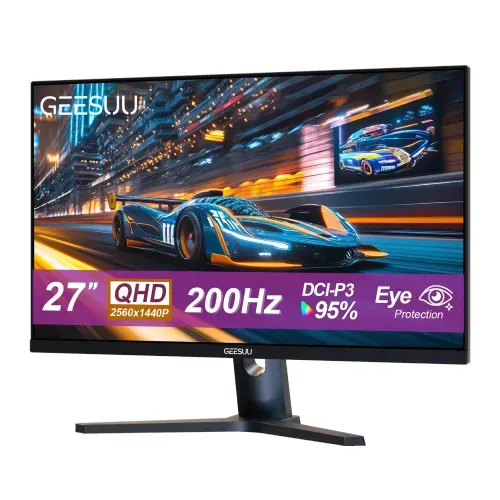
The GEESUU BlazeWheel MG270L2Q is a flat 27-inch gaming monitor. GEESUU’s own product page lists this model family with QHD 1440p resolution, IPS technology, a 200Hz refresh rate, a 1ms response claim, 95% DCI-P3 coverage, eye-care functions, HDMI 2.1 and DisplayPort 1.4. Bangladesh retailers identify the model as BlazeWheel MG270L2Q and GEESUU. Those exact identifiers matter: GEESUU also sells Bafang, CloudWing and LiuHe products, and the BlazeWheel name is used on other sizes and resolutions. Check MG270L2Q on the carton, invoice and warranty documents so the listing is not confused with a Full HD sibling or a different series.
27-inch QHD IPS panel and pixel density
Its 27-inch diagonal and 2560 × 1440 pixel resolution provide a 16:9 QHD workspace. The manufacturer’s product imagery calls out 27 inches and 2560 × 1440p, while local retailer specification tables repeat those figures. At this size the pixel density is about 109 pixels per inch, a useful balance between desktop text size and detail for games, editing timelines, spreadsheets and several side-by-side windows. The listed panel is IPS with LED backlighting, a flat shape and an anti-glare surface. GEESUU and local listings identify the panel technology, but do not disclose the LCD panel supplier or a calibration certificate.
200Hz refresh and 1ms response claims
GEESUU advertises up to 200Hz. A high refresh rate can show more frequent frames when the computer or console can render them, but the final refresh depends on the source, cable, resolution and selected input mode. The available product materials do not clearly confirm that 200Hz QHD is supported on both HDMI 2.1 sockets and both DisplayPort 1.4 sockets. Use the included DisplayPort 1.4 cable for a PC setup intended to run 2560 × 1440 at 200Hz, then verify the mode in the graphics driver and monitor menu. Do not assume every console reaches 200Hz: the console’s output limits still apply.
Color, contrast, brightness and HDR caveats
The manufacturer and Bangladesh listings quote a 1ms response time, but the public GEESUU page does not specify whether this means MPRT, a particular overdrive setting, or a GtG measurement. One local store labels 1ms as MPRT. Treat it as a manufacturer-rated 1ms claim, not a directly comparable GtG measurement unless the seller can provide the exact method. GEESUU lists 1200:1 typical contrast and 95% DCI-P3 color coverage. Local retailers additionally report 350 cd/m² typical brightness; that brightness figure is not present in the reviewed official product page or the six catalog images, so it should be labeled retailer-reported. No factory Delta E report was found.
Adaptive Sync and eye comfort
GEESUU markets Adaptive Sync and eye-care features, including anti-flicker, low-blue-light and anti-glare functions. Adaptive Sync can vary refresh to reduce tearing within a supported range, but GEESUU does not publish the minimum and maximum variable-refresh range in the reviewed materials. The display should not be described as NVIDIA G-SYNC certified based on the available evidence. A product listing includes HDR support, and product artwork promotes highlight and shadow enhancement; no VESA DisplayHDR certification, peak HDR brightness specification or local-dimming zone count was verified. Describe this carefully as HDR signal/tone-mapping support only where a retailer confirms it, not certified HDR performance.
HDMI and DisplayPort connections
For connecting a desktop PC, the listed inputs are two HDMI 2.1 ports and two DisplayPort 1.4 ports, plus one 3.5mm audio-out jack. The exact port labels are visible in catalog image six, and the official product title names HDMI 2.1 and DP 1.4. GEESUU says the product includes a 1.5m DP 1.4 cable. That is useful for a compatible graphics card and can avoid buying a separate DisplayPort cable for a standard desktop installation. The audio jack is an output for headphones or external speakers; the reviewed official page says the monitor has no built-in speakers. A PC’s GPU output and cable must support the desired QHD refresh mode.
Picture-in-picture and picture-by-picture
The second image advertises dual-input design and a one-button PIP/PBP toggle. Picture-in-picture and picture-by-picture can display signals from two connected sources at once, which may help compare content or keep a second source visible. Exact layout options, supported combinations, audio selection and resolution limits were not fully documented in the materials reviewed. Keep the feature at the level visible in the product artwork unless a manual confirms the detailed modes. HDMI and DisplayPort connections carry digital video and audio; for sound, select the monitor’s audio output in the source device and attach headphones or powered speakers. Do not promise built-in audio.
Stand, ergonomics and mounting
The supplied stand is shown with a tilt range of −5° to +15°, and Bangladesh listings repeat that range. The product images show a fixed-height desktop stand and no height, swivel or pivot mechanism. GEESUU’s official product title explicitly says “No VESA,” and retailer specification tables list VESA mounting as unavailable. This is therefore a stand-on-desk monitor rather than a VESA-arm model. Check the desk depth and viewing height before purchase; a separate monitor riser may be needed for ergonomic positioning. The back image also shows a centered stand column and a circular rear vent or design detail. Do not mistake that visible rear feature for a mounting interface.
Controls, power and included accessories
The image set shows a five-button rear control layout, and image two describes a one-button PIP/PBP toggle. The visible port strip identifies a DC power input, two HDMI 2.1 sockets, two DisplayPort 1.4 sockets and an audio output. GEESUU’s official product page lists a monitor, stand, base, 1.5m DP 1.4 cable and power adapter as box contents. The monitor uses external DC power; the page does not specify the adapter’s voltage or wattage in the reviewed content. Confirm that the adapter is present, has the correct rating and matches the local package before use. No built-in speakers are included, so plan for headphones or separate speakers if audio is needed.
Who should consider this display
This monitor is aimed at desktop users who want a larger QHD workspace and smoother motion than a conventional 60Hz display. The 27-inch IPS panel, claimed 200Hz maximum, 95% DCI-P3 gamut and multi-input arrangement can suit PC gaming, general productivity and media. The color-gamut claim describes coverage, not calibration accuracy; creators who need color-managed work should request measurement data or calibrate the display. The fixed-height stand and lack of VESA mounting limit placement choices. HDR should not be treated as a certified high-dynamic-range experience based on the evidence found. Before choosing it for a console, check the console’s supported QHD/refresh combinations.
Bangladesh price and warranty
Bangladesh retailer listings observed during this audit differ by seller and promotion. Star Tech displayed ৳20,900 as an offer price against a ৳23,200 crossed price; TechLand showed ৳21,200; one local retailer listing in the earlier search showed ৳23,200. Stock and discounts can change quickly. The existing BiponiBD variant price is ৳23,200 and is preserved as requested; review it against current stock and seller policy before changing commercial pricing. Multiple local retailer listings advertise a three-year warranty, but the reviewed GEESUU product page does not establish the Bangladeshi service provider. Ask the seller to confirm warranty provider, claim location, invoice requirements and exclusions in writing.
Before you place an order
Before ordering, confirm the precise MG270L2Q model code, current price, stock, included DP cable and power adapter, and the local warranty terms. Ask which input supports 2560 × 1440 at 200Hz and what cable or graphics output is required. Verify that no VESA mount or speakers are expected, and make sure the fixed-height stand suits the desk. If brightness is a deciding factor, request confirmation because 350 nits is reported by a retailer, not by the manufacturer material reviewed. If HDR, response time or VRR certification is essential, request the official manual or datasheet for that exact model rather than relying on generic seller wording. These checks make the product comparison more useful without overstating unverified details.