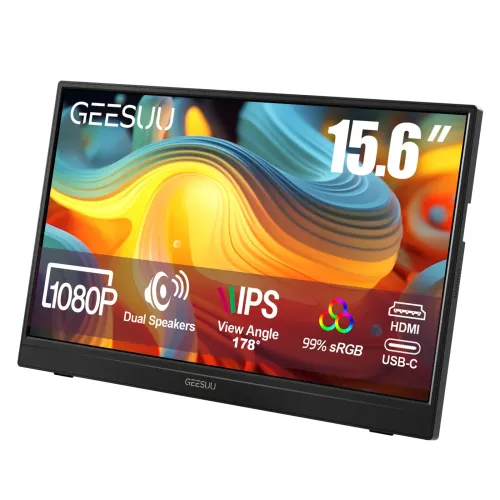
Portable second-screen overview
The GEESUU LiuHe M156L1F is a compact 15.6-inch portable monitor intended to add a second screen to a laptop, phone, handheld console or other compatible source. GEESUU publishes an official M156L1F user manual and a product page for the LiuHe portable monitor. Bangladesh retailers identify the same M156L1F model and describe it as Full HD IPS at 60Hz. At 15.6 inches, the display is easy to position beside a laptop or pack for temporary work and travel. The product is an external display, so it does not replace the host device or provide its own computing platform. Compatibility depends on the host’s video output, cable, power delivery and chosen input.
Display size, resolution and image
The panel measures 15.6 inches diagonally and uses a 1920 × 1080 Full HD resolution in a 16:9 format, according to GEESUU and its local exact-model resellers. Bangladesh listings identify an IPS panel and a 178-degree viewing angle. GEESUU’s product page also lists typical contrast at 1200:1. These characteristics make the monitor suitable as a general-purpose second screen for documents, browser windows, video and casual gaming. The official manual does not provide a complete panel datasheet with every brightness, color-gamut or pixel-response measurement. Avoid treating seller promotional artwork such as 99% sRGB or HDR as a calibrated guarantee unless the exact official specification confirms the measurement method and model configuration.
Refresh rate and gaming expectations
Local Bangladesh listings identify the M156L1F as a 60Hz monitor. The GEESUU manual covers input and OSD operation but does not include a model-specific resolution-frequency table. A 60Hz portable screen can extend a desktop or display casual gameplay, but it is not a high-refresh competitive gaming panel. A compatible host, cable and source must all send the selected video mode. Mini HDMI carries audio and video. The manual also describes a full-function USB-C signal connection. If the host’s USB-C connector lacks DisplayPort Alt Mode or another supported video-output feature, plugging in a cable alone may not create a picture. Check the laptop or phone specifications before assuming USB-C display compatibility.
USB-C roles and connection setup
The M156L1F has two USB-C connectors, but the manual describes different functions rather than promising that both carry video. One is a full-function Type-C port for a one-cable audio/video connection. Another is a USB-C power input that supports PD 2.0 and several voltage profiles. The user manual advises connecting power before the signal cable during troubleshooting. When using Mini HDMI, the monitor may need separate USB-C power while HDMI carries the picture. When using USB-C video, the host must support video over that port and provide sufficient output. Consult the port labels, host manual and included cable markings. A data-only USB-C lead should not be assumed to support video.
Mini HDMI and audio connection
The manufacturer manual states that the Mini HDMI port transmits both audio and video. A laptop, console or other HDMI source can use a standard-to-Mini-HDMI cable if the host offers HDMI output. GEESUU lists an HDMI cable among possible package contents, but the manual explicitly notes that the box contents can vary by model. The monitor includes an audio interface, and product specifications commonly describe an audio output. However, the same GEESUU manual says external headphones or speakers may be required for sound playback, which conflicts with the product page’s built-in-speaker claim. Buyers who need audio without headphones should ask the seller to demonstrate the exact unit and document the feature on the invoice.
Speaker claim and manual conflict
GEESUU’s official product page advertises built-in speakers, and the supplied gallery imagery also depicts dual-speaker marketing and a speaker opening. The exact M156L1F user manual, however, says that for sound playback additional headphones or speakers may be required. The manual may include text shared across several models, while the product listing may describe a speaker-equipped version, but the available sources do not resolve the configuration definitively. For accurate catalog content, the speaker feature is marked as a manufacturer-source conflict rather than promised as certain. Confirm the physical unit, audio output and package with the Bangladesh seller before relying on the integrated speakers.
Power delivery and flicker troubleshooting
The manual identifies a Type-C power input compatible with PD 2.0 at 5V, 9V, 12V, 15V and 20V. It recommends using an 18W-or-higher adapter first if the screen flickers and the power supply may be insufficient. This portable display may draw power from a compatible host in some setups, but HDMI itself does not supply the monitor’s operating power. The required adapter and connection depend on the host, cable, brightness and operating mode. GEESUU instructs owners to use the supplied adapter and not to substitute accessories casually. The manual’s box list includes a Type-C power cable, but the power adapter can vary or may not be included in a particular regional package.
Kickstand and viewing orientation
The gallery shows a rear kickstand with a locking structure and an adjustable viewing position. GEESUU’s product page describes a 90-degree rotating and 45-degree tilt stand, while one product image illustrates an approximate 0-to-35-degree adjustment. That difference may reflect separate rotation and tilt measurements or a graphic inconsistency; the sources do not explain it clearly. Treat the exact usable range as unverified until checking the physical unit. The portrait/landscape claim means the stand can be positioned for different screen orientations, but software rotation may also be required on the connected computer or phone. The manual does not establish a standard VESA mounting pattern for this model, so do not assume it accepts a monitor arm.
Weight, portability and bundle
GEESUU marketing artwork states a weight of about 700g. Bangladesh retailer specification tables list 0.62kg. The sources do not say whether either number includes the stand, cables, protective sleeve or packaging, so the catalog records both measurements with their provenance. This remains a light display compared with a desktop monitor, though the complete travel kit will weigh more. The official manual’s possible box contents are the display, Type-C data cable, Type-C power cable, HDMI cable and printed manual; it says contents can vary by model. Verify whether the local seller supplies a protective case, adapter and the necessary cable for your computer before purchase.
Eye-comfort and on-screen settings
The GEESUU manual describes a Low Blue Light menu option when supported by the monitor. The on-screen menu may also include brightness, contrast, color temperature, input selection, volume and scenario modes, with a note that functions can differ by model or software version. These controls let an owner adjust the image for room lighting and content. A low-blue-light preset changes display output and should not be described as a medical guarantee. For comfortable use, place the screen at an appropriate distance, adjust its angle to reduce reflections and take breaks during long sessions. Use the actual model’s OSD menu to confirm which options are present.
Warranty and market price context
Bangladesh listings observed for the GEESUU LiuHe M156L1F show three-year warranty claims. The exact local service provider and conditions are not established by the international product page or English manual, so confirm who handles claims, what documents are required and whether the package must be retained. During the audit, local retail prices ranged roughly from ৳12,500 to ৳13,000 on the pages reviewed, with availability varying by shop. These are external market observations only and do not describe BiponiBD price or stock. The catalog’s existing variant MSRP and SKU are preserved. No barcode, GTIN or country of origin was added because the reviewed exact-model sources did not establish those identifiers for the Bangladesh unit.
Compatibility and buying checklist
Before ordering, identify the source device and choose the matching input. USB-C video requires a compatible host port; Mini HDMI is a separate video path and generally needs the monitor powered through USB-C. Confirm the intended orientation, kickstand behavior, accessory bundle, weight basis and speaker configuration with the seller. The model is rated 60Hz in local listings, so choose a faster portable display if high refresh is important. Confirm that the SKU and printed label identify M156L1F, not another GEESUU LiuHe model such as M156B3F. This exact model has an official downloadable manual, but port function and contents can still vary by regional configuration. Request a demonstration if a particular device, cable, speaker or stand function is essential.
Features
- 15.6-inch Full HD 1920 × 1080 IPS portable display, 16:9 format.
- 60Hz refresh rate reported by multiple Bangladesh exact-model sellers; GEESUU manual does not specify refresh timing.
- Mini HDMI input carries audio/video for devices with a compatible HDMI output.
- Two USB-C ports have different stated roles: one full-function audio/video port and one PD 2.0 power input.
- PD 2.0 input is documented at 5V, 9V, 12V, 15V or 20V; manual recommends an 18W-or-higher adapter if flicker occurs.
- GEESUU product listing claims a 1200:1 typical contrast ratio and 178-degree viewing angle.
- Official product page advertises built-in speakers; the manual contains a conflicting instruction requiring external audio.
- Built-in kickstand shown in gallery; official product copy claims 90° rotation and 45° tilt, while the gallery graphic shows roughly 0–35° tilt.
- GEESUU manual lists low-blue-light menu support subject to actual model support.
- Manual says box may contain monitor, Type-C data cable, Type-C power cable, HDMI cable and manual; contents may vary.
Pros
- Portable 15.6-inch Full HD IPS second-screen format.
- Mini HDMI plus USB-C display input options suit compatible laptops and mobile devices.
- Manual documents a full-function Type-C signal connection and a separate PD 2.0 power input.
- Integrated kickstand and portrait/landscape use are advertised; gallery shows an adjustable rear support.
- Manufacturer manual and product page are available for the exact M156L1F model.
Considerations
- 60Hz is a basic refresh rate; faster gaming panels provide smoother motion.
- One USB-C input’s video role depends on DP Alt Mode support on the host; not every USB-C port outputs video.
- Speaker claims conflict between the GEESUU product page and official manual; verify the unit before relying on sound.
- Kickstand rotation/tilt range and measured weight differ across official graphics and reseller listings.
- Portable monitor may require separate power depending on host-device output; cable and adapter compatibility should be checked.
FAQs
What is the exact model?
The exact model is GEESUU LiuHe M156L1F. GEESUU publishes a user manual specifically titled for model M156L1F. Regional plug and bundle identifiers may differ.
What size and resolution does it have?
GEESUU and Bangladesh product listings describe a 15.6-inch IPS panel with 1920 × 1080 Full HD resolution and a 16:9 aspect ratio.
What refresh rate does it support?
Bangladesh exact-model listings report 60Hz. The official user manual does not publish a detailed timing table, so confirm the supported refresh mode with the connected device and received unit.
How can I connect it to a laptop?
The manual identifies one Mini HDMI audio/video input and a full-function USB-C port for one-cable audio/video connection. USB-C video requires the host port to support DisplayPort Alt Mode or equivalent video output.
Are both USB-C ports for video?
No such claim is verified. The manual documents one full-function Type-C port for audio/video and a separate USB-C power input supporting PD 2.0. Check the port labels on the unit.
Does it have built-in speakers?
GEESUU’s product page advertises built-in speakers, but its M156L1F manual says additional headphones or speakers are needed for sound playback. Because these sources conflict, verify the exact unit or package with the seller.
What does the Mini HDMI port carry?
The GEESUU manual says the Mini HDMI port carries audio and video. You may need a standard HDMI-to-Mini-HDMI cable; GEESUU lists an HDMI cable among possible box contents, which can vary.
What power supply does it need?
The manual documents a USB-C power input compatible with PD 2.0 at 5V, 9V, 12V, 15V or 20V. It recommends trying an adapter rated 18W or higher if the image flickers.
How adjustable is the stand?
The official product page claims 90-degree rotation and 45-degree tilt, while the gallery graphic depicts roughly 0–35-degree kickstand adjustment. Confirm the movement range on the exact unit.
How much does the monitor weigh?
A GEESUU product graphic states 700g, while Bangladesh listings commonly report 0.62kg. Sources do not make clear whether cables, case or stand are included in each measurement.
What is included in the box?
The manual lists a display, Type-C data cable, Type-C power cable, HDMI cable and user manual, and explicitly says contents may vary by model. Confirm the local package with the seller.
What warranty is offered in Bangladesh?
Bangladesh seller listings show three years, but the local claim provider and terms should be confirmed on the seller invoice. Do not assume the international manufacturer terms are identical.