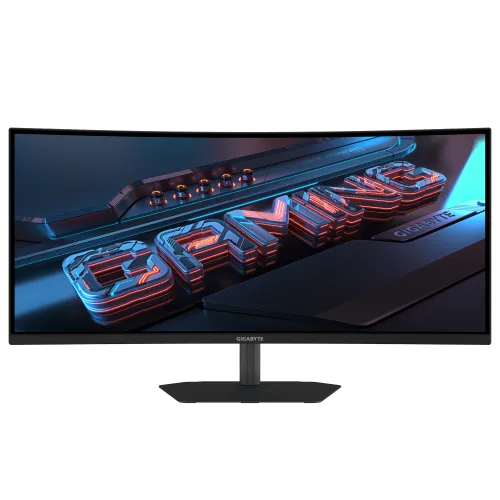
GIGABYTE G34WQC2 overview
The GIGABYTE G34WQC2 is a 34-inch ultrawide curved gaming monitor with a 21:9 aspect ratio, VA panel and native 3440 × 1440 WQHD resolution. GIGABYTE lists a 1500R curve, maximum 200Hz refresh rate, 1ms GTG response time and VESA DisplayHDR 400 certification. Its wide canvas is intended for PC games, editing timelines, multiple desktop windows and compatible video. The manufacturer lists 450 cd/m² typical brightness, 4000:1 typical contrast, 95% DCI-P3 / 125% sRGB colour saturation and 1.07 billion colours (8-bit + FRC). Connectivity includes two HDMI 2.0 inputs, two DisplayPort 1.4 inputs, an earphone jack and built-in 2W × 2 speakers. The stand provides 130mm height adjustment, tilt and ±15° swivel; the panel also supports 100 × 100mm VESA mounting. The catalog now uses the active GIGABYTE brand and exact model name G34WQC2. The previous model field included marketing text, and some third-party descriptions confuse this model with the older G34WQC. Existing slug, Active status, Monitors category, variant SKU, ৳53,500 MSRP and three-year catalog warranty are preserved.
Ultrawide WQHD screen
Native 3440 × 1440 resolution spreads across a 21:9 image area. Compared with a typical 16:9 screen, the wider format can show more of a game environment or more horizontal space in spreadsheets, browser windows and editing software. It can place two windows side by side depending on application layout and operating-system scaling. GIGABYTE specifies a 34-inch panel and 797.22 × 333.72mm active viewing area, with 0.23175mm pixel pitch and a non-glare surface. A 34-inch monitor needs sufficient desk width and viewing distance. Games and video services differ in ultrawide support; unsupported content may show black bars, crop or stretch according to player settings. WQHD gaming is demanding, so the graphics card must render the desired titles at a suitable frame rate. The display’s horizontal span can improve immersion and desktop workspace, while users sitting very close may prefer a smaller screen or greater viewing distance. The 1500R curve and chair position shape how evenly the wide image is viewed.
200Hz refresh and GTG response
GIGABYTE rates the G34WQC2 for up to 200Hz and 1ms grey-to-grey response time. A high refresh rate can make rapid camera movement, aiming and pointer movement look smoother when the computer supplies enough frames. It does not mean every game runs at 200 frames per second: performance depends on the graphics card, processor, game engine, resolution, graphics settings and software. The selected signal mode and connection matter too. The monitor provides two DisplayPort 1.4 inputs and two HDMI 2.0 ports, but the source device and cable must support the desired WQHD refresh mode. GIGABYTE specifies response time using GTG. Some Bangladesh seller text labels 1ms as MPRT; GTG and MPRT measure different behaviors, so this page follows the manufacturer’s stated GTG figure. Motion clarity depends on overdrive settings, frame rate, variable refresh and the scene. After connecting, check the graphics driver and operating-system display menu to select a supported refresh rate.
VA panel, curve and contrast
The G34WQC2 uses a 1500R curved VA panel. GIGABYTE lists a typical 4000:1 contrast ratio and 178° horizontal and vertical viewing angles. The VA contrast specification can help dark areas appear deeper than on many conventional IPS displays, while the ultrawide curve wraps the image toward the viewer. Actual contrast, uniformity and black level depend on the room, settings and panel. Viewing-angle ratings do not mean colours remain identical from every position. The non-glare screen can reduce some reflections but is not immune to bright lamps or windows. GIGABYTE lists 450 cd/m² typical brightness. The 1500R curve is a viewing preference; seating distance, desk depth and how directly the user faces the monitor affect comfort. Buyers should measure their setup and compare curved screens in person if they have not used one before. The 21:9 shape is especially useful when software or games can make use of the additional width.
HDR400 and colour range
GIGABYTE lists VESA DisplayHDR 400 certification, 450 cd/m² typical brightness, and 1.07 billion colours using 8-bit plus frame-rate control. The manufacturer also lists 95% DCI-P3 and 125% sRGB colour saturation. These colour-space percentages describe different reference spaces and should not be compared as a single scale. HDR results depend on the monitor, source, game or video, settings and room. DisplayHDR 400 identifies a tested capability, but it does not promise the same experience as a high-end local-dimming display or OLED panel. Users should enable HDR in the operating system or compatible content where appropriate, then check whether the image suits their preference. The gamut figures are not a guarantee of factory calibration or professional colour accuracy. Photographers and designers should verify calibration documentation and use an appropriate calibration workflow. Dark-scene appearance is also influenced by the VA panel, brightness setting and ambient lighting.
Ports, sound and variable refresh
The monitor has two HDMI 2.0 inputs, two DisplayPort 1.4 inputs and one earphone jack. Multiple video inputs can keep a gaming PC and additional sources connected at the same time. The available resolution, refresh rate, HDCP and variable-refresh mode depend on the source device, cable and selected port. GIGABYTE lists AMD FreeSync Premium support; the graphics card, driver, connection and frame-rate range must also be compatible for variable refresh behavior. Built-in stereo speakers are rated at 2W × 2, offering basic sound without separate speakers. Headphones or an external audio system can be used for a different listening experience. GIGABYTE also lists flicker-free, low blue light and HBR3. These features do not replace good room lighting or breaks during long sessions. If a particular port or cable is essential, verify the rear panel and in-box accessories with the Bangladesh seller. Source auto-detection and audio routing can vary by computer, console and operating-system settings.
Stand, mounting and workspace
The supplied stand supports 130mm height adjustment, tilt from −5° to +21° and ±15° swivel. Pivot is listed as unavailable, so the stand is not designed to turn the ultrawide panel into portrait orientation. GIGABYTE lists a 100 × 100mm VESA mounting pattern and a Kensington lock. A monitor arm or wall mount must support the unit’s weight and use the correct screws. The official dimensions are 808.0 × 534.6 × 220.0mm with the stand and 808.0 × 363.9 × 110.8mm without it, expressed width × height × depth. Estimated weight is 7.36kg with stand and 5.54kg without stand. Leave room for the rear curve, cables and ventilation. A 34-inch ultrawide can overhang small desks, so measure the surface before ordering. Screen height, chair position, viewing distance and window placement all influence comfort over long gaming or work sessions.
Power and box contents
GIGABYTE lists a built-in power board, AC 100–240V at 50/60Hz and 37W consumption, with test conditions following CEC standards. Power-saving mode is listed below 0.5W and off mode below 0.3W. Actual use changes with brightness, refresh setting, picture mode and content. Keep ventilation openings clear and use a grounded outlet. The manufacturer lists a power cable, DisplayPort cable, quick start guide and warranty card among the accessories. Package contents can vary by local distribution channel, so confirm the box contents with the seller. Inspect the display and stand on arrival, save the invoice and serial number, and follow the seller’s return process if shipping damage is present. Use a compatible cable for high-bandwidth modes. GIGABYTE notes that enabling OSD Sidekick through GCC requires a PC-to-monitor HDMI or DisplayPort connection.
Bangladesh price and warranty
Exact-model Bangladesh listings reviewed on 5 November 2026 showed ৳52,500 at Techland, ৳53,500 at PQS and ৳54,500 at Star Tech. Prices, promotions and stock can change, so this dated range is market context and is not a BiponiBD offer or price promise. The catalog variant MSRP of ৳53,500 remains unchanged. Seller pages list a three-year warranty, matching the existing catalog warranty field; confirm the actual warranty provider, service location, serial coverage, claim conditions, invoice and packaging requirement before buying. One retailer’s page includes outdated copy about the older G34WQC at 180Hz, even though its exact model title is G34WQC2. The exact-model manufacturer page is the specification source for this review. Ask the seller to confirm the model printed on the unit, current price, stock, delivery charge, return and dead-pixel policy, cable bundle and written warranty terms. A similar product title alone does not establish that it is the same model.
Who should consider it
The G34WQC2 may suit PC gamers and desktop users who want a wide 21:9 screen, WQHD detail and a high refresh rate. The 1500R VA panel, stated 4000:1 contrast and 450 cd/m² typical brightness shape its visual profile. Its horizontal canvas can help with game immersion, editing timelines and multiple windows. The size needs a wide desk and a reasonable viewing distance. A computer must have sufficient graphics performance to render 3440 × 1440 at the desired frame rate. The 200Hz rating is most relevant when the source and connection support that mode. Two HDMI and two DisplayPort inputs make it easier to leave several devices wired. Built-in 2W × 2 speakers are convenient, though audio enthusiasts may prefer a headset or external speakers. The included stand adjusts height, tilt and swivel but does not pivot. Users requiring portrait orientation should consider a compatible arm or a different display. HDR400 certification may help with HDR content, but buyers should match expectations to the product’s panel and stated brightness.
Setup checklist and summary
Before ordering, verify the model label G34WQC2, current BiponiBD offer, local stock, three-year warranty provider, return terms and box contents. Confirm the computer can drive 3440 × 1440 at the refresh rate you want and select a supported DisplayPort 1.4 or HDMI 2.0 mode. After connecting, set the desired resolution and refresh rate in the operating system and graphics driver, then configure FreeSync and HDR if supported by the source. If using an arm, check VESA 100 × 100mm and load capacity. Measure the desk for an 808mm-wide display and allow space for its curve and cables. GIGABYTE’s exact-model specifications identify the G34WQC2 as a 34-inch 1500R VA ultrawide with WQHD resolution, up to 200Hz, 1ms GTG, VESA DisplayHDR 400, four video inputs, built-in speakers and an adjustable stand. This exact-model documentation also distinguishes the product from older G34WQC listings that quote a different refresh rate.