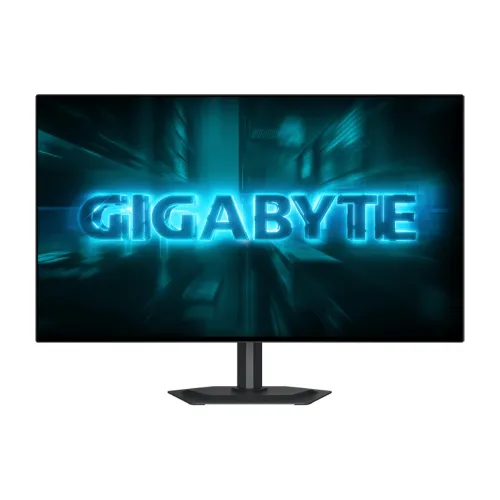
The GIGABYTE GO27Q24G is a 27-inch QHD gaming monitor built around a WOLED panel and a maximum 240Hz refresh rate. Its 2560 × 1440 resolution gives a dense desktop image with more detail than Full HD while remaining less demanding than 4K at the same frame rate. The 16:9 shape works with standard desktop interfaces, video and the large majority of games. WOLED pixels can produce very dark areas and strong contrast, which can make scenes with both shadows and highlights feel more dimensional. GIGABYTE lists a typical 1.5M:1 contrast ratio and VESA DisplayHDR True Black 400 certification. The 27-inch size can suit a normal gaming desk without occupying the width of an ultrawide display.
A 27-inch QHD OLED gaming display
The GIGABYTE GO27Q24G is a 27-inch QHD gaming monitor built around a WOLED panel and a maximum 240Hz refresh rate. Its 2560 × 1440 resolution gives a dense desktop image with more detail than Full HD while remaining less demanding than 4K at the same frame rate. The 16:9 shape works with standard desktop interfaces, video and the large majority of games. WOLED pixels can produce very dark areas and strong contrast, which can make scenes with both shadows and highlights feel more dimensional. GIGABYTE lists a typical 1.5M:1 contrast ratio and VESA DisplayHDR True Black 400 certification. The 27-inch size can suit a normal gaming desk without occupying the width of an ultrawide display.
A QHD image at 27 inches is a practical middle ground for players who want crisp interface text and a high frame-rate target. Windows scaling and game interface settings can be adjusted to suit eyesight and seating distance. The monitor has a flat panel rather than a curved screen. Its glossy anti-reflection surface retains a glossy appearance, so placement relative to windows and room lights still matters. A visible reflection can distract even when the coating reduces some reflected light. Before purchase, compare the stand footprint and monitor depth with the desk, and confirm that the chair position allows a comfortable viewing distance. The official dimensions are 604.4 × 526.5 × 187.5mm with the stand and 604.4 × 350.2 × 54.4mm without it.
240Hz motion and system requirements
The maximum 240Hz refresh capability means the display can present up to 240 refresh cycles per second when the chosen signal mode and source support it. Higher refresh can make cursor movement, camera pans and fast action appear smoother when a game delivers correspondingly high frame rates. GIGABYTE specifies a 0.03ms GTG response rating. Refresh rate and pixel transition time describe different aspects of the display: one describes update frequency, the other a measured pixel transition under a defined test. Neither number guarantees a particular game frame rate or complete system latency. Actual performance also depends on the graphics card, game engine, driver, settings and cable.
To target 2560 × 1440 at 240Hz, make sure the graphics output and selected monitor input support that combination. Use a suitable DisplayPort 1.4 or HDMI 2.1 connection, check the supported modes in the graphics driver, and select the desired refresh in system display settings. Some games may require frame-rate limits or graphics adjustments to keep motion consistent. A high refresh ceiling is useful only when the computer can generate enough frames for the player’s chosen experience. If the GPU delivers a lower rate, adaptive sync can help coordinate display updates with supported variable frame rates, but the user should check the current driver and monitor menu configuration. Read the manual for the correct port mode and avoid assuming every cable with the same connector shape has the same bandwidth.
WOLED, MLA+ and color
GIGABYTE describes the GO27Q24G as a WOLED monitor with Advanced Micro Lens Array+ technology. The specification sheet lists 10-bit display color supporting 1.07 billion colors and 99% DCI-P3 coverage. These figures indicate broad color capability and a high color depth mode, but they do not certify that every unit is calibrated for a particular professional workflow. Photo, video and design work that requires color matching should use color-managed applications and a calibration approach appropriate to the intended standard. The monitor includes a color calibration test report among the listed accessories, which can provide reference information for the shipped unit.
The manufacturer lists 275 cd/m² typical brightness for SDR at 100% average picture level and 1300 cd/m² typical for HDR at 1.5% average picture level. The HDR figure refers to a small bright area under the stated condition, not sustained full-screen output. HDR appearance depends on the source content, operating system, game, monitor mode and the lighting in the room. VESA DisplayHDR True Black 400 provides an identified certification level, while actual viewing preference varies. Begin with the manufacturer’s recommended picture mode, adjust brightness for the room and compare SDR and HDR content rather than assuming one setting will suit every task. The glossy anti-reflection surface may look vivid, but should be kept away from direct bright reflections.
Connections for a gaming setup
The listed video inputs are two HDMI 2.1 ports and one DisplayPort 1.4 port. A USB Type-C connection and an earphone jack are also specified. This selection can support a desktop computer plus additional devices such as a console, subject to each source’s available video modes. Check the monitor’s input menu when switching between devices. GIGABYTE does not list USB-C power delivery wattage in this specification, so do not assume the Type-C port charges a laptop. Nor should a USB-C connector be treated as proof of a particular video or charging feature; consult the device and cable specifications.
The monitor’s product materials list features such as AI OLED Care and Tactical Switch 2.0, and the local retailer page lists G-SYNC and FreeSync Premium support. GIGABYTE’s specification table confirms OLED VRR Anti-Flicker, while its formal spec page does not enumerate adaptive sync branding in the same way as the retailer. Accordingly, verify support and setup instructions in current manufacturer documentation and the monitor menu for the exact firmware. The earphone jack offers a wired audio path, but integrated speakers are not listed. If sound is needed, connect headphones or dedicated speakers to the PC, console or monitor audio output as appropriate. Cable routing can be planned before mounting, especially if the display is placed on an arm.
HDR, contrast and viewing conditions
OLED technology can show deep black tones because individual pixels can be switched off. The manufacturer lists typical contrast at 1.5M:1, and the HDR certification is VESA DisplayHDR True Black 400. These characteristics can benefit games and films with dark scenes, visible shadow detail and high-contrast lighting. The display supports a maximum 240Hz refresh, so users can choose between high motion clarity and a visual profile that suits a particular game. The factory modes and in-game HDR calibration should be adjusted together; HDR is not always more accurate or more comfortable if a title or operating-system configuration is incorrect.
The rated 1300 cd/m² HDR brightness is stated for a 1.5% average picture level, which is a small highlight area. It should not be read as sustained full-screen brightness. For a dark room, lower brightness can be more comfortable; in a bright room, positioning and reflection control become important. Anti-reflection treatment is useful, but the glossy finish can still show reflections. HDR quality also varies with the content master and source device. Use the operating system’s HDR calibration and the monitor’s guidance when available, and revisit settings after changing between desktop work, streaming video and games.
Ergonomics, stand and mounting
The included stand supports tilt from -5° to +21°, swivel of ±15°, pivot up to 90° counterclockwise and 130mm of height adjustment. These movements allow users to align the screen with their seated position and rotate it when a portrait layout is useful. The monitor also provides a 100 × 100mm VESA mounting pattern and a Kensington lock. The net weight is listed as approximately 5.6kg with the stand or 4.1kg without it; gross packaged weight is approximately 8.0kg. Check that a monitor arm or wall bracket is rated for the actual display and can attach to the specified VESA pattern.
The monitor measures 604.4 × 526.5 × 187.5mm with the stand and 604.4 × 350.2 × 54.4mm without it. The box is specified at 795 × 131 × 475mm. Leave space for the stand, cable bends and movement when adjusting the panel. Raise or lower the display so the top portion sits at a comfortable eye level and avoid excessive neck rotation. A VESA mount can free desk space but should be fixed securely to a suitable support. After moving the display, recheck that the cable plugs are seated and do not carry the display by the panel surface.
OLED care and warranty
GIGABYTE lists AI OLED Care and specifies a three-year warranty including panel burn-in. Panel care tools are intended to help manage usage, but users should follow the on-screen prompts and official care instructions. If a desktop layout keeps bright static elements visible for extended periods, use reasonable sleep settings, a screen saver, and automatic hiding of unused taskbars where practical. Do not interrupt a maintenance cycle unless the documentation says it is safe. These habits are sensible for an OLED product, but the presence of care features does not mean that all patterns of use have identical outcomes.
The listed accessories include a power cable, DisplayPort cable, quick start guide, warranty card and color calibration test report. Keep the warranty card and purchase invoice, verify the exact GO27Q24G model on the box, and check regional coverage before buying. The manufacturer states three years including burn-in, but service procedure and local seller responsibilities should be read in the written terms for the specific unit. GIGABYTE specifies 36W power consumption, below 0.5W in power-saving mode and below 0.3W when off, with AC 100–240V at 50/60Hz. Use the supplied cable and an appropriately grounded outlet.
Who should consider it
The GO27Q24G may suit PC gamers looking for QHD sharpness, a 240Hz ceiling, OLED contrast and a 27-inch flat-screen format. Competitive players should first confirm that their games and computer can make effective use of the refresh rate. Players of visually rich single-player games may value the OLED contrast, HDR support and broad DCI-P3 coverage. A color report and 10-bit support can also be useful for creators who need a capable display, although color-critical work still calls for calibration and a workflow matched to the delivery standard. The ergonomic stand can help users adapt the screen to more than one desk posture.
It may not fit users who need a currently available product for immediate purchase, want integrated speakers, prefer a matte screen, or cannot follow OLED care guidance. A 240Hz monitor is not automatically a good match for a graphics card that produces substantially fewer frames in the user’s chosen games. Buyers focused on everyday documents may find a lower-refresh IPS monitor more economical. Check stock, delivered price and warranty before placing an order. At the time of this review, Star Tech’s exact-model page showed Out Of Stock and To be announced for price. No active local in-stock offer was verified, so no market price range or recommended price is included here.
Key features
- 27-inch WOLED panel with QHD 2560 × 1440 resolution
- 240Hz maximum refresh rate and 0.03ms GTG response rating
- Advanced Micro Lens Array+ (MLA+) technology
- VESA DisplayHDR True Black 400 certification
- 275 cd/m² typical SDR brightness and 1300 cd/m² typical HDR peak at 1.5% APL
- 10-bit color support with 1.07 billion colors and 99% DCI-P3 coverage
- Glossy anti-reflection screen surface and 178° horizontal/vertical viewing angles
- Two HDMI 2.1 inputs, DisplayPort 1.4, USB-C and earphone output
- OLED VRR Anti-Flicker and AI OLED Care features
- Tactical Switch 2.0 feature listed by the retailer
- Stand provides tilt, swivel, pivot and 130mm height adjustment
- 100 × 100mm VESA mount, Kensington lock and 3-year burn-in-inclusive warranty
Advantages
- QHD resolution and a high 240Hz refresh ceiling suit fast-paced PC gaming
- WOLED contrast and True Black HDR certification support deep-looking dark scenes
- MLA+ panel design and wide DCI-P3 coverage target bright, vivid images
- Useful ergonomic stand adjustments and standard VESA mounting
- Three-year warranty including panel burn-in is listed by the manufacturer
Points to consider
- The checked local seller listing showed Out Of Stock and no announced purchase price
- A 240Hz QHD signal requires compatible source hardware, settings and cable support
- OLED ownership benefits from following panel-care guidance for static content
- Glossy screens can reflect bright windows or room lights despite anti-reflection treatment
- No integrated speakers are specified; use headphones or separate speakers
Frequently asked questions
What resolution does the GO27Q24G support?
Its native resolution is 2560 × 1440 QHD in a 16:9 aspect ratio.
What is the panel size and type?
It is a 27-inch WOLED monitor using MLA+ technology.
What refresh rate does it support?
GIGABYTE lists up to 240Hz. The selected output mode, cable, graphics card and software must support the requested resolution and refresh rate.
What is the response time?
The manufacturer lists 0.03ms GTG. This test rating does not by itself determine full system input latency.
Which HDR certification is listed?
VESA DisplayHDR True Black 400. The manufacturer specifies 275 cd/m² typical SDR brightness and 1300 cd/m² typical HDR brightness at 1.5% APL.
Which video connections are included?
Two HDMI 2.1 inputs, one DisplayPort 1.4 input and one USB-C port are listed, along with an earphone jack.
Does it have built-in speakers?
No speakers are listed in GIGABYTE’s specifications. Plan to use headphones or external speakers.
Can the stand be adjusted?
Yes. It supports -5° to +21° tilt, ±15° swivel, up to 90° counterclockwise pivot and 130mm height adjustment.
Can it be VESA mounted?
Yes. The specified VESA pattern is 100 × 100mm. Verify mount weight support and hardware before installation.
What warranty is specified?
GIGABYTE lists three years including panel burn-in. Confirm regional eligibility and local service terms with the seller.
Is it currently available in Bangladesh?
The checked Star Tech listing showed Out Of Stock and To be announced for price. No current purchaseable local offer was confirmed.
What Bangladesh price was verified?
No in-stock exact-model price was verified. Search snippets or an out-of-stock page price should not be treated as a current offer or MSRP.
Technical claims are grounded in the GIGABYTE GO27Q24G specification page. Star Tech availability was checked separately and showed the model out of stock. Recheck seller stock, final price and local warranty terms before ordering.