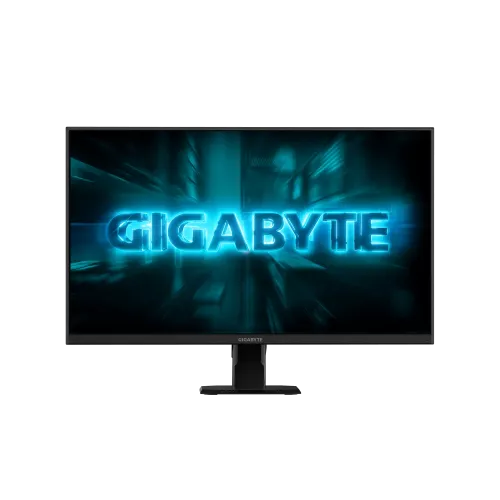
GIGABYTE GS27F2: 27-inch Full HD, up to 240Hz SS IPS
The GIGABYTE GS27F2 is a 27-inch Full HD gaming monitor built around a Super Speed IPS (SS IPS) panel. GIGABYTE advertises a maximum refresh rate of 240Hz. Its user guide includes an OSD Overclock control, so this review does not label 240Hz as a native mode or say overclocking is unnecessary; the manual's supported-timing list includes 1920 × 1080 at 240Hz on HDMI 1, HDMI 2 and DisplayPort. Its 1ms figure is MPRT, not an officially published grey-to-grey measurement. The GS27F2 also lists 115% sRGB, 300 cd/m² typical brightness, HDR10 signal support and Adaptive-Sync. The official specification page lists 16.7M colors while its English manual lists 1.073B (8-bit + FRC); that document conflict is disclosed below rather than silently resolved. This guide distinguishes the GS27F2 from similarly named models and explains its ports, gaming controls, comfort, desk fit, package and Bangladesh buying considerations.
Panel size, Full HD resolution and pixel density
The flat 16:9 screen measures 27 inches diagonally, with a manufacturer-listed active area of 596.74 × 335.66mm. Resolution is 1920 × 1080 pixels, also called Full HD or FHD, with a listed pixel pitch of approximately 0.3108mm. That is about 81.6 pixels per inch. The large panel gives games and video a broad image, while fine text and close-up spreadsheet work will look less dense than on a 24-inch Full HD screen or a 27-inch QHD display. Consider your normal viewing distance, eyesight and the kind of work you do before choosing this size and resolution. Windows scaling can enlarge interface text but does not add detail to the panel. The SS IPS panel has a non-glare surface and 178-degree horizontal and vertical viewing angles; these describe viewing consistency, not a promise that reflections disappear in a bright room.
Up to 240Hz refresh and compatible PC setup
GIGABYTE's specification lists a 240Hz maximum refresh rate. The GS27F2 user guide also documents an OSD Overclock ON/OFF control, but does not state in the text whether the 240Hz timing requires that switch. The manual's supported timing table lists 1920 × 1080 at 240Hz on HDMI 1, HDMI 2 and DisplayPort, while GIGABYTE's overview advertises FHD 240Hz. We therefore describe 240Hz as the published maximum and do not call it native or promise that it runs with Overclock disabled. The graphics card or console, connection, cable and display settings must support the selected mode; after connecting, check the OSD and operating-system display controls. Higher refresh can make motion feel smoother when a computer renders high frame rates. A monitor cannot make a game render faster by itself, so pair it with a suitable GPU and settings. Console output is limited by the console's own supported modes.
Response rating, Adaptive-Sync and Aim Stabilizer Sync
The official response figure is 1ms MPRT; GIGABYTE does not publish a GtG figure on the reviewed specification. GIGABYTE advertises Adaptive-Sync and labels the GS27F2 G-Sync Compatible on its product overview. Its user guide calls the blur-reduction control Aim Stabilizer Sync and says the function is unavailable below 100Hz; that manual section does not state that VRR must be disabled. We therefore do not describe Aim Stabilizer Sync and VRR as mutually exclusive. Exact GPU, driver, cable, refresh setting and OSD configuration still affect operation. Black Equalizer, crosshair, timer, refresh-rate display and alignment tools provide additional on-screen controls.
Color, brightness and HDR10 expectations
GIGABYTE lists a typical brightness of 300 cd/m², a typical static contrast ratio of 1000:1, 16.7 million colors and 115% sRGB gamut. The 115% gamut figure describes gamut coverage or volume as stated by the maker; it is not a factory calibration report or a claim of color accuracy. If you create color-critical work, use a calibrated workflow and a display with documented accuracy suitable for that task. The specification includes HDR10 signal support. That means the monitor can accept HDR10 content; the published sheet does not list a VESA DisplayHDR tier or local dimming. With 300 cd/m² brightness and typical IPS contrast, buyers should keep HDR expectations modest and treat HDR10 as format compatibility rather than high-impact, cinema-grade HDR. The non-glare coating helps manage reflections, though room placement and lighting still matter.
Ports, multiple devices and audio
The rear input selection includes two HDMI 2.0 ports, one DisplayPort 1.4 port and a 3.5mm earphone output. GIGABYTE's specification and the manual's supported-timing table list 1920 × 1080 at 240Hz across HDMI 1, HDMI 2 and DisplayPort. There are no built-in speakers and no USB hub ports listed; the 3.5mm jack is an audio output for headphones or external speakers. Correcting an earlier source-reading error: GIGABYTE's specification footnote says OSD Sidekick requires a USB A-male to B-male connection between the PC and monitor. It is not controlled over HDMI/DisplayPort alone. The product overview describes keyboard and mouse control through GIGABYTE Control Center; use the required USB cable and check the regional package contents before relying on this utility.
Gaming tools, eye comfort and practical ergonomics
GIGABYTE includes gaming aids such as Black Equalizer, crosshair and timer overlays, plus multi-display alignment tools and the Aim Stabilizer mode. TÜV Rheinland Flicker-Free and Low Blue Light certifications are listed for the display. These are comfort features, not a guarantee against eyestrain; sensible brightness, viewing distance, breaks and room lighting remain useful. The included stand tilts from -5 to +20 degrees. It does not provide height adjustment, swivel or portrait pivot, so position the desk and chair to put the top of the screen near eye level. A standard 100 × 100mm VESA pattern allows a compatible monitor arm or wall mount, and a Kensington lock slot is listed. The rear cable clip helps guide wires along the stand. Confirm arm load capacity and screw compatibility before mounting.
Dimensions, power and in-box items
With its stand attached, the monitor measures 613.71 × 440 × 205.35mm (width × height × depth) and weighs 4.57kg. Without the stand, it measures 613.71 × 369.6 × 55.58mm and weighs 4.17kg. The carton is 740 × 156 × 500mm (width × depth × height) with 7.41kg gross weight. For shipping, the package values are more relevant than the assembled monitor dimensions. The monitor uses an internal power board and accepts AC 100–240V at 50/60Hz. GIGABYTE lists 20W typical consumption, below 0.5W in saving mode and below 0.3W when off. This modest rated draw can help when estimating UPS runtime, though actual runtime depends on the UPS battery and other connected equipment. The standard package lists a power cable, HDMI cable, quick-start guide and warranty card; DisplayPort cable inclusion can vary by regional batch.
Bangladesh price, warranty and model comparison
During this review, Bangladesh retailer listings placed the GS27F2 around ৳25,000–৳26,500, with individual pages and promotions varying. The catalog’s saved variant price is ৳26,200 and is preserved. Star Tech, Ryans and Tech Land BD list a three-year warranty term; verify the invoice, warranty provider, serial registration, dead-pixel policy and service process with the seller before purchase. The catalog brand mapping currently reads “Others” although the product is unmistakably GIGABYTE; the task’s preservation rule means this content update leaves the brand ID/name untouched and records the mapping for separate admin correction. Do not confuse GS27F2 with GS27F (an older lower-refresh model), G27F 2 (a separate model with different published gamut data), or GS27F2A (a different stand configuration). This guide follows the GS27F2 official specification and names retailer pricing only as a dated local snapshot.
Who should choose the GS27F2?
The GS27F2 is most compelling for players who prioritize a high refresh rate, IPS viewing angles and flexible PC connections at Full HD resolution. It can also suit a multi-device desk where two HDMI sources and one DisplayPort source remain connected. Buyers mainly doing text-heavy work at close range may prefer higher pixel density, while players seeking a height-adjustable stand should budget for a VESA arm. If you need speakers, a USB hub, a certified DisplayHDR tier, or high-accuracy color-work specifications, those requirements are not met or not documented here. As always, compare the current price and warranty at checkout, verify the exact GS27F2 model label on the invoice, and choose the input and settings that match your computer. The figures in this listing are anchored to the official model sheet; unverified unit-specific origin and barcode fields remain unset rather than guessed.