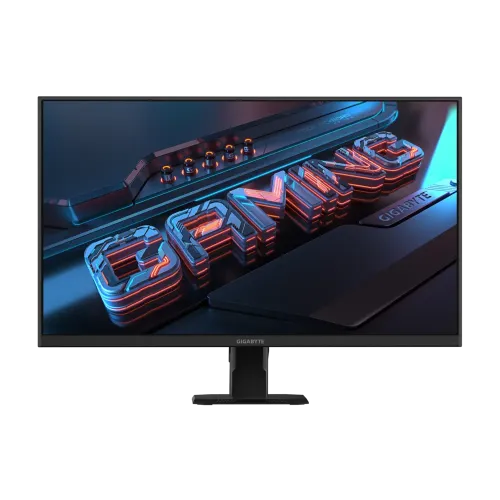
Gigabyte GS27FA: 27-inch Full HD Super Speed IPS monitor
The Gigabyte GS27FA is a 27-inch Full HD gaming monitor built around a Super Speed IPS (SS IPS) panel. Gigabyte lists 1920 × 1080 resolution, a native maximum refresh rate of 180Hz and a 1ms MPRT response rating. The display supports 180Hz over both its HDMI 2.0 inputs and DisplayPort 1.4. This model is GS27FA: do not confuse it with the older GS27F or G27F 2, which have different refresh, stand and USB features. The 27-inch screen gives games and desktop content a large viewing area, while Full HD on this size is less dense than 24-inch Full HD or 27-inch QHD. This guide explains that tradeoff, verified connectivity, motion features, stand limitations, power, package contents and Bangladesh warranty.
Panel size, resolution and pixel density
The 27-inch (68.58cm) flat panel has an active display area of 596.74 × 335.66mm and a 16:9 aspect ratio. Its 1920 × 1080 Full HD resolution and 0.3108 × 0.3108mm pixel pitch work out to about 81.6 pixels per inch. That density is a useful consideration if you sit close to the screen or read small text for long periods: a 24-inch Full HD monitor packs the same resolution into a smaller area, while a 27-inch QHD model has more pixels at the same diagonal. A larger screen can still be comfortable for games and video at a suitable desk distance, and operating-system scaling can enlarge interface text. Gigabyte calls the panel SS IPS and lists a non-glare surface, 178° horizontal and vertical viewing angles, and edge-type panel construction. The official display-area figure describes the lit screen, not the external chassis dimensions.
Native 180Hz refresh and compatible sources
Gigabyte specifies a maximum refresh rate of 180Hz. Bangladesh distributor and retailer specifications confirm 180Hz at Full HD through HDMI 2.0 and DisplayPort 1.4. It is the model's listed native maximum and does not require an overclock toggle. Select 1920 × 1080 and 180Hz in the computer's advanced display settings; the graphics card, driver, cable and operating system must expose that mode. Both HDMI ports can be used for a compatible PC or console, and the single DisplayPort gives another PC connection. Consoles may offer 1080p at up to 120Hz through a supported HDMI mode, depending on the console and game. A 180Hz monitor can display up to 180 refreshes each second, but games need to render frames at a matching rate to use every refresh. If 180Hz is unavailable, check the selected input, cable, driver and operating-system display mode before assuming a monitor fault.
1ms MPRT, Aim Stabilizer and adaptive sync
Gigabyte advertises 1ms MPRT (Moving Picture Response Time) and the Aim Stabilizer feature. MPRT is a motion-clarity measure associated with backlight strobing; it is not an official gray-to-gray pixel transition figure. Gigabyte does not publish a GtG value for this model in the reviewed specification sheet, so the two measurements should not be conflated. The monitor also supports AMD FreeSync and VESA Adaptive-Sync, which can match display refresh with compatible graphics output to reduce tearing when frame delivery changes. Gigabyte lists Aim Stabilizer and FreeSync separately; they cannot be used simultaneously because the strobing mode and variable refresh serve different purposes. Check the on-screen menu and GPU software for available settings. The practical result depends on game frame rate, driver, source and chosen mode; a feature name alone does not guarantee a particular response time or eliminate every artifact.
Brightness, contrast and color
The official specification lists typical brightness at 300cd/m² and a typical static contrast ratio of 1000:1. Gigabyte lists 16.7 million display colors and 105% sRGB color saturation. That gamut figure indicates a wider color range than the standard sRGB volume; it is not a factory-calibration result and does not promise a particular Delta E, color accuracy or full coverage in a calibrated workflow. Gigabyte does not state whether the panel uses native 8-bit or 6-bit plus frame-rate control in the public specification reviewed, so this guide reports the published 16.7M color figure without guessing the panel's internal bit-depth architecture. Non-glare coating helps reduce reflections, but room lighting and brightness settings still affect viewing comfort. For professional color-critical work, seek independent measurements and calibration information rather than relying on gamut volume alone.
HDR Ready: signal support and realistic limits
Gigabyte describes the display as HDR Ready. This means it accepts HDR content/signal support as described by the manufacturer; the specification does not list a VESA DisplayHDR certification tier or local-dimming zones. With 300cd/m² typical brightness and 1000:1 static contrast, buyers should treat HDR as basic signal compatibility rather than expect the highlight brightness and dark-scene control of a certified high-dynamic-range display. HDR behavior also depends on the source, operating-system settings and game or video mastering. Compare HDR and SDR modes with content you use, and return to SDR if desktop colors or brightness look less natural. This distinction helps avoid confusing a supported HDR input with a measured performance certification.
Video ports, audio and Gigabyte software
The GS27FA provides two HDMI 2.0 inputs, one DisplayPort 1.4 input and a 3.5mm earphone output. There are no built-in speakers and no USB hub ports. Headphones or powered speakers can connect through the audio output, while sound itself comes from the PC or console over HDMI/DisplayPort. Gigabyte lists OSD Sidekick as an integrated feature within Gigabyte Control Center (GCC); the manufacturer notes that a PC must be connected to the monitor over HDMI or DisplayPort. The product has no USB upstream/downstream port, so do not assume it has the USB hub found on some related monitors. Its on-screen gaming functions include Aim Stabilizer, Black Equalizer, Crosshair and Timer. These are display controls; they do not change a game's mechanics or substitute for supported game settings.
Stand, tilt and VESA mounting
The included stand tilts from -5° to +20°. The specification lists no height adjustment, swivel or pivot, so it is a fixed-height, tilt-only design. If the screen needs to sit higher or rotate into portrait orientation, use a compatible riser or a monitor arm. Gigabyte provides standard 100 × 100mm VESA mounting points and a Kensington lock provision. Check the arm's weight rating and mounting hardware before installation. The product images show a compact black base, stand column and cable-routing feature. A tilt-only stand can be adequate on a desk with the right chair and viewing height, but it offers less ergonomic range than a fully adjustable stand. Keep the cable route clear when changing the tilt angle.
Dimensions, weight and delivery packaging
Gigabyte lists the monitor with stand at 619 × 447 × 172mm (width × height × depth) and 5.02kg estimated net weight. Without the stand, the chassis measures 619 × 365.5 × 50.2mm and weighs 4.1kg. The retail box is 740 × 156 × 500mm, with 6.91kg estimated gross weight. Check desk width and depth before placing the stand, and leave room behind it for connected cables. These packaged measurements are used for variant shipping metadata; actual courier charges can also depend on volumetric-weight rules. The estimated figures are manufacturer data and may vary slightly with production or packaging. If wall mounting, use the unboxed display weight and 100 × 100mm VESA pattern when checking compatibility.
Power and included accessories
Unlike a monitor that uses an external power brick, Gigabyte lists a built-in power board. The input accepts AC 100–240V at 50/60Hz. Typical power consumption is listed as 23W under Gigabyte's stated CEC test condition; power-saving mode is 0.5W and power-off mode is 0.3W. The official accessories list includes a power cable, HDMI cable, Quick Start Guide and warranty card. Confirm the exact cable length and box contents with the local seller because regional packages can differ. The included HDMI cable can connect a compatible device, while a suitable HDMI 2.0 or DisplayPort 1.4 source and cable can support the monitor's listed 180Hz mode. Follow the manual for assembly and connect the power cord directly to a suitable outlet.
Warranty and Bangladesh price snapshot
The Bangladesh distributor and major local retailers list a three-year official warranty for the GS27FA. The saved BiponiBD variant price is ৳25,300. During this review, local retail listings showed approximately ৳25,000–৳26,500 depending on seller and current discount; Star Tech and other stores can show a separate regular price. These are date-specific snapshots, not a price guarantee. Before paying, confirm that the unit is supplied through the Bangladesh official channel, the warranty card/serial is valid, the service location is accessible, and the invoice states the warranty provider and duration. Check dead-pixel terms, replacement window and exclusions with the seller. Manufacturer warranty terms may vary by region and plug-code suffix, so the Bangladesh invoice and local distributor terms govern local service.
GS27FA versus similarly named Gigabyte monitors
The GS27FA identifier matters when comparing specifications. Gigabyte and local listings identify this model as 180Hz, with a tilt-only stand, no built-in speakers and no USB hub. Similar GS27F and G27F 2 models have different refresh and stand/USB details; do not transfer their specifications to the GS27FA because the names look alike. The regional sales part number can include a suffix such as 20VM0-GS27FABT-1EUR, but the canonical model/MPN for this listing is GS27FA. The existing catalog brand mapping is “Others”; it is preserved to maintain product identity, while the page uses Gigabyte consistently in customer-facing copy and search metadata. A dedicated Gigabyte brand entity was not verified in the current catalog lookup, so this product edit does not silently change its brand ID.
Who this monitor suits
The GS27FA is suited to a buyer looking for a 27-inch SS IPS Full HD screen, a high 180Hz refresh mode, variable refresh support, basic gaming overlays and a three-year local warranty. It has three digital video inputs, an internal power supply and a standard VESA pattern. Its main tradeoffs are the lower pixel density of 27-inch Full HD and the limited tilt-only stand. HDR Ready does not mean certified HDR performance; the specification lists no built-in speakers, GtG response value or USB ports. If you prioritize sharper text, compare a 27-inch QHD display. If you need a height-adjustable stand, USB hub, or integrated audio, compare those specific features before buying. For a gaming PC, check that your graphics output and cable can select 1920 × 1080 at 180Hz.
Setup checklist
Place the monitor on a stable surface, connect its stand and power cable, and attach a PC or console using HDMI 2.0 or DisplayPort 1.4. Select 1920 × 1080 and 180Hz in operating-system display settings. Turn on Adaptive-Sync/FreeSync in the monitor and GPU software if supported. Test Aim Stabilizer separately from FreeSync, since the two modes cannot run simultaneously. Adjust the screen tilt for a comfortable viewing angle; use a VESA-compatible arm if the fixed stand height is unsuitable. Connect headphones or external speakers to the 3.5mm output. Install Gigabyte Control Center from the official support page if you want OSD Sidekick control over the display connection, and check the manual for regional setup guidance. Keep the warranty card and invoice for service.
Specification transparency and source notes
This guide uses Gigabyte's official GS27FA overview, specification sheet and support page, cross-checked against Smart Technologies (BD), Star Tech, Ryans and other Bangladesh listings. Official data confirms the panel, active area, resolution, refresh, response rating, color and display properties, connections, stand, dimensions, weight, power and accessory list. The official specification reports 105% sRGB while some retailer pages show an older or differing 105%/other gamut figure; the official model sheet is the basis used here. Gigabyte's public sheet does not state a GtG response time or internal panel bit-depth architecture. Barcode and country of origin are not verified on the local unit, so they remain unset. The five gallery images were individually reviewed: straight-on front, two angled front views, side profile and rear view. Alt text describes the visible monitor rather than repeating generic image numbers.