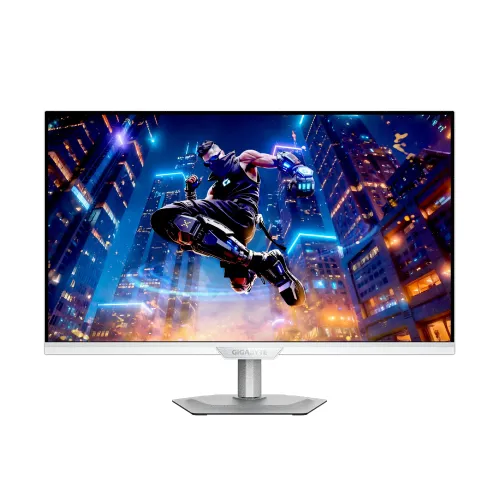
GIGABYTE M27Q2 QD ICE 27-Inch 200Hz (OC 210Hz) QHD Quantum Dot SS IPS Gaming Monitor — Complete Technical & Buyer Guide
The GIGABYTE M27Q2 QD ICE is a 27-inch flat 2K QHD (2560 × 1440) gaming, content-creation, and multi-system productivity monitor that combines a fast Super Speed IPS (SS IPS) liquid-crystal panel with a Quantum Dot (QD) optical backlight layer and a clean ICE White industrial design. Engineered for competitive PC gamers, digital creators, and hybrid laptop-plus-desktop professionals, the M27Q2 QD ICE delivers a 200Hz native refresh rate (overclockable up to 210Hz), a verified 1ms gray-to-gray (GTG) response time, wide color saturation rated at 99% DCI-P3 and 150% sRGB with 1.07 billion display colors (10-bit / 8-bit + FRC), VESA DisplayHDR 400 certification, and GIGABYTE’s integrated hardware KVM switch with USB Type-C (DisplayPort Alternate Mode and up to 18W Power Delivery).
Unlike conventional matte-black monitors that contrast sharply with white or silver PC hardware, the M27Q2 QD ICE features a white lower front bezel with a centered GIGABYTE emblem, an ice-white sculpted rear chassis with four-sided thermal ventilation, and a metallic silver ergonomic column mounted on a flat, low-profile octagonal metal base. Whether deployed as a high-refresh esports display, a wide-gamut photo and video editing screen, or a two-system KVM workstation, it balances motion speed, color vibrancy, and ergonomic adjustability.
27-Inch 2K QHD (2560 × 1440) Pixel Density & Quantum Dot Super Speed IPS Architecture
Across an active display viewing area of 596.736 mm (H) × 335.664 mm (V) in a 16:9 widescreen aspect ratio, the GIGABYTE M27Q2 QD ICE renders 2560 × 1440 discrete pixels (3,686,400 total pixels) at a fine 0.2331 mm × 0.2331 mm pixel pitch, achieving approximately 108.79 pixels per inch (PPI):
- 77.7% More Workspace Than 1080p at Unscaled 109 PPI: Compared with a 27-inch Full HD (1920 × 1080, ~81.6 PPI) display, the 1440p QHD pixel matrix provides 77.7% more desktop real estate and noticeably sharper edge fidelity in games and desktop applications. In Windows and macOS, ~109 PPI runs comfortably at 100% native operating-system scaling, allowing software engineers, analysts, and video editors to view side-by-side code editors, multi-column spreadsheets, and editing timelines without fractional scaling blur.
- Quantum Dot (QD) Backlight Enhancement: By placing a semiconductor Quantum Dot layer over the edge-lit LED backlight of the Super Speed IPS panel, the monitor produces cleaner red, green, and blue spectral peaks. Official GIGABYTE specifications rate the panel’s color saturation at 99% DCI-P3 and 150% sRGB—delivering rich saturation for cinema-grade DCI-P3 media, AAA game worlds, and sRGB/DCI-P3 creative workflows. For color-critical production where strict Delta-E accuracy is required, users can pair the monitor’s OSD color-space modes with a hardware colorimeter profile.
- 1.07 Billion Colors (10-Bit / 8-Bit + FRC) & 178° Viewing Angles: Support for 1.07 billion colors (8-bit + Frame Rate Control) reduces visible banding across subtle sky, fog, and lighting gradients. The In-Plane Switching liquid-crystal alignment preserves consistent color and gamma across 178° horizontal and 178° vertical viewing angles, while a non-glare matte surface suppresses distracting reflections from overhead lighting or windows.
- 350 cd/m² Typical Brightness, 1000:1 Contrast & VESA DisplayHDR 400: The edge-lit LED backlight outputs 350 cd/m² (nits) typical SDR luminance paired with a 1000:1 static contrast ratio and carries VESA DisplayHDR 400 certification for high-dynamic-range games and video streams. Because the panel uses an edge-lit IPS architecture without multi-zone Mini-LED local dimming, HDR400 primarily enhances highlight brightness and wide-gamut tone mapping rather than deep local-dimmed black levels.
200Hz Native / 210Hz Overclocked Refresh Rate, 1ms GTG Response & Adaptive-Sync
The GIGABYTE M27Q2 QD ICE elevates refresh performance over earlier 165Hz and 170Hz QHD gaming monitors to deliver smoother target tracking in competitive shooters, battle royales, racing titles, and MOBAs:
- 200Hz Native Refresh Rate with 210Hz Overclocking: Operating natively at 200Hz (a 5.00 ms frame interval) and supporting an optional OSD overclock up to 210Hz (a 4.76 ms frame interval), the panel updates more than three times faster than a standard 60Hz monitor (16.67 ms) and provides tighter motion continuity than 144Hz (6.94 ms) or 165Hz (6.06 ms) displays. Note that 210Hz is an optional overclocked mode enabled through the monitor OSD and graphics driver when driven by a compatible source over DisplayPort 1.4 or USB Type-C.
- True 1ms (GTG) Super Speed IPS Response & Smart OD: Thin-layer Super Speed IPS liquid crystals achieve a verified 1ms gray-to-gray (GTG) response time, cutting pixel transition trails behind fast-moving objects. GIGABYTE’s Smart OD dynamic overdrive continuously monitors real-time frame rates and automatically adjusts overdrive voltage across varying refresh rates to minimize both high-refresh trailing smear and low-refresh inverse ghosting (overshoot halos).
- AMD FreeSync / Adaptive-Sync & Aim Stabilizer: Variable Refresh Rate (VRR) support via AMD FreeSync / VESA Adaptive-Sync (and G-SYNC Compatible driver operation on supported NVIDIA GPUs) synchronizes the monitor’s refresh cycle to the graphics card’s output rate to eliminate screen tearing and stutter. In addition, GIGABYTE’s Aim Stabilizer backlight strobing technology reduces perceived motion blur during rapid horizontal mouse flicks in fast-paced FPS titles.
Integrated Hardware KVM Switch, USB Type-C (18W PD) & Full I/O Port Breakdown
A standout advantage of GIGABYTE’s M-series platform is its integrated Keyboard, Video, and Mouse (KVM) hardware switch combined with a six-port video and USB connectivity bay:
- 1× DisplayPort 1.4 (Full 2560 × 1440 at 200Hz / 210Hz OC): Serves as the primary high-bandwidth interface for desktop gaming PCs, supporting native QHD (2560 × 1440) resolution at the full 200Hz native and 210Hz overclocked refresh rates with 10-bit color and Adaptive-Sync. A DisplayPort cable is included in the factory box.
- 1× USB Type-C Port (DisplayPort Alternate Mode + Upstream Data + Power Delivery up to 18W): Connects compatible laptops, MacBooks, iPads, smartphones, or handheld gaming PCs over a single USB-C cable—carrying native 2560 × 1440 video at up to 200Hz/210Hz, routing USB KVM peripheral data, and supplying up to 18W of USB Power Delivery. Buyers should note that 18W Power Delivery is designed to charge phones, tablets, or trickle-charge low-power ultrabooks, whereas full-load notebooks and gaming laptops require their dedicated AC power adapter.
- 2× HDMI 2.0 Inputs (Up to 144Hz at 2560 × 1440 QHD): Dual HDMI 2.0 ports support secondary PCs, media players, and PlayStation 5 or Xbox Series X/S consoles (supporting 1440p at 120Hz on current-generation consoles). Because HDMI 2.0 has a maximum 18 Gbps TMDS bandwidth ceiling, desktop PC users should note that HDMI 2.0 supports native 2560 × 1440 up to 144Hz, whereas achieving 200Hz or 210Hz at QHD requires DisplayPort 1.4 or USB Type-C.
- Built-In USB 3.2 Hub (2× USB 3.2 Downstream + 1× USB 3.2 Upstream): Plug your keyboard, mouse, or wireless receiver into the 2× USB 3.2 Downstream Type-A ports on the monitor, and connect your desktop PC using the included USB 3.2 Type-B upstream cable. Once mapped in the KVM menu, pressing the physical KVM / Tactical Switch 2.0 button seamlessly switches your display, keyboard, and mouse between your desktop PC and your USB Type-C device.
- 1× 3.5mm Earphone Audio Jack (No Built-In Internal Speakers): Official GIGABYTE specifications confirm that the M27Q2 QD ICE does not include built-in internal speakers. A rear 3.5mm stereo earphone jack routes digital audio received over DisplayPort, HDMI, or USB Type-C to wired headphones or external powered speakers.
Tactical Gaming Suite, OSD Sidekick Software & Eye-Care Certifications
GIGABYTE equips the M27Q2 QD ICE with hardware-rendered gaming overlays, multi-source display modes, and Windows-based software controls:
- Tactical Switch 2.0 & Quick Resolution Switch: The physical tactical button next to the 5-way OSD navigation joystick can be configured to trigger the KVM switch or toggle aspect-ratio / resolution framing modes tailored for competitive esports titles.
- Black Equalizer, Game Assist & 6-Axis Color Control: Black Equalizer selectively brightens dark shadow regions in games without overexposing bright highlights, helping players spot opponents in dim corners. Game Assist adds customizable on-screen Crosshair reticles, an elapsed Timer, a refresh/frame Counter, and multi-monitor alignment lines, while 6-axis Color Control enables independent tuning of red, green, blue, cyan, magenta, and yellow channels.
- Hardware Dashboard & PiP / PbP Multi-Source Viewing: When the USB upstream cable is connected to a PC, the on-screen Dashboard overlay displays real-time system telemetry—including CPU and GPU temperatures, clock frequencies, fan speeds, and mouse DPI—without third-party overlay hooks. Picture-in-Picture (PiP) and Picture-by-Picture (PbP) modes allow two video inputs to be viewed simultaneously on the 27-inch QHD panel.
- OSD Sidekick via GIGABYTE Control Center: Per GIGABYTE’s official specification note, connecting the PC and monitor with the supplied USB (A-Male to B-Male) upstream cable enables OSD Sidekick, allowing users to adjust picture modes, overdrive, KVM assignments, and hotkeys directly with a mouse and keyboard in Windows.
- TÜV Rheinland Certified Flicker-Free & Low Blue Light: Direct-current (DC) backlight regulation eliminates invisible PWM screen flicker, and hardware-certified Low Blue Light filtering reduces high-energy blue light emissions during long coding, editing, and gaming sessions.
ICE White Aesthetic, 4-Way Ergonomic Stand, VESA 100 × 100 mm & Internal Power Board
Visual inspection of all six product gallery views confirms a cohesive white-and-silver mechanical design built for ergonomic flexibility and tidy desk routing:
- Full 4-Way Ergonomic Stand on a Thin Octagonal Metal Base: The silver upright column supports 130 mm of height adjustment, -5° to +21° tilt, ±15° left/right swivel, and -0° to +90° clockwise portrait pivot for vertical coding, long-form reading, or secondary stream-chat layouts. Its flat octagonal metal base plate keeps a minimal footprint on the desk so mousepads and angled keyboards can sit close to the column without obstruction.
- Quick-Release VESA 100 × 100 mm Mount & Four-Sided Cooling: Pressing the quick-release latch beneath the circular rear hinge detaches the stand column cleanly, exposing a recessed 100 × 100 mm VESA mounting pattern (panel-only net weight is 4.30 kg) for third-party monitor arms or wall brackets. Top, side, and bottom louvers provide four-sided passive cooling, and a lower-right Kensington lock slot provides physical security.
- Built-In Internal Power Supply (30W Typical): The M27Q2 QD ICE integrates a built-in AC 100–240V ~ 50/60Hz power board inside the chassis, connecting directly via a standard AC power cord with no external power adapter brick required. Power consumption is rated at 30W typical in operation, 0.5W in Power Saving Mode, and 0.3W in Power Off Mode.
- Verified Dimensions, Weights & Standard Box Contents:
- Physical Dimensions with Stand (W × H × D): 612 × 515 × 192 mm · Net Weight with Stand (Esti.): 5.91 kg.
- Physical Dimensions without Stand (W × H × D): 612 × 371 × 59 mm · Net Weight without Stand (Esti.): 4.30 kg.
- Box Dimensions (W × H × D): 800 × 480 × 169 mm · Gross Weight (Esti.): 8.19 kg.
- Official Included Accessories: Power cable, DisplayPort (DP) cable, USB cable, Quick Start Guide (QSG), and Warranty card. Before completing an order, buyers should verify the exact M27Q2 QD ICE model code, included cable bundle, and written seller/distributor warranty terms on their purchase invoice.