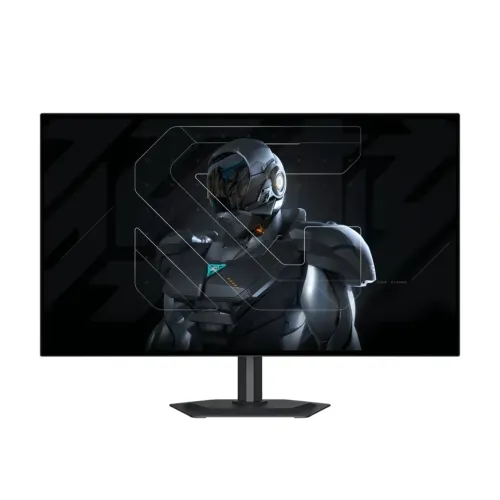
GIGABYTE MO27Q28G QHD 280Hz OLED gaming monitor
The GIGABYTE MO27Q28G is a 27-inch-class desktop gaming monitor with a 2560 × 1440 QHD panel. GIGABYTE identifies the technology as 4th-generation Primary RGB Tandem WOLED. The active diagonal is 26.5 inches, while the product is sold in the familiar 27-inch size class. It has a flat 16:9 screen and an anti-reflection surface. Its intended use is a PC or console display; the manufacturer documentation does not describe a built-in smart TV operating system or streaming apps.
The combination of QHD resolution and a maximum 280Hz refresh rate suits players who want high motion clarity without stepping up to a 4K display. The actual refresh rate depends on the graphics source, game, port, cable, resolution and display settings. A computer must render enough frames to make use of the panel’s maximum refresh. A high refresh display cannot increase a game’s frame rate by itself, and users should check that their selected connection supports the mode they intend to use.
GIGABYTE lists 0.03ms GTG response time. This is the manufacturer’s gray-to-gray pixel transition specification; it is not total system latency, click-to-photon time or a guarantee that every transition measures identically in independent testing. Graphics performance, frame pacing, input devices, settings and game engine all affect perceived responsiveness. The product is best evaluated as a display with a fast stated pixel response and refresh capability rather than as a promise of a particular competitive result.
Tandem WOLED panel and image characteristics
The official specification describes a 4th-generation Primary RGB Tandem WOLED panel. GIGABYTE’s product material highlights a multi-layer tandem OLED design intended to improve panel brightness and efficiency. This screen is WOLED; it should not be mislabeled QD-OLED. The flat anti-reflection coating helps reduce reflections from room lighting, although it cannot eliminate glare in every placement. The stated active display area is 586.75 × 330.05mm, with a 0.2292mm horizontal and vertical pixel pitch.
For SDR, the manufacturer lists 335 cd/m² typical brightness at APL 100%. The HDR figure is 1,500 cd/m² typical at APL 1.5%. These are tied to different average picture levels and are not directly comparable as a full-screen brightness promise. The 1.5M:1 contrast ratio is the listed specification. OLED pixels can switch off to produce black areas, but room illumination, image content, display mode and measurement conditions influence what viewers see.
The panel supports 10-bit color and up to 1.07 billion colors. GIGABYTE specifies 99.5% DCI-P3 and 84% BT.2020 coverage, and states factory calibration to Delta E below 2 with a printed calibration report in the package. Those are manufacturer claims, not a guarantee that every unit or mode has been independently measured by this shop. Color managed creative work should still use a suitable workflow and, where required, independent calibration. For games and video, the wide stated gamut can present saturated colors when the source and selected picture mode are configured appropriately.
HDR and comfort features
The official certification is VESA DisplayHDR True Black 500. This naming matters: it identifies the specific True Black certification class and should not be shortened to generic “HDR 500” in a way that loses the standard. HDR results depend on the source device, application, operating system, connection and monitor mode. Content mastered for HDR can use the screen differently from SDR material, while peak output varies with image size and average picture level. The brightness values should therefore be read together with their stated APL conditions.
GIGABYTE lists TÜV Rheinland certifications for Flicker-Free, Discomfort Glare Free and Low Blue Light as part of its All-Around Eyecare positioning. These features are intended to address display flicker, reflections and blue-light settings, but they do not guarantee that a particular person will avoid eyestrain. Room lighting, viewing distance, breaks, brightness and individual sensitivity still matter. The anti-reflection screen also does not remove all reflections; positioning it away from direct windows and lamps remains useful.
OLED care is relevant for any display that can show static menus, desktop taskbars or game HUDs for long periods. GIGABYTE provides AI OLED Care functions such as pixel cleaning, static-content controls, logo and taskbar dimming, and related panel protection. Follow the on-screen prompts and manual, let maintenance routines complete, and avoid powering the panel off in a way that interrupts a requested care cycle. These features can help manage use but are not a promise that image retention or wear is impossible.
Refresh, variable sync and gaming tools
The monitor supports a maximum refresh rate of 280Hz and carries a manufacturer-rated 0.03ms GTG response specification. GIGABYTE identifies NVIDIA G-SYNC Compatible operation and AMD FreeSync Premium Pro, together with VRR Anti-Flicker. Variable refresh can coordinate the panel refresh with supported graphics output over an appropriate connection, helping reduce tearing when frame rates fluctuate within the supported operating range. Compatibility and available modes depend on the graphics hardware, driver, cable and settings.
G-SYNC Compatible is not the same statement as a dedicated NVIDIA G-SYNC hardware module. The catalog should describe the compatibility accurately so buyers do not infer a hardware module. FreeSync Premium Pro is the AMD branding listed by GIGABYTE. Neither label guarantees that every game will be tear-free or stutter-free in all conditions. V-Sync choices, frame limits, game performance and the monitor’s current input mode can affect the result.
Tactical Switch 2.0 offers a quick switch to a 24-inch display-size or aspect-ratio preset for players who prefer a smaller active image. Ultra Clear and Black Equalizer 2.0 provide additional motion and shadow visibility controls. Game Assist includes tools such as crosshair, timer, counter and Eagle Eye, while PiP/PbP can place multiple source views on screen. OSD Sidekick supports display settings from a connected computer, and KVM switching helps share connected peripherals between compatible devices. These are menu features, not substitutes for game-specific settings or accessibility tools.
Ports, USB hub and KVM
The official input list includes two HDMI 2.1 connectors and one DisplayPort 1.4 connector. A USB Type-C port supports DisplayPort Alternate Mode as an upstream video connection and Power Delivery up to 18W. That 18W figure can support compatible mobile devices or accessories, but it is far below typical full laptop charging needs. Do not assume this monitor will power a laptop like a 65W or 90W USB-C dock. Check the computer’s own input and charging requirements before connecting.
The built-in USB hub has two USB 3.2 downstream ports and one USB 3.2 upstream connection. The upstream connection links the monitor hub to a host computer; downstream ports can serve compatible peripherals. GIGABYTE lists KVM support, which can share a keyboard and mouse across compatible host connections. The monitor’s KVM behavior depends on how the USB upstream and video cables are attached and how the OSD is configured. USB-C video and hub functions are separate from the limited 18W charging output.
For sound, the specification lists a 3.5mm earphone jack and built-in stereo speakers rated at 5W × 2. The jack is a headphone connection, not a microphone input according to the official I/O table. Retail or regional pages may differ in how they label audio sockets, so this listing follows GIGABYTE’s official port list. Speakers are useful for basic playback, but external headphones or dedicated speakers may be preferable for a more immersive or precise audio setup.
Ergonomics, mounting and physical fit
The stand supports tilt from −5° to +21°, swivel of ±15°, clockwise pivot from 0° to +90°, and 130mm of height adjustment. This range makes it possible to raise the panel, angle it toward the viewer or rotate it to portrait orientation. The pivot specification is clockwise; the product should not be described as offering bidirectional pivot unless a separate manual revision confirms that. Users should leave enough clearance for rotation and for the stand’s footprint.
The monitor supports a 100 × 100mm VESA mount and includes a Kensington security lock provision. A third-party arm must match the VESA pattern and safely support the monitor’s weight. Use the mounting instructions and appropriate fasteners, and support the screen carefully during installation. The black chassis is approximately 604.4 × 526.5 × 187.5mm with stand, and 604.4 × 350.2 × 54.4mm without stand. These figures are width, height and depth, so compare them to the desk or mount space in the same orientation.
Net weight is approximately 6.0kg with the stand and 4.05kg without it; gross packaged weight is approximately 8.75kg. The carton dimensions are 795 × 131 × 475mm. Consider these measurements when planning a desk arm, shelf or delivery route. The display should be handled by its frame rather than pressing the OLED surface. Keep cables and the external adapter arranged so the monitor can be moved through its adjustment range without pulling on connectors.
Power, package and setup
Power is supplied through an external adapter connected to AC 100–240V at 50/60Hz. GIGABYTE lists 35W consumption under the CEC test standard, below 0.5W in power-saving mode and below 0.3W in power-off mode. These values describe specified test and operating states; actual energy use varies with brightness, selected picture mode, audio volume, connected USB devices and usage. Keep the adapter ventilated and use the supplied power cord and adapter appropriate to the product.
The listed package includes the power cable and adapter, an HDMI 2.1 cable, DisplayPort cable, USB upstream cable, Quick Start Guide, warranty card and factory color-calibration test report. Package contents can depend on region or distributor, so inspect the sealed box and written accessories list at delivery. The printed color report is part of the product package as specified by GIGABYTE; its presence does not mean every color mode has been independently calibrated for every workflow.
For initial setup, assemble the stand on a soft clean surface as directed in the quick guide, connect the power adapter, and select the native 2560 × 1440 resolution in the source device. Choose a refresh rate supported by the graphics connection and monitor input. Install the USB upstream cable if you plan to use the USB hub or KVM. Connect headphones or speakers to the listed audio output if needed. Review the OSD for VRR, OLED care, picture mode and KVM settings before relying on them.
Strengths and trade-offs
The main strengths are the QHD resolution, fast 280Hz maximum refresh, fast manufacturer-rated response, tandem WOLED panel, broad stated color gamut and True Black 500 certification. The adjustable stand, USB hub, KVM, USB-C video input, built-in speakers and set of gaming controls provide more flexibility than a basic display with only a fixed stand and video input. Factory calibration with a printed report may also be useful to buyers who care about color presentation, while remaining a manufacturer-stated specification.
This is a high-performance OLED monitor with care practices and setup choices to consider. Long static desktop elements deserve attention, and OLED protection functions should be used as described in the guide. The USB-C power output is 18W, so it should not be positioned as a full laptop charger. USB hub and KVM require their host connection cables and correct configuration. Users needing more brightness for a sunlit room should compare the specified SDR behavior and physical room placement rather than relying on a short-lived HDR peak figure alone.
The stand rotates clockwise to portrait and lists a finite swivel and tilt range, which should be checked against the desk layout. Built-in 5W speakers are convenient but may not replace dedicated audio equipment. Current price, stock, package content and local warranty terms can change by seller. Buyers should confirm the exact GIGABYTE model, written local warranty, OLED burn-in terms and included accessories on the seller invoice before payment, especially when purchasing through a third-party listing.
Bangladesh price and warranty notes
During this research snapshot, Bangladesh seller pages displayed approximate asking prices from ৳83,999 to ৳87,500, with some regular prices up to ৳90,000. Star Tech and Skyland were observed around ৳85,000, while TechLand showed about ৳87,500 against a higher regular price; several local shops showed values within the broader range. These are retailer observations, not a live BiponiBD offer or a promise that stock is available. Delivery charge, payment method and discount eligibility can change the final checkout total.
The existing catalog variant MSRP is ৳85,000 and is retained. Do not treat that stored MSRP as a guaranteed current street price. Before ordering, confirm that the seller has the MO27Q28G variant, whether the unit is available for immediate delivery, whether the price is cash-only, and whether the invoice identifies the local distributor. Compare the final price after delivery and any payment-specific condition rather than relying only on a search snippet or an old cached listing.
Bangladesh retailers commonly describe a three-year warranty, and GIGABYTE’s product information states that the three-year OLED warranty includes panel burn-in coverage subject to regional policy and seller/distributor terms. Exact service route, exclusions and proof requirements are determined by the written local warranty and invoice. Ask the seller to confirm the applicable Smart Technologies or distributor coverage and burn-in terms for the exact unit. Keep the invoice and warranty card, and contact the seller promptly if the package or serial details differ.
Who this display may suit
The MO27Q28G may suit PC players who can drive QHD at high frame rates and value the combination of 280Hz, variable refresh, an OLED panel and gaming-focused OSD tools. It can also serve general desktop tasks, video and creative viewing, provided the user configures color modes for the application and follows panel-care guidance. It is a desktop monitor with multiple wired inputs and a USB hub rather than an all-in-one computer or smart television.
Console buyers should verify the console’s output modes, cable and input before expecting a particular refresh rate or VRR behavior. A monitor’s HDMI 2.1 connector alone does not guarantee that a game runs at 280 frames per second; the source device, game rendering and console output limit the actual signal. For laptop users, USB-C can carry DisplayPort Alternate Mode video and provide up to 18W, but a separate charger may still be necessary. The monitor’s KVM may help users sharing a desk between two compatible hosts.
For office use, the height adjustment and pivot support can make the panel easier to position for documents, coding or multi-window work. The panel’s high refresh capability is independent of office productivity; text clarity still depends on scaling, viewing distance and source configuration. People sensitive to reflections should position the anti-reflection display away from bright windows and check it under their actual room lighting. Users should choose a monitor based on their own workflow, desk dimensions and required device connections.
Care, troubleshooting and responsible expectations
If the image does not appear, check power at the adapter, the selected input, cable seating and the source output settings. If a high refresh mode is missing, verify the source graphics capability, cable path, monitor input, resolution and operating-system display menu. USB hub peripherals require the upstream connection to a host; USB-C video requires a device that supports DisplayPort Alternate Mode. The 18W USB-C power figure should not be used to diagnose a laptop that requires a higher wattage charger.
If speakers produce no sound, select the monitor as the audio output device on the connected computer or console and confirm the monitor volume and source routing. The earphone jack is a separate output path. If VRR does not activate, check graphics drivers, supported port, source settings and monitor OSD. Game Assist and KVM settings can also vary with the selected input. Consult the GIGABYTE manual before resetting settings or changing cable arrangements.
For cleaning, follow the instructions in the manual and use a soft, clean cloth without pressing the OLED surface. Avoid liquids entering the enclosure and never spray cleaner directly onto the screen. Allow OLED maintenance tasks to run when the monitor requests them. These care steps are sensible handling guidance rather than a warranty guarantee. Keep packaging for transport when possible, and use both hands to support the monitor frame during movement.