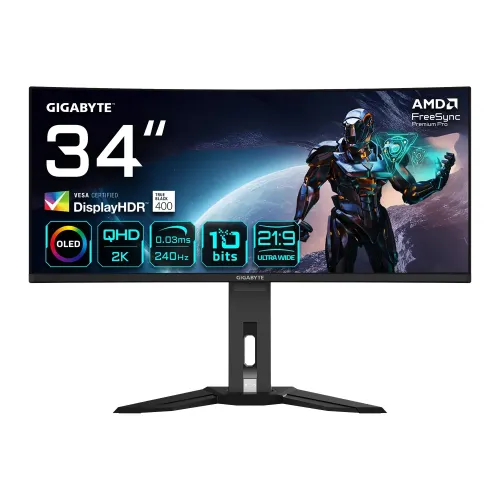
GIGABYTE MO34WQC2 34-inch WQHD curved QD-OLED gaming monitor
The GIGABYTE MO34WQC2 is a 34-inch ultrawide display designed for PC gaming, compatible console setups and multi-window desktop work. Its 3440 x 1440 WQHD resolution uses a 21:9 aspect ratio, while the 1800R curve follows the wide panel shape. GIGABYTE describes the QD-OLED panel as powered by Samsung; the manufacturer specification classifies the display technology as OLED. This wording identifies the product technology without making a separate claim about panel manufacturing or component supply.
The native pixel grid contains 4,953,600 pixels. The specified active viewing area is 800.06 x 337.06 mm and the pixel pitch is 0.2315 x 0.2315 mm. The surface treatment is listed as anti-reflection. The dimensions, resolution and curve can help buyers compare desk fit and viewing format with a conventional 16:9 monitor. Actual viewing comfort depends on desk depth, viewing distance, room lighting and user preference.
QD-OLED image, contrast and color specifications
GIGABYTE rates typical contrast at 1.5M:1 and lists 178-degree horizontal and vertical viewing angles. The monitor supports 10-bit color, described as 1.07 billion colors, and 99% DCI-P3 color saturation. These are manufacturer specifications, not a report of independent calibration or a guarantee that every unit will match a particular studio reference without adjustment. The on-screen display includes 6-axis color control and selectable picture modes for users who want to tune the image to their workspace and content.
For HDR, the exact-model specification lists VESA DisplayHDR True Black 400 and VESA Certified ClearMR 13000. The brightness entries must be read with their test conditions: 250 cd/m² typical for SDR at 100% Average Picture Level (APL), and 1000 cd/m² typical for HDR at 3% APL. The latter is a small-highlight measurement, not sustained full-screen brightness. HDR results also depend on the source, software settings and supported content.
Fast refresh and supported video timings
The maximum refresh rate is 240Hz and the listed gray-to-gray response time is 0.03ms. A 240Hz refresh can show up to 240 image updates per second when the connected computer or console supplies a matching signal. To reach the maximum mode, configure a supported resolution and refresh rate in the source device and use an appropriate cable. GIGABYTE's user manual timing table includes 3440 x 1440 at 240Hz in the columns for HDMI 1, HDMI 2 and DP/Type-C; supported output can still vary with the graphics device, cable, firmware and operating mode.
The monitor carries VESA Certified ClearMR 13000 and is specified as flicker-free. GIGABYTE also identifies AMD FreeSync Premium Pro on its product feature material. Adaptive refresh operation depends on a compatible graphics device, connection and software configuration. Marketing labels describe supported features; they do not guarantee a particular frame rate in every game. The ultrawide 3440 x 1440 image requires more graphics processing than a lower-resolution display at the same frame rate.
Connections, USB hub and KVM
Video inputs comprise two HDMI 2.1 ports, one DisplayPort 1.4 and one USB Type-C upstream connection. USB-C supports Alternate Mode and up to 18W Power Delivery. That power rating can support some accessories or lower-power devices, but it is not a replacement for a high-wattage laptop charger. Check the host device's charging requirements before planning a single-cable desk setup.
The built-in USB hub includes two USB 3.2 downstream ports and one USB 3.2 upstream port. Separate earphone and microphone jacks are listed. A KVM switch lets a user share compatible attached peripherals and switch control between connected host systems after wiring and configuring them according to the manual. The result depends on the selected video input and upstream USB connection; it does not mean the monitor itself contains a computer or a network switch.
Gaming controls, OLED care and built-in sound
GIGABYTE lists Tactical Switch, Resolution Switch, Eagle Eye, Black Equalizer 2.0, Dashboard, Crosshair, Timer, Counter, Picture-in-Picture and Picture-by-Picture, Auto-Update, OSD Sidekick and GIGABYTE OLED Care. Availability and behavior can depend on firmware and connected system. OLED Care includes display maintenance controls described in the user guide. Follow the on-screen prompts and manual recommendations; do not interrupt a maintenance cycle unless the instructions permit it.
Audio is provided by two integrated 3W speakers. The monitor also has dedicated headphone and microphone jacks. Speaker output can be convenient for system sounds or calls, while headphones or separate speakers may better suit private listening or a room that needs more volume. The specification confirms speaker presence and rated output, not a particular sound-quality result.
Stand, mounting and physical measurements
The stand supports tilt from -5 to +20 degrees, swivel up to 30 degrees in either direction and 130mm of height adjustment. A standard 100 x 100 mm VESA mounting pattern is listed, along with a Kensington lock provision. GIGABYTE's specification does not list a pivot adjustment. With the stand attached, the monitor measures 811.7 x 595.3 x 244.3 mm and weighs 9.86 kg. Without the stand, the dimensions are 811.7 x 361.2 x 105.8 mm and weight is 6.68 kg.
The listed carton dimensions are 990 x 527 x 238 mm and the estimated gross package weight is 12.5 kg. These shipping measurements describe the boxed product and can differ from the assembled monitor dimensions. Confirm the space available on the desk, arm load rating, doorway clearance and delivery access before ordering an ultrawide display.
Power, included items and warranty context
The specification identifies a built-in power board rather than an external power adapter. Electrical input is AC 100–240V at 50/60Hz. Typical power consumption is 48W, with power-saving mode below 0.5W and power-off mode below 0.3W. GIGABYTE's listed box contents include a power cable, HDMI cable, DisplayPort cable, USB cable, Quick Start Guide and warranty card; exact in-box items can vary by region or seller package.
GIGABYTE advertises a 3-year warranty that includes OLED burn-in coverage, subject to its regional policy and operating guidance. Bangladesh retailer listings also state three years, but the pages checked did not provide a complete local burn-in claim agreement. Ask the seller for the applicable written warranty, authorized service route, required packaging and any exclusions before purchase. This product page does not promise that every local seller applies identical manufacturer terms.
Pros and considerations
- Manufacturer-listed 240Hz maximum refresh and 0.03ms GTG response time.
- QD-OLED, 99% DCI-P3, 10-bit color and VESA DisplayHDR True Black 400 specifications.
- Official manual timing table lists the native 3440 x 1440 resolution at 240Hz across HDMI 1, HDMI 2 and DP/Type-C.
- Useful desk connectivity with KVM, USB hub, USB-C video, built-in speakers and ergonomic stand adjustments.
- USB-C power delivery is limited to 18W; use the laptop's own power supply when it needs more.
- The full-screen SDR rating is 250 cd/m²; 1000 cd/m² applies to HDR at 3% APL, not full-screen use.
- Confirm local OLED burn-in service terms and current seller price before checkout.
Frequently asked questions
1. What is the resolution of the GIGABYTE MO34WQC2?
The manufacturer lists 3440 x 1440 WQHD resolution in a 21:9 aspect ratio.
2. What panel and curve does this monitor use?
GIGABYTE describes the 34-inch panel as QD-OLED powered by Samsung. The official specification lists an 1800R curve and an anti-reflection surface.
3. Does it support 240Hz at its native resolution?
The monitor is rated for up to 240Hz. The official user manual timing table lists 3440 x 1440 at 240Hz for HDMI 1, HDMI 2 and DP/Type-C.
4. What is the response-time rating?
GIGABYTE lists 0.03ms GTG. This is the manufacturer rating; actual motion appearance depends on the source, settings and content.
5. What are the stated brightness and HDR ratings?
The specification lists 250 cd/m2 typical at SDR APL 100%, 1000 cd/m2 typical at HDR APL 3%, and VESA DisplayHDR True Black 400 certification. These values use different test conditions.
6. Which video ports are included?
There are two HDMI 2.1 ports, one DisplayPort 1.4 and one USB-C upstream port with Alternate Mode. USB-C Power Delivery is rated up to 18W.
7. Can I connect USB devices and switch between computers?
The monitor has two USB 3.2 downstream ports, one USB 3.2 upstream port and a built-in KVM feature. Setup and supported host connections are described in the user guide.
8. Are speakers built in?
Yes. GIGABYTE lists two 3W speakers, plus separate earphone and microphone jacks.
9. Can the stand be adjusted?
The official specification lists 130mm height adjustment, tilt from -5 to +20 degrees and swivel of plus or minus 30 degrees. It also lists a 100 x 100 mm VESA mount.
10. What are the monitor dimensions and weight?
With stand it is 811.7 x 595.3 x 244.3 mm and 9.86 kg. Without stand it is 811.7 x 361.2 x 105.8 mm and 6.68 kg. The box is 990 x 527 x 238 mm and gross shipping weight is listed as 12.5 kg.
11. What is the warranty in Bangladesh?
GIGABYTE describes a 3-year warranty including OLED burn-in coverage, with regional terms. Bangladesh retailer pages list three years but do not establish identical claim terms; confirm the written local policy with the seller before purchase.
12. What price should I expect in Bangladesh?
Retail pages checked on 6 November 2026 displayed prices from ৳129,800 to ৳156,799, but one page showed inconsistent sale and regular-price labels. This is a dated market observation, not a BiponiBD offer; check the seller for current stock and final price.
Technical source: GIGABYTE's product feature page, exact-model specification and official user manual. Manufacturer and dated retailer URLs are recorded in the specifications and audit evidence. Retail prices are observations from 6 November 2026 and can change without notice.