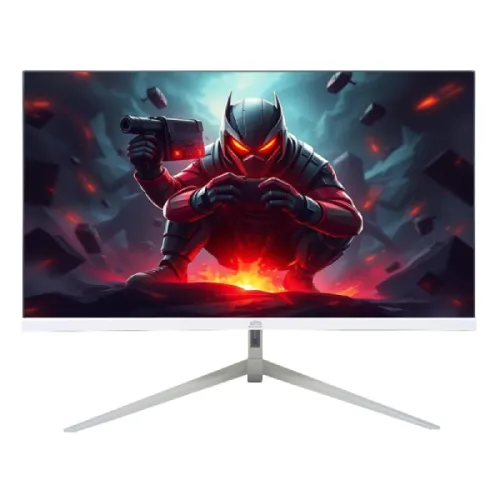
Gigasonic GS-21.5FHD500S8 is a 21.5-inch Full HD IPS monitor with a retailer-listed 100Hz refresh rate, one HDMI input and one VGA input. Star Tech and Samanta list 300-nit brightness, while Sell Tech prose states 250 cd/m². Two directly checked in-stock seller pages showed ৳7,800–৳8,500; these observations are not a BiponiBD offer.
Overview and intended use
Gigasonic GS-21.5FHD500S8 is a 21.5-inch Full HD IPS monitor with a listed 100Hz refresh rate. Star Tech and Samanta Computer identify the 21.5-inch IPS, 1920 × 1080 and 100Hz model; their direct pages and Sell Tech BD provide matching HDMI and VGA details. This size can suit a compact gaming desk, study area, office computer or general home setup where Full HD and a faster-than-60Hz refresh option are useful. It is a flat 16:9 LCD monitor, not an ultrawide or 4K display. The model code should be checked carefully because retailer pages write it in slightly different forms, including GS-215FHD500S8. Match the actual monitor label and invoice to GS-21.5FHD500S8 before purchase, and reconfirm stock and warranty conditions with the selected seller.
Full HD resolution and screen size
The panel measures 21.5 inches diagonally and is listed at Full HD 1920 × 1080 resolution in a 16:9 aspect ratio. Native resolution is the preferred setting for crisp text, browser content and standard 1080p video. For everyday work it can show documents, online classes, messaging, spreadsheets and a game window without requiring a large desk footprint. The 0.248mm pixel pitch is listed by Star Tech. Text size and usable workspace still depend on the operating system’s scaling and the user’s viewing distance. A 21.5-inch Full HD screen offers less room for detailed editing or many side-by-side windows than a larger monitor. It is not a 1440p or 4K panel, so buyers who need more pixels should compare a higher-resolution model rather than assuming that “gaming” in the title means a premium gaming feature set.
IPS panel and viewing angles
Retailer specifications identify an IPS panel and list a 178-degree horizontal and vertical viewing angle. IPS is often selected for broad viewing and relatively consistent colour when the user is not sitting perfectly straight in front of a monitor. The angle rating is a specification rather than a promise that brightness and colour remain identical from every position. The screen is listed as anti-glare, which can reduce reflections from ordinary room lighting but does not eliminate glare from a window or direct light source. Place the display away from strong reflections and adjust the tilt for a comfortable view. No independent calibration report or measured colour-accuracy data was found in the checked listing pages, so the monitor should not be described as professionally calibrated or guaranteed for print-critical work.
Brightness, contrast and colour evidence
Star Tech and Samanta list 300 nits brightness and 1000:1 contrast. Sell Tech BD’s descriptive text states 250 cd/m², which conflicts with those two pages; the brightness figure is therefore reported with its retailer-source variation rather than as a manufacturer-confirmed value. Star Tech lists 178-degree viewing angles and the screen as anti-glare; Samanta repeats a 300-nit value and 1000:1 contrast. The available pages do not establish a measured sRGB coverage or factory calibration. The monitor is suitable to consider for general use, but users working with colour-critical photographs, illustration, video grading or print should request a calibration report or choose a display with independently documented accuracy. Keep room lighting in mind because perceived contrast changes with reflections and brightness.
100Hz refresh and 5ms response
Star Tech, Sell Tech and Samanta list a maximum refresh rate of 100Hz and a 5ms response time. When the computer supports 100Hz at 1920 × 1080 and the correct mode is selected, cursor movement and compatible game animation can look smoother than at 60Hz. The real result depends on the graphics output, cable, driver, game frame rate and monitor settings. A listed 5ms value does not describe every pixel transition or reveal input lag, overshoot, motion blur or adaptive-sync behaviour. The reviewed pages do not confirm FreeSync, G-Sync compatibility or a measured input-lag result. This is an entry-level 100Hz option, not a substitute for testing a monitor designed for high-refresh competitive gaming. Confirm the display settings on the connected device after setup.
HDMI, VGA and HDCP
The exact-model listings show one HDMI input and one VGA input. Star Tech specifies HDCP support on HDMI. HDMI is normally the most convenient digital connection for a recent computer; VGA can support older systems that still use an analog output. VGA carries picture rather than audio. No DisplayPort, USB-C, USB hub or second HDMI port is listed. If a laptop lacks HDMI or VGA, check that an adapter supports the desired 1920 × 1080 at 100Hz mode before ordering. Verify that the correct input is selected when the monitor is connected. The reviewed specifications do not promise automatic input switching or a built-in KVM function. If HDMI is used for a console or PC, the monitor’s lack of listed built-in speakers means audio should be planned through the connected device or external equipment.
Anti-glare surface and everyday comfort
The direct Star Tech specification identifies an anti-glare surface, and Samanta repeats the anti-glare display. This surface treatment may help reduce reflections from indoor lights, but comfort still depends on screen placement, brightness and the room. Set brightness to match ambient light instead of using maximum output automatically. Tilt the screen to face the seated position and avoid bright windows directly behind the viewer. Take breaks during long study or gaming sessions and follow ordinary ergonomic practices. The listings do not establish medical eye-protection performance, so no health benefit is promised. The flat screen and moderate size can fit a compact desktop, while height, swivel and pivot movement are not documented in the checked specifications.
Stand, colour and dimensions
Star Tech lists the monitor colour as silver and white and gives dimensions of 48.55 × 17.72 × 31.8cm with the stand, alongside a 48.55 × 3.18 × 28.72cm listing without it. These are retailer-provided measurements and should be confirmed if the monitor must fit a specific shelf or arm. The product pages reviewed do not clearly confirm a VESA mounting pattern or adjustable stand range, so verify these details with the seller before planning a wall or arm installation. Keep the stand on a stable flat surface and leave room for cables. Compare the stand footprint and monitor width to the available desk area rather than relying solely on the diagonal measurement.
Power adapter and energy use
Star Tech lists an external power supply, a 100–240VAC input range, up to 19W maximum consumption, 13W typical consumption and 0.5W standby. Those figures are from a retailer specification table, not independently measured power testing. Use the adapter supplied with the actual monitor and check its output voltage, current, polarity and connector before connecting it. The listing warns that the adapter is not covered by the warranty. Do not replace it with a similar-looking power brick unless its electrical specifications match. Keep the adapter ventilated and away from moisture. Real power draw may vary with brightness and operating mode. If the adapter fails, contact the seller or warranty provider before sourcing a replacement.
Observed Bangladesh price and availability
Two directly opened Bangladesh retail pages showed the exact model in stock during the review: Sell Tech BD at a ৳7,800 cash-discount price and Samanta Computer at ৳8,500. These observations provide an approximate ৳7,800–৳8,500 two-seller reference range for the check time, not an offer from BiponiBD and not a promise of future stock. Star Tech displayed ৳8,800 but marked the item Out Of Stock, so that price is not used in the in-stock range. Prices can change by payment type, location, delivery and promotions. Confirm the final checkout amount and physical stock before ordering. The two sellers list a three-year warranty and state that the adapter is excluded from warranty; confirm the exact terms on the invoice.
Warranty and included items
The opened retailer pages list a three-year warranty, with Star Tech and Samanta explicitly noting that the adapter is not covered. The warranty provider, service centre, dead-pixel policy, exclusions and claim process should be confirmed in writing. The reviewed pages do not provide a complete, consistent in-box accessory list. Ask the seller whether the package contains the stand, power adapter and any HDMI or VGA cable rather than assuming every cable is included. Keep the invoice and packaging until the return period ends. A retailer’s warranty statement describes that seller’s coverage terms and is not a substitute for the written warranty supplied with the unit. If the display will be used at work or school, confirm whether the purchasing organization needs a tax invoice or serial-number registration.
Who may find this monitor useful
This monitor may fit a student, home user or office worker who wants an IPS Full HD screen with a 100Hz refresh option at a compact 21.5-inch size. It can handle document work, online classes, browsing, streaming and casual gaming when paired with a compatible computer. The single HDMI and VGA inputs can serve a modern digital source and an older analog device, though switching between multiple digital devices may require a separate switch. It may be less suitable for users who need USB-C laptop charging, DisplayPort, built-in speakers, multiple HDMI inputs, a clearly verified adjustable stand, published adaptive sync or calibrated colour. Competitive players should compare tested motion performance and input lag rather than relying only on 100Hz and 5ms headline numbers.
Setup checklist
Before installation, verify the rear label and invoice show the intended Gigasonic model. Place the monitor on a stable desk, connect the supplied power adapter and use HDMI where possible. Select the matching input and set Windows or the relevant operating system to 1920 × 1080. If 100Hz is available, select it and check for a stable picture; some cables, adapters or graphics outputs may limit available modes. Adjust screen tilt if supported by the supplied stand, reduce reflections and set brightness for the room. Test both HDMI and VGA if both are needed, and confirm HDCP playback with the intended source if relevant. Check the display for dead pixels, backlight issues and physical damage promptly within the seller’s return window. Keep the adapter receipt because the retailer pages exclude it from warranty.
Care and troubleshooting
Switch off and unplug the display before cleaning. Use a soft, clean cloth and avoid spraying liquid directly onto the screen. Do not use abrasive materials that can damage the surface coating. If there is no picture, confirm power, cable seating, input selection and the source device’s display output before assuming the monitor has failed. For a blurry image, check that the computer is using 1920 × 1080 and that any analog VGA connection is secure. If 100Hz is missing, check the graphics adapter, driver, cable and operating-system advanced display settings. Persistent flicker, unexpected shutdowns or adapter heat should be discussed with the seller or service provider. Do not open the monitor or power adapter yourself while warranty service may apply.
Comparison and buying decision
Compare the exact model against alternatives using the native resolution, panel, refresh rate, connection count, stand, warranty and verified price together. The GS-21.5FHD500S8 offers an IPS Full HD panel and a listed 100Hz maximum, while remaining limited to one HDMI and one VGA input in the sources checked. A larger 24-inch model can give more physical workspace; a model with USB-C can simplify a laptop desk; a monitor with confirmed speakers may suit a setup without external audio. The brightness specification differs between retailer descriptions, and built-in audio is shown as N/A at Star Tech. Check those needs before purchase. A product title containing “gaming” does not guarantee adaptive sync, low input lag or tested response performance. Choose according to the actual computer and desk requirements.
Evidence and specification limits
The review used direct Chrome pages for Star Tech, Sell Tech BD and Samanta Computer. Star Tech lists 300 nits, 1000:1, 0.248mm pixel pitch, IPS, 100Hz, 5ms, anti-glare and HDMI with HDCP. Samanta confirms IPS, FHD, 100Hz, 5ms, 300 nits, one HDMI, one VGA and a three-year warranty excluding the adapter. Sell Tech shows In Stock at ৳7,800 cash price and its prose describes 250 cd/m². That brightness conflict is recorded. Star Tech is out of stock at its ৳8,800 displayed price and is excluded from the current in-stock comparison. No manufacturer datasheet was identified in the checked sources, so technical values remain retailer-derived rather than manufacturer-verified.
Frequently asked questions
What is the exact model?
The catalog and Star Tech title use Gigasonic GS-21.5FHD500S8. Some retailer pages omit punctuation in the code; match the rear label and invoice.
What is the screen size and resolution?
Retailers list a 21.5-inch IPS panel with Full HD 1920 × 1080 resolution.
Does it support 100Hz?
Star Tech, Sell Tech and Samanta list 100Hz. The computer and cable must support the selected mode.
What is the response time?
The retailer pages list 5ms. The sources do not provide a full measured transition or input-lag report.
How many ports are available?
Listings show one HDMI input and one VGA input; Star Tech specifies HDCP support for HDMI.
Does it include built-in speakers?
Star Tech lists built-in speaker as N/A. Plan external audio or use the source device’s audio output.
What brightness does the monitor have?
Star Tech and Samanta list 300 nits, while Sell Tech description says 250 cd/m². Confirm the specification for the exact unit.
Is the screen anti-glare?
Star Tech and Samanta list an anti-glare surface. Room placement still matters to reduce reflections.
Can it be wall mounted or height adjusted?
The checked pages do not clearly confirm VESA pattern or height-adjustment range. Ask the seller before buying a mount.
What power adapter does it use?
Star Tech lists an external supply with 100–240VAC input. Use the supplied adapter and confirm its output label.
What is the warranty?
Star Tech and Samanta list three years and exclude the adapter. Confirm coverage and provider in writing.
What are the observed prices and stock?
Sell Tech showed In Stock at ৳7,800 cash-discount price and Samanta at ৳8,500. Star Tech showed ৳8,800 but was Out Of Stock. Recheck before ordering.