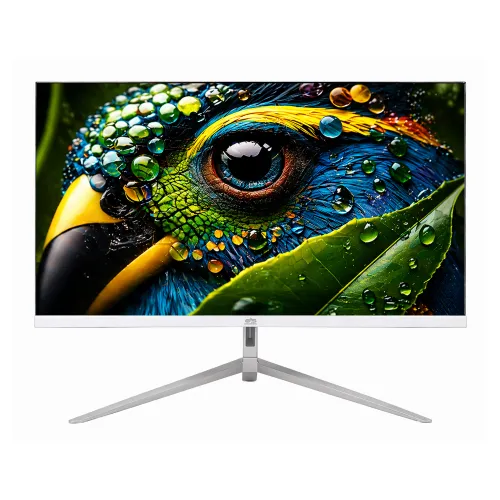
Gigasonic GS-21.5FHD500S9 White 21.5-inch FHD IPS Monitor
Model and source confidence
This catalog entry is for the white Gigasonic GS-21.5FHD500S9 21.5-inch Full HD IPS monitor. No first-party manufacturer website or downloadable exact-model datasheet was located for this audit. The display details below therefore reflect named Bangladesh seller listings and are presented as retailer-reported specifications, not as independently measured or manufacturer-certified facts. Star Tech’s exact white offer identifies its retail code 49399 and describes a 100Hz variant; another Star Tech page uses the same model code for a 75Hz white listing, while other exact-model sellers report 100Hz. The same code also appears with black and white color options. Confirm the exact refresh mode, color and revision on the delivered unit or supplier documentation before relying on a particular mode.
Screen and resolution
Retailer listings identify a 21.5-inch LED-backlit IPS display with Full HD 1920 × 1080 resolution and a 16:9 aspect ratio. These details are consistent across multiple exact-model seller pages, but the absence of a first-party datasheet limits independent verification. A 21.5-inch Full HD screen can fit everyday desktop work, study, browsing and video playback when the user wants a compact monitor. Set the computer to 1920 × 1080 for the listed native resolution. The catalog does not claim a measured color calibration, HDR support, professional gamut certification or touch input.
Refresh and response figures
For this white retail variant, Star Tech and several Bangladesh sellers describe a 100Hz refresh rate and 5ms GTG response time. Other listings for the same GS-21.5FHD500S9 model code state 75Hz. Treat 100Hz as the seller-listed specification of this catalog variant, not a confirmed property of every unit sharing the model code. Check the box label, model suffix, supplier record and computer display settings if refresh rate is important. The cited 5ms GTG value is also a retailer claim; response time varies by measurement method and operating mode. Do not assume Adaptive Sync or a particular measured input lag from these two numbers.
Image, panel and comfort claims
Retailers describe the panel as IPS with a 178° horizontal and vertical viewing angle, approximately 250 cd/m² brightness, anti-glare surface, flicker-free feature and Low Blue Light mode. These claims appear in seller tables, not an accessible manufacturer datasheet. They should not be expanded into unsupported claims such as TÜV certification, guaranteed eye-strain reduction, HDR or professional color accuracy. Room lighting, reflections, brightness settings and viewing distance all influence the experience. Position the screen comfortably, reduce glare and take breaks during long sessions.
Connections and audio
Seller specification tables list one HDMI input and one VGA input. They do not establish the HDMI version, maximum refresh per input or included signal cable for every production batch. The product information does not list DisplayPort, USB, audio output or built-in speakers; plan to use the computer’s audio output or separate speakers if needed. Confirm connector types on the delivered monitor and on the computer before ordering. If the PC has only DisplayPort or USB-C, a compatible active or passive adapter may be needed, depending on the source and display mode.
Stand and mounting
Retail listings describe a white V-shaped stand with tilt from about −5° to +15° and no height adjustment. Some sellers mark VESA wall mounting as supported but do not publish the hole spacing. Do not assume a 75 × 75mm or 100 × 100mm pattern without checking the rear of the unit, manual or supplier specification. Bracket screws, load rating and whether a wall bracket is included also require confirmation. A seller image may show the stand shape but cannot verify the delivered item’s mounting pattern.
Power, dimensions and package contents
Retail listings describe an external power adapter, an AC input range of 100–240V at 50/60Hz, and power consumption below 24W. These figures are seller-published and the exact adapter output, polarity and package accessories were not confirmed from a first-party source. Check the supplied adapter label and use the correct power supply. The sources reviewed did not provide dependable exact product dimensions or weight for this white variant, so this description does not invent them. Reserve desk space around the visible screen and stand and inspect the package contents at delivery.
Color and images
This entry is specifically the white finish. The two existing product images show a white rear housing and a white front bezel with a silver-colored V-shaped stand; the rear image bears the GIGASONIC mark. They visually match the catalog’s white color designation and the seller-described shape, but image appearance alone cannot verify the model revision, physical stock match or rights to reuse the files. The gallery IDs and URLs remain the catalog’s existing assets; descriptive alt text identifies the visible front and rear views without claiming unit-specific photography.
Warranty and Bangladesh offer
The catalog currently lists a three-year warranty. Star Tech’s white 100Hz listing also advertises three years and excludes the adapter from warranty; other local sellers state three years under their own terms. Those retailer terms do not prove the provider or coverage for BiponiBD inventory. Confirm the local warranty provider, adapter coverage, exclusions, dead-pixel policy, invoice and serial requirements, and claim channel with BiponiBD. The saved BiponiBD variant price is BDT 8,199 and Active, but this does not prove current physical stock, checkout total or delivery availability.
Who may consider it
The retailer-described Full HD IPS screen, HDMI/VGA inputs and reported refresh options can suit a compact office, home, study or casual entertainment setup when the exact unit supports the mode the buyer needs. It may be useful where a white display and matching stand are desired. Before buying for gaming, confirm whether the actual white batch is 75Hz or 100Hz, whether the source supports it over the selected input, and whether the retailer’s 5ms GTG figure matches the buyer’s expectations. Buyers who need speakers, DisplayPort, an adjustable-height stand, confirmed VESA spacing or a manufacturer datasheet should compare models with those details explicitly documented.
Setup and care
Place the monitor on a stable, level desk and leave space around the external adapter and display for ventilation. Connect a compatible HDMI or VGA cable, select the correct input and choose 1920 × 1080 in the operating system. Use the display settings to confirm which refresh rates are actually available for the delivered unit; do not rely on a product headline alone because listings for this model code conflict between 75Hz and 100Hz. Adjust tilt within the seller-described range, avoid pressure on the panel and follow the supplied manual for cleaning. Use a soft lint-free cloth and do not spray liquid directly onto the display.
Specification and source note
Details on this page were cross-checked on 2026-11-03 against the exact-model Star Tech white product page, Rose Tech, Re-Build Computer and other Bangladesh retailer pages. Sellers commonly report IPS, 1920 × 1080, 21.5 inches, HDMI plus VGA, 5ms GTG and eye-care features. The 75Hz/100Hz conflict and differing color/seller codes mean these specifications remain retailer-derived. No primary manufacturer specification sheet, exact VESA pattern, dimensions or unit-specific warranty proof was found. The product content retains the saved BiponiBD price and status; competitor price and stock are not substituted for BiponiBD’s offer.