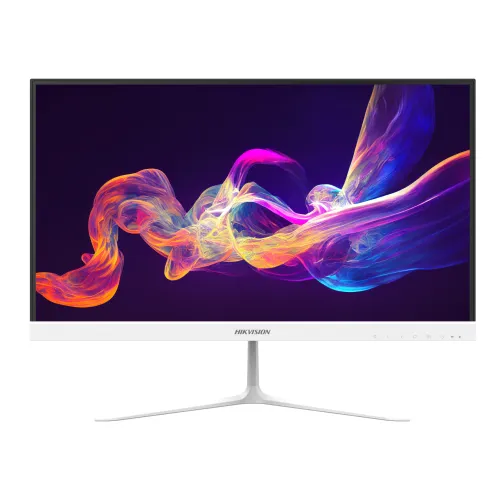
Exact white model identity and suffix
The product is the white Hikvision DS-D5022F2-6P2 monitor. Hikvision’s white datasheet title writes the model as DS-D5022F2-6P2/W, while the technical drawing calls it DS-D5022F2-6P2-W (white); Bangladesh retailers commonly shorten it to DS-D5022F2-6P2. The suffix and color should be checked on the carton before assigning a unit-specific part number. The visible BiponiBD product is the white version, not the black DS-D5022F2-CBD/-1P2 family. A retailer code such as Star Tech’s 47696 is a store identifier and should not be stored as manufacturer part number or BiponiBD SKU.
Full HD IPS display and active area
Hikvision identifies a 21.5-inch Full HD IPS panel with E-LED backlight, 1920 × 1080 resolution and 178-degree horizontal and vertical viewing angles. The white datasheet lists an active area of 478.656 × 260.28mm, while Bangladesh retail pages sometimes use a different active-area figure or refer to the panel as 21.45 inches. The diagonal class and panel resolution are consistent, but those active-area measurements do not match across sources. The listing should use the manufacturer’s 21.5-inch size and explain the 21.45-inch retail shorthand only where useful. Avoid precise PPI claims until Hikvision resolves the geometry.
Pixel-pitch data needs a source note
The white-model datasheet states a pixel pitch of 0.0831mm horizontally and 0.241mm vertically. Several Bangladesh product listings state 0.241 × 0.241mm. The datasheet’s horizontal value may represent a subpixel width or a documentation inconsistency, but the public source does not explain it. Do not silently normalize these into a single exact value or derive a pixel-density marketing claim. The catalog attribute records both the official text and the retailer value as a discrepancy that needs confirmation. This keeps the data auditable while the other unambiguous display facts remain usable.
100Hz maximum refresh and typical mode
Hikvision’s white-model documentation lists 100Hz refresh. Retailer technical tables commonly distinguish 60Hz typical and 100Hz maximum. The official datasheet identifies one HDMI 1.4 and one VGA input but does not show a detailed per-port timing table. Connect a compatible graphics source by HDMI to reach the highest supported mode, then select the refresh option offered by the computer. The display refresh specification describes the maximum monitor mode, not the frame rate that a game or application will render. VGA’s available timing depends on the source device, cable and mode. Do not promise that both inputs provide identical refresh performance without an official timing chart.
8ms response time, distinct from sibling claims
The official white DS-D5022F2-6P2/W datasheet specifies an 8ms response time. Some black sibling listings or generic Hikvision product templates display 6.5ms or 1ms figures; those claims are not the correct white-model response specification. Response time is one characteristic of panel transitions and does not mean there will be no motion blur. Refresh rate, frame rate, overdrive and content also affect how moving objects appear. The product title and FAQ should keep the exact 8ms figure attached to the white -6P2 version rather than borrowing faster response figures from another DS-D5022 variant.
Color, brightness and contrast
Hikvision specifies 250cd/m² brightness, a 1000:1 contrast ratio, 8-bit color depth with 16.7 million colors, and 72% NTSC color gamut. These values describe the manufacturer’s published panel specification. They are not a factory calibration certificate and should not be presented as a guarantee of color accuracy for print production. For everyday documents, browsing, study, video and general office applications, the 21.5-inch IPS Full HD panel provides a standard desktop format. IPS viewing angles help preserve the picture when the screen is viewed from the side.
Low Blue Light and 3D noise reduction
The white model lists a Low Blue Light design for eye care and 3D noise reduction. Low-blue-light options can change the appearance of whites and color, so users doing color-sensitive work should check the selected mode. Noise reduction is a video processing feature; it should not be described as a gaming enhancement or as a guarantee that every source image will be clearer. Neither feature is medical treatment or a promise against eye fatigue. Room brightness, display positioning, text scale and breaks remain relevant for long work sessions.
Video inputs and 3.5mm audio out
The official white datasheet lists HDMI 1.4 digital input, VGA analog input and a 3.5mm audio output interface. It does not list built-in speakers. Connect external speakers or headphones to the monitor’s audio output when audio is routed through the supported signal path; a VGA connection itself carries video only, so audio may need a separate connection from the computer. The model does not list DisplayPort or USB-C. Verify the computer output and audio routing before ordering so that the required cables or external audio equipment are available.
White three-side narrow-bezel design
Hikvision’s white datasheet describes an ultra-thin device body with narrow borders on three sides. The body and stand should appear white in product images to match the -6P2 white configuration. The black -CBD/-1P2 sibling can share a similar panel but is a different finish and some suffixes have differing connector or response claims. The white manufacturer drawing specifies 2.38mm top/left/right bezel and 21.55mm lower bezel. A narrow bezel can help create a cleaner side-by-side arrangement, but a physical frame remains visible around the panel.
Tilt stand, VESA and installation
Hikvision supports a 75 × 75mm VESA mounting pattern using four M4 × 6mm points. The white datasheet also provides dimensions with the base, while local retailers say the stand tilts. The numeric tilt angle is not included in the reviewed white-model table, so the listing does not promise a range or other height, swivel or pivot adjustments. Check that a wall bracket or monitor arm supports 75 × 75mm and uses suitable screws. Verify its load rating and leave room for the rear cables.
Dimensions, weight and package size
With its base, the monitor measures 493.26 × 369.12 × 162.75mm (W × H × D). Without the base, dimensions are 493.26 × 290.14 × 42.68mm. The package measures 598 × 391 × 106mm. Hikvision lists net weight at 2.0 ± 0.5kg and gross weight at 3.2 ± 0.5kg. These are separate product and shipping measurements and should not be interchanged. The published tolerance is retained because the source provides a range rather than a single exact weight.
Power supply and what is in the box
The monitor uses a DC 12V, 2.0A external power adapter. Maximum operating consumption is listed at 24W, with standby consumption up to 0.5W. The white-model packing list includes one monitor, one base component, one 12V/2A adapter, a 1.5m HDMI cable, a user manual and a multilingual manual. Hikvision notes that appearance and parameters can vary by actual device and recommends consulting local sales staff, so the delivered box contents and label should be checked when the unit arrives.
Bangladesh warranty and price references
Smart Technologies is identified in Bangladesh distributor references for Hikvision products, and exact-model retailers commonly list a three-year warranty. The channel observed approximate retail prices from ৳8,800 to ৳10,000 during this audit; promotions and seller listings can change. These public references do not establish BiponiBD’s purchase channel, current stock, live price, delivery status or the warranty route for a specific unit. The official datasheet does not set the Bangladesh claim procedure. Confirm warranty provider and terms against BiponiBD’s actual unit, invoice and warranty documentation.
Separate -6P2 from Hikvision sibling variants
The DS-D5022F2 family uses suffixes that can change color, refresh generation, speaker hardware and sometimes ports. This white -6P2/W has an 8ms response claim, 3.5mm audio out and no built-in speakers. Black -CBD/-1P2 listings may use the same general IPS/100Hz platform but show different response details or batch-dependent audio output. Earlier -1P1 hardware has different generation details. Black -2P2 can include built-in speakers, which do not belong to this white -6P2. VA panels from other DS-D5022 lines and their 3000:1/4000:1 contrast values also do not apply. Keep the exact white model and the gallery’s chassis color aligned.
Category and search-ready listing
The existing Monitors category is appropriate. Useful filters include Hikvision, white monitors, IPS, 21.5-inch, Full HD, 100Hz and VESA displays. A clear title should include DS-D5022F2-6P2, white, 21.5-inch, IPS and 100Hz so buyers can distinguish it from black -CBD and speaker-equipped -2P2 models. Preserve the existing URL slug. Use the official white part notation carefully, document the pixel-pitch discrepancy, and do not infer a specific refresh timing for every port. Current price and stock must come from BiponiBD’s own live offer, not a competitor listing.