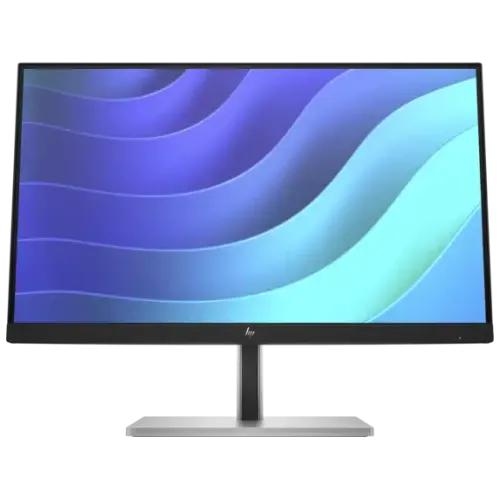
HP E22 G5 21.5-inch FHD IPS Monitor — Complete Office Buyer Guide
Exact model and part number
This listing is for the HP E22 G5 FHD Monitor, HP's 21.5-inch commercial E-Series G5 screen. HP QuickSpecs identifies product number 6N4E8AA; regional sales SKUs include 6N4E8AS for some Asia-Pacific channels and 6N4E8E9 for Europe. Check the carton label and invoice because a suffix can identify a local bundle or cord configuration. The E22 G5 is not the earlier E22 G4 (product number 9VH72AA), the budget P22 G5, the larger 23.8-inch E24 G5, or the USB-C docking E24u G5. Those neighboring names can look similar in retailer listings, yet their ports and capabilities differ. The existing product identity, category, status and slug are preserved.
21.5-inch Full HD IPS picture
The display uses a flat 21.5-inch (54.6cm diagonal) IPS LCD with edge-lit W-LED backlighting, a 16:9 aspect ratio and native Full HD resolution of 1920 × 1080. HP lists a 47.61 × 26.78cm active area, 0.25mm pixel pitch and about 102 pixels per inch. A three-sided micro-edge bezel helps when two screens are placed side by side. The anti-glare surface has a 3H hardness rating and 25% haze in HP's technical documentation. Full HD at this compact size gives text and desktop interfaces higher pixel density than many 24-inch or 27-inch Full HD monitors, making it a practical fit for small desks, office work and shared workstations.
Refresh rate, motion and pixel density
HP specifies a maximum refresh rate of 75Hz and a typical 5ms gray-to-gray response time with overdrive. This is an office/productivity monitor, not a high-refresh gaming display. The 75Hz mode can provide a little smoother cursor movement and scrolling than 60Hz when supported by the computer, while 5ms GtG is the stated overdrive measurement. Resolution and refresh still depend on the computer, operating system and cable. The 102-PPI panel suits crisp documents and common business apps at ordinary viewing distance. Buyers focused on competitive gaming, higher frame rates or motion clarity should compare a model whose official specs list a substantially higher refresh rate.
Brightness, contrast and color
HP QuickSpecs lists 250 nits typical brightness, 1,000:1 static contrast and 8,000,000:1 dynamic contrast. The dynamic ratio is a separate processing-based specification; use 1,000:1 for ordinary native panel comparisons. HP states 99% sRGB color gamut and up to 16.7 million colors through 8-bit (6-bit + FRC) processing. This coverage is useful for everyday office content, web graphics and media, but it is not a per-unit proofing calibration or a factory Delta-E guarantee. The panel has 178-degree horizontal and vertical viewing angles. One Bangladesh seller has mixed a VGA claim from the older G4 into its E22 G5 table; this guide follows HP's exact 6N4E8AA specification where retailer data conflicts.
HP Eye Ease and flicker-free comfort
HP Eye Ease is HP's always-on hardware low-blue-light solution in this model, certified as a TÜV Low Blue Light Hardware Solution; HP describes it as reducing blue light without the pronounced yellow tint of a software-only warm mode. The monitor is also flicker-free and includes on-screen color and brightness controls. These features may make long work sessions more comfortable for some users, but they do not guarantee relief from eye strain; adjust brightness, take breaks and set up the workstation to suit your environment. HP Display Center and HP Client Management Script Library are listed as management software options; verify the matching OS and product support page before installing utilities or applying firmware.
Video inputs and compatibility
The E22 G5 provides one HDMI 1.4 input and one DisplayPort 1.2 input, both with HDCP. It has no VGA connector. That distinction matters when connecting older desktop computers, projectors or KVM equipment: an adapter may be needed, and the adapter must support the intended resolution. The monitor has no USB-C display input and cannot charge a laptop over USB-C Power Delivery. Do not mistake it for the E24u G5, which is the separate USB-C docking model. The box includes both a 1.8m HDMI 1.4 cable and a 1.8m DisplayPort 1.2 cable according to HP QuickSpecs, giving the buyer two supported digital connection options at setup.
USB hub, charging and device connection
A USB-B upstream port links the monitor's four-port SuperSpeed USB-A 5Gbps hub to the computer. HP identifies three standard downstream USB-A ports and one port with BC1.2 device charging up to 7.5W (5V, 1.5A). The USB-B-to-A cable is included in HP's listed package; connect it to the PC to enable the hub. These are USB-A data/peripheral connections, not an integrated USB-C dock, Ethernet adapter or laptop-charging solution. A connected computer must be on for ordinary hub behavior, and charging output is intended for small accessories rather than powering a laptop. The monitor has no built-in speakers and no 3.5mm audio jack; use the computer, USB audio device or separate speakers for sound.
Four-way ergonomic stand and mounting
HP supplies a four-way ergonomic stand: up to 150mm height adjustment, −5° to +23° tilt, ±45° swivel and ±90° pivot. The panel can rotate into portrait orientation for long documents or coding, with the operating system set to portrait after rotation. A 100 × 100mm VESA mounting pattern supports a compatible arm or wall mount, and the quick-release stand is detachable. A standard lock slot is provided for basic physical security. The stand has a black head with a black-and-silver column/base. Use a stable desk, leave room for the rectangular base and route cables through the stand's cable management feature.
Power, size, weight and sustainability
HP specifies an internal power supply supporting 100–240V AC at 50/60Hz, with 20W typical, 50W maximum and 0.5W standby consumption. HP lists ENERGY STAR certification, EPEAT Gold/Climate+ registration and TCO Certified Edge for the documented SKU. The assembled dimensions with stand are approximately 48.87 × 21.10 × 49.30cm (W × D × H); without stand, the panel is approximately 48.87cm wide and 29.39cm high, with depth varying by whether the hinge is attached. Weight is about 4.9kg with stand and 2.9kg without it. Verify shipping carton and electrical details from the local unit label if exact logistics measurements matter.
What is included in the package
HP QuickSpecs lists the E22 G5 monitor, an HDMI 1.4 cable (1.8m), DisplayPort 1.2 cable (1.8m), USB Type-B-to-A cable (1.8m), AC power cord, Quick Setup Poster and warranty card. Regional bundles may differ, so compare the package contents on the exact carton or ask the seller before purchase. The included HDMI and DP cables avoid an immediate extra cable purchase for many desktop setups. A VGA cable is not listed, and the monitor itself has no VGA port. HP lists no audio accessories because the display has no built-in speakers or audio output jack.
Workstation use, strengths and trade-offs
This screen is designed for office desks, administrative teams, study spaces, call-center stations and multi-monitor setups that need an adjustable stand, a compact Full HD panel and a USB peripheral hub. The 21.5-inch size and 102-PPI density provide relatively crisp text, while the 99% sRGB claim and IPS angles suit everyday web and business visuals. Height, tilt, swivel and pivot adjustment help align the screen with the user. The monitor is not a USB-C one-cable dock, has no webcam, no speakers and no analog VGA input. Those limitations are easy to plan around when the computer uses HDMI or DisplayPort and audio is handled separately.
Bangladesh price and warranty
Bangladesh seller pages observed during this review showed exact-model prices from about ৳22,499 to ৳23,500, including Star Tech at ৳23,500 and other retailer offers that may change with stock and promotions. The current BiponiBD variant price of ৳23,500 is preserved. Local sellers advertise a three-year warranty; the claim route, authorized local provider, dead-pixel policy and required documents can vary by channel and imported region. HP's regional warranty terms are not a substitute for the Bangladesh seller's written coverage. Keep the invoice and any packaging required for claims, and confirm who handles service before purchase.
Before placing an order
Before ordering, confirm the actual unit is HP E22 G5 with product number 6N4E8AA or the relevant regional 6N4E8AS variant, and verify its serial-number warranty route with the seller. Check that the computer provides HDMI or DisplayPort because this model has no VGA, and choose the connection that your PC supports. Connect USB-B upstream if you want the four-port USB hub. Expect 75Hz maximum, no USB-C laptop charging, no speakers and no audio jack. Confirm that the stand's 150mm height range and portrait pivot suit your desk, or select a VESA arm. Ask about current stock, final price, box contents and local warranty claim requirements.