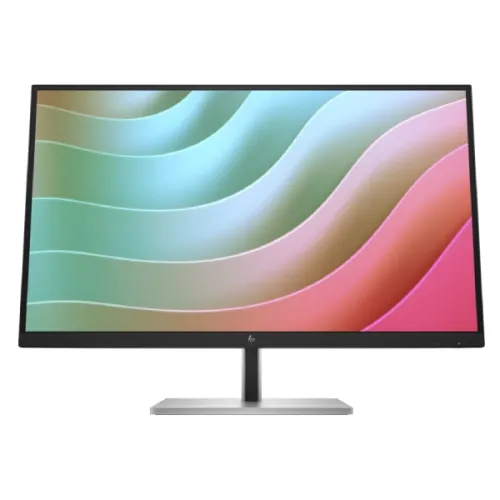
HP E27k G5 at a glance
The HP E27k G5 is a 27-inch 4K monitor for office and productivity setups. HP Bangladesh identifies the model as 6N4C4AA and specifies an IPS LCD panel with 3840 × 2160 resolution at 60Hz. Its distinguishing feature is integrated docking connectivity: USB-C video and power, additional USB data, USB-A ports and wired Ethernet. Built-in speakers and an adjustable stand make it a complete desk display for many everyday computer workflows.
This listing normalizes its model and MPN, improves the specifications and product content, and compares current exact-model Bangladesh seller prices. The existing URL, active status, category, variant SKU and catalog MSRP remain intact. HP’s official specifications are used for technical details; Star Tech, Tech Land and PQS provide the dated local price and stock observations.
4K resolution and 27-inch workspace
The native resolution is 3840 × 2160 pixels in a 16:9 format. That pixel count can keep fine text, detailed images and multiple application panels visible on one screen. At a 27-inch diagonal, 4K provides a dense desktop image; system scaling can make menus and text easier to read at a comfortable viewing distance. The 163 pixels-per-inch figure and 0.15mm pixel pitch are listed by HP.
A 4K display does not increase the processing speed of the connected computer. The graphics hardware must support the selected resolution, and the output path must carry the signal. HP says DisplayPort 1.4 or HDMI 2.0 is required for native resolution. Check the computer, adapter, dock and cable if the monitor does not initially expose 3840 × 2160.
60Hz panel for productivity
HP specifies a maximum refresh rate of 60Hz. This is a conventional mode suited to office applications, browsing, video playback and general computer work. It is not a high-refresh gaming panel, so users who prioritize competitive motion may prefer a faster display. The 60Hz rate applies regardless of the monitor’s 4K pixel count and should be considered separately from its response-time figure.
A 5ms gray-to-gray response time with overdrive is listed. Overdrive changes pixel transitions to reduce visible trailing under some conditions, but the actual result depends on settings and content. The response-time number should not be read as a promise of the same transition on every color change. For work and casual gaming, the intended use and 60Hz refresh are more practical comparison points than response time alone.
IPS panel and image quality
The display uses IPS LCD technology. HP lists 178-degree horizontal and vertical viewing angles, which can help keep the image visible from positions away from the center. Brightness is specified as 350 nits typical, with a 1000:1 typical static contrast ratio. The screen is flat and uses an anti-glare finish, which can reduce reflections but cannot eliminate all glare in every room.
HP lists 99% sRGB color gamut and 10-bit color processing via 8-bit plus frame-rate control, for up to 1.07 billion colors. Those figures describe gamut and color-depth capability, not a guarantee of factory calibration or professional uniformity. Color-sensitive work may require calibration and a color-managed workflow. For documents and general media, the published values provide useful comparison details.
USB-C docking and charging
The USB-C video input supports DisplayPort Alt Mode 1.4 and up to 65W USB Power Delivery according to HP. A compatible laptop can send display output and receive charging through a single USB-C cable, reducing cable clutter. The connection also uses the display as a docking point for supported downstream devices. Cable and host compatibility matter: not every USB-C port on a laptop supports video output or the same charging level.
HP separately lists a USB-C data connection with up to 15W power delivery. This is distinct from the USB-C video input rated up to 65W. Read the port labels and setup guide so the laptop is connected to the intended port. A 65W display power budget may not fully power every laptop during demanding workloads; compare the laptop’s included adapter rating and requirements.
USB-A expansion and Ethernet
Three SuperSpeed USB Type-A ports support a 5Gbps signaling rate, with one port identified for charging. They can keep a keyboard, mouse, webcam or storage device attached to the monitor when using the supported upstream connection. Performance depends on the connected host, device and cable; a 5Gbps port rating describes the interface, not the speed of every connected drive.
A gigabit RJ-45 Ethernet port is listed for a wired network connection. This can provide a convenient desk network path when a compatible USB-C laptop is connected. Network operation depends on the computer, drivers, cable and network. The monitor’s docking features may reduce the need for a separate hub, but users should verify that all required devices and network functions work with their particular operating system.
Video inputs and signal path
HP lists one DisplayPort 1.4 input and one HDMI 2.0 input in addition to USB-C video. This gives desktop computers, laptops and other compatible sources a few direct connection choices. If the monitor is used with two computers, select the source input on the on-screen controls. The availability of USB-C charging and downstream data depends on using the designated USB-C connection rather than HDMI or DisplayPort alone.
The monitor can drive its native 4K resolution at 60Hz when the connected graphics device and cable support the mode. Docks, KVM switches, adapters and long or low-spec cables may limit resolution, refresh, bit depth or charging. Troubleshoot the complete signal path: connect the computer directly, confirm output settings, update drivers, and add any intermediate device back after the expected mode is working.
Built-in audio
HP specifies two integrated speakers rated at 3W each. They can support basic video calls, system sounds and casual media without a separate audio device. Speaker output and perceived volume depend on the source, room and listening distance. Users needing richer sound, stronger bass or a wider sound field may prefer external speakers or headphones. The monitor’s speaker specification does not describe microphone capability.
The product specifications inspected do not identify a built-in camera. The official page explicitly says no integrated camera. For meetings, connect a separate webcam and select the intended microphone and speaker in the video-call software. Confirm audio output routing through the connected computer, especially when changing between HDMI, DisplayPort and USB-C sources.
Stand flexibility and VESA mounting
The stand supports up to 150mm of height adjustment, tilt from -5° to +20°, swivel of ±45° and pivot of ±90° according to HP. These adjustments help align the image with eye level, angle the display toward a nearby seat, or rotate it for portrait documents. The stand is detachable, which can be useful when packing or switching to a separate mounting solution.
HP lists 100 × 100mm VESA mounting. A compatible arm or wall mount can free desk space or extend the monitor’s reach. Confirm the mount’s supported weight, screw length, desk clearance and safe motion range before installing it. Keep cables long enough for the full swivel and height movement. The included stand may be more convenient for a standard workstation and does not require buying mounting hardware.
Comfort and visual coating
HP Eye Ease is described as a hardware low-blue-light solution with TÜV certification. The monitor is also listed as flicker-free. These features provide display-comfort options for extended office use, but individual comfort varies with brightness, ambient lighting, text size and viewing distance. Position the display so windows and overhead lamps do not reflect directly toward the viewer. Adjust brightness to the room rather than leaving it at maximum.
The panel has an anti-glare surface and 3H hardness rating. Anti-glare treatment can reduce reflections while preserving the image, but strong direct light can still be distracting. HP’s stated 350-nit brightness is typical and may suit many work environments. For a brightly lit area, compare how the monitor handles ambient reflections with your other options and use the stand to orient it appropriately.
Design and desk fit
HP describes a three-sided borderless bezel that can work in a two-screen workspace. The physical dimensions with stand are listed as approximately 61.34 × 22.73 × 54.7cm (width × depth × height), and weight with stand is 10kg. The packaging is larger than the monitor itself, so allow clearance if the unit must be transported or stored before setup.
The panel can also be mounted without the supplied stand. HP lists separate dimensions for the screen without stand and package dimensions. These measurements help with desk and shelf planning, but verify the final mounting surface and cable bend space. A monitor arm may make the display easier to position while requiring a sturdy desk clamp and proper clearance behind the desk.
Power use and operating conditions
HP specifies 29W typical, 190W maximum and 0.5W standby power consumption, with 100–240V AC, 50/60Hz input. Actual energy use depends on brightness, connected devices and operating state. The 190W maximum is a peak specification, not the expected continuous draw in every task. USB-C power delivery to a laptop is a separate function from the display’s typical operating power.
The monitor is designed for normal indoor work conditions. Keep ventilation paths clear and avoid blocking the rear of the panel with documents or fabric. Use a properly grounded outlet and the supplied power cable. If the display and laptop are connected through a dock, account for the dock and host power requirements separately; the monitor’s 65W USB-C output does not increase its video refresh rate.
Productivity and professional use
This model is aimed at desks where one USB-C cable, Ethernet and USB accessories simplify the workstation. A compatible laptop can connect for 4K video, supported charging and access to connected USB or network peripherals. The 27-inch 4K surface can accommodate dense spreadsheets, multiple documents, design tools and detailed media. Height adjustment and pivot can also help when working with long pages, code or portrait layouts.
99% sRGB coverage is a useful published figure for everyday creative tasks, but color-critical work should evaluate calibration and consistency. The 60Hz panel favors office and general content over fast competitive gaming. Check whether the 65W charging level is enough for the laptop. A heavier workstation may need its own power adapter even while using the display for data and video.
Compatibility and setup checklist
Before connecting a laptop, verify it has a USB-C port with DisplayPort Alt Mode and that the port supports the required charging behavior. Use the intended video-input USB-C connection for up to 65W Power Delivery. If USB-C video is unavailable, use DisplayPort or HDMI for the picture and a separate upstream data connection where supported. Follow the monitor setup guide to attach the stand and route cables safely.
After setup, open the computer’s display settings and choose 3840 × 2160 at 60Hz. Select the correct monitor input and check that USB peripherals and Ethernet are detected. If charging is slow, confirm that the right USB-C port and a compatible cable are used, and compare the laptop’s demand with the monitor’s 65W maximum. Test the speakers and adjust on-screen brightness and Eye Ease options for the workspace.
Bangladesh pricing and availability
On 6 November 2026, Star Tech and Tech Land displayed ৳62,500 cash/online prices and PQS displayed ৳61,700. Star Tech and Tech Land also showed higher regular or EMI amounts. These current seller pages identify the exact E27k G5 model; the price range records the lower cash or online figure rather than installment totals. The existing BiponiBD variant MSRP remains ৳62,500.
The three retailer pages showed in-stock status when checked. Stock can change before an order is placed, and a seller may apply different totals by payment method. These observations are comparison context and do not create a BiponiBD store offer. Check delivery, packaging, included cable and checkout price on the retailer page before purchasing.
Warranty and buying fit
HP Bangladesh lists a three-year limited warranty for the model. Star Tech and Tech Land also list three years; PQS describes official brand warranty in its product copy, though its visible specs did not surface a detailed term. Confirm the local service provider, coverage, exclusions and claim process in writing, then retain the invoice and serial number. Warranty wording can differ by importer and seller.
The E27k G5 is a good fit to compare when docking convenience, 4K workspace, Ethernet, speakers and ergonomic adjustment are priorities. It may not suit users seeking a high-refresh gaming screen or a one-cable charging solution above 65W. Compare the price, charging limit, port layout and written warranty with the laptop and peripherals already in use before deciding.