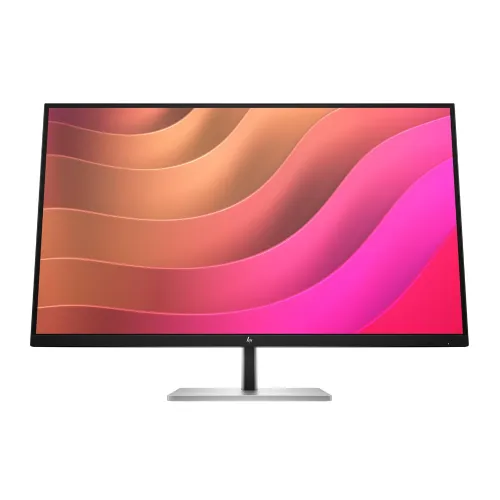
Executive Overview: HP E32k G5 4K USB-C Professional Docking Monitor
The HP E32k G5 4K USB-C Monitor (HP Bangladesh Product Number 6N4D6AA; also cataloged in regional retail channels under part code 6N4D6E9) is an enterprise-grade 32-inch class (31.5-inch / 80 cm viewable diagonal) Ultra HD workstation display and single-cable USB-C desktop docking hub. Purpose-built for corporate executives, software engineers, quantitative financial analysts, CAD architects, and hybrid knowledge workers, the HP E32k G5 unifies a native 3840 x 2160 (4K UHD) IPS panel, an integrated 65W USB Type-C power delivery dock, a secondary 15W USB Type-C data and charging port, a dedicated RJ-45 Gigabit Ethernet controller, dual 3W stereo speakers, and a four-way ergonomic stand inside a single cohesive chassis.
Contemporary hybrid offices and home studios require effortless switching between portable laptops and stationary multi-peripheral workstations without tangles of external adapters, HDMI dongles, and separate laptop power bricks. By combining uncompressed 4K video signal transport via DisplayPort 1.4 Alternate Mode, up to 65W host notebook charging, multi-port 5Gbps SuperSpeed USB data routing, and wired enterprise network manageability over a single USB Type-C cable, the HP E32k G5 eliminates the need for a standalone desktop docking station. Supported by hardware-level HP Eye Ease low-blue-light filtration, an automatic Ambient Light Sensor, an internal universal power supply, and a 3-year HP limited warranty, this display serves as a high-reliability centerpiece for demanding professional workflows across Bangladesh.
31.5-Inch 4K Ultra HD IPS Panel Architecture and Pixel Geometry
At the foundation of the HP E32k G5 is a flat, active-matrix In-Plane Switching (IPS) liquid crystal panel illuminated by a high-efficiency edge-lit LED backlight. While marketed within the 32-inch monitor category, the exact active viewable diagonal measures 31.5 inches (80 cm) across a standard 16:9 widescreen aspect ratio. Across this expansive viewing surface, the native 3840 x 2160 (4K UHD) resolution addresses 8,294,400 individual pixels—delivering four times the workspace capacity and pixel count of a conventional 1920 x 1080 Full HD monitor and 2.25 times the canvas area of a 2560 x 1440 QHD display.
140 PPI Pixel Density and 0.18 x 0.18 mm Pixel Pitch Optimization
Choosing the right physical diagonal for 4K Ultra HD resolution directly impacts daily visual comfort and usable screen real estate. On smaller 27-inch 4K monitors, the 163 PPI density is so tight that operating systems typically default to 150% interface scaling so text remains readable, reducing the effective desktop workspace to the equivalent of a 2560 x 1440 screen. Conversely, stretching 3840 x 2160 across a 43-inch television-sized panel lowers pixel density to roughly 103 PPI and forces the user to crane their neck to see the screen corners. Expanding the 3840 x 2160 pixel matrix across a 31.5-inch viewable diagonal establishes a balanced 0.18 x 0.18 mm pixel pitch and an optical density of 140 pixels per inch (PPI). At standard ergonomic desktop viewing distances between 60 cm and 85 cm, this 140 PPI geometry delivers distinct operational advantages:
- Razor-Sharp Sub-Pixel Typography at 100% to 125% Scaling: Fine serif and monospace fonts in integrated development environments (IDEs), legal contracts, medical diagnostic reports, and multi-tab financial workbooks render with smooth, alias-free character edges. Power users can comfortably run Windows 11, Linux desktop environments, or macOS at 100% or 125% scaling to maximize visible rows and columns without straining to read small glyphs.
- True Four-Quadrant 1080p Window Tiling: Because 3840 x 2160 equals four exact 1920 x 1080 quadrants, professionals can snap four full-HD application windows in a 2x2 grid—such as a code editor, a terminal session, a browser preview, and a system telemetry dashboard—with zero physical bezel splits interrupting the view.
- Expansive Horizontal Timeline and Spreadsheet Visibility: Video editors working in Adobe Premiere Pro or DaVinci Resolve, audio engineers managing multi-track DAW sessions, and financial modelers auditing multi-decade balance sheets can view dozens of columns and long horizontal timelines simultaneously without constant horizontal scrolling.
- Uniform 178-Degree IPS Viewing Cone: The In-Plane Switching liquid crystal cell alignment maintains chromatic stability, gamma linearity, and luminance consistency across wide 178-degree horizontal and 178-degree vertical viewing angles. Unlike Vertical Alignment (VA) or Twisted Nematic (TN) panels whose off-axis corners can exhibit contrast washout on a wide 71.4 cm screen, the HP E32k G5 preserves consistent color and contrast from edge to edge, even when colleagues gather around the desk for collaborative design reviews.
10-Bit Color Depth, 99% sRGB Gamut, and Optical Surface Engineering
Professional visual tasks—including UI/UX interface design, corporate brand asset preparation, geographic information system (GIS) mapping, architectural rendering, and executive presentation authoring—require dependable sRGB coverage and smooth tonal transitions. The HP E32k G5 achieves 10-bit color depth support (displaying up to 1.07 billion colors) by pairing an 8-bit native IPS panel driver with high-speed Frame Rate Control (8-bit + FRC) temporal dithering. Compared to conventional 8-bit office displays limited to 16.7 million colors, 10-bit signal processing provides 64 times more discrete chromatic steps, virtually eliminating visible color banding across subtle sky gradients, soft drop shadows, and monochrome radiographic or photographic imagery.
Luminance Headroom, Contrast Ratios, and 99% sRGB Fidelity
- 350 Nits (cd/m²) Typical Brightness: Rated at 350 nits of typical luminance, the edge-lit LED backlight provides substantial brightness reserve to maintain clear legibility in sunlit offices, glass-walled conference rooms, and brightly illuminated corporate floors.
- 1000:1 Static and 8,000,000:1 Dynamic Contrast Ratio: The native 1000:1 static contrast ratio ensures crisp separation between dark text, UI borders, and white document backgrounds, while dynamic backlight modulation scales up to 8,000,000:1 when rendering high-contrast video sequences.
- 99% sRGB Color Space Coverage: Factory-tuned to cover 99% of the sRGB color gamut, the display reproduces web content, digital marketing graphics, product photography, and standard Rec.709 video assets with faithful saturation and hue accuracy across cross-platform workflows.
- Anti-Glare Polarizer with 3H Surface Hardness: The outer optical layer combines a low-haze matte anti-glare diffusion treatment with a durable 3H hard-coating. This surface engineering diffuses harsh reflections from overhead fluorescent tubes, LED troffers, and desk lamps without introducing grainy sparkle across fine text, while protecting the panel surface against accidental scuffs during routine microfiber cleaning.
60Hz Refresh Precision, Scan Frequencies, and 5ms GtG Overdrive Response
Always-On Visual Ergonomics: HP Eye Ease, Flicker-Free Dimming, and Ambient Light Sensor
Working eight to twelve hours a day in front of a large 31.5-inch high-luminance screen places continuous demands on the human visual system. HP engineers the E32k G5 with a comprehensive, three-pillar hardware eye-care architecture designed to minimize ocular fatigue without compromising display quality:
2. Direct-Current Flicker-Free Backlight Regulation
3. Integrated Ambient Light Sensor for Automatic Luminance Adaptation
A common cause of late-afternoon eye fatigue occurs when a monitor remains locked at a high daytime brightness setting after natural room light fades, creating an uncomfortable luminance contrast between the bright screen and the darker room. Mounted discreetly along the top bezel, the HP E32k G5's built-in Ambient Light Sensor continuously measures environmental room illumination and automatically adjusts the panel's backlight brightness in real time. In bright midday conditions, the sensor scales luminance upward toward 350 nits to preserve contrast; in dim evening offices, it gently lowers brightness to prevent glare, conserving energy while protecting visual comfort.
Single-Cable USB-C Docking Architecture and Multi-Port I/O Backplane
What elevates the HP E32k G5 above standard 32-inch 4K monitors is its integrated workstation docking architecture. Instead of purchasing, powering, and cabling a separate USB-C or Thunderbolt desk dock, users can connect their notebook to the monitor with a single USB Type-C cable to unlock video, power, wired networking, audio, and multi-device USB expansion. Every port on the monitor is engineered for high-throughput productivity:
- 1 x Primary SuperSpeed USB Type-C Port (5Gbps Signaling Rate, DisplayPort 1.4 Alt Mode, Up to 65W USB Power Delivery): Acting as the central host uplink, this port accepts uncompressed 4K UHD (3840 x 2160 at 60Hz) video via DisplayPort 1.4 Alternate Mode while simultaneously delivering up to 65W of regulated USB Power Delivery to charge the connected laptop, routing Gigabit Ethernet traffic, and activating the integrated USB hub.
- 1 x Secondary SuperSpeed USB Type-C Port (5Gbps Signaling Rate, Up to 15W USB Power Delivery): A dedicated downstream USB-C port providing 5Gbps data transfer alongside up to 15W (5V/3A) of charging power. This port is ideal for connecting high-speed external NVMe SSDs, charging a smartphone or tablet at 15W, or powering a USB-C conference speakerphone or webcam without occupying a port on the host laptop.
- 3 x SuperSpeed USB Type-A Ports (5Gbps Signaling Rate, Including 1 Battery-Charging Port): Three full-size USB 3.2 Gen 1 Type-A downstream ports accommodate wired mechanical keyboards, wireless mouse receivers, USB headsets, hardware authentication tokens, and flash storage. One of the three USB-A ports supports dedicated battery charging (up to 7.5W), allowing peripherals to charge even when the host computer is disconnected or asleep.
- 1 x RJ-45 Gigabit Ethernet Port (10/100/1000 Mbps): Modern ultrabooks from HP, Apple, Dell, and Lenovo rarely include a physical RJ-45 LAN jack. The HP E32k G5 bridges wired corporate Ethernet directly over the primary USB-C cable to the host notebook, delivering deterministic, low-latency 1000 Mbps network throughput for large repository clones, database queries, VPN tunnels, and uninterrupted 4K video calls.
- 1 x DisplayPort 1.4 Input (with HDCP Support): A dedicated full-size DisplayPort 1.4 connector enables native 3840 x 2160 @ 60Hz 10-bit connectivity from desktop towers, CAD workstations, and discrete NVIDIA or AMD graphics cards.
- 1 x HDMI 2.0 Input (with HDCP Support): Provides full 18Gbps bandwidth for 4K UHD @ 60Hz video from secondary laptops, Mac Minis, media streamers, or boardroom presentation systems.
Dual-Host Workflow Scenarios and USB Power Delivery Budget
With three distinct 4K 60Hz video inputs—USB Type-C (DP 1.4 Alt Mode), DisplayPort 1.4, and HDMI 2.0—the HP E32k G5 excels in multi-machine desktop environments. A software developer or engineer can keep a desktop workstation permanently connected via DisplayPort 1.4 (and a secondary USB-C or USB-A link) while docking a corporate ultrabook or MacBook via the 65W USB-C cable. The 65W USB Power Delivery output is specifically sized to sustain and fast-charge 13-inch, 14-inch, and 15-inch business notebooks (such as HP EliteBook 800/1000 series, HP Dragonfly, ProBook, Dell XPS/Latitude, Lenovo ThinkPad X1 Carbon/T-series, and Apple MacBook Air / 14-inch MacBook Pro) while simultaneously providing an independent 15W budget on the secondary USB-C port for mobile accessories.
Enterprise IT Manageability: MAC Pass-Through, PXE Boot, and Single Power-On
In enterprise IT environments, banks, telecommunications firms, and large software houses where network security and remote asset lifecycle management are mandatory, traditional USB-to-Ethernet adapters often create administrative blind spots because the network switch only sees the shared adapter's MAC address rather than the individual laptop's identity. The HP E32k G5 incorporates enterprise-class firmware features directly into its docking controller:
- HP Display Manager & HP Display Center: Gives IT teams remote visibility to track monitor serial numbers, manage firmware, lock OSD settings, and configure multi-zone screen snapping across the organization.
Integrated Dual 3W Stereo Speakers for Conferencing and Multimedia
Four-Way Ergonomic Stand, 3-Sided Micro-Edge Chassis, and VESA Mounting
Because a 31.5-inch monitor commands a substantial field of view, precise physical positioning is critical to preventing neck, shoulder, and upper-back strain. HP pairs the E32k G5's modern 3-sided micro-edge (borderless) chassis—styled with a professional black display head and bead-blasted silver ergonomic stand—with a full four-way adjustable mechanical column:
- 150 mm Height Adjustment: A generous 15 cm vertical glide range lets users of any stature position the top third of the 31.5-inch panel at natural eye level, or lower the screen close to the desk surface when wearing bifocal or progressive lenses.
- -5° to +20° Tilt Range: Smooth pitch articulation allows quick angle adjustments to counter changing daylight angles or transition between seated and standing desk positions.
- ±45° Swivel Articulation (-45° to +45°): Enables smooth horizontal rotation of the 71.4 cm wide screen to share presentations, architectural drawings, or code diffs with colleagues seated nearby.
- ±90° Portrait/Landscape Pivot (-90° to +90°): The precision-balanced hinge supports full 90-degree clockwise and counterclockwise rotation into portrait orientation—an exceptional capability for a 31.5-inch 4K monitor when reviewing multi-hundred-line source code files, server logs, or vertical publication layouts.
- Compact Footprint and 100 x 100 mm VESA Mount: With the stand attached, the monitor measures 71.4 x 22.7 x 60.34 cm and weighs 8.4 kg, resting on a flat, low-profile silver base that leaves usable desk space in front of the column. For multi-monitor cockpit arms or wall installations, the stand detaches via a quick-release latch to expose a standard 100 x 100 mm VESA mounting pattern (head-only dimensions: 71.4 × 4.7 × 42.12 cm without hinge or 71.4 × 7.47 × 42.12 cm with hinge), complemented by a physical security lock-ready slot.
Rather than burdening the user with a heavy external power adapter brick, the HP E32k G5 integrates a high-capacity internal universal power supply operating on 100 to 240 VAC at 50 or 60 Hz via a standard detachable AC power cord. Because the monitor is engineered to drive a 31.5-inch 350-nit 4K IPS panel while simultaneously supplying up to 65W on its primary USB-C port, up to 15W on its secondary USB-C port, power to three USB-A ports, Gigabit Ethernet, and dual 3W speakers, its internal power architecture is built with generous thermal and electrical headroom:
- 39W Typical Power Consumption: Under standard desktop display workloads without heavy external charging loads, the monitor consumes a modest 39W typically.
- 210W Maximum Power Capacity: When the panel operates at peak brightness while delivering full 65W + 15W USB-C power delivery, USB-A charging, and speaker output simultaneously, the internal PSU supports up to 210W maximum draw without throttling laptop charging speeds.
- 0.5W Standby Mode: Power draw drops to just 0.5W in standby when the host system enters sleep or powers down.
What Is in the Box and Regional Packaging Notes
According to HP Bangladesh official product specifications for the HP E32k G5 (6N4D6AA), the factory retail box contains:
- HP E32k G5 4K USB-C Monitor (31.5-inch viewable head with 4-way ergonomic stand)
- 1 x USB Type-C to USB Type-C Cable (1.0 m length for single-cable video, 65W power, data, and Ethernet)
- 1 x AC Power Cord (connects directly to the internal 100–240V power supply)
- Quick Setup Poster
- Warranty Card (supported by a 3-Year HP Limited Warranty; HP notes that exact included cables may vary by country or regional distribution batch)
Target Professional Workflows in Bangladesh
- Software Engineering, Cloud DevOps, and Data Science: Run multi-pane IDEs, Docker/Kubernetes cluster monitors, database query consoles, and documentation side by side at native 3840 x 2160 resolution while charging a laptop and accessing wired Gigabit LAN through one USB-C cord.
- Architecture, CAD/CAM, GIS, and Creative Production: Review fine vector linework, PCB schematics, and 10-bit 99% sRGB visual layouts with accurate color reproduction and zero-yellow-cast HP Eye Ease hardware blue-light protection.
```
---
Desk setup and compatibility
Before connecting a computer, confirm that its USB-C port supports DisplayPort video and check its charging needs. HP rates the primary USB-C port for DisplayPort 1.4 Alt Mode, 5Gbps data and up to 65W Power Delivery. The second USB-C port is downstream and rated up to 15W; HDMI 2.0 and DisplayPort 1.4 are alternate video inputs. A connector's shape alone does not guarantee video support. The stand adjusts in height, tilt, swivel and pivot, and the display supports a 100 × 100mm VESA mount. Allow room for the 31.5-inch screen and its cables, and use the setup guide when connecting the USB hub or Ethernet. At the 6 November 2026 check, Star Tech and Ryans showed out of stock with no active price. HP Bangladesh lists a three-year limited warranty and notes cables can vary by country. Its listed box contents are a monitor, warranty card, quick setup poster, USB-C cable and AC cord. Verify current stock, package contents and local service terms with the seller.