HP M22f 21.5-inch FHD IPS Monitor
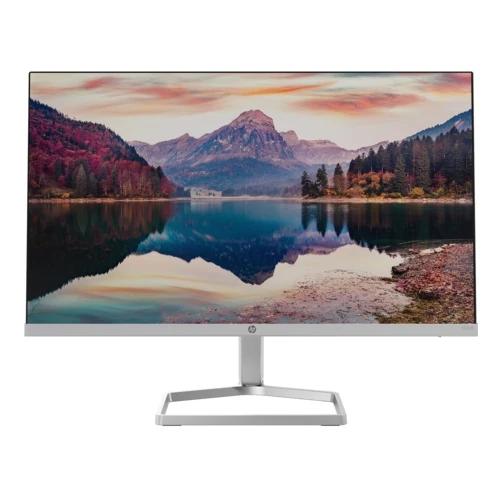
The HP M22f is a compact everyday monitor built around a 21.5-inch diagonal Full HD IPS panel. Retailers commonly call it a 22-inch model, but HP’s datasheet gives the measured diagonal as 21.5 inches. Its 1920 × 1080 resolution and 16:9 shape suit office documents, online learning, web browsing, video calls and streamed entertainment from a desk where a large display would take too much room. The flat panel uses an edge-lit LED backlight and a three-sided micro-edge frame that keeps the overall front clean. The product images show the slim silver-colored stand and bezel with a landscape image on screen; the actual bezel is visible and content color depends on the source and settings.
IPS technology is useful when more than one person views the screen or when the user shifts position while working. HP specifies 178-degree horizontal and vertical viewing angles. The native pixel grid is Full HD, and the pixel pitch is 0.248 mm with roughly 102 pixels per inch. That density gives text and interface elements a crisp appearance at normal desk distance while remaining readable without relying on a 4K-class scaling setup. The monitor is a 16:9 panel, so standard computer desktops, online video and most modern presentations fit without letterboxing. HP lists supported legacy resolutions as well as its native mode; for best clarity, set the computer to 1920 × 1080.
Color and brightness are aimed at general productivity and home entertainment. HP lists typical brightness of 300 nits, 1000:1 static contrast and a 99% sRGB gamut. The panel supports 16.7 million colors using 8-bit output through 6-bit plus frame-rate control. These values make the M22f appropriate for web graphics, school work, office documents and everyday photo viewing, but a percentage gamut figure alone does not promise factory calibration or professional color accuracy. For color-critical print or grading work, use a calibrated professional display and verify the exact unit. The anti-glare surface and 3H hardness are intended for ordinary indoor use, not for outdoor sunlight or impact protection.
The refresh rate reaches 75Hz, with a vertical frequency range of 48 to 75Hz. Compared with a 60Hz screen, the extra refresh headroom can make pointer movement and scrolling appear somewhat smoother. AMD FreeSync is listed by HP to help synchronize supported graphics output with display refresh and reduce tearing when frame rates vary. The response rating is 5ms GtG with overdrive. This is a clearly specified overdrive mode, not a 1ms claim; fast competitive play is better served by a display with a higher refresh ceiling and a measured motion response that suits the game. Compatibility and available refresh modes depend on the graphics source, cable and operating system.
Connectivity covers common office computers from different generations. The rear panel provides one HDMI 1.4 input with HDCP support and one VGA input. HDMI is the digital connection for modern laptops, desktops and compatible media devices; VGA allows continued use with older PCs and equipment. The M22f does not provide DisplayPort, USB-C, a USB hub, a headphone jack or integrated speakers. If audio is needed, route it through the connected computer or source device to external speakers or headphones. The images show the rear connector area, so check a source device’s available outputs before selecting a cable or adapter.
HP’s eye-comfort features include an always-on HP Eye Ease blue-light filter, Eyesafe certification, TÜV certification, flicker-free operation and an anti-glare coating. HP says Eye Ease is designed to reduce blue light without sacrificing color accuracy. These features can make a long work session more comfortable for some users, but comfort varies from person to person and is not a medical guarantee. The on-screen controls provide brightness, color, image, input, information and power settings. HP Display Center software can be used to personalize supported display settings and partition a desktop; software functions depend on the computer and operating system.
The supplied stand is designed for a straightforward compact desk setup. HP specifies tilt adjustment from -5 to +25 degrees, which lets the user angle the panel to reduce reflections and find a comfortable viewing position. It does not provide height adjustment, swivel or pivot. The stand includes a cable pass-through feature to organize a cord behind the display. HP lists the product as not VESA-mount compatible, so do not assume that a standard 75 × 75 mm or 100 × 100 mm arm will attach. The monitor weighs about 2.2kg with the stand, making it manageable to position while still requiring a stable, level desk surface.
HP provides useful physical dimensions for planning a workspace. Without the stand, the monitor measures approximately 48.55 × 3.18 × 28.72cm (width × depth × height); with the stand, it is 48.55 × 17.72 × 31.8cm. The package is approximately 55 × 11.8 × 35.5cm and weighs about 4.1kg. Measure the desk depth and the available shelf height before ordering, and allow clearance for the power plug and video cable. HP’s product imagery depicts a silver stand and dark rear casing, while the regional datasheet may describe product and stand color separately. Color can vary by the exact regional version and lighting.
Power is supplied by an external adapter rated for 100–240V AC at 50/60Hz. HP’s datasheet states 14W on-mode power demand in SDR and 0.5W in standby. The existing BiponiBD record and Star Tech/TechLand specification tables instead report 13W typical, 19W maximum and 0.5W standby. These statements may reflect different measurement conditions or regional reporting, so this listing retains HP’s exact datasheet figure as the manufacturer specification and documents the retailer/catalog figures as a conflict. Check the adapter label and product documentation supplied with the actual unit. Do not infer the exact adapter output voltage from a family page.
HP describes sustainability and compliance features including ENERGY STAR certification and EPEAT registration, with status varying by country. Its marketing material says the monitor uses 85% recycled plastic in the enclosure, including 5% ocean-bound plastic by weight, and recycled packaging materials subject to stated exclusions. The datasheet also lists a range of regulatory certifications that may vary with destination market. These claims are product-family evidence; the specific regional stock and label should be checked if certification or material claims are important for procurement. The exact country of manufacture is not established by the product family specification and remains unspecified for this catalog unit.
HP’s datasheet lists product part numbers such as 2D9J9E9#ABB and other regional suffix variants, and an associated UPC for that documented configuration. Star Tech lists MPN 2D9J9AA, while TechLand lists 2E2Y3AA. The suffixes indicate that several product configurations or markets exist; the exact model identifier remains M22f. Because the catalog record does not include a verified box label or serial number, this description does not assign a regional part number, UPC, GTIN or country of origin to the particular unit. Confirm the sticker on the box and the warranty card before purchase. The retailer-reported three-year Bangladesh warranty also differs from HP’s US datasheet warranty statement of two years, so local warranty coverage must be confirmed with the seller.
In practical terms, the M22f fits users who need a compact FHD monitor for a basic home office, study station, point-of-sale desk or secondary screen. Its IPS panel, 99% sRGB rating, 75Hz refresh, HDMI/VGA connections and eye-comfort functions cover common day-to-day use without adding complex controls. Its limitations are equally important: no speakers, no audio output, no USB connectivity, no VESA mount and only tilt adjustment. A larger screen can show more workspace at once, while users who play fast-paced games may prefer a higher-refresh model. Choose based on the available desk space, ports and mounting needs, and verify the actual warranty and regional SKU before buying.
This catalog listing describes the HP M22f FHD monitor and its documented capabilities. Product-family specifications come from HP’s datasheet and support page; local price and warranty details are external retailer context and are not a promise of BiponiBD stock or selling price. The published product should be understood as a 21.5-inch, 1920 × 1080 IPS display with up to 75Hz refresh and 5ms GtG response with overdrive. Check the package contents and regional labels on receipt. If a particular adapter, cable, operating condition or warranty is essential, verify it with the seller before placing an order.
Verified specification summary