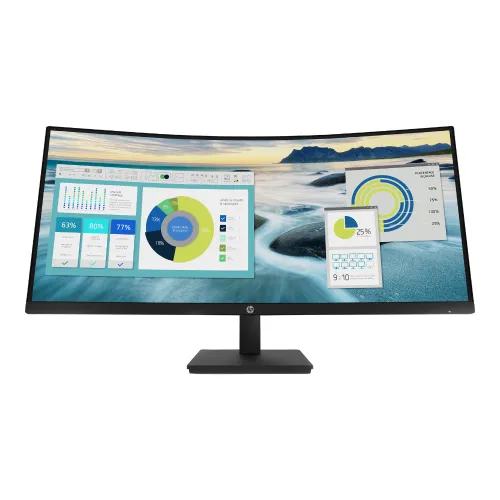
HP P34hc G4 (21Y56AA) is a 34-inch 21:9 curved VA monitor with WQHD 3440 × 1440, USB-C video and up to 65W charging, four USB-A ports and integrated speakers. Compare HP P34hc G4 price in Bangladesh, full specifications, features, warranty and verified retailer listings on BiponiBD.
Exact product identity
HP P34hc G4 is a 34-inch ultrawide monitor in the HP P-series. The Bangladesh product specification identifies the retail product number as 21Y56AA and describes it as a WQHD USB-C curved monitor. The diagonal is 86.36cm, the native pixel grid is 3440 × 1440 and the aspect ratio is 21:9. The P34hc G4 combines a curved VA LCD panel, USB-C docking features, a USB hub and integrated speakers. Check the label and invoice for model P34hc G4 and product number 21Y56AA; similar HP P-series displays can have different panel sizes, ports and warranty terms.
Ultrawide WQHD workspace
The 3440 × 1440 resolution spreads 4,953,600 pixels across a 21:9 canvas. That extra width can keep a spreadsheet beside a reference window, place an editing timeline alongside preview content, or show several workplace apps without stacking every panel vertically. The monitor’s 110 pixels per inch and 0.231mm pixel pitch describe its pixel density. Operating-system scaling, font size and the distance from the display still determine how comfortable text looks. The 34-inch diagonal makes it important to center the screen and ensure that the sides remain easy to view without excessive head movement. Measure the desk and check the monitor’s 80.94cm width before ordering.
VA panel and 1500R curve
HP specifies a VA LCD panel with a 1500R curvature. The arc is designed to bring the wide panel’s edges toward the viewer when sitting near the center. HP lists a 3500:1 static contrast ratio and a 5,000,000:1 dynamic contrast ratio; the static figure is the more useful baseline for comparing typical panel contrast. VA technology can deliver stronger native contrast than many IPS panels, while viewing angle, gamma shift and room reflections can still affect the picture away from the center. HP lists 178-degree horizontal and vertical viewing angles. A curved screen is a preference choice, so consider seating position and shared-viewing needs.
Resolution and refresh-rate details
HP lists WQHD (3440 × 1440) as the native resolution and states that the maximum resolution timing is 3440 × 1440 at 60Hz. The same official product-specification page lists a vertical scan-frequency range of 48–100Hz. Local retailer key features call the panel 60Hz. These figures describe different specification lines and do not clearly establish that the native resolution can run at 100Hz on every input. Buyers who depend on a particular refresh rate should verify the exact resolution, refresh setting, cable and port with HP or the retailer before ordering. This model is oriented toward office productivity and ultrawide desktop work; compare dedicated gaming monitors if high refresh and competitive motion are the primary goals.
USB-C power and docking
The USB-C port supports DisplayPort 1.2 Alt Mode and SuperSpeed data at 5Gbps, with up to 65W Power Delivery. A compatible laptop can send video and USB data while receiving power through one cable. The host computer must support USB-C video output; a charging-only cable or USB-C port without DisplayPort Alt Mode will not provide the intended display connection. 65W suits many office laptops, but some workstation and gaming notebooks require more power or may use their own AC adapter during intensive work. Before relying on a one-cable desk setup, verify laptop compatibility, charging needs and supported display mode.
USB hub and video inputs
HP lists one DisplayPort 1.2, one HDMI 2.0 and one USB-C video input. Four downstream USB Type-A ports operate at a 5Gbps signaling rate, and one USB-B port provides a hub connection. The hub can keep peripherals such as a keyboard, mouse or USB accessory attached to the monitor, but the USB upstream connection must link to the computer. This means the video cable and USB data path may be separate when using HDMI or DisplayPort. The additional inputs make it easier to attach more than one video source. Confirm which input is active and whether the connected host is also attached to the hub when troubleshooting peripherals.
Audio and meetings
The P34hc G4 has two integrated speakers rated at 3W each, for a total output of 2 × 3W. They can provide convenient audio for operating-system alerts, casual videos or routine meetings without adding desktop speakers. Speaker wattage does not measure all aspects of sound quality; users who need richer audio, more volume or clearer monitoring may prefer external speakers or headphones. HP also lists one line output for connecting compatible audio equipment. The monitor does not list an integrated camera or microphone in its official specifications, so users who need video-call capture should attach separate equipment.
Ergonomics, curve and mounting
The stand allows 100mm of height adjustment and tilt from -5° to +21°. HP lists no swivel and no pivot, and its specifications identify a detachable stand. A VESA 100 × 100mm pattern allows use with a compatible arm or mount. The screen measures 80.94cm wide with stand and weighs 10.51kg with stand, so check the desk, mount and arm ratings before installation. The 1500R curve works best when the user sits reasonably centered. Leave space behind the display for its depth and cabling. If side-to-side positioning or rotation is important, select a mount that provides those adjustments.
Brightness, color and screen finish
HP lists 250 nits typical brightness, 85% NTSC color gamut and 8-bit panel depth. These values suit general office use, documents, dashboards and media, but color-critical design work may benefit from a display with wider verified gamut coverage and calibration controls. Bright rooms with strong sunlight can make a 250-nit screen harder to see, even with an anti-glare surface. HP also lists 3H surface hardness and 0.231mm pixel pitch. Use the brightness control to match the room and reduce reflections by placing lights away from the screen. Gamut figures describe the panel’s stated color range and should not be treated as a calibration certificate.
Eye-comfort features
HP lists Flicker-free technology and TÜV-certified Low Blue Light, as well as an anti-glare screen. These features can support personal viewing preferences during long desk sessions. Comfort still depends on the viewing distance, brightness, room lighting, posture and breaks. The product specifications do not prove that the display prevents eye strain or health conditions, so the features should be described as display options rather than a medical promise. The stand’s height and tilt adjustments help align the screen with a seated workspace. Users who need other ergonomic movements can consider a suitable VESA arm because swivel and pivot are not included on the stand.
Bangladesh price snapshot
On 6 November 2026, Star Tech’s direct product page showed the HP P34hc G4 In Stock at ৳70,499 cash/online, a separate displayed price of ৳74,500 and regular price of ৳76,490. Tech Land’s direct page showed In Stock at ৳73,500 with a regular price of ৳79,000. This provides a dated direct-listing reference rather than a guaranteed quote. The existing BiponiBD variant MSRP of ৳73,500 is retained. Retailer discounts and payment terms can change, so compare the final checkout total, delivery charges and warranty terms on the day of purchase.
Warranty and in-box items
HP Bangladesh lists a three-year labour limited warranty. The two checked local sellers also state three years, but seller terms may differ on service location, parts, labour, panel defects and claim documentation. Ask who handles the warranty and keep the invoice. HP lists a DisplayPort cable, HDMI cable, USB-C-to-USB-C cable, AC power cord, warranty card and quick setup poster in the box. Regional packaging can vary, so confirm included accessories with the seller if a specific cable is required. The catalog’s existing three-year warranty entry is retained; it does not imply that every local service detail has been independently confirmed.
Who should consider it
The HP P34hc G4 may suit professionals who want an ultrawide WQHD desktop, a large curved canvas, USB-C video and laptop power, a built-in USB hub and integrated audio. Its port selection can make a desk with several peripherals easier to organize. Users who primarily need accurate wide-gamut color, higher brightness, swivel or pivot adjustments, or confirmed high-refresh gaming should compare alternatives against those requirements. A 34-inch 21:9 display needs enough desk depth and width, and the 65W USB-C charging limit should be matched to the laptop. Check model 21Y56AA, desired native refresh mode, local warranty provider and the final price before buying.
Setup checklist
Before setup, verify that the desk or VESA arm can support a 10.51kg display with its stand and that the screen can sit at a comfortable distance. Connect the host through USB-C if it supports DisplayPort Alt Mode and if up to 65W charging is adequate; otherwise connect video over DisplayPort or HDMI and attach the USB-B upstream cable for hub functions. In the operating system, choose 3440 × 1440 and confirm the refresh rate. If the selected port does not offer the expected mode, test a suitable cable, update the graphics driver and consult HP’s supported timing table. Adjust height, tilt, brightness and anti-glare placement for the workspace.
Key features
- 34-inch diagonal (86.36 cm) VA LCD panel with 1500R curvature and a 21:9 ultrawide aspect ratio.
- Native WQHD resolution is 3440 × 1440; HP lists maximum resolution timing at 60Hz and vertical scan frequency from 48 to 100Hz.
- 250-nit typical brightness, 3500:1 static contrast, 5,000,000:1 dynamic contrast and 85% NTSC color gamut per HP specifications.
- USB-C carries DisplayPort 1.2 Alt Mode video and data, with up to 65W USB Power Delivery for compatible laptops.
- One DisplayPort 1.2, one HDMI 2.0, four SuperSpeed USB-A 5Gbps ports and one USB-B hub connection.
- Integrated stereo speakers provide 2 × 3W output; a line output supports external audio equipment.
- Ergonomic stand supports 100mm height adjustment and -5° to +21° tilt; HP lists no swivel or pivot.
- VESA mounting pattern is 100 × 100mm; the stand is detachable.
- Anti-glare screen surface, 3H hardness, Flicker-free and TÜV-certified Low Blue Light features.
- 178° horizontal and vertical viewing angles, 110 PPI, 0.231mm pixel pitch and 8-bit panel depth.
- Internal power supply supports 100–240VAC, 50/60Hz; HP lists 48W typical, 190W maximum and 0.5W standby consumption.
- HP Display Center software and a standard physical security lock slot are listed; ENERGY STAR and TCO certifications are stated.
Pros
- The 21:9 3440 × 1440 workspace provides substantial horizontal room for documents, timelines and side-by-side applications.
- USB-C can carry display and data while providing up to 65W power to compatible laptops, reducing desk cabling.
- Four USB-A downstream ports, USB-B hub connection, HDMI, DisplayPort and line output cover common desk accessories and sources.
- High stated 3500:1 static contrast and 1500R VA curve can suit productivity and media viewing in a well-positioned workspace.
- Height, tilt, VESA mounting and the detachable stand support flexible placement; speakers are built in.
- Star Tech and Tech Land direct pages showed the exact model in stock at ৳70,499 and ৳73,500 respectively on 6 Nov 2026.
Considerations
- The large curved 34-inch screen needs adequate desk width and viewing distance; it may feel oversized on a shallow desk.
- HP lists 60Hz for the maximum native WQHD timing while its vertical scan range reaches 100Hz; buyers should verify the exact input timing they need.
- USB-C Power Delivery is capped at 65W, which may not fully power some high-performance laptops under heavy load.
- The stand has tilt and height adjustment but HP lists no swivel or pivot movement.
- 85% NTSC color gamut and 250-nit typical brightness are moderate for color-critical production or very bright rooms.
- Retail prices, discounts, stock and warranty provider can change; confirm the checkout total and local coverage with the seller.
Frequently asked questions
What is the HP P34hc G4 price in Bangladesh?
On 6 November 2026, Star Tech showed ৳70,499 cash/online with In Stock, and Tech Land showed ৳73,500 with In Stock. Their displayed regular prices differed. Verify the live checkout total, delivery charge and availability before purchase.
What is the exact HP model and part number?
HP identifies this product as the P34hc G4 WQHD USB-C Curved Monitor, product number 21Y56AA. The HP Bangladesh specification page uses that exact model and part number.
What are its screen size and resolution?
It has a 34-inch (86.36 cm) diagonal 21:9 display with native WQHD resolution of 3440 × 1440 pixels.
What panel and curvature does it use?
HP specifies a VA LCD panel with 1500R curvature. The curved ultrawide layout can keep the sides of the screen within a more consistent viewing arc when seated centrally.
Is this a 60Hz or 100Hz monitor?
HP’s Bangladesh product specification lists native WQHD maximum timing at 60Hz and separately lists vertical scan frequency of 48–100Hz. Local sellers describe 60Hz. Because these statements differ by spec category/input timing, verify the exact 3440 × 1440 mode over the intended port before purchase.
Does USB-C charge a laptop?
Yes, the USB-C port supports DisplayPort 1.2 Alt Mode and up to 65W USB Power Delivery. The laptop must support video over USB-C; 65W may be insufficient for some high-power laptops under heavy use.
What ports and USB connections are included?
HP lists one DisplayPort 1.2, one HDMI 2.0, one USB-C 5Gbps with video and up to 65W PD, four USB-A 5Gbps ports, one USB-B hub connection and one line output.
Does it have built-in speakers?
Yes. HP specifies two speakers with 2 × 3W output. A line output is also available for external speakers or headphones.
Can I mount it on a monitor arm?
HP lists a 100 × 100mm VESA mounting pattern and a detachable stand. Check that the arm supports the monitor’s 10.51kg with-stand weight and confirm the mounting requirements in the manual.
What adjustments does the stand support?
The stand supports 100mm height adjustment and tilt from -5° to +21°. HP lists no swivel and no pivot, so an adjustable arm may be useful if those movements are needed.
What eye-comfort features are included?
HP lists Flicker-free and TÜV-certified Low Blue Light features, plus an anti-glare surface. These are display features and should not be interpreted as a medical guarantee.
What warranty applies in Bangladesh?
HP’s Bangladesh product specification lists a three-year labour limited warranty. The Star Tech and Tech Land listings also state three years. Confirm the local service provider, coverage terms and claim process with the seller.