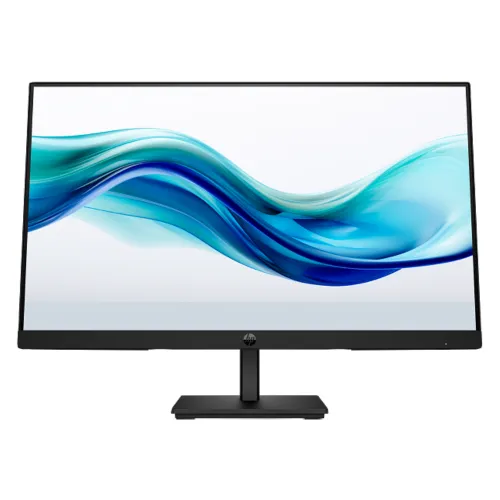
Product identity and what is verified
The HP Series 3 Pro 324pf is a 23.8-inch Full HD monitor for desktop, home-office and study setups. HP QuickSpecs identifies the product as the Series 3 Pro FHD Monitor 324pf and lists model 9U5J5UT. The exact technical claims on this page are taken from HP’s worldwide technical sheet, Version 2 dated December 17, 2024. That makes the panel, ports, refresh modes, power and physical details stronger than unverified seller copy. Regional SKUs, warranty coverage and the exact BiponiBD stock unit still require local confirmation.
A familiar Full HD desktop format
The panel measures 23.8 inches diagonally and uses a native resolution of 1920 × 1080 pixels in a 16:9 layout. This common format works with ordinary desktop applications, web pages, spreadsheets, video calls, online learning and streaming. It gives enough room for typical office windows while remaining compatible with a wide range of computers. Full HD provides less fine detail and less workspace than QHD or 4K. Buyers who keep many detailed windows open or edit high-resolution images should compare higher-resolution displays before choosing a 23.8-inch FHD screen.
IPS panel and viewing characteristics
HP identifies an IPS panel with typical horizontal and vertical viewing angles of 178 degrees at the stated contrast criterion. IPS is useful when a screen is viewed slightly off center or shared with another person, as colors and contrast are generally more consistent across viewing positions than on narrow-angle panels. The rating is a technical viewing-angle convention, not a promise of identical brightness from every seat. The monitor is flat, with an active area of approximately 52.7 by 29.64 centimeters. Position it to reduce reflections and keep the display near a comfortable eye line.
100Hz refresh and compatible connections
HP lists a maximum refresh rate of 100Hz. At native 1920 × 1080 resolution, HDMI 1.4 and DisplayPort 1.2 can drive up to 100Hz when the computer graphics output, cable and selected timing support it. VGA is listed for up to 60Hz at native resolution. Refresh rate describes how often the display can update; it is different from the number of frames an application can render. After connection, check the operating system’s display settings and select the intended refresh rate. A 100Hz panel cannot make a computer render more frames than its hardware and software allow.
Response time and motion expectations
The QuickSpecs lists a typical 5ms gray-to-gray response time with overdrive. This is a defined panel transition measurement under the manufacturer’s stated conditions, not a guarantee that every pixel transition appears equally quick. Overdrive can affect transitions and may have different results at different settings. The monitor sheet does not advertise a separate MPRT number, so one should not be substituted for the documented 5ms GtG figure. For general office tasks and video, the 100Hz maximum refresh and IPS format are the main documented motion-related attributes. Competitive players should consult independent testing of the exact model.
Brightness, contrast and color reproduction
HP specifies 250 nits typical brightness, a 1000:1 static contrast ratio and up to 16.7 million colors through 6-bit + FRC. The color gamut is stated as 72% NTSC. These are technical specifications rather than measurements of a particular unit after calibration. Brightness can be adjusted for room lighting, and perceived contrast depends on ambient light and viewing conditions. The published color gamut does not establish factory calibration or professional color accuracy. For color-critical photo or print work, look for measured color error and calibration evidence for the exact monitor rather than relying on the gamut percentage alone.
Anti-glare surface and eye comfort features
HP specifies an anti-glare screen treatment, with 3H surface hardness and 25% haze. The anti-glare treatment can help reduce reflections from nearby lights, although it cannot eliminate every reflection or replace careful placement. HP also lists Flicker Free with TÜV certification and HP Eye Ease, a hardware low-blue-light solution with TÜV certification. These are display features intended to support comfortable viewing options. Users should still set brightness for the room, take regular breaks and choose a viewing distance that feels comfortable. The presence of these features is not a medical claim.
Ports and signal compatibility
The rear connections comprise one HDMI 1.4 port, one DisplayPort 1.2 and one VGA connector. HP lists HDCP support for HDMI and DisplayPort. Having all three inputs can help connect newer laptops or desktops alongside older equipment, though a computer needs a matching output or a suitable adapter. HP states the computer must support the intended 1920 × 1080 timing; the monitor itself cannot add missing output capability to a host device. Use a quality cable and verify that the image is stable at the target resolution and refresh rate before arranging a permanent cable run.
Stand, tilt range and VESA mounting
The supplied stand is detachable and the display tilts from −5 to +23 degrees according to HP. The QuickSpecs lists a 100 × 100 mm VESA pattern, allowing a compatible arm or wall mount to be considered. The sheet does not specify height adjustment, swivel or pivot functions, so do not assume the included stand raises, rotates or turns the panel to portrait orientation. For ergonomic placement, check the height of the desk and chair; a separate riser or rated VESA arm can provide more positioning options. Follow the mount maker’s weight and screw guidance.
Physical dimensions and desk planning
With the stand attached, HP lists dimensions of approximately 59.5 cm wide, 12.4 cm deep and 39.1 cm high. Packed dimensions are approximately 53.89 by 5.14 by 32.36 cm as labeled in the QuickSpecs. The listed product weight is 3.77 kg with stand, 3.38 kg for the display head and 5.86 kg packed. These figures help estimate desk footprint, shelf clearance and package handling. Keep room behind the screen for cables and ventilation, and check the actual stand position if the desk is shallow. Carton measurements can differ slightly by regional packaging.
Power supply and energy figures
The monitor has an internal power supply rated for 100–240 VAC at 50/60Hz. HP lists 20W typical consumption, up to 30W maximum and 0.5W in standby. These figures are product specifications, not a promise of the exact energy use in every setup. Brightness, operating mode and connected signal can affect consumption. The QuickSpecs also identifies 14W SDR on-mode consumption under the listed EU energy measurement. Use the supplied regional power cord and follow the label on the product; do not infer that an unrelated adapter is required, since HP specifies an internal supply.
What is included and regional variation
HP lists an AC power cord and an HDMI 1.4 cable in the box, along with a quick setup poster. A DisplayPort cable is listed only for specified North America, Latin America, Japan and EMEA AF SKUs; it should not be assumed for every region. Local cartons may have a different regional SKU or included cable bundle. Ask BiponiBD to confirm the exact package contents before purchase if a particular cable is important. Keep the carton, invoice and serial information until the monitor has been checked and the local warranty details are understood.
Warranty needs exact local confirmation
HP’s QuickSpecs explains that warranty coverage varies by region and SKU: it lists 3/3/0 for several regions and 3/3/3 in select APJ countries. These abbreviations do not prove which service plan applies to a particular Bangladesh unit. The catalog currently says “03 years warranty,” but the warranty provider, service center, coverage terms and serial eligibility are not established by the global document. Confirm these details with BiponiBD and make sure the written terms appear on the invoice. Do not use the worldwide specification sheet as evidence that a specific local serial qualifies for a particular service arrangement.
Who may find the 324pf a good fit
This monitor may suit users who want a conventional 23.8-inch Full HD screen with an IPS panel, documented 100Hz digital support and several input choices. It can be considered for office documents, browser work, classes, general home use and casual media when the connected computer supports the selected mode. Users needing built-in speakers, a USB hub, a height-adjustable stand or QHD detail should compare other models because those features are not listed in the HP QuickSpecs. The product’s strongest advantages are clear model documentation, practical connectivity and eye-comfort features; final fit depends on desk setup, warranty and exact regional stock.
Setup and first-use checklist
Before setup, check that the carton and rear product label identify the HP 324pf and record the serial number. Attach the stand securely or use a compatible VESA mount, connect the supplied power cord, then connect HDMI or DisplayPort for 100Hz support when available. Open the computer’s display settings and select 1920 × 1080 and the preferred refresh rate. VGA is limited to 60Hz at native resolution according to HP. Adjust brightness and tilt for the room, inspect the screen and ports, and retain the invoice and packaging while confirming the local warranty and return process.
Understanding the specifications responsibly
Manufacturer specifications describe the design target and supported modes; they do not guarantee that every unit, computer or cable will behave identically. HP notes that component performance may vary higher or lower. The 250-nit brightness and contrast figures are typical values, while refresh support depends on the input and host device. The product page keeps these distinctions visible so a shopper can compare the model without treating every rating as a measured result from the exact unit. If a requirement is essential—such as 100Hz over a particular adapter or service coverage—verify it before ordering.
Specification summary
Key features
- 23.8-inch (60.5 cm) flat IPS display with Full HD 1920 × 1080 native resolution.
- Up to 100Hz over HDMI 1.4 or DisplayPort 1.2; VGA supports up to 60Hz at native resolution.
- Typical brightness 250 nits, static contrast 1000:1 and 16.7 million colors through 6-bit + FRC.
- Anti-glare surface with 3H hardness and 25% haze specification.
- TÜV-certified Flicker Free and HP Eye Ease hardware low-blue-light solution.
- Three-sided borderless bezel design with black display head and stand.
- One HDMI 1.4, one DisplayPort 1.2 and one VGA input; HDCP supported on HDMI and DisplayPort.
- Tilt range −5° to +23°; 100 × 100 mm VESA mount and detachable stand.
- Internal power supply; typical 20W, maximum 30W and 0.5W standby.
Advantages
- The IPS Full HD 23.8-inch format fits common office and study desks.
- 100Hz digital refresh is above standard 60Hz when the computer and connection support it.
- HDMI, DisplayPort and legacy VGA provide flexible connection choices.
- TÜV-certified Flicker Free and HP Eye Ease low-blue-light features are documented by HP.
- Standard 100 × 100 mm VESA support allows use with compatible monitor arms.
Points to consider
- Full HD provides less workspace and detail than QHD at similar viewing distances.
- The stand offers tilt adjustment but no height adjustment is specified.
- The VGA input is limited to 60Hz at native resolution; 100Hz requires HDMI or DisplayPort.
- No built-in speakers, webcam or USB hub are listed in the HP QuickSpecs.
- Local warranty provider and serial eligibility need confirmation for the exact Bangladesh unit.
Frequently asked questions
What is the exact monitor model?
This product is the HP Series 3 Pro FHD Monitor 324pf. HP QuickSpecs identifies model 9U5J5UT. Confirm that the delivered unit label matches 324pf and the regional SKU shown on its carton.
What is its screen size and resolution?
HP specifies a 23.8-inch diagonal IPS panel with native Full HD resolution of 1920 × 1080 pixels and a 16:9 aspect ratio.
Does it support 100Hz?
Yes. HP lists a maximum 100Hz refresh rate over HDMI and DisplayPort at 1920 × 1080. VGA supports up to 60Hz at the native resolution. The computer, cable and selected display mode must also support the desired timing.
Which ports are available?
The rear panel has one DisplayPort 1.2, one HDMI 1.4 and one VGA input. HP lists HDCP support on HDMI and DisplayPort.
What is the panel brightness?
HP lists typical brightness of 250 nits and static contrast of 1000:1. Actual results can vary by panel and settings.
Does it have an anti-glare screen?
Yes. HP lists an anti-glare screen treatment, 3H surface hardness and 25% haze.
Is low-blue-light support included?
HP lists HP Eye Ease, a TÜV-certified hardware low-blue-light solution. HP also lists Flicker Free as TÜV certified. These features do not replace comfortable brightness and break settings.
Can it be mounted on a monitor arm?
HP specifies a 100 × 100 mm VESA mounting pattern. Check that the arm supports the monitor weight and uses the correct screws. The stand is detachable.
Can I adjust its height?
HP specifies tilt from −5° to +23° and a detachable stand, but does not list height adjustment. A compatible riser or arm may be needed to change screen height.
Does it include speakers?
HP QuickSpecs does not list built-in speakers. Plan to use separate audio equipment unless the exact delivered unit documentation states otherwise.
What power does it use?
HP specifies an internal power supply and 100–240 VAC, 50/60Hz input. Power is listed at 20W typical, 30W maximum and 0.5W standby.
What warranty applies in Bangladesh?
The catalog record says three years, but HP warranty terms vary by region and SKU. Confirm the written local provider, service location, start date and serial eligibility with BiponiBD before purchase.
Technical specifications sourced from HP QuickSpecs for model 9U5J5UT. Exact regional SKU, package and local warranty need seller confirmation.