HP Series 5 527da 27-Inch 100Hz FHD IPS Monitor: Complete Buyer Guide
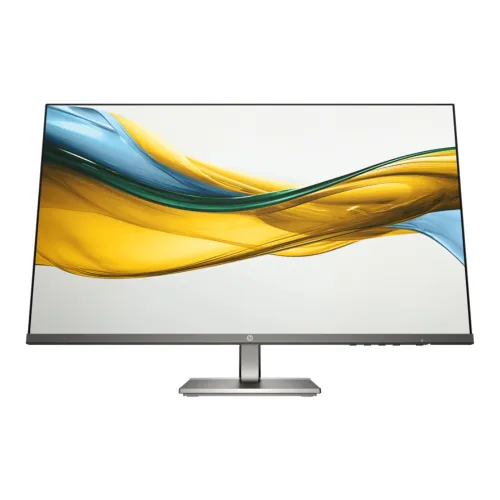
The HP Series 5 527da is a 27-inch Full HD monitor built for everyday work, study, video calls and home entertainment. It combines an IPS panel, a 100Hz maximum refresh rate, 99% sRGB color coverage, built-in speakers and an adjustable stand. HP’s official datasheet identifies the B11W6AT regional part number, and HP’s product-number listing also identifies B11W6AS as a regional SKU for the same 527da model. Bangladesh seller data points to B11W6AS as the common local code; always verify the delivered label and invoice. The datasheet provides the technical baseline used in this guide. Bangladesh retailer listings show the model around ৳23,000–৳24,500, while this product’s existing catalog price remains ৳23,500. The review preserves its product name, URL, status, category, brand, variant, seller SKU and price while correcting the editorial and specification fields. The notes below explain the practical benefits and the points buyers should confirm with the seller.
27-inch Full HD IPS: workspace and image detail
The 527da has a 27-inch (68.6cm) flat IPS LCD with a native resolution of 1920 × 1080 pixels and a 16:9 aspect ratio. This shape is widely used for documents, browser windows, video meetings and streaming. IPS technology is designed to maintain image consistency across wide viewing positions; HP lists horizontal and vertical viewing angles of 178 degrees. The anti-glare coating helps diffuse reflections from ordinary room lighting, while the three-sided micro-edge design makes the screen look less boxed in and can reduce the visible gap between two adjacent displays. The trade-off is pixel density: Full HD across 27 inches gives about 82 pixels per inch. This is sufficient for typical desk distances and general office tasks, but fine text and detailed vector work will not look as dense as on a 27-inch QHD screen. If you frequently read small text, compare the resolution in person or consider a higher-resolution option. HP lists a 0.3114mm pixel pitch and 82 PPI, confirming the expected density.
100Hz refresh and 5ms response
HP specifies a maximum refresh rate of 100Hz at the native FHD resolution, with supported vertical scan frequencies from 48 to 100Hz. A 100Hz refresh can update the image more often than a traditional 60Hz screen, making cursor movement, scrolling and supported video motion appear smoother. The computer must send a 100Hz signal and the selected mode must be enabled in the operating system or graphics settings. The 5ms grey-to-grey response time is specified with overdrive. It describes a pixel transition under HP’s stated measurement method and should not be read as total input lag or a guarantee that every color transition takes exactly five milliseconds. This monitor is primarily a productivity and general-use model. It can display casual games, but its 100Hz ceiling is not aimed at high-refresh competitive gaming displays.
Color, brightness, contrast and eye comfort
The panel is rated at 300 nits brightness, 1500:1 static contrast and 8,000,000:1 dynamic contrast. Static contrast compares bright and dark output under the same measurement conditions; the dynamic figure describes a different scene-dependent adjustment and should not be treated as the monitor’s native contrast. HP specifies 99% sRGB color coverage and up to 16.7 million colors using an 8-bit (6-bit plus FRC) panel. That makes the display suitable for web content, spreadsheets, presentations, video and common visual tasks. It does not guarantee that each unit arrives color-calibrated for print production or other color-critical work. The 300-nit rating works well in many indoor rooms, though direct sunlight can still make reflections and readability difficult. HP Eye Ease provides an always-on low-blue-light mode designed to reduce blue light without adding a yellow color shift; HP lists TÜV Low Blue Light hardware-solution certification and flicker-free operation. Comfort also depends on brightness, viewing distance, posture and regular breaks, so set the screen for the room and your working position.
Speakers, ports and device connections
The official HP datasheet lists two HDMI 1.4 ports, one VGA input, one 3.5mm audio-in jack and one 3.5mm audio-out jack. Two HDMI connections allow a desktop and another HDMI device to remain connected at once, while VGA can be useful for older computers or office equipment. There is no DisplayPort or USB-C video input listed. Buyers connecting a modern thin laptop may need an HDMI adapter or a dock; check that it supports the desired Full HD refresh rate. The monitor includes two integrated speakers rated at 2W each, so it can play basic audio for a meeting, notification or casual video without an extra desktop speaker. Small monitor speakers generally have limited bass and volume compared with dedicated audio equipment. The audio jacks provide additional routing options, although the connected computer and monitor settings determine which source carries sound. Some Bangladesh quick listing cards show only one HDMI port, but HP’s product sheet for model 527da specifies two; verify the rear ports and product number on the actual regional unit when port count is essential.
Stand ergonomics, size and desk fit
The supplied stand supports a 100mm height range and tilt from -5 to +25 degrees. This makes it easier to raise the display toward eye level and angle it to reduce glare. The datasheet does not list swivel or portrait pivot adjustment, and it does not state a VESA mount pattern. The stand is detachable, but that alone does not establish compatibility with a monitor arm. Confirm the mounting pattern from the exact monitor chassis or official unit documentation before purchasing an arm. HP lists dimensions with the stand at 23.93 × 8.35 × 19.7 inches (about 60.8 × 21.2 × 50.0cm) and a weight of 9.3lb (about 4.22kg). Without the stand, it measures 23.93 × 1.35 × 14.02 inches (about 60.8 × 3.43 × 35.6cm) and weighs 6.33lb (about 2.87kg). The package is larger and heavier: 27.17 × 4.96 × 16.93 inches and 15.45lb (about 7.0kg). Allow room for the base and cables when planning a desk layout. An integrated cable pass-through in the stand helps route the power and video leads neatly.
Power, software and sustainability
HP lists an external power supply with an input range of 100–240V AC at 50/60Hz. The datasheet rates typical power consumption at 23W, maximum at 31W and standby at 0.5W. The box contents include the monitor, HDMI cable, power adapter, AC power cord and document kit; included cables may vary by country, so confirm the Bangladesh package with the seller. HP Display Center can be used on a supported Windows host to adjust display settings and arrange screen layouts. HP also lists the Client Management Script Library for supported managed-PC environments. These host software features require compatible operating systems and do not change the panel’s native capability. HP reports 90% post-consumer recycled plastic, 10% recycled metal in the stand and 20% recycled glass in the panel; HP notes that recycled content and sustainability registration can vary by country. Energy Star and EPEAT registrations are also listed, with regional registration depending on availability.
Bangladesh price, warranty and buying checklist
The local pages reviewed list the HP Series 5 527da around ৳23,000 at City Computer, ৳23,200 at PQS, ৳23,500 at Ryans and ৳24,000 at Techland, with additional listings up to ৳24,500. Offers and inventory change, so these figures are a comparison snapshot rather than a promise of current stock. The product’s current ৳23,500 catalog price was retained. HP’s datasheet specifies a three-year limited warranty, and Bangladesh seller pages also advertise three years; the service provider, region, serial number, invoice and claim procedure determine local coverage. Before ordering, confirm the unit label says 527da and the regional product number (commonly B11W6AS in Bangladesh; B11W6AT is another HP-listed regional SKU), box contents, two HDMI inputs, local warranty provider and whether the box must be kept for a claim. For buyers who want an adjustable 27-inch work display with built-in sound, the HP 527da is a practical office choice. If your priority is sharp fine text, USB-C single-cable docking, VESA arm mounting, high-refresh gaming or stronger audio, compare those requirements against other monitors before checkout.