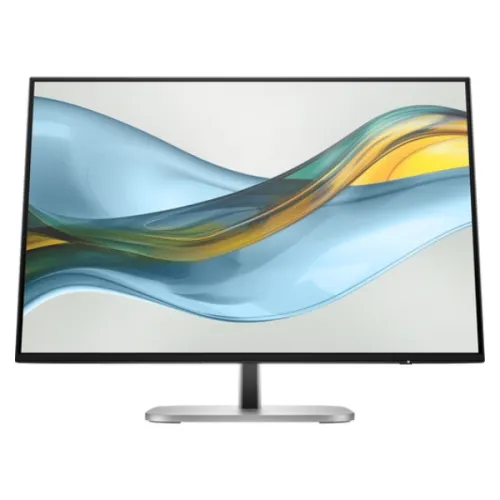
HP Series 5 Pro 527pq 27-inch QHD IPS monitor
A QHD workspace for everyday professional work
The HP Series 5 Pro 527pq is a 27-inch flat IPS monitor with a native QHD resolution of 2560 × 1440. HP’s datasheet lists a maximum refresh rate of 100Hz, a 16:9 aspect ratio and a 100% sRGB gamut. Those specifications make the display relevant to office tasks, research, dashboards, spreadsheets, online meetings and general creative work. The complete model identifier matters when comparing listings: the 527pq belongs to HP’s Series 5 Pro family, while nearby 527-series monitors can have Full HD resolution or different ports. Check the 527pq name and 9D9S0UT product code on the retailer listing or invoice.
What QHD adds to a 27-inch screen
QHD means 2560 × 1440 pixels. On a 27-inch display, this gives more detail and desktop space than Full HD at the same screen size. It can help keep a document, reference page and spreadsheet visible together, or provide more room for timelines and application panels. The screen uses a 16:9 shape and HP lists approximately 109 pixels per inch. Text size depends on the operating system’s scaling setting; users can enlarge interface elements while keeping the panel at its native resolution. If the connected computer cannot output QHD, it can still use lower supported modes, but native resolution provides the intended sharpness.
IPS viewing and sRGB color
HP identifies the panel as IPS and specifies 178-degree horizontal and vertical viewing angles. This supports consistent viewing when the user shifts position or shares the screen with a colleague. The datasheet lists 100% sRGB coverage and true 8-bit color, supporting up to 16.7 million colors. Coverage describes the range of the sRGB color space that the display can reproduce; it does not independently confirm color accuracy, calibration or uniformity. General photo editing and web content work can benefit from the stated coverage, but color-critical production should use a calibrated display and color-managed software. Brightness is rated at 350 nits typical and static contrast at 1500:1.
100Hz refresh and response time
The 527pq supports a maximum refresh rate of 100Hz. A higher refresh can make scrolling, pointer movement and compatible video playback look smoother than a 60Hz setting, provided the computer and connection expose the desired mode. HP notes that 100Hz is supported on host PCs with DisplayPort 1.2 or higher. The display’s specified response time is 5ms grey-to-grey with overdrive. Response figures depend on test conditions and transition; they should not be read as a promise that every motion scene is blur-free. This is a professional monitor with a faster-than-60Hz mode, not a specialized esports display.
Connections and supported modes
HP lists one HDMI 2.0 input and one DisplayPort 1.2 input. The exact signal mode depends on the connected device, graphics driver, cable and selected operating-system setting. The datasheet includes QHD at 60Hz, 75Hz and 100Hz among its supported resolutions, and says 100Hz requires a compatible host over DisplayPort 1.2 or higher. If the refresh selector does not show 100Hz, check the source output, cable, adapter, driver and whether the computer’s display settings allow the mode. The two video inputs let users connect different sources, but the monitor displays one selected input at a time.
USB hub for desk accessories
The monitor has four USB-A ports with 5Gbps signaling, including one port that supports charging, plus a USB-B upstream connection. The USB-A ports can help connect a keyboard, mouse, storage device or other compatible peripheral near the screen. The upstream connection is important: a video cable alone does not carry the data link required by this hub. Connect the USB-B-to-A cable from the monitor to the computer, then attach accessories to the monitor’s USB-A ports. Charging capability is listed for one port, but the available current and device compatibility can vary. Keep the computer connection accessible if the display will be used as a shared docking point.
Eye comfort and screen finish
HP Eye Ease is listed as a TÜV-certified low-blue-light hardware solution, and the datasheet also specifies flicker-free operation. The panel surface is anti-glare with 25% haze and a 3H hardness rating. These features may help reduce reflections and provide a more comfortable starting point for long desk sessions, but comfort still depends on room lighting, brightness, viewing distance and breaks. The on-screen controls provide brightness and image options so users can tailor the picture to the work environment. The monitor is not listed as an HDR display; buyers should compare it as a standard SDR productivity screen rather than assume HDR certification.
A fully adjustable stand
Unlike a basic tilt-only stand, the supplied 527pq support provides a broad set of adjustments. HP lists 150mm of height travel, tilt from -5 degrees to +20 degrees, swivel up to 45 degrees in either direction and pivot up to 90 degrees for portrait orientation. These movements can help align the display with the user’s eye level, desk layout and document orientation. The exact tilt range differs from some retailer specifications, so this description follows HP’s manufacturer datasheet. The monitor also supports a 100 × 100mm VESA mount if the user prefers a separate arm; check its load capacity and installation hardware.
Desk fit, dimensions and weight
The official datasheet lists dimensions of approximately 61.34 × 22.89 × 54.38cm with the stand, and 61.34 × 4.69 × 35.67cm without it. The monitor weighs about 6.2kg with the stand and 4.6kg without. Measure desk width and depth, leaving room for the base and cable connections behind the screen. For dual-monitor layouts, the three-sided micro-edge bezel can make the inner gap feel smaller, although the physical monitor frames remain present. If the screen will be mounted, confirm the VESA adapter and arm clearance before removing the supplied support.
USB, video and HDCP compatibility
The HDMI and DisplayPort inputs both support HDCP according to HP. This is relevant for protected video playback from compatible computers and media sources, but the playback chain must also support the required content protection level. HP specifies one USB-B upstream port and four USB-A ports, not USB-C video input or a USB-C docking connection. Users with a laptop that only has USB-C may need a suitable video adapter or dock; check that the accessory supports QHD at the desired refresh rate and provides the USB upstream connection if the monitor hub will be used. Match the cable to the source and monitor ports.
Built-in features and software
The monitor includes on-screen controls for brightness, color, image, input, power and management settings. HP lists Progressive White Balance and Works with Chromebook as special features, and names HP Display Center and HP Client Management Script Library as management software. Software availability and features depend on the operating system, host computer and HP support terms. No integrated webcam or speakers are listed for this model. Users who need conferencing audio or video should plan for external accessories. These details distinguish the 527pq from some monitors that bundle a camera, speaker bar, USB-C docking or network connection.
Power use and operating details
HP specifies an internal power supply with a 100–240V AC, 50/60Hz input. The datasheet lists power consumption at 30W typical, 72W maximum and 0.5W in standby. Actual use varies with brightness, active features, USB charging and operating mode. The monitor supports a security lock slot, though the lock itself is a separate accessory. HP’s product documentation lists a three-year limited warranty for the model family; local retailer procedures and the specific unit’s proof of purchase determine how a claim is handled. The current BiponiBD warranty field also states three years, but buyers should confirm local claim terms with the seller.
Which users may find it useful?
The 527pq can fit office and home workstations that need QHD detail, sRGB coverage and ergonomic adjustment. A 27-inch screen with 2560 × 1440 pixels works well for text, spreadsheets, web research, presentations and general media. The USB hub can keep common peripherals within reach, while the adjustable stand offers more positioning options than a fixed support. For professional color work, use calibration and compare the task’s color requirements with the stated sRGB coverage. For fast competitive gaming or high-dynamic-range production, compare refresh, variable-refresh and HDR requirements with the exact product specifications instead of relying on the 100Hz figure alone.
Setup checklist before use
Place the monitor on a stable surface or a compatible VESA arm. Connect the source using HDMI 2.0 or DisplayPort 1.2, set 2560 × 1440 in the operating system, and choose an available refresh rate. To use the USB hub, connect the USB-B upstream cable to the computer. Adjust height, tilt, swivel or pivot to suit the workstation, and set brightness for the room. If 100Hz is required, confirm the host and DisplayPort connection support it and select the mode in system settings. Test both video inputs and the USB peripherals, and check the panel and cables while the seller’s return window is active.
Model, warranty and seller checks in Bangladesh
Bangladesh retailer listings show varying prices, availability notices and seller conditions. Those snapshots change, so no live price or stock promise is included in the product description. Confirm that the invoice identifies HP Series 5 Pro 527pq and ask the seller to verify the exact product code, warranty provider, claim requirements and current box contents before ordering. HP’s datasheet lists a DisplayPort cable, HDMI cable, USB Type-B-to-A cable, power cord, warranty card and quick setup poster, but retailers can supply regional packages. Keep the invoice and included documents for support. The specific country of origin for an individual unit is not set here because HP lists more than one possible country for the model family.
Technical highlights
- 27-inch IPS LCD with QHD 2560 × 1440 native resolution and 16:9 aspect ratio
- 100Hz maximum refresh rate; compatible host and DisplayPort 1.2 or higher required for 100Hz
- 350-nit typical brightness and 1500:1 static contrast ratio
- 100% sRGB gamut and true 8-bit color (up to 16.7 million colors)
- 5ms grey-to-grey response time with overdrive
- 178° horizontal and vertical viewing angles
- Anti-glare screen with 25% haze and 3H hardness
- HP Eye Ease low-blue-light hardware solution certified by TÜV; flicker-free operation
- One HDMI 2.0 and one DisplayPort 1.2 video input, both supporting HDCP
- Four USB-A 5Gbps ports (one charging) plus one USB-B upstream connection
- Fully adjustable stand: 150mm height, tilt, ±45° swivel and ±90° pivot
- 100 × 100mm VESA mount, security lock slot, Progressive White Balance and Works with Chromebook certification