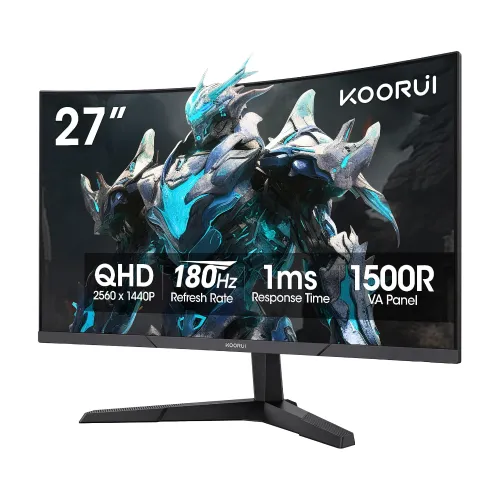
27-inch QHD curved gaming display
The KOORUI 27E6QCA is a 27-inch, 16:9 curved gaming monitor with a native 2560 × 1440 QHD resolution. Its VA panel uses a 1500R curve and an anti-glare surface. KOORUI lists a 180Hz maximum refresh rate, 1ms response rating, 300 cd/m² typical brightness, 4000:1 static contrast, 100% sRGB and 90% DCI-P3 color gamut. These are manufacturer specifications; panel results can vary by settings and unit. The catalog’s current ৳26,000 variant price is preserved. Bangladesh seller prices and warranty terms below are time-sensitive listings, so confirm them with the seller before ordering.
QHD resolution, pixel density and curve
The 2560 × 1440 resolution provides more desktop workspace and finer detail than Full HD at the same 27-inch size. The listed pixel pitch is about 0.2331mm, or approximately 108.8 pixels per inch. The 1500R curve describes the panel’s curvature; whether it feels immersive or distracting depends on desk distance and personal preference. Its 16:9 shape suits typical games and video. The anti-glare surface can reduce reflections but does not eliminate room glare. A VA panel’s 4000:1 static contrast rating can support deeper dark scenes than many standard IPS panels, while viewing angle, black smearing and uniformity remain dependent on the specific panel and content.
180Hz refresh rate and response rating
KOORUI lists a maximum 180Hz refresh rate and a 1ms response rating. The 180Hz QHD mode is supported over DisplayPort 1.4. HDMI 2.0 supports up to 144Hz at 2560 × 1440, or up to 180Hz at 1920 × 1080, according to the reviewed model specification. That distinction matters when choosing a cable and input: use DisplayPort for QHD at the full 180Hz. A high refresh display can show frames more frequently when the computer renders them, but it does not create extra frames or guarantee a particular response in every game. The 1ms figure is a manufacturer rating tied to its specified response method/settings, not a promise that every pixel transition always completes in one millisecond. Check the selected resolution and refresh mode in the operating system after connecting.
Adaptive Sync and variable refresh
The monitor supports Adaptive-Sync and AMD FreeSync. KOORUI also describes NVIDIA G-SYNC Compatible operation over DisplayPort; this means variable refresh compatibility, not a dedicated NVIDIA G-SYNC hardware module. A compatible NVIDIA graphics card, driver, cable and configuration may be required, and behavior can vary. Enable variable refresh in the monitor and graphics settings if desired, then confirm the active mode in the driver panel. Adaptive Sync can help coordinate display refresh with changing frame output, but it cannot compensate for every performance dip or remove all motion artifacts. The product listing should not imply a separate G-SYNC hardware module or a certification that the source does not specify.
Color, contrast and HDR input
The manufacturer specification lists 100% sRGB, 90% DCI-P3, 16.7 million colors and an 8-bit color depth. One supplied promotional graphic incorrectly pairs “8Bit Color Depth” with “10.7B colors”; an 8-bit signal represents about 16.7 million values, so the corrected specification follows the consistent 8-bit and 16.7M figures. KOORUI lists HDR10 input support and HDR 400-class tone mapping in the on-screen display description. This wording does not establish VESA DisplayHDR 400 certification or prove a particular measured HDR brightness. The typical brightness is 300 cd/m², with the specification sheet listing a 250 cd/m² minimum. Use the color gamut figures as coverage claims, not as a factory calibration report or professional color accuracy guarantee.
Ports and choosing the right connection
The connection panel has two HDMI 2.0 inputs, one DisplayPort 1.4 input, a 3.5mm audio output and a DC power input. For 2560 × 1440 at 180Hz, connect through DisplayPort 1.4. At QHD, HDMI 2.0 is listed up to 144Hz; it can reach 180Hz at Full HD. The audio jack provides an output for headphones or external speakers. There are no built-in speakers. The included accessories can vary by regional bundle; the reviewed source lists a DisplayPort 1.2 cable, but verify the actual package and cable with the seller. If a desired mode is missing, check the GPU output, cable, monitor input selection, graphics driver and operating-system refresh setting.
Game assistance and eye-care options
The on-screen display includes a crosshair overlay, FPS counter, timer, dark-field brightening/Black Stabilizer, overdrive and scenario modes such as Standard, Movie, FPS, RTS and Eye Saver. Flicker-Free and Low Blue Light are listed features. These controls let users tune the picture for a game or room, but aggressive overdrive can create visible overshoot and presets may change color appearance. Compare settings in the content you actually use. Eye-care features are not medical treatment or a guarantee against eye strain; reasonable brightness, viewing distance, ambient light and breaks still matter. The monitor’s five-way rear joystick controls the OSD, as shown in the supplied rear-panel image.
Stand, mounting and physical measurements
The included stand supports tilt from -5° to +15°. The reviewed specification does not list stand height, swivel or pivot adjustment, so plan for a fixed-height setup or a compatible monitor arm if those movements are important. The rear mounting pattern is VESA 100 × 100mm, with M4 × 8mm screws specified. With the stand, dimensions are 611.5 × 468.8 × 229.2mm (W × H × D); without the stand they are 611.5 × 364.1 × 90.1mm. Net weight with stand is 4.22kg and without stand is 3.68kg. The carton measures 682 × 139 × 446mm and gross boxed weight is 5.90kg. The existing catalog weight is corrected to distinguish the monitor from its packaging. Check desk depth, arm load rating and mounting hardware before installation.
Power, adapter and included package
The display uses an external AC/DC adapter rated for 100–240V AC, 50/60Hz input and 19V 2.58A output. The manual lists maximum operating consumption of 48W and standby/sleep consumption up to 0.5W. The box dimensions and gross weight include packaging and should not be confused with the screen’s net weight. The source lists a DisplayPort cable, power adapter and documentation; actual included contents can differ across regional imports. Confirm the exact accessories, plug type, warranty card and model label on the box before purchase. KOORUI’s model identifier is 27E6QCA; barcode and GTIN remain unverified for this specific regional unit and are left blank.
Bangladesh price, warranty and buyer checks
The checked Bangladesh listings ranged from about ৳25,299 to ৳26,000: Skyland advertised approximately ৳25,299–৳25,500, Computer Vision BD ৳25,500, Tech Diversity BD ৳25,500, and Star Tech and Apple Gadgets BD ৳26,000. These are seller listing snapshots, not a fixed market price, and stock, discount and payment conditions can change. The sellers reviewed advertised three-year warranty coverage, but the issuer and service conditions should be confirmed on the invoice. BiponiBD’s existing ৳26,000 variant price remains unchanged. Ask the seller to confirm the exact 27E6QCA model, local warranty provider, dead-pixel policy, return terms, package contents and the correct cable for QHD 180Hz. This model suits buyers seeking a curved QHD VA screen with high refresh and strong stated contrast; those needing built-in speakers, a height-adjustable stand or a verified regional barcode should check those requirements before ordering.
Simple setup checklist
Place the monitor on a stable desk, connect the supplied or compatible power adapter, then connect a gaming PC to DisplayPort 1.4 if you want 2560 × 1440 at 180Hz. Select the DisplayPort input and set QHD and 180Hz in the operating system or GPU control panel. With HDMI 2.0, choose up to 144Hz at QHD or up to 180Hz at Full HD. Enable Adaptive-Sync in the monitor and graphics settings when supported. Adjust tilt, brightness and overdrive to suit your desk and inspect moving scenes for artifacts. For wall or arm mounting, use the 100 × 100mm VESA pattern and compatible M4 × 8mm fasteners. If refresh options are missing, verify the cable, GPU output, input, driver and display mode before troubleshooting the monitor itself.