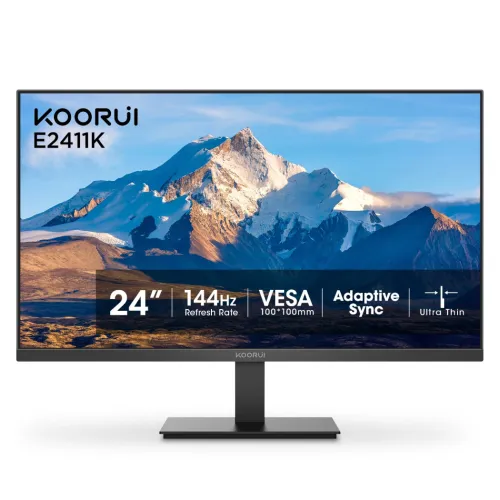
KOORUI E2411K model and monitor overview
The KOORUI E2411K is a 23.8-inch monitor marketed for gaming and general computer use. Its core identity is an IPS LCD panel with LED backlighting, Full HD resolution and a maximum refresh rate of 144Hz. Keeping the manufacturer model code separate from screen size and marketing language makes the product easier to identify across a retailer invoice, warranty card and technical support request. Some retail titles call the screen 24 inches; the KOORUI documentation gives a 23.8-inch diagonal, which is the precise size used here. The monitor has a conventional flat 16:9 shape and a black finish in the inspected catalog imagery.
Resolution, aspect ratio and everyday workspace
The native pixel grid is 1920 × 1080, commonly called Full HD or 1080p. With a 16:9 aspect ratio, this layout is familiar for web browsing, video playback, online classes, office documents and most PC games. Full HD is also supported by a wide range of graphics hardware, so it can be a practical match for entry-level or midrange computers that may struggle to render modern games at higher resolutions. Buyers who keep many detailed windows open or work with high-resolution images may prefer a QHD display for additional desktop space. The resolution itself does not guarantee game frame rate; that depends on the connected system and chosen settings.
IPS panel and viewing angles
KOORUI identifies the E2411K panel as IPS, with listed horizontal and vertical viewing angles of 178 degrees. IPS technology is commonly chosen for viewing consistency across a wider seated position than narrow-angle panels, which can help when sharing a screen or shifting posture at a desk. The exact-model materials also list 16.7 million colors. Viewing-angle and color-count figures describe panel capability; they do not represent a measured calibration report. No factory calibration certificate, Delta E tolerance or measured color profile was found in the product documentation reviewed, so color-critical design and print work should not rely on the IPS label alone.
Refresh rate and motion expectations
A maximum refresh rate of 144Hz means the monitor can refresh up to 144 times per second when receiving a compatible signal. Compared with a conventional 60Hz display, this can make pointer movement, scrolling and supported games appear smoother. The computer still needs to render frames at an adequate rate, and the monitor must be set to the desired mode in the operating system or graphics control panel. A 144Hz panel does not force a game to run at 144 frames per second. KOORUI’s exact-model user guide and product material support 144Hz; this listing does not inflate that number or imply that every console or connection will provide the same experience.
Response time: manufacturer evidence and seller claims
Response-time numbers are meaningful only when their measurement method is named. The KOORUI E2411K exact-model user guide lists 5ms (OD), while the manufacturer product page describes overdrive (OD) settings as 10, 7 and 5. Several Bangladesh retailer pages advertise 1ms GTG. The exact-model manufacturer guide reviewed does not substantiate that 1ms GTG statement, so the catalog now identifies the manufacturer-documented figure and records the conflict. Overdrive settings can change pixel transitions and may introduce overshoot; the best setting depends on the user’s tolerance and actual image behavior. A GTG number and an OD mode should not be presented as interchangeable tests.
Brightness, contrast and color gamut
KOORUI lists 250 cd/m² brightness and a 1000:1 contrast ratio. The product page also states 99% sRGB and 72% NTSC gamut, alongside 16.7 million colors. These values give shoppers a more complete picture than a bare “IPS gaming monitor” label. The brightness figure can help compare monitors for typical indoor desks, but perceived visibility also depends on ambient light, screen finish and user settings. A gamut percentage describes the range of colors the panel can reproduce under the stated measurement convention; it is not evidence of color accuracy, uniformity or calibration. The reviewed materials do not supply measured luminance uniformity or a factory calibration report.
Ports and the HDMI revision discrepancy
The KOORUI exact-model user guide identifies one HDMI 1.4 input, one VGA input and one audio-out port. Some local retailer descriptions call the monitor’s HDMI port version 2.0. The KOORUI sales page also describes an included HDMI 2.0 cable, but cable capability alone does not establish the version of the monitor’s input connector. For a source that needs a specific interface revision or timing, confirm the physical port and supported mode with the seller before ordering. The reviewed exact-model materials do not list DisplayPort or USB-C. The HDMI input supports the product’s Full HD high-refresh use according to manufacturer product information; do not assume an unlisted port exists based on a generic monitor description.
Adaptive Sync and graphics compatibility
KOORUI lists Adaptive Sync support, a variable-refresh feature intended to coordinate display refresh with compatible graphics output. Retail listings also use FreeSync or G-Sync language, but the reviewed exact-model manufacturer documents do not establish NVIDIA G-SYNC certification. Compatibility can depend on the graphics processor, driver, cable, selected input and configuration. Users should consult their GPU documentation and verify supported modes after connecting the display. This description distinguishes the manufacturer’s Adaptive Sync statement from certification claims that were not verified. It also avoids promising tear-free performance in every game or setup, since the result depends on the full computer and display chain.
Eye-care features and sensible viewing
KOORUI lists Flicker Free and Low Blue Light features for the E2411K. These options may suit people who want to adjust display behavior during extended desk use, but they do not remove the need for breaks, comfortable room lighting and a suitable viewing distance. The actual effect depends on the monitor’s settings and personal preference. The documentation reviewed does not provide a medical outcome claim, so the feature names should be treated as display functions rather than health guarantees. Users can adjust brightness and color mode to fit their environment and should avoid setting brightness higher than necessary for the room.
Stand, tilt and mounting
The exact-model KOORUI user guide specifies a stand tilt range from −5° to +15°. Height adjustment, swivel and pivot are not listed for the supplied stand. Some Bangladesh listings show a larger +20° upper tilt; the manufacturer guide is used as the source of record in this catalog. The monitor also supports a 100 × 100mm VESA mounting pattern and KOORUI specifies M4 × 8mm screws. This gives owners an option to use a compatible desk arm or wall mount, subject to the mount’s load rating and installation instructions. Check clearance for cables and ventilation before placing the panel close to a wall.
Dimensions, weight and desk planning
With its stand attached, the E2411K measures 541.93 × 424.74 × 185.11mm. The panel-only dimensions are 541 × 322 × 42mm, and KOORUI lists 2.75kg with the stand and 2.40kg for the monitor head. The package is 596 × 93 × 392mm and has a gross weight of 3.60kg. Separating the screen’s own dimensions from shipping-box measurements helps shoppers judge desk fit and delivery handling correctly. Leave additional clearance for the stand footprint, power adapter and signal cables. If mounting the monitor, use the panel dimensions and VESA instructions rather than the stand-attached dimensions.
Power adapter and consumption
The manufacturer specifies an external 12V DC, 2A power adapter. The product materials list operating consumption at no more than 24W and standby at no more than 0.5W. An external adapter means the power brick needs a place near the desk and its cable routing should be considered when positioning the screen. Use an adapter with the specified voltage and current rating, and do not substitute an unverified power supply. The package list includes a power adapter, though contents can differ by market or production batch. Check that the supplied adapter and cable are included and undamaged when receiving the monitor.
Audio and speaker expectations
The E2411K has an audio-out connection, but the exact-model KOORUI user guide says it does not include built-in speakers. This distinction matters for users connecting a desktop PC or console who expect sound from the display itself. Headphones or powered external speakers can be used with the audio-out connection as appropriate to the source routing. If a self-contained display with integrated sound is a requirement, this model may need an additional audio device. The reviewed documentation does not list a microphone, USB hub or wireless audio feature, so none are claimed in this catalog description.
Included package and regional variation
KOORUI documentation lists the monitor, stand components, external power adapter, HDMI cable and documentation. The user guide gives package dimensions of 596 × 93 × 392mm and gross weight of 3.60kg. Bangladesh retail inventory can come from different supply batches, and accessory contents or warranty handling may vary by seller. Buyers should check the sealed package, stand parts, adapter and cable when receiving the product. If an accessory is missing, contact the seller promptly with the invoice and package contents. The included cable is described by the manufacturer as HDMI 2.0, but that description should not be confused with the monitor’s HDMI input revision in the exact-model guide.
Warranty and Bangladesh buying context
Several exact-model Bangladesh retailer listings show a three-year warranty. This is retailer-specific commercial coverage rather than a universal promise for every seller or imported unit. Before purchase, confirm who provides the warranty, whether it is official or seller-backed, what documents are required and where service is handled. An invoice and warranty card are important for future claims. External price observations reviewed around 3 November 2026 were roughly BDT 14,400 to BDT 14,500, with listing prices and stock subject to change. These observations are market context only; they do not represent the BiponiBD offer price. Check the current page and seller terms before ordering.
What the catalog images establish
The two supplied catalog images show the KOORUI E2411K monitor from a direct front view and an angled view. The first image includes visible product branding and model text in the image composition; its graphic also calls out screen size, refresh rate, Adaptive Sync and VESA mounting. The second view shows the display at an angle with a landscape image on screen. These images help describe appearance and visible marketing callouts, but they do not prove technical values such as port revision, response-time measurement, electrical consumption or warranty. Those details are taken from manufacturer documentation and are explicitly qualified where sources conflict.
Who this monitor may suit
The E2411K may suit a buyer looking for a 23.8-inch Full HD IPS screen with 144Hz refresh, a conventional 16:9 workspace, Adaptive Sync and VESA mounting. It can serve everyday browsing, study, office tasks and gaming where the connected computer can deliver a matching refresh signal. It may be less suitable for shoppers who require QHD detail, built-in speakers, height-adjustable ergonomics, verified 1ms GTG response or a confirmed HDMI 2.0 monitor input. Comparing the manufacturer model code, the written retailer warranty and the needed ports against the intended computer is a practical final check before buying.
Verified key features
- 23.8-inch IPS LCD panel with Full HD 1920 × 1080 native resolution and 16:9 aspect ratio.
- 144Hz maximum refresh rate for smoother motion when the computer supplies a compatible signal.
- 250 cd/m² rated brightness and 1000:1 typical contrast ratio.
- 178° horizontal and vertical viewing angles; 16.7 million colors and 99% sRGB/72% NTSC gamut stated by KOORUI.
- One HDMI input, one VGA input and one audio-out port; exact-model guide identifies HDMI 1.4.
- Adaptive Sync support for variable-refresh operation with compatible devices; compatibility depends on GPU, connection and settings.
- Eye Care features include Flicker Free and Low Blue Light as listed by KOORUI.
- 100 × 100mm VESA mounting with M4 × 8mm screw specification.
- Tilt stand adjusts −5° to +15°; height, swivel and pivot adjustment are not listed.
- External 12V 2A adapter; manufacturer lists ≤24W operating and ≤0.5W standby consumption.
Advantages
- 144Hz refresh rate is a useful step up from conventional 60Hz displays for supported games and fast scrolling.
- IPS panel and 178° viewing angles support a broad seated viewing position.
- Full HD resolution is widely supported by entry-level PCs and consoles and is less demanding than QHD or 4K.
- Adaptive Sync and eye-care features are documented by the manufacturer.
- VESA compatibility provides a mounting option beyond the supplied tilt stand.
Considerations
- Full HD at 23.8 inches offers less desktop detail than a QHD monitor of similar size.
- The supplied stand is tilt-only; height and swivel adjustment are not listed.
- No built-in speakers; the audio-out port requires headphones or external speakers.
- Manufacturer guide says HDMI 1.4; retailer HDMI 2.0 and 1ms GTG claims conflict with exact-model documentation.
- Color gamut is stated, but no factory calibration report or color accuracy tolerance is published in reviewed materials.
Frequently asked questions
What is the exact model?
The manufacturer model is KOORUI E2411K. The 23.8-inch screen size and 144Hz refresh description are product attributes, not part of the model code.
What resolution and refresh rate does it support?
The native resolution is 1920 × 1080 (Full HD), with a maximum 144Hz refresh rate. The source computer, connection and selected display mode must also support the desired refresh rate.
Is the display an IPS panel?
Yes. KOORUI identifies the E2411K as an IPS display with LED backlighting, a 16:9 aspect ratio and 178° horizontal/vertical viewing angles.
Is its response time 1ms?
The KOORUI exact-model user guide states 5ms (OD), while KOORUI’s product page lists overdrive options 10/7/5. Some retailer pages claim 1ms GTG, but the reviewed manufacturer documentation does not verify that figure. This listing uses the manufacturer-documented value.
Which HDMI version is on the monitor?
The exact-model KOORUI user guide identifies one HDMI 1.4 input. Some retailers describe it as HDMI 2.0, and the manufacturer page references an included HDMI 2.0 cable; a cable rating does not change the monitor input specification. Confirm the port revision with the seller if it affects your setup.
What ports are available?
The reviewed exact-model materials list one HDMI input, one VGA input and one audio-out port. They do not list DisplayPort, USB-C or built-in speakers.
Does the E2411K include speakers?
No built-in speakers are listed in the KOORUI exact-model documentation. The audio-out connection can be used with compatible headphones or external speakers.
Does it support G-SYNC or FreeSync?
KOORUI lists Adaptive Sync support. Retail pages use FreeSync and G-Sync wording, but separate NVIDIA G-SYNC certification was not verified in the manufacturer materials reviewed. Compatibility depends on the graphics card, connection and settings.
Can I mount it on an arm?
Yes. KOORUI lists a 100 × 100mm VESA pattern and M4 × 8mm screws. Check the arm’s supported load and follow the monitor and arm installation instructions.
Can the stand adjust height?
The supplied stand is documented for tilt from −5° to +15°. Height, swivel and pivot adjustments are not listed in the exact-model user guide.
What are the dimensions and power requirements?
With the stand, the monitor measures 541.93 × 424.74 × 185.11mm. Panel-only dimensions are 541 × 322 × 42mm; package dimensions are 596 × 93 × 392mm. The external adapter is 12V DC, 2A. KOORUI lists up to 24W operating consumption and up to 0.5W standby.
What warranty applies in Bangladesh?
Several Bangladesh retailer listings show a three-year warranty. Warranty coverage is seller- and invoice-specific, so confirm the provider, conditions and claim process on the invoice and warranty card.
Exact-model KOORUI documentation was prioritized. Local prices and warranty terms can change by seller; confirm them before ordering.