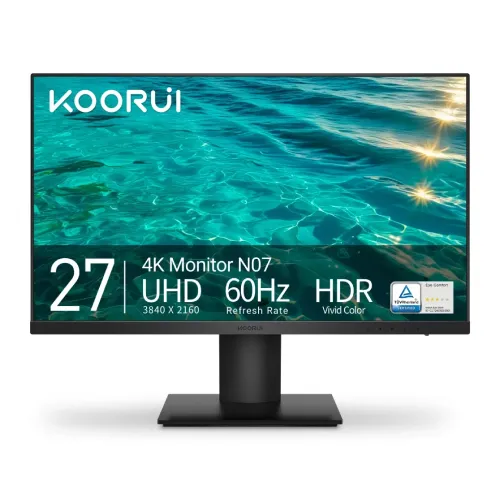
KOORUI N07 27-inch 4K monitor overview
The KOORUI N07 is a flat 27-inch IPS desktop monitor with native 4K UHD resolution of 3840 × 2160 and a 60Hz refresh rate. KOORUI describes it as a business monitor, while some Bangladesh retailers categorize it under gaming products. Its high pixel density, wide published color coverage, HDR10 input support and three digital video connections make it suitable for detailed desktop work, UHD video and casual play. The official product page lists a 300 cd/m² typical brightness, 1000:1 static contrast and 90% DCI-P3 gamut. It also specifies 10-bit color support, implemented as 8-bit plus FRC, and response-time overdrive modes rather than a verified native 1ms GTG response. This guide distinguishes manufacturer specifications from local retailer wording and corrects catalog fields that mix incompatible meanings.
4K resolution and pixel density
The 27-inch panel has 3840 × 2160 pixels, or about 8.29 million pixels. For a 16:9 27-inch display, that is approximately 163 pixels per inch, with a pixel pitch near 0.155 mm. Fine text, interface details, high-resolution photos and 4K video can therefore look substantially more detailed than on a Full HD screen of similar size. The trade-off is that interface elements may appear small at 100% scaling; users can adjust operating-system scaling to suit their eyesight and applications. A source device must output 4K at 60Hz through a supported connection for the full native mode. Cable quality, graphics hardware, docks and operating-system settings can affect available resolution and refresh choices.
IPS image, brightness and contrast
KOORUI specifies an IPS panel with 178-degree viewing angles, 300 cd/m² typical brightness and 1000:1 typical static contrast. IPS technology is commonly chosen for broad viewing angles and consistent color presentation across a desktop. The 1000:1 contrast value is the typical static figure; dynamic contrast is a different processing figure and does not represent the same simultaneous black-to-white measurement. The stated brightness is suitable for many indoor rooms, but is not a promise of HDR mastering performance or visibility in direct sunlight. Adjust brightness to the room and keep strong windows or lamps from reflecting directly onto the screen. The official listing describes HDR support, but the panel’s 300-nit brightness and static contrast remain relevant when judging the visual impact of HDR content.
Color depth and color gamut
KOORUI lists 10-bit color depth, 1.07 billion colors, 90% DCI-P3 and 99% sRGB coverage. The 10-bit output is specified as 8-bit plus frame-rate control, or FRC, rather than a native 10-bit panel. Gamut coverage describes the range of colors the display can represent; it does not certify factory calibration, uniformity or a particular Delta E accuracy. The N07 can be useful for web graphics and general photo work when correctly configured, but professional color-critical production should use a calibrated display and color-managed workflow. Different sources may report gamut using different measurement methods, so treat the listed percentages as manufacturer specifications and verify the exact work requirements before purchase.
HDR10 and supported content
KOORUI lists HDR among the N07’s features, and the product artwork identifies HDR vivid color. Bangladesh listings call this HDR10. HDR content requires a compatible operating system or player, graphics output, cable and application. The monitor’s HDR input support allows it to receive supported HDR signals, but it does not mean the display has the brightness, local dimming or contrast of a high-end HDR reference monitor. Expect format support and a more vivid presentation in compatible content, with actual tone mapping and highlight detail dependent on the source and the display settings. For everyday SDR office work, 4K resolution, pixel density and color range may matter more than the HDR label.
Refresh rate, adaptive sync and response settings
The N07 is a 60Hz monitor. KOORUI lists Adaptive-Sync and gaming modes; local sellers also describe FreeSync and G-Sync compatibility. These are compatibility features that depend on the graphics card, driver, connection and settings, not a dedicated NVIDIA G-Sync hardware module. The published response modes are overdrive (OD) settings of 4ms, 6ms and 8ms. Some reseller text advertises “1ms GTG”, but the official N07 page and manual describe OD levels and do not substantiate a native 1ms GTG claim. The catalog therefore records the verified OD choices and flags the retailer claim. A 60Hz panel is intended for standard desktop refresh and casual gaming, not high-refresh competitive play.
Ports and device setup
The monitor provides two HDMI 2.0 inputs, one DisplayPort 1.4 input and a 3.5mm audio output. The three video inputs allow several devices to remain connected, with the active source selected through the monitor controls. KOORUI’s included accessory list identifies an HDMI cable; check with the local seller which cable version is in the delivered regional package. No USB-C, USB hub or USB power delivery is listed. A compatible computer can drive 3840 × 2160 at 60Hz through an appropriate HDMI 2.0 or DisplayPort connection. The 3.5mm jack is an audio output for headphones or external speakers; the N07 does not have built-in speakers. Confirm the graphics card or laptop dock has the needed 4K output before ordering.
Stand, ergonomics and mounting
The supplied stand supports tilt adjustment from -5 to +20 degrees. The standard stand is fixed-height and does not support portrait pivot or swivel according to the official manual and the supplied product views. The catalog’s former “Pivot: Yes” value was an unsupported retailer-table claim and has been corrected. A VESA 100 × 100 mm pattern supports compatible arms or wall mounts; a separate VESA mount can provide height, swivel or portrait positioning if its load rating and screw requirements are suitable. The product images show a compact cylindrical neck and square base, but photographs do not establish every adjustment specification. Set the screen at a comfortable height and viewing distance, or use a compatible VESA arm for additional positioning.
Eye comfort and daily use
KOORUI identifies TÜV Rheinland Eye Comfort certification on its product information, and the supplied product image displays a TÜV Eye Comfort badge. The manufacturer also lists eye-care modes; local listings specify flicker-free and blue-light-filter functions. Such features can support a comfortable setup, but do not guarantee that every user will avoid eye strain. Set a readable scaling level, take regular viewing breaks and tune brightness to ambient light. The 27-inch 4K resolution is well suited to detailed documents, timelines, design canvases and multiple windows, while the stand’s limited adjustment may call for a riser or VESA arm to achieve a suitable eye line.
Power, size and weight
KOORUI lists an external DC power adapter rated at 19V and 2.58A, approximately 49W maximum adapter capacity. This is an input/adapter rating, not the monitor’s measured power consumption; the catalog label has been corrected accordingly. The manufacturer lists dimensions of approximately 613.49 × 458.96 × 205.32 mm with the stand, a net weight of 4.07 kg with stand, 3.65 kg for the monitor head alone and 5.69 kg packaged. The product and package measurements describe different configurations. The variant’s gross package weight and with-stand dimensions are recorded in the catalog’s shipping fields, while the specification text distinguishes the head-only and packaged values.
Price and warranty in Bangladesh
Retailer pages checked for this review showed the KOORUI N07 around ৳28,500–৳29,000. Star Tech listed ৳28,500 at the time checked, while other listings were around ৳28,500 or ৳29,000; availability and promotions can change. The BiponiBD variant price of ৳29,000 is preserved. Bangladesh sellers advertise a three-year warranty, though the exact service provider, box-retention requirement and coverage conditions can vary. Confirm the final price, live stock, invoice and warranty provider with the seller before purchase. The manufacturer’s US product page lists its own warranty terms, which do not automatically define the local distributor’s Bangladesh coverage.
Who should consider the N07
The N07 may suit users who want a compact 27-inch 4K work display for text, spreadsheets, photos, design layouts, UHD video and everyday home or office use. Its 163-PPI density provides fine detail, the IPS panel offers wide viewing angles, and 2× HDMI plus DisplayPort support multiple connected sources. The color-space figures and 8-bit-plus-FRC output are useful context for creative tasks, but buyers doing color-critical production should validate calibration and workflow needs. Users seeking high-refresh gaming, a height-adjustable stock stand, built-in sound, USB-C docking or stronger HDR performance should compare monitors that explicitly provide those features. Match the model to the actual graphics output, desk setup and type of work.
Model identification and corrected listing notes
The manufacturer model is KOORUI N07; “27-inch 4K” describes size and resolution rather than part of the model identifier. The brand entity KOORUI exists in the catalog and is now linked instead of the generic “Others” brand. The exact model identifier N07 is used for product and variant MPN; barcode and GTIN remain blank because no exact regional retail box barcode was verified. The retailer’s “1ms GTG” and “Pivot: Yes” statements are not repeated as confirmed specifications. The “19V/2.58A” value is labeled as an external adapter rating instead of consumption. These distinctions make the buyer information easier to compare with the official product page and the monitor’s model label.