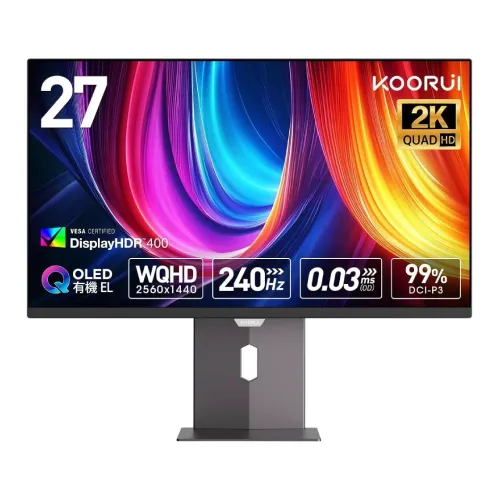
KOORUI S2721XO QHD QD-OLED gaming monitor
The KOORUI S2721XO is a flat 27-inch-class gaming monitor built around a 2560 × 1440 QHD OLED display. KOORUI’s product material and Bangladesh listings describe the panel as QD-OLED; the supplied user guide calls it an OLED monitor. The model is also referenced as MG27P9QS2 in the manual/regulatory material. For ordering and product identification, S2721XO is the retail model used in this listing.
Its central appeal is the combination of a 240Hz maximum refresh rate, a manufacturer-rated 0.03ms grey-to-grey response time, and OLED pixel behavior. This specification set is aimed at responsive PC gaming and high-frame-rate console use where the connected device, cable, resolution and game can deliver a compatible signal. A 240Hz panel cannot create extra frames that the source system does not render.
The display uses a 16:9 aspect ratio and a listed 0.2292mm pixel pitch. QHD provides more working space and detail than Full HD at the same screen class while asking less of a graphics card than 4K. The 27-inch class is a practical desktop size for competitive games, general work and media, provided the viewer is comfortable with the desk distance and OLED viewing characteristics.
Panel, image and color
KOORUI’s parameter sheet lists 250 cd/m² typical brightness, 178° horizontal and vertical viewing angles, 1.07 billion display colors and 100% sRGB with 98% DCI-P3 coverage. Another source advertises 99% DCI-P3, so this product copy follows the 98% figure shown in the parameter sheet used by local distributors. Color-space percentages are stated manufacturer specifications rather than independent calibration measurements; actual appearance depends on the selected picture mode, signal, calibration and unit.
The manual lists a static contrast ratio of 1,500,000:1 and dynamic contrast of 2,000,000:1. Some retailer summaries show 150,000:1 instead. That tenfold discrepancy is retained in the evidence notes; the product attribute follows the KOORUI parameter table value and should not be interpreted as a guarantee of measured contrast under every test method. OLED can produce very deep blacks because pixels can switch off individually, but room light, content and measurement method affect perceived contrast.
HDR support is documented as HDR True Black 400. One local retailer uses the phrase DisplayHDR 400 in a summary, while the KOORUI specification sheet names HDR True Black 400. Those labels are not interchangeable certification claims, so this listing uses the wording in the manufacturer parameter sheet. HDR playback also depends on the source, operating system, game or video, cable and selected monitor mode. The HDR label alone does not establish that every scene will reach the panel’s highest peak brightness.
The anti-glare surface and wide stated viewing angles help with ordinary desk positioning. The flat panel avoids the geometric distortion associated with curved screens and suits side-by-side windows, timelines and text. OLED has its own care considerations: prolonged static content may contribute to image retention over time. The monitor’s on-screen menu includes panel-care options such as Pixel Shift, logo brightness adjustment and Pixel Refresh; users should follow the manual and avoid interrupting maintenance routines.
Refresh rate, response and adaptive sync
At up to 240Hz, the screen can refresh up to 240 times per second when the computer and connection provide an eligible timing mode. The monitor’s listed 0.03ms GTG response figure is a manufacturer rating, not a promise that every transition or complete system interaction takes 0.03ms. Input delay, frame pacing, game settings, graphics hardware and cable configuration also affect perceived responsiveness.
KOORUI lists Adaptive Sync. Bangladesh product listings additionally identify AMD FreeSync Premium and NVIDIA G-Sync compatibility. These describe variable-refresh operation with supported graphics hardware; this monitor should not be described as containing a dedicated NVIDIA G-SYNC hardware module. Use a suitable DisplayPort or HDMI connection, current graphics drivers and compatible settings to enable variable refresh.
Adaptive Sync can help reduce visible tearing when frame output varies within the monitor’s supported operating range. It does not remove every form of stutter, guarantee a particular frame rate or replace good game configuration. The monitor also provides game-oriented on-screen controls, including selectable game presets, crosshair and timer functions, subject to the menu and source configuration.
Connections and device compatibility
The KOORUI manual parameter table specifies two HDMI 2.1 inputs, one DisplayPort 1.4 input and one audio-out jack. Local retailer descriptions conflict: some label the HDMI inputs HDMI 2.0, while others list HDMI 2.1. The Ports and HDMI attributes therefore state that two HDMI inputs are present and explicitly record the version conflict. Confirm the exact hardware revision and supported mode with the seller before relying on a particular HDMI bandwidth or console refresh-rate combination.
The manual says there is no USB Type-C input and no USB hub. An audio-out jack is provided, while the manual indicates no built-in speakers. Connect headphones or external speakers to the audio output as appropriate, and route sound through the connected computer or console. The physical input list in the manual is a more reliable guide than unrelated cable mentions in some regional package tables.
DisplayPort 1.4 is a wired option for a compatible PC graphics card. The manual’s supplied cable list includes a DisplayPort data cable; actual cable length and in-box items should be checked on the local package because distributor bundles can differ. Use certified, undamaged cables and consult the graphics card and monitor manuals when selecting resolution, refresh rate, HDR and variable-refresh settings.
Stand, mounting and desk fit
The supplied ergonomic stand supports height adjustment up to 110mm, tilt from −5° to +20°, swivel from −20° to +20° and portrait rotation from −90° to +90°, according to the KOORUI user manual. These ranges improve the chance of aligning the screen with a seated workstation and allow a portrait orientation for documents or code. The displayed values describe the stand’s adjustment range; they are not a substitute for checking desk clearance.
A 100 × 100mm VESA mounting pattern is listed. A compatible arm or wall bracket must support the monitor’s weight and match the mounting hardware and installation requirements. Remove the stand as instructed before mounting, support the panel carefully and avoid pressing on the OLED surface.
KOORUI lists dimensions with stand as 610 × 216 × 522mm (approximately 610.11 × 215.82 × 521.84mm in the distributor parameter table) and net weight around 6.85kg. Measure the available desk width, depth, height and arm capacity before purchase. The black chassis includes rear ambient RGB lighting effects. Lighting is an accent feature; the manual describes selectable ambient-light modes and does not imply that the monitor illuminates the room like a lamp.
Power, setup and package
The manual specifies an external 24V DC, 5A power adapter, maximum operating consumption up to 120W and standby consumption up to 0.5W. Keep the adapter ventilated and use the supplied power components appropriate to the local package. The stated ratings are maximum or standby figures from the product documentation, not a forecast of every user’s electricity consumption.
The manual’s accessory list includes the monitor, stand column and base, a DisplayPort cable, power adapter, AC power cord, user guide and installation guide. Regional retailer tables may show different accessories, so verify the sealed package and warranty card at purchase. Assembly instructions describe attaching the stand and base and using a soft protective surface when placing the panel face down.
After setup, select the monitor’s native 2560 × 1440 resolution and an available refresh rate in the computer or console display settings. The manual describes the OSD controls, display presets, color-temperature settings, Adaptive Sync, HDR controls and panel-care features. Available options can vary with input source and mode; some settings may be disabled while HDR or another special picture mode is active.
Advantages and trade-offs
The main advantages are QHD pixel density at a desktop-friendly screen size, a 240Hz maximum refresh rate, a very fast stated OLED response, wide viewing angles and a wide listed color gamut. Height, tilt, swivel and pivot adjustment provide more flexibility than a fixed basic stand, and VESA mounting supports compatible arms. Rear ambient lighting, Adaptive Sync and HDR True Black 400 add gaming-focused options.
There are practical trade-offs. The 250 cd/m² typical SDR rating is lower than some bright-room monitors, and HDR performance depends on scene size and content rather than a single headline figure. OLED panels require sensible care with static interface elements. The HDMI version and contrast ratio differ between product sources, so buyers who need a specific console mode or rely on exact contrast documentation should confirm the unit revision and seller specifications before ordering.
There are no built-in speakers, no USB hub and no USB-C display input according to the manual. A laptop may therefore need an HDMI or DisplayPort adapter and a separate charging connection. The monitor is a display, not a smart TV: the documentation lists no wireless networking, operating system, streaming apps or internal battery.
Bangladesh price, warranty and purchase checks
At the time of this content review, direct Bangladesh listings showed an observed price range of approximately ৳81,500–৳83,000: TechLand and UltraTech around ৳81,500, Skyland around ৳81,500–৳82,000, Tech Diversity around ৳81,900, and Star Tech and Ryans around ৳82,000. These are dated retailer observations, not a guaranteed BiponiBD offer, stock promise or future price. Compare each seller’s current checkout price, delivery charges and stock before buying.
The catalog variant MSRP remains ৳82,000. Local sellers commonly list a three-year warranty. Warranty coverage, service provider, dead-pixel policy, panel-care exclusions and whether service is handled locally can vary by distributor and invoice. Keep the invoice and warranty card and verify the applicable written terms with the seller.
The model is listed as KOORUI S2721XO, with S2721XO as the product model and manufacturer part number. MG27P9QS2 is an internal or regulatory manual reference, not a substitute SKU. This listing retains its existing product URL and variant SKU for catalog continuity while correcting the brand assignment and the polluted model/MPN fields.
Who this monitor may suit
This display may suit players who want a QHD OLED panel and high refresh capability, creators or office users who value a broad stated color gamut, and workstation owners who benefit from an adjustable stand. It is especially relevant when the graphics source can drive the requested 1440p refresh mode and the user is comfortable managing OLED panel care.
It may be a less suitable choice for users who need built-in audio, USB-C docking, a USB peripheral hub, unusually high typical SDR brightness, or an unambiguous HDMI-version record without first confirming the exact local revision. A lower-cost IPS display may better fit a static all-day office workload or a setup where OLED-specific care is not desired.
Frequently asked questions
What is the exact model? The retail model is KOORUI S2721XO. The manual also references MG27P9QS2 in its model/regulatory material.
Is the display 27 inches? It is marketed as a 27-inch monitor. The listed 0.2292mm pixel pitch and QHD resolution correspond to an active area close to the common 26.5-inch panel class.
What resolution does it use? The native resolution is 2560 × 1440 pixels, also called QHD or 2K in product listings.
What panel technology is used? KOORUI and local product listings describe it as QD-OLED. The user manual calls it an OLED monitor, so the listing records both terms.
What is the maximum refresh rate? KOORUI specifies up to 240Hz. The connected device, cable, resolution and settings must support the selected mode.
What is the response time? The manufacturer specification lists 0.03ms GTG. This is a product rating, not a guarantee of total system latency.
Does it support HDR? The KOORUI parameter sheet lists HDR True Black 400. Some retailer copy instead says DisplayHDR 400; those names differ, and the listing uses the manufacturer sheet wording.
What are the HDMI ports? The manual parameter table says two HDMI 2.1 ports, while some local retailers list HDMI 2.0. The exact HDMI revision is disputed across sources; confirm the shipped revision with the seller.
What other ports are available? The documented inputs are one DisplayPort 1.4 and an audio-out jack. The manual lists no USB-C input, no USB hub and no built-in speakers.
Does it support adaptive refresh? KOORUI lists Adaptive Sync; retailers identify AMD FreeSync Premium and NVIDIA G-Sync compatibility. It does not have a dedicated NVIDIA G-SYNC hardware module.
Can the stand be adjusted? Yes. The manual lists 110mm height adjustment, −5° to +20° tilt, −20° to +20° swivel and −90° to +90° pivot.
Can it be mounted on a VESA arm? It lists a 100 × 100mm VESA pattern. Check arm load rating, hardware and clearance before installation.
Does it have built-in speakers? No built-in speakers are documented. Use the audio-out jack with compatible headphones or external audio equipment.
What is included in the box? The manual lists a stand and base, DisplayPort cable, power adapter and cord, user manual and installation guide. Confirm package contents with the local seller because regional bundles can vary.
What is the local warranty and price? Bangladesh retailers commonly list three years of warranty and the observed price was about ৳81,500–৳83,000 during this review. Confirm current price, availability and written warranty terms before purchase.
How should I protect the OLED panel? Follow KOORUI’s manual, use the monitor’s panel-care controls, avoid unnecessary long static sessions and allow pixel-care routines to complete as directed. Do not press on the screen during cleaning or installation.