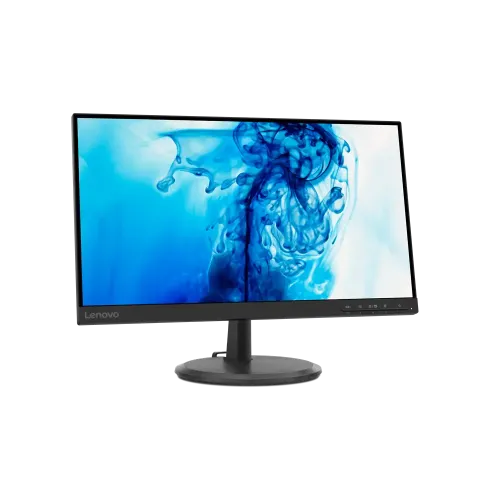
Lenovo D22e-20 (machine type 66D2KAC6MY) is a 21.45-inch Full HD VA monitor with 75Hz, AMD FreeSync, anti-glare and 3000:1 contrast. Lenovo lists HDMI 1.4, VGA, audio-out, VESA 100mm and a three-year limited warranty. Local stock was unavailable at the seller pages checked; no current price range is claimed.
Overview and intended use
The Lenovo D22e-20 Monitor, machine type 66D2KAC6MY, is a 21.45-inch Full HD VA display with a 75Hz refresh rate. Lenovo’s PSREF page identifies a WLED backlight, anti-glare surface, 3000:1 contrast ratio, 72% NTSC colour gamut, AMD FreeSync and a tilt stand. This screen can fit an office desk, home computer, study station or light gaming setup where a compact FHD panel and HDMI/VGA connectivity are useful. It is not a 4K display, and its 75Hz ceiling differs from higher-refresh competitive gaming monitors. Match the machine type on the label and invoice because the D22e-20 name can refer to regional variants. Ask the seller to confirm the exact 66D2KAC6MY unit, local warranty and current physical stock before ordering.
Screen size, Full HD and pixel layout
Lenovo lists a 21.45-inch diagonal view area, Full HD resolution of 1920 × 1080, 16:9 aspect ratio, 0.2490 × 0.2410mm pixel pitch and 103 dpi. Native 1920 × 1080 is the recommended setting for clear text and standard FHD video. This resolution provides enough room for common documents, web pages, online classes and general office applications while keeping the monitor footprint moderate. A 21.45-inch screen offers less physical space than a 24-inch or larger display, and Full HD has fewer pixels than QHD or 4K. Operating system scaling changes the effective workspace and apparent text size. Users who routinely edit large images, detailed CAD drawings or multiple large spreadsheets may prefer a larger or higher-resolution monitor.
VA panel and contrast
Lenovo identifies a VA panel with a 3000:1 contrast ratio, 250 cd/m² typical brightness and 178-degree horizontal and vertical viewing angles. A VA panel’s contrast specification can support visibly deeper dark tones than many standard IPS displays in a dim room, while the listed viewing angle provides context for off-centre viewing. These figures are manufacturer specifications, not independent laboratory measurements. The monitor is listed with 72% NTSC gamut and 8-bit colour support; that gamut number is not a measured sRGB calibration report. Lenovo does not publish a factory calibration certificate on this PSREF page. For photo editing, print proofing or colour-critical work, request a measurement report or select a monitor with documented calibration. Bright reflections and ambient light still affect perceived contrast.
75Hz refresh and response modes
Lenovo lists a maximum refresh rate of 75Hz. The response time is 4ms in Extreme mode and 6ms in Typical mode. A compatible computer may show smoother cursor movement and scrolling at 75Hz than at 60Hz, but the source device, cable, driver and selected display mode determine what can actually be used. Extreme mode and Typical mode represent different settings, so the 4ms figure should not be treated as the normal response time for every pixel transition. These published values do not provide a full motion-blur, overshoot or input-lag measurement. The 75Hz maximum is suited to ordinary desktop work and casual gaming, but buyers seeking 144Hz or higher competitive play should compare monitors designed for that use.
AMD FreeSync compatibility
The PSREF specification lists AMD FreeSync. Lenovo notes that FreeSync technology works with compatible AMD Radeon graphics. When the source hardware and connection support the technology and the feature is enabled, variable refresh may help reduce visible tearing within the supported operating range. The product data does not provide independent tests of the range, low-framerate compensation or input lag. Compatibility depends on the graphics card, driver, connection and display settings. Do not assume that the word FreeSync guarantees the same result across every game or device. Confirm the feature is available in the connected system before purchase if adaptive refresh is a key requirement.
Flicker Free and Low Blue Light
Lenovo lists TÜV Rheinland Flicker Free and TÜV Rheinland Low Blue Light certifications. These are product features, not medical treatment claims. User comfort depends on brightness, room lighting, viewing distance and breaks. Place the monitor to reduce direct reflections and set brightness for the room rather than leaving it at maximum. The anti-glare surface can reduce some reflections but does not prevent glare from a bright window or lamp. For long work sessions, use a comfortable viewing position and take regular breaks. The product’s certification entry should not be interpreted as a guarantee that every user will avoid eye fatigue.
HDMI, VGA and audio-out
Lenovo lists one HDMI 1.4 port, one VGA input and one 3.5mm audio-out connector. HDMI is the digital input for current computers and other compatible sources. VGA supports older computers with an analog output. The audio-out port can route source audio to external headphones or speakers; the monitor’s built-in speakers are listed as none. VGA itself carries picture rather than sound, so audio use depends on the source connection. The PSREF page does not list DisplayPort, USB-C, USB hub, additional HDMI inputs, webcam or microphone. Confirm that a laptop without HDMI or VGA can use a compatible adapter at 1920 × 1080 and the desired refresh rate before ordering.
Stand, tilt and VESA mounting
Lenovo lists a tilt stand with adjustment from approximately -5° to +22° and support for a 100mm VESA mount. The PSREF page does not list height adjustment, swivel or pivot movement, so treat the supplied stand as tilt-only unless the actual unit proves otherwise. A VESA arm can provide different positioning, but check the mount’s 100mm pattern, screw length, load capacity and clearance. Support the monitor securely while mounting it. The tilt range can help aim the display toward the seated user and reduce reflections, but it does not replace ergonomic height adjustment. Confirm whether the bracket is included; Lenovo lists a monitor with stand, HDMI cable, power cable and quick setup guide in the box, not a separate VESA arm.
Dimensions and weight
Lenovo gives dimensions of 493.0 × 209.5 × 367.4mm with the stand and 493.0 × 52.5 × 292.2mm for the monitor head only. The monitor weighs 2.6kg with the stand and 2.3kg without it; the packaged weight is 4.1kg. Check the with-stand width and depth against the desk before ordering, and use the head-only dimensions when planning a VESA installation. Leave room for power and video cables and keep ventilation clear. Packaging measurements and retailer listings may use a different axis order, so the Lenovo values are shown explicitly as width × depth × height. These are manufacturer specifications; measure the exact product if installation clearance is critical.
Integrated power and consumption
Lenovo lists an integrated power supply and typical / maximum power consumption of 15W / 17W. No external adapter is listed in the PSREF model configuration. The box contents include a 1.8m power cable. Use the supplied cable and follow the electrical instructions for the region. Actual power draw varies with brightness and operating state; 15W typical and 17W maximum are specification values rather than a measurement of every usage pattern. Keep the power connector and cable undamaged, route the cable so it cannot pull the monitor off the stand and disconnect power before cleaning.
Included items and service coverage
Lenovo lists a monitor with stand, a 1.8m HDMI cable, a 1.8m power cable and a quick setup guide in the box. The PSREF entry specifies a three-year limited warranty for model 66D2KAC6MY. Local retailer warranty statements may differ by region or seller, so check the written coverage, service provider, exclusions and claim process on the invoice. Keep the serial number and purchase receipt. The official Lenovo specification is the reference for the base product package, but a seller bundle can change. Confirm the carton is sealed and contains the promised accessories before leaving the store or accepting delivery.
Observed local stock and price
The official PSREF page provides product specifications rather than a Bangladesh retail offer. Direct Chrome checks found Star Tech Out Of Stock with price To be announced; Tech Land displayed ৳9,700 but marked Out of Stock; PC House also showed Out Of Stock. Search snippets and secondary listings were inconsistent or included an incorrect resolution, so they were not used to infer a current price. No directly verified in-stock offer was found during this check. BiponiBD therefore keeps its store price unavailable and does not publish a market range. Recheck local stock and final price with the seller before placing an order.
Who may find this monitor suitable
The D22e-20 may suit office users, students and home computer users who need Full HD resolution, a VA panel, 75Hz, HDMI and VGA in a compact display. The 3000:1 contrast specification and anti-glare surface can be useful for everyday documents and video. AMD FreeSync support may be relevant to users with compatible Radeon graphics, while the audio-out connector allows external sound equipment. It may be less suitable for buyers who need built-in speakers, USB-C docking, multiple HDMI inputs, a height-adjustable stand, 144Hz competitive gaming or a factory-calibration report. Before deciding, compare the complete feature set and local written warranty rather than relying only on “75Hz Full HD” in a product title.
Setup and first checks
Check the carton label for machine type 66D2KAC6MY and inspect the monitor and accessories for shipping damage. Connect power and HDMI where available, select the correct input and set the computer to 1920 × 1080. If 75Hz is offered by the graphics device, select it and verify a stable picture. Confirm FreeSync in the graphics driver and monitor settings if it is needed. Tilt the display to a comfortable angle, set brightness for the room and route cables safely. Test both HDMI and VGA if both are required, and check the 3.5mm audio-out with the intended headphones or speakers. Inspect the panel for dead pixels or backlight defects promptly within the seller’s return window. Keep the invoice and box for warranty service.
Care and troubleshooting
Turn off and unplug the monitor before cleaning. Use a soft dry cloth and follow Lenovo’s care guidance; do not spray cleaner directly onto the panel or use abrasive material. If there is no picture, check the power cable, selected input, source output and cable connection before assuming a fault. If the image is soft, set native 1920 × 1080 resolution. If 75Hz is missing, check the graphics driver, connection and advanced display settings. If FreeSync is not available, verify a compatible Radeon graphics device and driver. For sound through the audio-out jack, check the source device’s audio routing and volume; built-in speakers are not included. Contact the seller or authorized service provider for persistent defects rather than opening the monitor.
Evidence and source limits
The exact machine type was matched on Lenovo PSREF: 66D2KAC6MY. The manufacturer specification supports the display, refresh, response modes, brightness, contrast, gamut, power, dimensions, weight, ports, audio-out, FreeSync, low-blue-light/flicker-free certifications, VESA and in-box accessories. Direct local seller pages were used for current stock and local warranty context. Star Tech, Tech Land and PC House were out of stock at the time of checking, so no current price range is claimed. The page uses the manufacturer’s width × depth × height dimension order to avoid retailer axis ambiguity. Local price and availability can change after this review.
Frequently asked questions
What exact Lenovo model is this?
The Lenovo PSREF model is D22e-20, machine type 66D2KAC6MY. Confirm the exact code on the unit label.
What size and resolution does it have?
It is a 21.45-inch VA display with Full HD 1920 × 1080 resolution and a 16:9 aspect ratio.
What refresh rate and response time are listed?
Lenovo lists 75Hz, with 4ms in Extreme mode and 6ms in Typical mode.
Does it support AMD FreeSync?
Yes. Lenovo lists AMD FreeSync and notes that it works with compatible AMD Radeon graphics.
What ports are available?
The manufacturer lists HDMI 1.4, VGA, a power connector and a 3.5mm audio-out jack.
Does it have built-in speakers?
No. Lenovo lists speakers as none; use headphones or external speakers through the audio-out connection or source device.
Can it be wall mounted?
Lenovo lists support for a 100mm VESA mount. Confirm arm clearance and fasteners before installation.
How does the stand adjust?
The tilt stand is listed with an approximate range from -5° to +22°. Height, swivel and pivot are not listed.
What are the dimensions and weight?
With stand it is 493.0 × 209.5 × 367.4mm and 2.6kg. The head-only dimensions are 493.0 × 52.5 × 292.2mm and weight is 2.3kg.
What accessories are included?
Lenovo lists the monitor with stand, a 1.8m HDMI cable, a 1.8m power cable and a quick setup guide.
What warranty does Lenovo list?
Lenovo PSREF lists a three-year limited warranty for machine type 66D2KAC6MY. Confirm local service terms with the seller.
What is the current price and availability in Bangladesh?
Star Tech, Tech Land and PC House showed out-of-stock states during direct checks. No in-stock offer was verified, so no market price range is published.