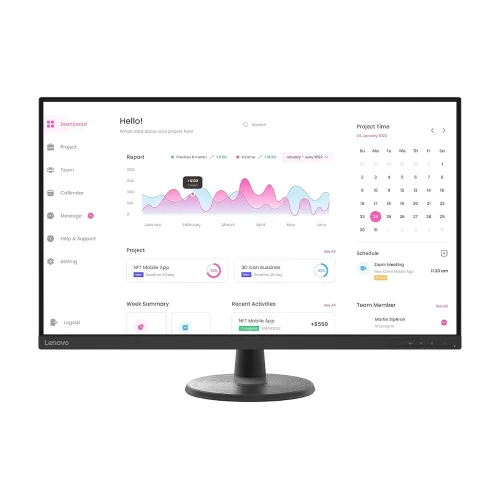
Lenovo D32-40 31.5-inch FHD monitor overview
The Lenovo D32-40 is a large, flat desktop monitor built around a 31.5-inch-class VA panel and Full HD resolution. Lenovo identifies the panel as 31.5 inches (80.1 cm), with a 16:9 aspect ratio and a native 1920 × 1080 image. The VA panel specification lists 250 cd/m² typical brightness and 3000:1 typical static contrast. Its large viewing area is useful for spreadsheets, web browsing, video and general desktop work when viewed from a suitable distance. Full HD keeps computer demands modest, but text and fine graphics are less dense than on a same-size QHD screen. This guide separates Lenovo’s published values from observations in Bangladesh retailer listings and flags conflicts that could otherwise make a specification misleading.
Screen size, image area and resolution
Lenovo specifies an active image area of approximately 698.4 × 392.85 mm. The screen is a flat 16:9 panel, so common Full HD videos and desktop layouts fit without an unusual aspect ratio. At 1920 × 1080, the panel has about 2.07 million pixels. The pixel pitch in Lenovo PSREF is 0.364 × 0.364 mm. That pitch corresponds to about 69.8 pixels per inch; calculating from 1920 × 1080 across a 31.5-inch diagonal gives about 69.9 PPI. PSREF and some retailer tables also display 92.5 dpi, which does not agree with those dimensions and is likely a copied value. The corrected catalog records the arithmetic value while retaining a note that the datasheet has a conflicting entry.
VA panel, contrast and viewing
The D32-40 uses a VA liquid-crystal panel with WLED backlighting. Lenovo lists 250 cd/m² typical brightness, 3000:1 typical static contrast and 178-degree horizontal and vertical viewing angles. VA’s high stated static contrast can help dark scenes look deeper than on many basic office panels, although perceived contrast depends on room lighting and viewing position. The 178-degree figure describes the stated viewing-angle specification; it does not mean color and contrast remain identical from every position. Adjust the screen angle and seating position for comfortable use. The reviewed Lenovo specification does not provide a verified factory color-calibration report, uniformity guarantee or HDR certification, so this listing makes no claim about those properties.
Refresh rate and input-specific limits
Lenovo’s published information distinguishes the recommended 60Hz timing from supported higher refresh operation. The D32-40 can reach up to 75Hz over HDMI; DisplayPort operation is listed at 60Hz. Some retailer summaries show only 60Hz, while other tables may simplify the HDMI maximum. For an accurate expectation, use 60Hz as the standard mode and treat 75Hz as HDMI-only. The available mode also depends on the computer, graphics output, cable, resolution and operating-system display settings. After connecting by HDMI, check the display settings to see whether 75Hz is offered. Do not assume that connecting through DisplayPort will provide the HDMI-specific 75Hz mode.
Motion response settings
Lenovo’s PSREF lists four response-time levels: Level 1 at 8ms, Level 2 at 6ms, Level 3 at 5ms and Level 4 at 4ms. These are manufacturer response-time settings and should not be read as a guarantee that every pixel transition completes in that time under every condition. A faster response setting can change visible trails, but image artifacts and the appearance of motion depend on content, transition, refresh mode and viewing conditions. This is a general-purpose 60Hz monitor with a supported 75Hz HDMI mode, rather than a high-refresh gaming display. It can handle everyday video and casual play, while competitive players seeking substantially higher refresh rates should compare dedicated gaming models.
Color range and visual comfort
The official specification lists 99% sRGB coverage, 16.7 million colors and 8-bit color support. It also lists flicker-free operation. These figures describe the published color range and display features, not proof of factory calibration or professional color accuracy. For print work, photography or other color-critical tasks, use a suitable calibration process and color-managed software. Lenovo’s documentation for this model does not establish HDR support; this catalog therefore does not advertise HDR. Adjust brightness for the room, and use a comfortable viewing distance. A larger screen can make windows and media easier to see, but the Full HD pixel density may make small text look less finely rendered than on a smaller Full HD display.
Ports and connecting a computer
The D32-40 provides one HDMI 1.4 input, one DisplayPort 1.2 input and a 3.5mm audio output. HDMI is the connection Lenovo identifies for the up-to-75Hz mode. DisplayPort supports the standard 60Hz timing described above. The 3.5mm connector is an audio output; it is not a USB port or a built-in speaker. The official port list does not include USB-C, a USB hub, Ethernet or laptop charging. Before buying, check which video output is available on the desktop, laptop dock or graphics card and choose the matching cable. The package documentation lists an HDMI cable, but confirm the exact contents of the Bangladesh unit with its seller because regional bundle details can differ.
Stand, mounting and placement
The included stand supports tilt adjustment from -5 to +22 degrees. Lenovo does not list height adjustment, swivel or pivot on the supplied stand. A VESA 100 × 100 mm mounting pattern is specified for compatible monitor arms and wall mounts. Verify the mount’s supported screen size and load rating, and use appropriate screws before installation. The monitor’s listed size is about 698.4 mm wide at the active panel, so measure the desk and viewing distance before placing it. Lenovo describes the monitor as having an integrated power supply; the retailer’s isolated “Type: Integrated” row is clarified as power-supply information rather than a panel type.
Power, dimensions and supplied items
Lenovo specifies universal AC input at 100–240V and 50–60Hz. The listed typical operating consumption is below 26.5W, maximum operating consumption below 46W, standby below 0.5W and off mode below 0.3W. The support materials identify the monitor, stand, power cable, HDMI cable, quick-start guide and warranty booklet among the box contents. Regional packaging and included cable details should be checked with the seller. Keep the packaging and warranty paperwork where required by the local provider. This product record does not claim a shipping weight or parcel dimensions because the available product data does not establish a reliable packaged measurement.
Choosing Full HD at 31.5 inches
A 31.5-inch Full HD display offers a wide physical canvas and relatively uncomplicated graphics requirements. It can suit users who prefer larger interface elements, watch videos from farther away or need a broad screen for everyday windows. The trade-off is pixel density: at roughly 70 PPI, small text and thin diagonal lines look less crisp at close range than on a smaller Full HD screen or a 31.5-inch QHD monitor. Users working with detailed spreadsheets, dense text, diagrams or high-resolution photos may prefer more pixels. If you sit farther back and value a larger image over fine detail, the D32-40’s size may be appealing. Consider desk depth and the distance at which you can comfortably read before choosing.
Gaming and everyday use
The monitor’s standard refresh is 60Hz, with up to 75Hz available through HDMI under supported conditions. That can make compatible desktop motion somewhat smoother than 60Hz, but it remains below the refresh rates of purpose-built gaming displays. The VA contrast figure may be attractive for darker video scenes, while the response-time setting and motion characteristics should be assessed against the games being played. Lenovo lists no adaptive-sync feature in the reviewed specification, so the catalog does not promise variable refresh or a tearing-free gaming mode. For office work, web browsing, video playback and casual play, the combination of a large panel and Full HD can be practical. Match expectations to the actual graphics connection and refresh mode.
Bangladesh price, availability and warranty
Bangladesh retailer pages checked for this audit list the D32-40 at approximately ৳27,000 to ৳29,000, with some pages showing a sale price and a higher regular price. These are retailer snapshots, not a guaranteed market average; stock, promotions and final checkout totals can change. The catalog’s existing variant price of ৳27,000 is preserved. Retailer listings advertise a three-year warranty, but Lenovo support eligibility and local service conditions can depend on the machine type and seller. Confirm stock, exact machine type, invoice, warranty provider, box-retention requirements and final price before ordering. The selected part family is 66FCGAC2; the regional suffix can vary, so the listing does not guess an EAN, UPC or GTIN.
Model identification and verification notes
The product family is Lenovo D32-40, Machine Type 66FC, part family 66FCGAC2. A Bangladesh/Malaysia ordering code commonly appears as 66FCGAC2MY, but imported regional stock can carry a different suffix. The catalog MPN is normalized to the part family 66FCGAC2 rather than a marketing phrase that mixes model, diagonal and resolution. Barcode and GTIN remain blank because an exact regional retail box label was not verified. One pair of supplied rear-view images is nearly identical in angle and crop; both files are retained because gallery assets are part of the existing product record. Buyers should match the exact model label and included accessories on the delivered unit.